
vue v-show与v-for同时配合v-bind使用并在href中传递多个参数的使用方法
最近在项目中,因为还没使用前端构建工具,还在使用vue+jquery方法渲染页面
碰到几个小问题,在此记录下作为vue学习之路上的一个小知识点
需求:1、数据列表存在与否状态,没有数据显示默认提示,有数据则渲染出数据列表
2、列表数据存在3种状态,分别为0,1,2根据状态给数据打上可使用,已使用,已过期,
3、如果列表状态为0和1时,才可以查看详细状态,同时可以带上每条数据商品id和状态id,否则不可以跳转到详情页面
一,界面实现
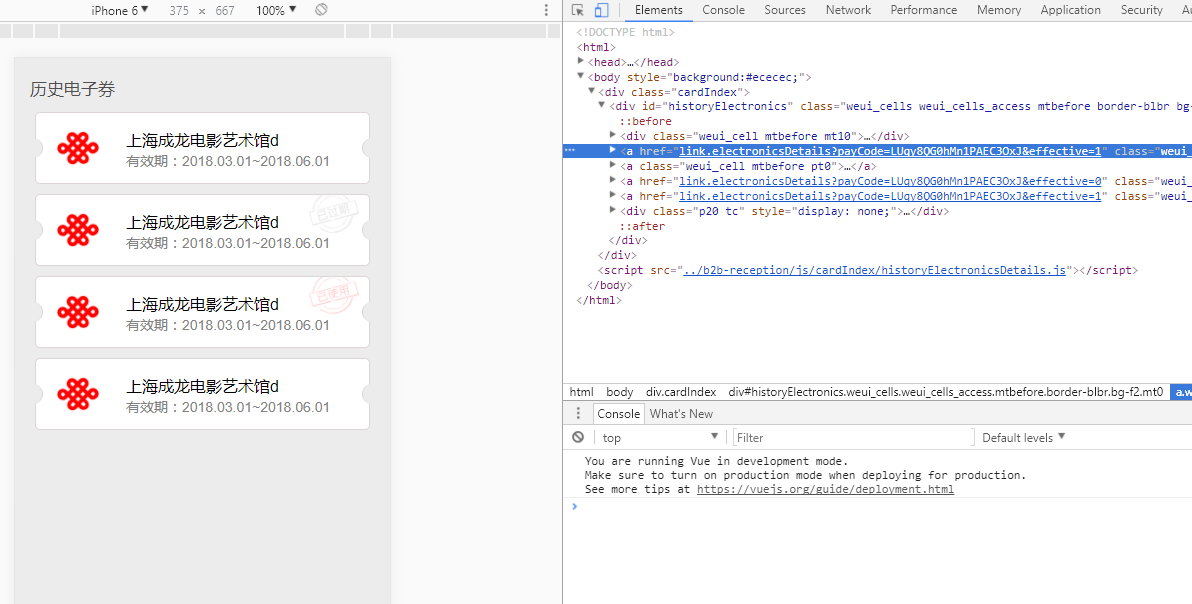
二,页面代码
        <div class="weui_cells weui_cells_access mtbefore border-blbr bg-f2 mt0" id="historyElectronics">

<!--            电子券 -->

            <div class="weui_cell mtbefore mt10">

                <div class="weui_cell_bd weui_cell_primary">

                    <p class="f4f">历史电子券</p>

                </div>

            </div>

<!--             <a class="weui_cell mtbefore pt0" v-show="electronicsCard != ''" v-for="electronicsCards in electronicsCard" :href="'link.electronicsDetails?payCode='+electronicsCards.otherOrderId+',effective='+electronicsCards.effective" > -->

            <a class="weui_cell mtbefore pt0" v-show="electronicsCard != ''" v-for="electronicsCards in electronicsCard" :href="getTitleHref(electronicsCards.otherOrderId,electronicsCards.effective)" >

                <div class="weui_cell_bd weui_cell_primary">

                    <div class="cardbarmain electronics">

                        <span class="posl"></span>

                        <span class="posr"></span>

                        <div class="cardbarmainimg"><img src="../b2b-reception/images/logo/chinaliantong.png" width='100%'/></div>

                        <div class="cardbarmainp">

                            <p class="f16" v-text="electronicsCards.productName"></p>

                            <p class="f14 mt5 f-gray82">有效期:<span v-text="electronicsCards.expiryStart"></span>~<span v-text="electronicsCards.expiryEnd"></span></p>

                        </div>

                        <div class="poscardsrc2" v-if="electronicsCards.effective==2"><img src="../b2b-reception/images/cardimg/history02.png" /></div>

                        <div class="poscardsrc2" v-else-if="electronicsCards.effective==0"><img src="../b2b-reception/images/cardimg/history03.png" /></div>

                    </div>

                </div>

            </a>

            <div class="p20 tc" v-show="electronicsCard == ''">

                <img src="../b2b-reception/images/cardimg/rcordSrc02.png" width='100%'/>

                <p class="tc p10 f16 f-gray">暂无历史电子券~</p>

            </div>

        </div>
三,vue代码
var otherOrderId=[]; //payCode

var list = []; //初始列表

var effective=1;  //订单类型

var page = 1;

//初始化历史电子券列表

var historyElectronics = new Vue({

    el:"#historyElectronics",

    data:{

        electronicsCard:[],

    },

    methods:{

        getTitleHref:function(val1,val2){

            if(val2==0 || val2==1){

                return 'link.electronicsDetails?payCode='+val1+'&effective='+val2;

            }else{

                return;

            }

        }

    }

})

$(function(){

    electronicsAjax();

})

//滚动加载

$(window).scroll(function(){

    var viewH =$(document).height();//可见高度

    var contentH =$(document.body).outerHeight(true);//内容高度

    var scrollTop =$(window).scrollTop();//滚动高度

    if((scrollTop+contentH)/viewH >=0.95){ //到达底部时,加载新内容

        if (flag) {

            page++;

            flag = false;

            electronicsAjax();

        }

    }

});

//电子券列表接口

function electronicsAjax(){

    $.ajax({

        type: "POST",

        data:{page:page,effective:effective},

        url : "/wechat/slyderAdventures/pointsNumber",

        success : function(listData) {

        var listData =[ //示例数据

                    {"createDate":1516091197000,"creator":null,"lastModifyDate":null,"lastModifier":null,"sid":"3","productId":"57794","productType":"9","userId":null,"systemOrderId":"H2018011616262918810821","otherOrderId":"LUqy8QG0hMn1PAEC3OxJ","productName":"上海成龙电影艺术馆d","productExpiryStart":1516032000000,"productExpiryEnd":1518624000000,"commonCode":"923310000864","effective":"1","expiryStart":"2018.03.01","expiryEnd":"2018.06.01"}

                    ,{"createDate":1516091197000,"creator":null,"lastModifyDate":null,"lastModifier":null,"sid":"3","productId":"57794","productType":"9","userId":null,"systemOrderId":"H2018011616262918810821","otherOrderId":"LUqy8QG0hMn1PAEC3OxJ","productName":"上海成龙电影艺术馆d","productExpiryStart":1516032000000,"productExpiryEnd":1518624000000,"commonCode":"923310000864","effective":"2","expiryStart":"2018.03.01","expiryEnd":"2018.06.01"}

                    ,{"createDate":1516091197000,"creator":null,"lastModifyDate":null,"lastModifier":null,"sid":"3","productId":"57794","productType":"9","userId":null,"systemOrderId":"H2018011616262918810821","otherOrderId":"LUqy8QG0hMn1PAEC3OxJ","productName":"上海成龙电影艺术馆d","productExpiryStart":1516032000000,"productExpiryEnd":1518624000000,"commonCode":"923310000864","effective":"0","expiryStart":"2018.03.01","expiryEnd":"2018.06.01"}

                    ,{"createDate":1516091197000,"creator":null,"lastModifyDate":null,"lastModifier":null,"sid":"3","productId":"57794","productType":"9","userId":null,"systemOrderId":"H2018011616262918810821","otherOrderId":"LUqy8QG0hMn1PAEC3OxJ","productName":"上海成龙电影艺术馆d","productExpiryStart":1516032000000,"productExpiryEnd":1518624000000,"commonCode":"923310000864","effective":"1","expiryStart":"2018.03.01","expiryEnd":"2018.06.01"}

                    ]

        list = list.concat(listData);

        historyElectronics.electronicsCard=list;

        },error: function(json){

            $.toptips('数据异常,请刷新后重试...','warning');

        }

    });

}
vue v-show与v-for同时配合v-bind使用并在href中传递多个参数的使用方法的更多相关文章
- Vue使用v-for显示列表时,数组里的item数据更新,视图中列表不同步更新的解决方法
由于初始化类型错误导致的不更新,代码是这样的: <!DOCTYPE html> <html lang="en"> <head> <meta ...
- CF E. Vasya and a Tree】 dfs+树状数组(给你一棵n个节点的树,每个点有一个权值,初始全为0,m次操作,每次三个数(v, d, x)表示只考虑以v为根的子树,将所有与v点距离小于等于d的点权值全部加上x,求所有操作完毕后,所有节点的值)
题意: 给你一棵n个节点的树,每个点有一个权值,初始全为0,m次操作,每次三个数(v, d, x)表示只考虑以v为根的子树,将所有与v点距离小于等于d的点权值全部加上x,求所有操作完毕后,所有节点的值 ...
- vue & lifecycle methods & this bug & ES6 Arrow function & this bind bug
vue & lifecycle methods & this bug ES6 Arrow function & this bind bug bad fetchTableData ...
- Vue在v-for中给css传递一个数组参数
需求就是将很多个数据,以进度条的形式展示在页面上,形成一个可视化. 接下来是html代码 <!DOCTYPE html> <html> <head> <tit ...
- LOTO示波器配合VI曲线测试仪在电路板维修中的应用
LOTO示波器配合VI曲线测试仪在电路板维修中的应用 市面上的VI曲线测试仪价格都在2000元到万元不等,同时大多携带不方便,有个别产品可以携带,但是功能单一(比如无法保存曲线,对比曲线等),那么LO ...
- 浅谈Vue中计算属性(computed)和方法(methods)的差别
浅谈Vue中计算属性(computed)和方法(methods)的差别 源码地址 methods方法和computed计算属性,两种方式的最终结果确实是完全相同 计算属性是基于它们的响应式依赖进行缓存 ...
- Mybatis-Plus的Service方法使用 之 泛型方法default <V> List<V> listObjs(Function<? super Object, V> mapper)
首先 我们先看到的这个方法入参是:Function<? super Object , V> mapper ,这是jdk1.8为了统一简化书写格式引进的函数式接口 . 简单 解释一下我对Fu ...
- 让input支持 ctrl v上传粘贴图片? 让input支持QQ截图或剪切板中的图像数据(Java实现保存)
原理:监听粘贴 → 获取粘贴内容 → 将内容上传 → 抓取后返回替换至input 我们在生产中用到的界面: 测试地址 http://sms.reyo.cn 用户名:aa 密码:123456 以下是PH ...
- vue+el-element中根据文件名动态创建dialog的方法
背景 在项目中使用对话框的通常做法是把对话框封装成组件,在使用的地方引入,然后添加到template,使用visible.sync控制对话框的显示/隐藏,监听confirm事件处理用户点击确定.如下: ...
随机推荐
- SSH框架面试总结----1
1:struts2的工作流程 1)客户端浏览器发出HTTP请求. 2)根据web.xml配置,HTTP请求会被FilterDispatcher接收. 3)根据struts.xml,找到对应的Actio ...
- C++图书馆管理系统项目中部分功能代码实现(书籍推荐)
bool UserServiceImpl::Compare1(Book b1,Book b2)//按照借阅次数比较{ if(b1.GetCnt() > b2.GetCnt()) { return ...
- vue使用原生js实现滚动页面跟踪导航高亮
需要使用vue做一个专题页面. 滚动页面指定区域导航高亮. BetterScroll:可能是目前最好用的移动端滚动插件 如何自定义CSS滚动条的样式? 监听滚动页面事件,对比当前页面的位置与元素的位置 ...
- Java Web系统常用的第三方接口
1. Web Service 接口 1.1 接口方式说明和优点 在笔者的开发生涯中,当作为接口提供商给第三方提供接口时,以及作为客户端去调用第三方提供的接口时,大部分时候都是使用 Web Se ...
- Stall Reservations POJ - 3190 (贪心+优先队列)
Stall Reservations Time Limit: 1000MS Memory Limit: 65536K Total Submissions: 11002 Accepted: 38 ...
- POJ:1094-Sorting It All Out(拓扑排序经典题型)
Sorting It All Out Time Limit: 1000MS Memory Limit: 10000K Description An ascending sorted sequence ...
- poj 2236 网络连接问题 并查集
题意:n台电脑,当两台之间的距离小于d的时候可以连接. 题目会进行操作“修复”还有“查询是否已经连接”.只要在查询的时候输出YES或者ON 思路: 把可以相互连接的 即两者之间的距离小于 d q[i ...
- Linux下open函数、read函数、write函数记录
open() #include<sys/types.h> #include<sys/stat.h> #include<fcntl.h> int open( cons ...
- SmartGit 30天评估期结束解决办法
smartgit 需要输入序列号解决办法: 1.找到路径: %APPDATA%\syntevo\SmartGit\<main-smartgit-version> 然后删除: setting ...
- win7 命令提示符怎么以管理员方式打开
点击屏幕最左下角的"开始"按钮,选择"运行"命令: 在弹出的"运行"对话框中输入"CMD"命令,再单击"确定& ...