
(2)struts2配置祥解
struts工作流程
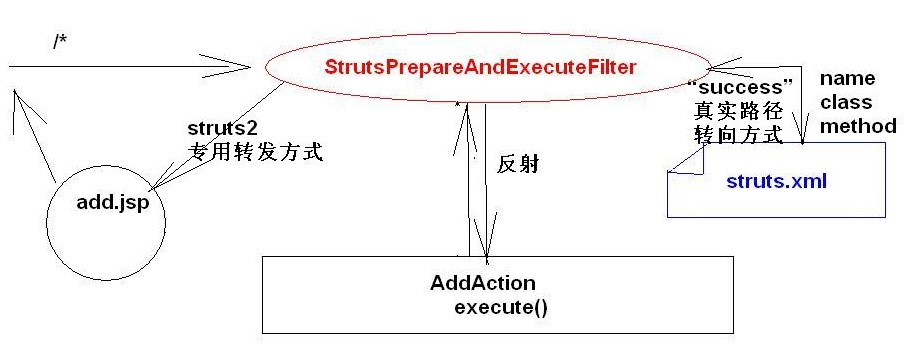
反射 :

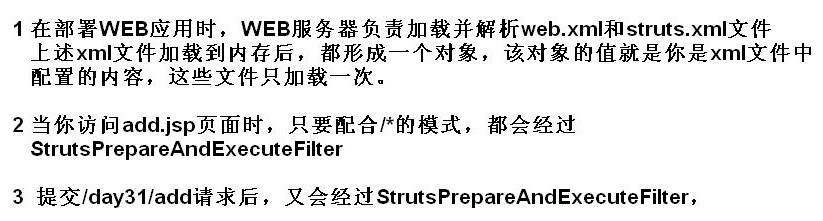
1.构造对象使用构造器
//类似为Servlet

public class AddAction {

    public AddAction(){

        System.out.println("框架反射创建AddAction实例");

    }
2.web.xml
2.4版本的servlet规范在部属描述符中新增加了一个<dispatcher>元素,这个元素有四个可能的值:即REQUEST,FORWARD,INCLUDE和ERROR,
可以在一个<filter-mapping>元素中加入任意数目的<dispatcher>,使得filter将会作用于
直接从客户端过来的request,通过forward过来的request,通过include过来的request,通过<error-page>过来的request。
如果没有指定任何< dispatcher >元素,默认值是REQUEST。
<!-- Struts2核心过滤器,专用于过滤所有请求-->

  <filter>

      <filter-name>struts2</filter-name>

      <filter-class>org.apache.struts2.dispatcher.ng.filter.StrutsPrepareAndExecuteFilter</filter-class>

  </filter>

  <filter-mapping>

      <filter-name>struts2</filter-name>

      <url-pattern>/*</url-pattern>

      <dispatcher>REQUEST</dispatcher>

  </filter-mapping>

</web-app>
由于AddAction中是转发所以不经过StrutsPrepareAndExecuteFilter。要使其经过改成dispatcher为FORWARD
*四)struts2其本配置详解(上)
(一)名称空间和访问Action路径规则
访问URL=名称空间 / <aciton标签的name属性值>
名称空间:页面名相同时,用namespace区分请求路径
(二)默认名称空间和测试Action的访问路径规则
默认命名空间是"/",可不写;
若名称空间是/,url=http:localhost:8080/day31/add
http://localhost:8080/day31/add?num1=100&num2=200
若名称空间是/xx,url=http://localhost:8080/day31/xx/add
http://localhost:8080/day31/xx/add?num1=100&num2=200
为什么需要namespace?

如果名称空间是/,且<action>的name属性值为add
如果URL是:http://127.0.0.1:8080/day31/xx/yy/zz/add回车
http://127.0.0.1:8080/day31/xx/yy/zz/add(正确)
http://127.0.0.1:8080/day31/xx/yy/add(正确)
http://127.0.0.1:8080/day31/xx/add(正确)
http://127.0.0.1:8080/day31/add(正确)
如果名称空间是/xx,且<action>的name属性值为add
如果URL是:http://127.0.0.1:8080/day31/xx/yy/zz/add回车
http://127.0.0.1:8080/day31/xx/yy/zz/add(正确)
http://127.0.0.1:8080/day31/xx/yy/add(正确)
http://127.0.0.1:8080/day31/xx/add(正确)
http://127.0.0.1:8080/day31/add(出错)
结论:不管URL请求是什么,namespace的属性值,一定名称空间的底线,不能少于namespace的值,
但可以多于namespace的值。
路径中,大小写敏感
(3)如果没有指定<action>的method属性
默认执行Action中的execute()方法
(4)推荐,文件只存在加载和解析,没有编译,所以尽量在xml中配置
execute()方法使其return "success";
//转发到add.jsp中  由struts.xml中的result代替
//request.getRequestDispatcher("/add.jsp").forward(request, response);

return "success";
web.xml
<!-- struts2的核心配置文件,在应用部署时加载并解析 -->

<struts>

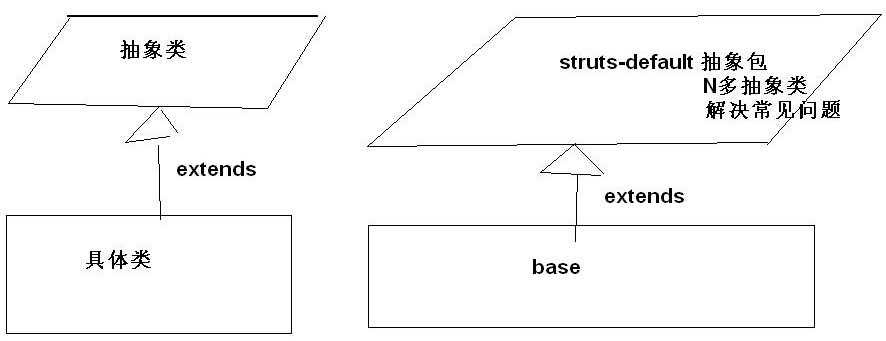
    <package name="base" extends="struts-default" namespace="/"><!-- struts2内部的一个核心包 -->

        <action name="add" class="cn.itcast.web.struts2.add.AddAction" >

            <result name="success" type="dispatcher">

                /add.jsp

            </result>

        </action>

    </package>

</struts>
如果没有指定<result>的name属性
name默认为Action中execute()方法的返回值:小写字母"success"
(5)如果没有指定<result>的type属性
type默认为"dispatcher"
struts2专用转发
(6)设置访问Action的扩展名的二种设置方式【struts.properties和struts.xml】
struts.action.extension=action,,
struts2访问Action的扩展名默认为:无或者是.action(小写)
修改Actin访问的扩展名:
A)src/struts.xml文件配置扩展名(value中四种)
<!-- 修改action的扩展名方式1 -->

<constant name="struts.action.extension" value="xx,qq,aciton,,"></constant>
http://localhost:8080/day31/add.qq?num1=100&num2=100
B)src/struts.properties文件配置扩展名
struts.action.extension=yy,do

struts.i18n.encoding=UTF-8
上述二种方式,最终都会替换框架默认的扩展名
加载的顺序是:先加载框架的,后加载程序员的
当properties和xml文件同时存在时,properties文件起决定作用。
*四)struts2其本配置详解(下)
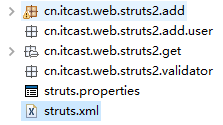
(7)指定包含多个struts.xml配置文件的规则
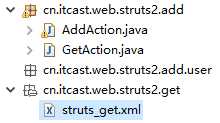
src/struts.xml是总的配置文件,用总的配置文件能过<include>标签,去包含子的配置文件,
便用多个模块操作,一个模块使用一个xml文件。

get.jsp
<a href="/day31/get" style="text-decoration:none">

        这是GET请求

</a>
GetAction
package cn.itcast.web.struts2.add;

public class GetAction {

    public String execute(){

        return "success";

    }

}
WEB-INF下ok.jsp
<body>

    ok.jsp

</body>
<?xml version="1.0" encoding="UTF-8"?>

<!DOCTYPE struts PUBLIC

    "-//Apache Software Foundation//DTD Struts Configuration 2.0//EN"

    "http://struts.apache.org/dtds/struts-2.0.dtd">

<struts>

    <package name="get" extends="struts-default" namespace="/">

        <action

            name="get"

            class="cn.itcast.web.struts2.add.GetAction"

            method="execute">

            <result name="success" type="dispatcher">

                /WEB-INF/ok.jsp

            </result>

        </action>

    </package>

</struts>

<?xml version="1.0" encoding="UTF-8"?>

<!DOCTYPE struts PUBLIC

    "-//Apache Software Foundation//DTD Struts Configuration 2.0//EN"

    "http://struts.apache.org/dtds/struts-2.0.dtd">

<struts>

    <package name="add" extends="struts-default" namespace="/">

        <action name="add" class="cn.itcast.web.struts2.add.AddAction">

            <result name="success" type="redirect">

                /add.jsp

            </result>

        </action>

    </package>

</struts>
<?xml version="1.0" encoding="UTF-8"?>

<!DOCTYPE struts PUBLIC

    "-//Apache Software Foundation//DTD Struts Configuration 2.0//EN"

    "http://struts.apache.org/dtds/struts-2.0.dtd">

<!-- struts2的核心配置文件,在应用部署时加载并解析 -->

<struts>

    <!-- 包含子的xml文件 -->

    <include file="cn/itcast/web/struts2/add/struts_add.xml"/>

    <include file="cn/itcast/web/struts2/get/struts_get.xml"/>

</struts>
(8)Action采用单例还是非单例模式,需要解决线程安全问题吗?
一次请求创建一个Action实例,每次都不同。无线程安全问题

在AddAction中private Integer age;在execute中age++;不会有线程安全问题、
(2)struts2配置祥解的更多相关文章
- struts2系列(三):struts2配置详解
原文链接:http://www.cnblogs.com/fmricky/archive/2010/05/20/1740479.html 1.<include> 利用include标签,可以 ...
- struts2配置详解
01.Struts 2基本结构 使用Struts2框架实现用登录的功能,使用struts2标签和ognl表达式简化了试图的开发,并且利用struts2提供的特性对输入的数据进行验证,以及访问Servl ...
- Struts2 配置详解
1. web.xml 此文件的配置可以参看struts2的示例文档 <filter> <filter-name>struts2</filter-name> < ...
- Struts2配置详解_配置Action
Struts2的核心功能是action,对于开发人员来说,使用Struts2主要就是编写action,action类通常都要实现com.opensymphony.xwork2.Action接口,并实现 ...
- log4j配置祥解
第一步:加入log4j-1.2.8.jar到lib下. 第二步:在CLASSPATH下建立log4j.properties.内容如下: 1 log4j.rootCategory=INFO, stdou ...
- 第三章 Struts2配置详解
3.1 Struts2执行过程 1.获取Struts2资源 2.在应用程序中导入Struts2的类库 3.在web.xml中配置StrutsPrepareAndExecuteFilt ...
- Struts2学习笔记二 配置详解
Struts2执行流程 1.简单执行流程,如下所示: 在浏览器输入请求地址,首先会被过滤器处理,然后查找主配置文件,然后根据地址栏中输入的/hello去每个package中查找为/hello的name ...
- struts2基本配置详解2
接上篇struts2基本配置详解,还有一些配置没有讲到,下面将继续. struts.xml <package name="com.amos.web.action" names ...
- Struts2学习笔记(二)——配置详解
1.Struts2配置文件加载顺序: default.properties(默认常量配置) struts-default.xml(默认配置文件,主要配置bean和拦截器) struts-plugin. ...
随机推荐
- 席位分配问题——惯例Q值法和d'hondt法的MATLAB程序
本篇博文为追忆以前写过的算法系列第四篇 温故知新 本篇于2009年发表于百度博客,当时还没接触CSDN.所以是文学和技术博客混淆,只是这个程序博文訪问量突破2000,有不少网友评论互动.应该 ...
- vscode 编译调试c/c++的环境配置
首先看了一下别人写的文章 http://blog.csdn.net/c_duoduo/article/details/51615381 在按照上文链接博主的安装步骤进行到MINGW的安装时出现一个问题 ...
- HDU 3461 Code Lock(并查集的应用+高速幂)
* 65536kb,仅仅能开到1.76*10^7大小的数组. 而题目的N取到了10^7.我開始做的时候没注意,用了按秩合并,uset+rank达到了2*10^7所以MLE,所以貌似不能用按秩合并. 事 ...
- android 怎样加速./mk snod打包
mm命令高速编译一个模块之后,一般用adb push到手机看效果,假设环境不同意用adb push或模块不常常改.希望直接放到image里,则能够用./mk snod,这个命令只将system文件夹打 ...
- sqlserver中的时间比较
例子: select count(*) from table where DATEDIFF ([second], '2004-09-18 00:00:18', '2004-09-18 00:00:19 ...
- 贷前系统ElasticSearch实践总结
贷前系统负责从进件到放款前所有业务流程的实现,其中涉及一些数据量较大.条件多样且复杂的综合查询,引入ElasticSearch主要是为了提高查询效率,并希望基于ElasticSearch快速实现一个简 ...
- beego的MVC架构介绍
beego 的 MVC 架构介绍 beego 是一个典型的 MVC 框架,它的整个执行逻辑如下图所示: 通过文字来描述如下: 在监听的端口接收数据,默认监听在 8080 端口. 用户请求到达 8080 ...
- 018 nginx与第三模块整合[一致性哈希模块整合]
nginx第三方模块官网:http://wiki.nginx.org/HttpUpstreamConsistentHash nginx第三方模块下载地址:https://github.com/repl ...
- PowerBuilder -- Tab控件
在tab中关闭窗口 Close(tab_1.getparent()) 调整tab中的控件的tab oder 鼠标右键tabpage_1,选择 Tab Order菜单.
- 统计分析表的存储过程遇ORA-00600错误分析与处理
1. 统计分析表的存储过程部分内容 CREATE OR REPLACE procedure SEA.sp_analyze_XXX_a is v_sql_1 varchar ...