
Bootstrap简单介绍
一、一个小知识点
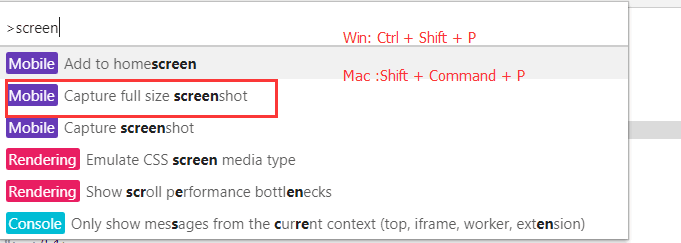
1、截取长屏的操作
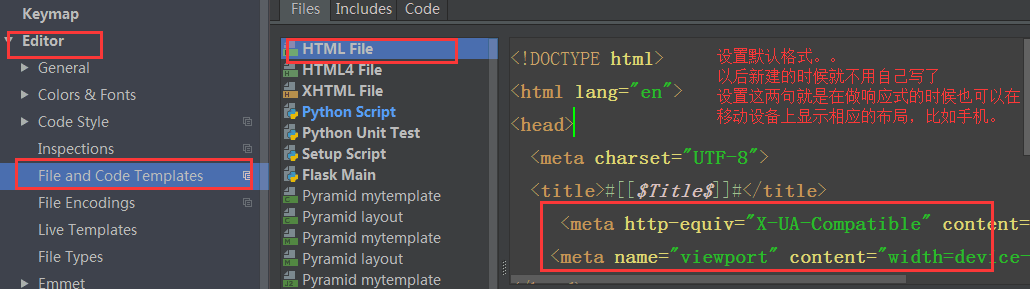
2、设置默认格式
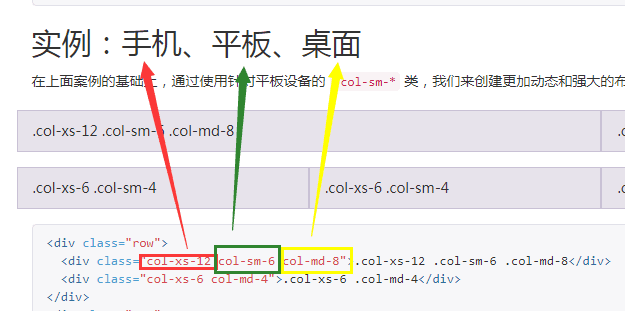
3、md,sm, xs
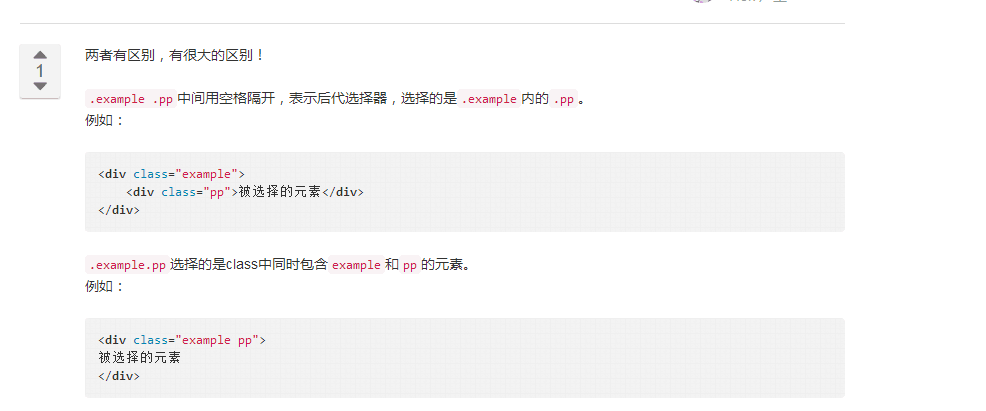
4、空格和没有空格的选择器
二、响应式介绍
- 响应式布局是什么?
同一个网页在不同的终端上呈现不同的布局等
- 响应式怎么实现的?
1. CSS3 media query 媒体查询
2. JS去控制网页的布局和样式等
- 缺点:工作量大,网页响应慢
- 优点: 专治疑难杂症
3. 用框架
- Bootstrap
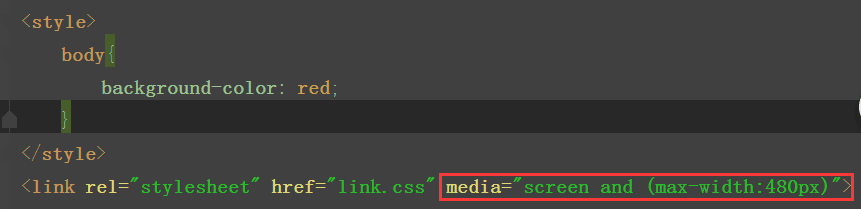
测试用css 媒体查询实现响应式
方式一、link.css文件
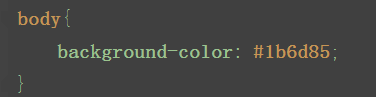
主文件中导入link.css文件
方式二、link2.css文件
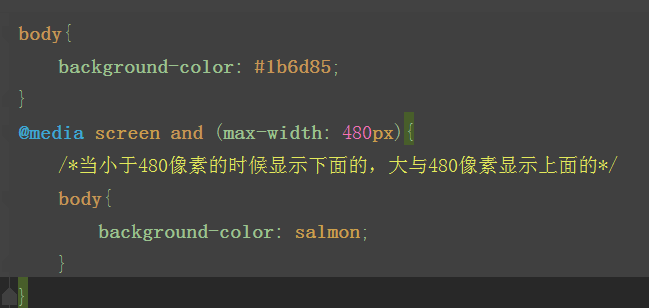
在主文件中导入link2.css文件

测试用Bootstrap实现响应式
 <!DOCTYPE html>

 <html lang="en">

 <head>

     <meta charset="UTF-8">

     <title>响应式示例</title>

     <meta http-equiv="X-UA-Compatible" content="IE=edge">

     <meta name="viewport" content="width=device-width">

     <link rel="stylesheet" href="bootstrap-3.3.7-dist/css/bootstrap.min.css">

       <style>

         body {

           overflow-x: hidden;

         }

         @media screen and (max-width: 767px) {

           .r1 {

             position: relative;

             right: 0;

             transition: all .25s ease-out;

           }

           .r1 .my-sidebar {

             right: -50%;

               /*当是小屏幕的时候先把列表组移过去*/

           }

           .r1.active {

             right: 50%;

               /*当点击按钮的时候在把列表组移进来*/

           }

           .my-sidebar {

             position: absolute;

             top: 0;

             width: 50%;

           }

     }

   </style>

 </head>

 <body>

 <!--导航条-->

 <nav class="navbar navbar-inverse">

     <div class="container">

         <!-- Brand and toggle get grouped for better mobile display -->

         <div class="navbar-header">

             <button type="button" class="navbar-toggle collapsed" data-toggle="collapse"

                     data-target="#bs-example-navbar-collapse-1" aria-expanded="false">

                 <span class="sr-only">Toggle navigation</span>

                 <span class="icon-bar"></span>

                 <span class="icon-bar"></span>

                 <span class="icon-bar"></span>

             </button>

             <a class="navbar-brand" href="#">Project name</a>

         </div>

         <!-- Collect the nav links, forms, and other content for toggling -->

         <div class="collapse navbar-collapse" id="bs-example-navbar-collapse-1">

             <ul class="nav navbar-nav">

                 <li class="active"><a href="#">Home <span class="sr-only">(current)</span></a></li>

                 <li><a href="#">About</a></li>

                 <li><a href="#">Contact</a></li>

             </ul>

         </div><!-- /.navbar-collapse -->

     </div><!-- /.container-fluid -->

 </nav>

 <div class="container">

     <div class="row r1">

         <!--左侧部分-->

         <div class="col-md-9 col-sm-9" id="c1">

             <!--toggle-->

             <!--visible-xs   当屏幕是超小屏幕的时候显示-->

             <p class="pull-right visible-xs">

                 <button class="btn-xs btn btn-primary" id="togglebtn">Toggle nav</button>

             </p>

             <!--巨幕-->

             <div class="bs-example" data-example-id="simple-jumbotron">

                 <div class="jumbotron">

                     <h1>Hello, world!</h1>

                     <p>This is a simple hero unit, a simple jumbotron-style component for calling extra attention to

                         featured content or information.</p>

                 </div>

             </div>

             <!--内容-->

             <!--分块的内容-->

             <div class="col-md-4 col-sm-6">

                 <h3>Thumbnail label</h3>

                 <p>Cras justo odio, dapibus ac facilisis in, egestas eget quam. Donec id elit non mi porta gravida at

                     eget metus. Nullam id dolor id nibh ultricies vehicula ut id elit.</p>

                 <p><a href="#" class="btn btn-default" role="button">查看详情>></a></p>

             </div>

              <!--分块的内容-->

             <div class="col-md-4 col-sm-6">

                 <h3>Thumbnail label</h3>

                 <p>Cras justo odio, dapibus ac facilisis in, egestas eget quam. Donec id elit non mi porta gravida at

                     eget metus. Nullam id dolor id nibh ultricies vehicula ut id elit.</p>

                 <p><a href="#" class="btn btn-default" role="button">查看详情>></a></p>

             </div>

              <!--分块的内容-->

             <div class="col-md-4 col-sm-6">

                 <h3>Thumbnail label</h3>

                 <p>Cras justo odio, dapibus ac facilisis in, egestas eget quam. Donec id elit non mi porta gravida at

                     eget metus. Nullam id dolor id nibh ultricies vehicula ut id elit.</p>

                 <p><a href="#" class="btn btn-default" role="button">查看详情>></a></p>

             </div>

              <!--分块的内容-->

             <div class="col-md-4 col-sm-6">

                 <h3>Thumbnail label</h3>

                 <p>Cras justo odio, dapibus ac facilisis in, egestas eget quam. Donec id elit non mi porta gravida at

                     eget metus. Nullam id dolor id nibh ultricies vehicula ut id elit.</p>

                 <p><a href="#" class="btn btn-default" role="button">查看详情>></a></p>

             </div>

              <!--分块的内容-->

             <div class="col-md-4 col-sm-6">

                 <h3>Thumbnail label</h3>

                 <p>Cras justo odio, dapibus ac facilisis in, egestas eget quam. Donec id elit non mi porta gravida at

                     eget metus. Nullam id dolor id nibh ultricies vehicula ut id elit.</p>

                 <p><a href="#" class="btn btn-default" role="button">查看详情>></a></p>

             </div>

             <!--分块的内容-->

             <div class="col-md-4 col-sm-6">

                 <h3>Thumbnail label</h3>

                 <p>Cras justo odio, dapibus ac facilisis in, egestas eget quam. Donec id elit non mi porta gravida at

                     eget metus. Nullam id dolor id nibh ultricies vehicula ut id elit.</p>

                 <p><a href="#" class="btn btn-default" role="button">查看详情>></a></p>

             </div>

         </div>

         <!--右侧部分:列表组-->

         <div class="col-sm-3  my-sidebar " id="listgroup">

             <div class="list-group">

                 <a href="#" class="list-group-item active">Cras justo odio</a>

                 <a href="#" class="list-group-item">Dapibus ac facilisis in</a>

                 <a href="#" class="list-group-item">Morbi leo risus</a>

                 <a href="#" class="list-group-item">Porta ac consectetur ac</a>

                 <a href="#" class="list-group-item">Vestibulum at eros</a>

                 <a href="#" class="list-group-item">Vestibulum at eros</a>

                 <a href="#" class="list-group-item">Vestibulum at eros</a>

                 <a href="#" class="list-group-item">Vestibulum at eros</a>

             </div>

         </div>

     </div>

 </div>

 <script src="jquery-3.2.1.min.js"></script>

 <script src="bootstrap-3.3.7-dist/js/bootstrap.min.js"></script>

 <script>

     $(document).ready(function () {

         $("#togglebtn").on("click",function () {

             $(".r1").toggleClass("active")

         })

     });

 </script>

 </body>

 </html>
用Bootstrap实现的响应式例子
三、常用插件
常用插件基本上都是基于jQuery ,
先导入插件的CSS文件
再导入jQuery文件
最后导入JS,注意jQuery是必须要放在JS上面的
1、Sweet Alert(弹出框)
  使用步骤:1下载 2解压找到里面的dist(主要是dist)和animate.css  3引入到自己的文件里就行了
  注:如果是html参数就要用animate


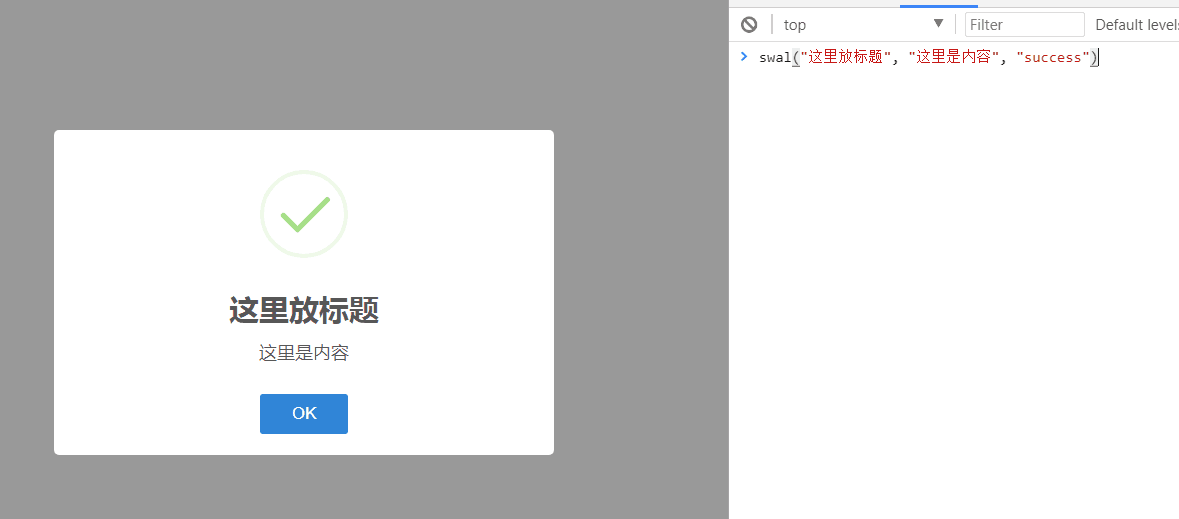
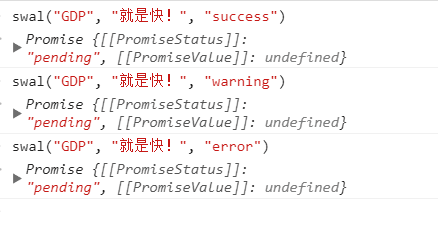
具体例子实现
代码实现
 <!DOCTYPE html>

 <html lang="en">

 <head>

     <meta charset="UTF-8">

     <meta http-equiv="X-UA-Compatible" content="IE=edge">

     <meta name="viewport" content="width=device-width, initial-scale=1">

     <title>sweetalert2</title>

     <link rel="stylesheet" href="sweetalert2/sweetalert2.min.css">

     <link rel="stylesheet" href="animate.css">

 </head>

 <body>

 <script src="../jquery-3.2.1.js"></script>

 <script src="sweetalert2/sweetalert2.min.js"></script>

 <script>

 //        swal({

 //            title: '你真的确定吗?',

 //            text: "当前操作是删库,可能你需要回去收拾一下行李,准备跑路。。。",

 //            type: 'warning',

 //            showCancelButton: true,

 //            confirmButtonColor: '#3085d6',

 //            cancelButtonColor: '#d33',

 //            confirmButtonText: '是的,我准备好离职了!',

 //            cancelButtonText: '是的,我准备好离职了!'

 //            // 点击确认按钮后,执行这个then

 //        }).then(function () {

 //            // 做逻辑判断

 //            console.log("做逻辑判断...");

 //            swal(

 //                '删除成功!',

 //                '留给你的时间不多了',

 //                'success'

 //            )

 //        })

 //    swal({

 //        title: 'Sweet!',

 //        text: 'Modal with a custom image.',

 //        imageUrl: 'z.png',

 //        imageWidth: 400,

 //        imageHeight: 200,

 //        imageAlt: 'Custom image',

 //        animation: false

 //    })

 </script>

 </body>

 </html>
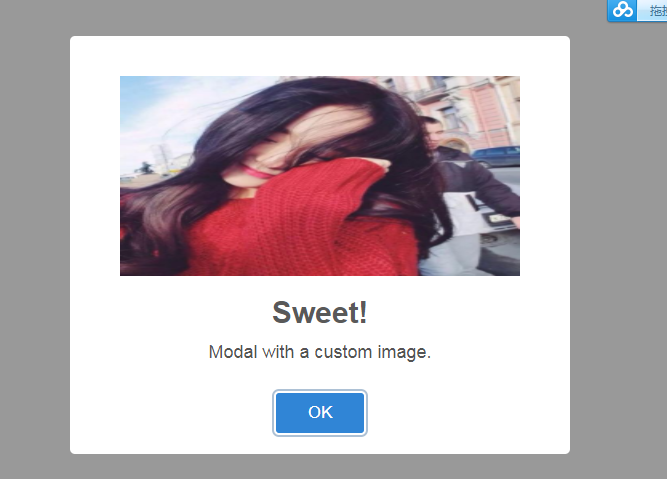
sweetAlert示例
运行结果截图:

2、jQuery lazyload 主要是为了节省流量,点击时才出现
懒加载图片例子
 <!DOCTYPE html>

 <html lang="zh-CN">

 <head>

   <meta charset="UTF-8">

   <meta http-equiv="x-ua-compatible" content="IE=edge">

   <meta name="viewport" content="width=device-width, initial-scale=1">

   <title>懒加载示例</title>

 </head>

 <body>

 <div>

   <div><img src="img/0.jpg" alt="" class="lazy" data-original="http://pic.pptbz.com/pptpic/201511/2015110586122945.jpg" width="600px" height="400px"></div>

   <div><img src="img/0.jpg" alt="" class="lazy" data-original="http://img1.bitautoimg.com/bitauto/2012/08/10/3aa9e774-574b-4165-b59a-db4f243bdc5a.jpg" width="600px" height="400px"></div>

   <div><img src="img/0.jpg" alt="" class="lazy" data-original="http://dl.bizhi.sogou.com/images/2014/01/09/485496.jpg" width="600px" height="400px"></div>

   <div><img src="img/0.jpg" alt="" class="lazy" data-original="img/4.jpg" width="600px" height="400px"></div>

   <div><img src="img/0.jpg" alt="" class="lazy" data-original="img/5.jpg" width="600px" height="400px"></div>

   <div><img src="img/0.jpg" alt="" class="lazy" data-original="img/6.jpg" width="600px" height="400px"></div>

   <div><img src="img/0.jpg" alt="" class="lazy" data-original="img/1.jpg" width="600px" height="400px"></div>

   <div><img src="img/0.jpg" alt="" class="lazy" data-original="img/2.jpg" width="600px" height="400px"></div>

   <div><img src="img/0.jpg" alt="" class="lazy" data-original="img/3.jpg" width="600px" height="400px"></div>

   <div><img src="img/0.jpg" alt="" class="lazy" data-original="img/4.jpg" width="600px" height="400px"></div>

   <div><img src="img/0.jpg" alt="" class="lazy" data-original="img/5.jpg" width="600px" height="400px"></div>

   <div><img src="img/0.jpg" alt="" class="lazy" data-original="img/6.jpg" width="600px" height="400px"></div>

   <div><img src="img/0.jpg" alt="" class="lazy" data-original="img/1.jpg" width="600px" height="400px"></div>

   <div><img src="img/0.jpg" alt="" class="lazy" data-original="img/2.jpg" width="600px" height="400px"></div>

   <div><img src="img/0.jpg" alt="" class="lazy" data-original="img/3.jpg" width="600px" height="400px"></div>

   <div><img src="img/0.jpg" alt="" class="lazy" data-original="img/4.jpg" width="600px" height="400px"></div>

   <div><img src="img/0.jpg" alt="" class="lazy" data-original="img/5.jpg" width="600px" height="400px"></div>

   <div><img src="img/0.jpg" alt="" class="lazy" data-original="img/6.jpg" width="600px" height="400px"></div>

   <div><img src="img/0.jpg" alt="" class="lazy" data-original="img/1.jpg" width="600px" height="400px"></div>

   <div><img src="img/0.jpg" alt="" class="lazy" data-original="img/2.jpg" width="600px" height="400px"></div>

   <div><img src="img/0.jpg" alt="" class="lazy" data-original="img/3.jpg" width="600px" height="400px"></div>

   <div><img src="img/0.jpg" alt="" class="lazy" data-original="img/4.jpg" width="600px" height="400px"></div>

   <div><img src="img/0.jpg" alt="" class="lazy" data-original="img/5.jpg" width="600px" height="400px"></div>

   <div><img src="img/0.jpg" alt="" class="lazy" data-original="img/6.jpg" width="600px" height="400px"></div>

   <div><img src="img/0.jpg" alt="" class="lazy" data-original="img/1.jpg" width="600px" height="400px"></div>

   <div><img src="img/0.jpg" alt="" class="lazy" data-original="img/2.jpg" width="600px" height="400px"></div>

   <div><img src="img/0.jpg" alt="" class="lazy" data-original="img/3.jpg" width="600px" height="400px"></div>

   <div><img src="img/0.jpg" alt="" class="lazy" data-original="img/4.jpg" width="600px" height="400px"></div>

   <div><img src="img/0.jpg" alt="" class="lazy" data-original="img/5.jpg" width="600px" height="400px"></div>

   <div><img src="img/0.jpg" alt="" class="lazy" data-original="img/6.jpg" width="600px" height="400px"></div>

   <div><img src="img/0.jpg" alt="" class="lazy" data-original="img/1.jpg" width="600px" height="400px"></div>

   <div><img src="img/0.jpg" alt="" class="lazy" data-original="img/2.jpg" width="600px" height="400px"></div>

   <div><img src="img/0.jpg" alt="" class="lazy" data-original="img/3.jpg" width="600px" height="400px"></div>

   <div><img src="img/0.jpg" alt="" class="lazy" data-original="img/4.jpg" width="600px" height="400px"></div>

   <div><img src="img/0.jpg" alt="" class="lazy" data-original="img/5.jpg" width="600px" height="400px"></div>

   <div><img src="img/0.jpg" alt="" class="lazy" data-original="img/6.jpg" width="600px" height="400px"></div>

   <div><img src="img/0.jpg" alt="" class="lazy" data-original="img/1.jpg" width="600px" height="400px"></div>

   <div><img src="img/0.jpg" alt="" class="lazy" data-original="img/2.jpg" width="600px" height="400px"></div>

   <div><img src="img/0.jpg" alt="" class="lazy" data-original="img/3.jpg" width="600px" height="400px"></div>

   <div><img src="img/0.jpg" alt="" class="lazy" data-original="img/4.jpg" width="600px" height="400px"></div>

   <div><img src="img/0.jpg" alt="" class="lazy" data-original="img/5.jpg" width="600px" height="400px"></div>

   <div><img src="img/0.jpg" alt="" class="lazy" data-original="img/6.jpg" width="600px" height="400px"></div>

   <div><img src="img/0.jpg" alt="" class="lazy" data-original="img/1.jpg" width="600px" height="400px"></div>

   <div><img src="img/0.jpg" alt="" class="lazy" data-original="img/2.jpg" width="600px" height="400px"></div>

   <div><img src="img/0.jpg" alt="" class="lazy" data-original="img/3.jpg" width="600px" height="400px"></div>

   <div><img src="img/0.jpg" alt="" class="lazy" data-original="img/4.jpg" width="600px" height="400px"></div>

   <div><img src="img/0.jpg" alt="" class="lazy" data-original="img/5.jpg" width="600px" height="400px"></div>

   <div><img src="img/0.jpg" alt="" class="lazy" data-original="img/6.jpg" width="600px" height="400px"></div>

   <div><img src="img/0.jpg" alt="" class="lazy" data-original="img/1.jpg" width="600px" height="400px"></div>

   <div><img src="img/0.jpg" alt="" class="lazy" data-original="img/2.jpg" width="600px" height="400px"></div>

   <div><img src="img/0.jpg" alt="" class="lazy" data-original="img/3.jpg" width="600px" height="400px"></div>

   <div><img src="img/0.jpg" alt="" class="lazy" data-original="img/4.jpg" width="600px" height="400px"></div>

   <div><img src="img/0.jpg" alt="" class="lazy" data-original="img/5.jpg" width="600px" height="400px"></div>

   <div><img src="img/0.jpg" alt="" class="lazy" data-original="img/6.jpg" width="600px" height="400px"></div>

   <div><img src="img/0.jpg" alt="" class="lazy" data-original="img/1.jpg" width="600px" height="400px"></div>

   <div><img src="img/0.jpg" alt="" class="lazy" data-original="img/2.jpg" width="600px" height="400px"></div>

   <div><img src="img/0.jpg" alt="" class="lazy" data-original="img/3.jpg" width="600px" height="400px"></div>

   <div><img src="img/0.jpg" alt="" class="lazy" data-original="img/4.jpg" width="600px" height="400px"></div>

   <div><img src="img/0.jpg" alt="" class="lazy" data-original="img/5.jpg" width="600px" height="400px"></div>

   <div><img src="img/0.jpg" alt="" class="lazy" data-original="img/6.jpg" width="600px" height="400px"></div>

 </div>

 <script src="https://cdn.bootcss.com/jquery/3.2.1/jquery.min.js"></script>

 <script src="jquery.lazyload.min.js"></script>

 <script>

   $("img.lazy").lazyload({

     effect: "fadeIn",

     event: "click"

   })

 </script>

 </body>

 </html>
懒加载图片例子
3、Font Awesome 字体图标(一般用fonts文件)
 <!DOCTYPE html>

 <html lang="en">

 <head>

     <meta charset="UTF-8">

     <meta http-equiv="X-UA-Compatible" content="IE=edge">

     <meta name="viewport" content="width=device-width">

     <title>图标示例</title>

     <link rel="stylesheet" href="font-awesome/css/font-awesome.css">

     <link rel="stylesheet" href="toastr/toastr.css">

     <link rel="stylesheet" href="bootstrap-3.3.7-dist/css/bootstrap.min.css">

 </head>

 <body>

 <button class="btn btn-primary btn-lg"><i class="fa fa-plug" aria-hidden="true"></i>微信</button>

 <span class="fa-stack fa-lg">

   <i class="fa fa-circle-o fa-stack-1x"></i>

   <i class="fa fa-wechat fa-stack-2x"></i>

 </span>

 <script src="jquery-3.2.1.min.js"></script>

 <script src="toastr/toastr.min.js"></script>

 <script>

     toastr.options = {

         "closeButton": true,

         "debug": false,

         "progressBar": false,

         "positionClass": "toast-top-left",

         "onclick": null,

         "showDuration": "300",

         "hideDuration": "1000",

         "timeOut": "5000",

         "extendedTimeOut": "1000",

         "showEasing": "swing",

         "hideEasing": "linear",

         "showMethod": "fadeIn",

         "hideMethod": "fadeOut"

     };

     toastr.info("Flatlab is an Awesome dashboard build with BS3 ", "Toastr Notification")

 </script>

 </body>

 </html>
字体图标示例
4、 Toastr (通知栏)
   使用步骤:1下载 2解压找到里面的build 3引入到自己的文件里就行了
   - 通知栏的插件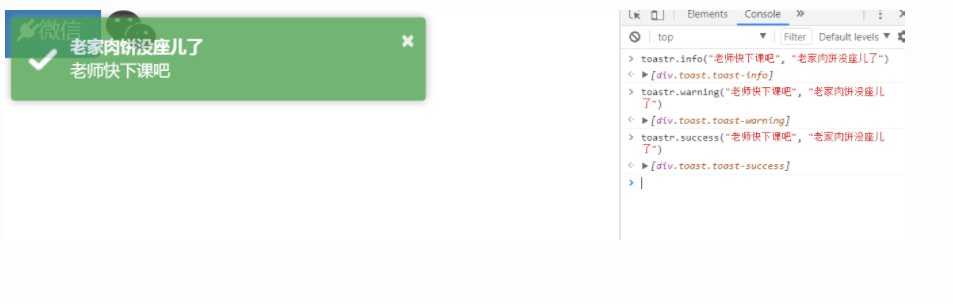
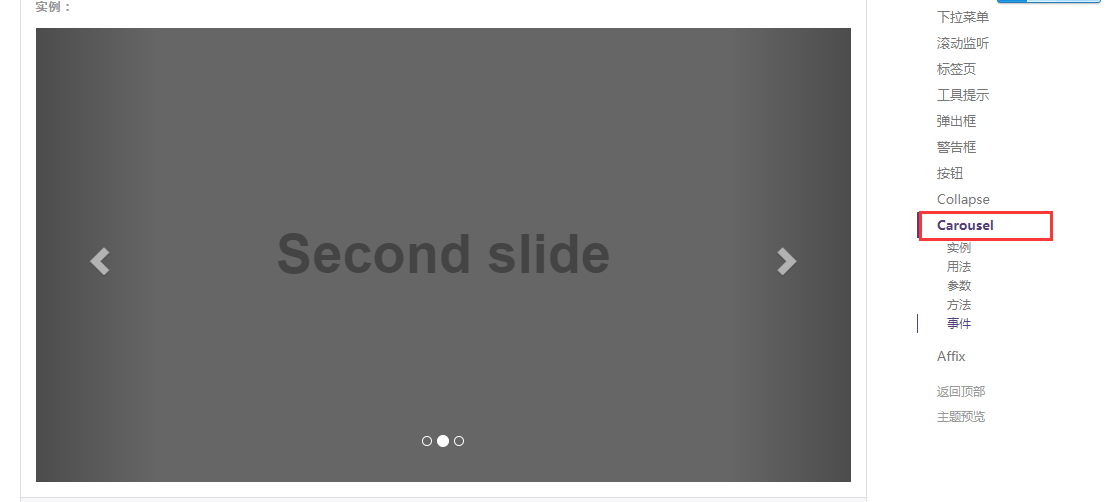
四、用Bootstrap实现的轮廓图
 <!DOCTYPE html>

 <html lang="en">

 <head>

     <meta charset="UTF-8">

     <meta http-equiv="X-UA-Compatible" content="IE=edge">

     <meta name="viewport" content="width=device-width">

     <title>轮播图示例</title>

     <link rel="stylesheet" href="bootstrap-3.3.7-dist/css/bootstrap.min.css">

 </head>

 <body>

 <!--<div class="container">-->

     <!--<div class="row">-->

         <!--<div class="col-md-12">-->

 <!--在javascript插件里面的Carousel中找-->

         <div id="carousel-example-generic" class="carousel slide" data-ride="carousel">

             <!-- Indicators -->

             <ol class="carousel-indicators">

                 <li data-target="#carousel-example-generic" data-slide-to="0" class="active"></li>

                 <li data-target="#carousel-example-generic" data-slide-to="1"></li>

                 <li data-target="#carousel-example-generic" data-slide-to="2"></li>

             </ol>

             <!-- Wrapper for slides -->

             <div class="carousel-inner" role="listbox">

                 <div class="item active">

                     <img src="img/banner_3.jpg" alt="...">

                     <div class="carousel-caption">

                         世情薄,人情恶,雨送黄昏花易落。

                     </div>

                 </div>

                 <div class="item">

                     <img src="img/banner_1.jpg" alt="...">

                     <div class="carousel-caption">

                         晓风干,泪痕残,欲笺心情,独语斜阑, 难 难 难。

                     </div>

                 </div>

                 <div class="item">

                     <img src="img/banner_2.jpg" alt="...">

                     <div class="carousel-caption">

                          人成各,今非昨。病魂常似秋千索。

                     </div>

                 </div>

             </div>

             <!-- Controls -->

             <a class="left carousel-control" href="#carousel-example-generic" role="button" data-slide="prev">

                 <span class="glyphicon glyphicon-chevron-left" aria-hidden="true"></span>

                 <span class="sr-only">Previous</span>

             </a>

             <a class="right carousel-control" href="#carousel-example-generic" role="button" data-slide="next">

                 <span class="glyphicon glyphicon-chevron-right" aria-hidden="true"></span>

                 <span class="sr-only">Next</span>

             </a>

         </div>

       <!--</div>-->

     <!--</div>-->

 <!--</div>-->

 <script src="jquery-3.2.1.min.js"></script>

 <script src="bootstrap-3.3.7-dist/js/bootstrap.min.js"></script>

 </body>

 </html>
示例
五、需要知道的几个插件网址
1、SweetAlert (弹出框):https://github.com/t4t5/sweetalert
2、SweetAlert2 (弹出框):https://github.com/limonte/sweetalert2
3、Font Awesome(字体图标):http://fontawesome.io
4、jQuery lazy load(懒加载):https://github.com/tuupola/jquery_lazyload
5、Toastr(通知栏):http://codeseven.github.io/toastr/
六、Bootstrap网址:http://v3.bootcss.com/
有时间看一下这个网址:http://www.jq22.com/daima
七、自定义Bootstrap组件,
1、找到自定义那一页
2、勾选我用到的组件
3、拉到最后面,点击下载
八、Bootstrap补充:
   - modal
    和模态框使用的
    $("#myModal").modal("show")
  - collapse :也是在JavaScript组件中去找,点击按钮有信息出来

   - tooltip : 相当于提示信息,就像是一个按钮,指向按钮会有提示信息
 <!DOCTYPE html>

 <html lang="en">

 <head>

     <meta charset="UTF-8">

     <meta http-equiv="X-UA-Compatible" content="IE=edge">

     <meta name="viewport" content="width=device-width">

     <title>按钮提示</title>

     <link rel="stylesheet" href="bootstrap-3.3.7-dist/css/bootstrap.min.css">

 </head>

 <body>

 <!-- HTML to write -->

 <button type="button" class="btn btn-primary" data-toggle="tooltip" data-placement="left" title="Tooltip on left">指向我</button>

 <button type="button" class="btn btn-default" data-toggle="tooltip" data-placement="bottom" title="Tooltip on bottom">Tooltip on bottom</button>

 <button type="button" class="btn btn-default" data-toggle="tooltip" data-placement="right" title="Tooltip on right">Tooltip on right</button>

 <!-- Generated markup by the plugin -->

 <div class="tooltip top" role="tooltip">

   <div class="tooltip-arrow"></div>

   <div class="tooltip-inner">

     Some tooltip text!

   </div>

 </div>

 <script src="jquery-3.2.1.min.js"></script>

 <script src="bootstrap-3.3.7-dist/js/bootstrap.min.js"></script>

 <script>

     $('.btn').tooltip();

 </script>

 </body>

 </html>
tooltip示例
Bootstrap简单介绍的更多相关文章
- 前端框架Bootstrap简单介绍
下载: 解压之后: 把这些文件拷贝到项目中 页面使用时 只需要引入: 然后我们就可以参考官网来设计需要的前端页面了 设计一个按钮:button 只需要标明css样式中使用的类 下面就是现实效果:
- Appium Android Bootstrap源代码分析之简单介绍
在上一个系列中我们分析了UiAutomator的核心源代码,对UiAutomator是怎么执行的原理有了根本的了解.今天我们会開始另外一个在安卓平台上基于UiAutomator的新起之秀--Appiu ...
- SQLite数据库和JPA简单介绍
SQLite数据库和JPA简单介绍 一.SQLite简单使用 SQLite是遵循ACID的关系数据库管理系统,它的处理速度很快,它的设计目标是嵌入式的,只需要几百K的内存就可以了. 1.下载SQLit ...
- 简单介绍什么是协程及其在ES6中的实现方式
协程,英文名coroutine,是一种执行过程可以被暂停和恢复的方法.各个协程之间相互协作完成一个任务. 让我们来看一个关于发挥协程作用的例子.假定我们有一个生产者和消费者的关系,生产者创建物品并将物 ...
- Bootstrap的介绍和响应式媒体查询
Bootstrap的介绍 凡是使用过Bootstrap的开发者,都不在乎做这么两件事情:复制and粘贴.哈哈~,是的使用Bootstrap非常简单,但是在复制粘贴之前,需要先对Bootstrap的用法 ...
- [原创]关于mybatis中一级缓存和二级缓存的简单介绍
关于mybatis中一级缓存和二级缓存的简单介绍 mybatis的一级缓存: MyBatis会在表示会话的SqlSession对象中建立一个简单的缓存,将每次查询到的结果结果缓存起来,当下次查询的时候 ...
- 利用Python进行数据分析(7) pandas基础: Series和DataFrame的简单介绍
一.pandas 是什么 pandas 是基于 NumPy 的一个 Python 数据分析包,主要目的是为了数据分析.它提供了大量高级的数据结构和对数据处理的方法. pandas 有两个主要的数据结构 ...
- 利用Python进行数据分析(4) NumPy基础: ndarray简单介绍
一.NumPy 是什么 NumPy 是 Python 科学计算的基础包,它专为进行严格的数字处理而产生.在之前的随笔里已有更加详细的介绍,这里不再赘述. 利用 Python 进行数据分析(一)简单介绍 ...
- yii2的权限管理系统RBAC简单介绍
这里有几个概念 权限: 指用户是否可以执行哪些操作,如:编辑.发布.查看回帖 角色 比如:VIP用户组, 高级会员组,中级会员组,初级会员组 VIP用户组:发帖.回帖.删帖.浏览权限 高级会员组:发帖 ...
随机推荐
- 使用聚合数据API查询快递数据-短信验证码-企业核名
有位朋友让我给他新开的网站帮忙做几个小功能,如下: 输入快递公司.快递单号,查询出这个快件的所有动态(从哪里出发,到了哪里) 在注册.登录等场景下的手机验证码(要求有一定的防刷策略) 通过输入公司名的 ...
- 【Excle】Excle中的逆向查询
一般vlookup使用 一般的vlookup使用,想必都会了,下面是一个一般vlookup的例子 意思就是以F2为查询值,区域A2:D10为查找区域,在首列中找到与F2单元格相同的工号,然后返回这个区 ...
- HBase笔记
吴超 1.1 Hbase是Hadoop中的数据库,Hadoop还需要数据库吗?我们学的Hadoop是一个分布式的存储和计算的平台 为什么要在他上面建一个数据库呢,数据库是干什么的呢,数据库是一个管理系 ...
- Apc缓存Opcode(转)
1.PHP执行 PHP的运行阶段也分成三个阶段: Parse.语法分析阶段. Compile.编译产出opcode中间码. Execute.运行,动态运行进行输出. ...
- 【转】AngularJs 弹出框 model(模态框)
原文转至 http://blog.csdn.net/violet_day/article/details/17170585 $modal是一个可以迅速创建模态窗口的服务,创建部分页,控制器,并关联他们 ...
- Python中strip方法的妙用
[开胃小菜] 当提到python中strip方法,想必凡接触过python的同行都知道它主要用来切除空格.有下面两种方法来实现. 方法一:用内置函数 #<python> if __name ...
- js 检测客户端网速
<!doctype html> <html> <head> <meta http-equiv=Content-Type content="text/ ...
- myeclipse中disable maven nature怎么恢复
eclipse更新maven的时候,不小心手一抖,点上了Disable Maven Nature,然后工程右键菜单中的Maven栏就不见了! 其实这是把maven工程转换成了一般工程,再转回来就好了. ...
- 常见 WEB 安全漏洞(转)
SQL注入 成因:程序未对用户的输入的内容进行过滤,从而直接代入数据库查询,所以导致了sql 注入 漏洞 . 思路:在URL处可以通过 单引号 和 and 1=1 and 1=2 等语句进行手工测试s ...
- 九度OJ 1041:Simple Sorting(简单排序) (排序)
时间限制:1 秒 内存限制:32 兆 特殊判题:否 提交:4502 解决:1680 题目描述: You are given an unsorted array of integer numbers. ...