
跟我一起学Git (十) Patches【转】
本文转载自:http://cs-cjl.com/2014/05/05/learn_git_with_me_10
Git实现了以下三条用于交换patch的命令:
- git format-patch 用于创建一个email格式的patch
- git send-email 通过SMTP发送一个Git patch
- git am 应用一个patch
创建Patches
git format-patch的常见用法包括
- 指定commit的个数,比如:-2
- commit range,比如:master~4..master~2
- 单个的commit,通常是分支的名称,比如:origin/master
下面通过一个简单的例子来说明:
$ git init

$ echo A > file

$ git add file

$ git commit -mA

$ echo B >> file ; git commit -mB file

$ echo C >> file ; git commit -mC file

$ echo D >> file ; git commit -mD file

$ git show-branch --more=4 master

[master] D

[master^] C

[master~2] B

[master~3] A
最简单的方法是通过-n来指定最近的n个提交
$ git format-patch -1

0001-D.patch

$ git format-patch -2

0001-C.patch

0002-D.patch

$ git format-patch -3

0001-B.patch

0002-C.patch

0003-D.patch
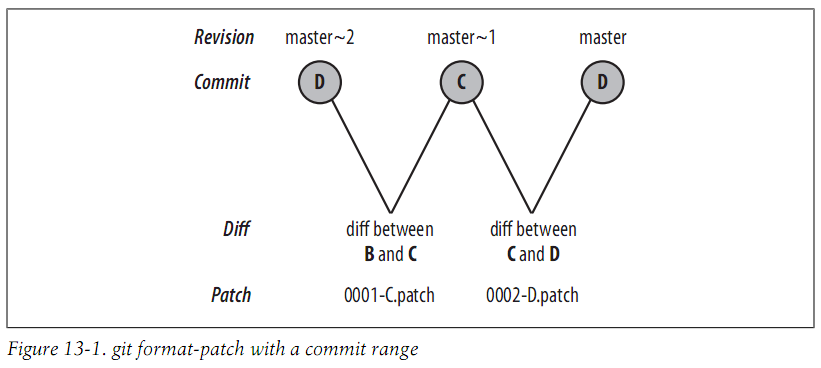
你也可以指定一个commit range,它会为每个提交生成一个patch文件
$ git format-patch master~2..master

0001-C.patch

0002-D.patch
每个文件都是一个单独的email
$ cat 0001-C.patch

From 6433985c17a4ee1611426f93b2abd2e3ac63877e Mon Sep 17 00:00:00 2001

From: Jianlong Chen <jianlong99@gmail.com>

Date: Sun, 9 Feb 2014 20:31:43 +0800

Subject: [PATCH 1/2] C

---

file | 1 +

1 file changed, 1 insertion(+)

diff --git a/file b/file

index 35d242b..b1e6722 100644

--- a/file

+++ b/file

@@ -1,2 +1,3 @@

A

B

+C

--

1.8.0.msysgit.0
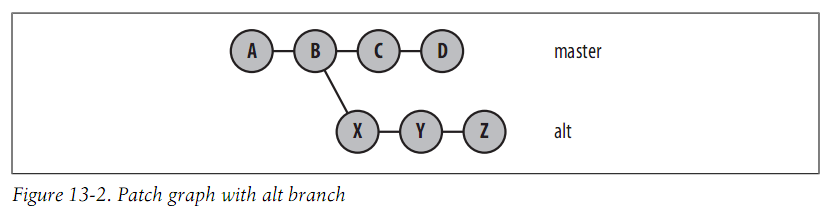
让我们继续这个例子,然后添加一个从B开始的分支alt
$ git log --format=oneline

a7466c2046a08fb30058c3f8cfdd5f1c6391e1e5 D

6433985c17a4ee1611426f93b2abd2e3ac63877e C

3a1aad8ab445f8d5430e30978d22cc6154c649a5 B

0408b034f6c7ab4a906f033133f7273133675ca0 A

$ git checkout -b alt 3a1aad

Switched to a new branch 'alt'

$ echo X >> file ; git commit -mX file

$ echo Y >> file ; git commit -mY file

$ echo Z >> file ; git commit -mZ file
现在commit graph如下:
假设master分支合并alt分支到提交E,然后添加一个提交F
$ git checkout master

Switched to branch 'master'

$ git merge alt

Auto-merging file

CONFLICT (content): Merge conflict in file

Automatic merge failed; fix conflicts and then commit the result.

# 解决冲突

$ cat file

A

B

C

D

X

Y

Z

$ git add file

$ git commit -m"All lines"

[master 9aa63f4] All lines

$ echo F >> file ; git commit -mF file

[master 4a1be4b] F

1 file changed, 1 insertion(+)
现在的commit graph如下:
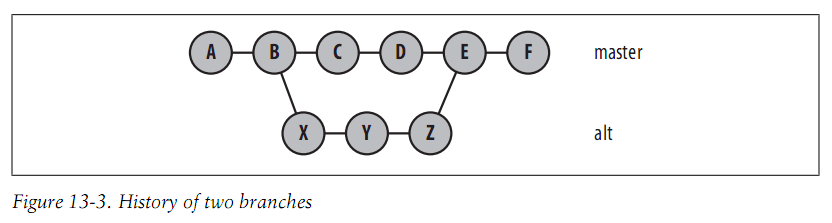
$ git show-branch --more=10

! [alt] Z

* [master] F

--

* [master] F

+* [alt] Z

+* [alt^] Y

+* [alt~2] X

* [master~2] D

* [master~3] C

+* [master~4] B

+* [master~5] A
现在你需要特别注意指定commit range,特别是包含merge提交的时候,比如你指定D..F
$ git format-patch master~2..master

0001-X.patch

0002-Y.patch

0003-Z.patch

0004-F.patch
D..F表示D到F的所有提交,但是不包括合并的提交。
如果你指定一个提交表示这个提交到HEAD的所有提交
$ git branch

  alt

* master

$ git format-patch master~5

0001-B.patch

0002-C.patch

0003-D.patch

0004-X.patch

0005-Y.patch

0006-Z.patch

0007-F.patch

$ git checkout alt

Switched to branch 'alt'

$ git format-patch master~5

0001-B.patch

0002-X.patch

0003-Y.patch

0004-Z.patch
默认情况下,不会包括第一个提交,可以通过以下方法包括:
$ git format-patch --root end-commit
发送Patches
你可以通过git send-email来发送patches或者其他任何方法来发送
应用Patches
你可以使用git apply或者git am来应用patch,git apply只会修改你的工作目录,你仍需要手动提交。
我们通过继续上面的例子来演示:
$ git checkout master

Switched to branch 'master'

$ git format-patch -o /tmp/patches master~5

/tmp/patches/0001-B.patch

/tmp/patches/0002-C.patch

/tmp/patches/0003-D.patch

/tmp/patches/0004-X.patch

/tmp/patches/0005-Y.patch

/tmp/patches/0006-Z.patch

/tmp/patches/0007-F.patch

$ mkdir /tmp/am

$ cd /tmp/am

$ git init

Initialized empty Git repository in /tmp/am/.git/

$ echo A >> file

$ git add file

$ git commit -mA

[master (root-commit) d053f2b] A

1 file changed, 1 insertion(+)

create mode 100644 file

$ git am /tmp/patches/*

Applying: B

Applying: C

Applying: D

Applying: X

error: patch failed: file:1

error: file: patch does not apply

Patch failed at 0004 X

The copy of the patch that failed is found in:

  /tmp/am/.git/rebase-apply/patch

When you have resolved this problem, run "git am --resolved".

If you prefer to skip this patch, run "git am --skip" instead.

To restore the original branch and stop patching, run "git am --abort".
应用patch失败了,为什么呢?你可以通过查看.git/rebase-apply/patch来查看应用失败的patch的内容
$ cat .git/rebase-apply/patch

---

file | 1 +

1 file changed, 1 insertion(+)

diff --git a/file b/file

index 35d242b..7f9826a 100644

--- a/file

+++ b/file

@@ -1,2 +1,3 @@

A

B

+X

--

1.8.0.msysgit.0

$ git show 35d242b

A

B

$ cat file

A

B

C

D
可以看到期待file的内容和目录file的内容不一样,Git不能正确地解决这个冲突。 可以通过使用git am -3来临时暂停应用patch,让你来手动解决这个冲突。
首先,回退到合并之前的状态:
$ rm -rf .git/rebase-apply/

$ git log --format=oneline

74270afa12617364616cacd9a9c0b9b221f973bf D

8d72e7bfd9bfec4e574d0cdd16908da9d146e24c C

50d6c249a1bb3a2817783d0c4117c8bcdb248aae B

d053f2bda3d2d9d4685e27a8e59433739cccaca3 A

$ git reset --hard d053f2

HEAD is now at d053f2b A

$ git show-branch --more=10

[master] A
现在来再次应用patch:
$ git am -3 /tmp/patches/*

Applying: B

Applying: C

Applying: D

Applying: X

Using index info to reconstruct a base tree...

M       file

Falling back to patching base and 3-way merge...

Auto-merging file

CONFLICT (content): Merge conflict in file

Failed to merge in the changes.

Patch failed at 0004 X

The copy of the patch that failed is found in:

  /tmp/am/.git/rebase-apply/patch

When you have resolved this problem, run "git am --resolved".

If you prefer to skip this patch, run "git am --skip" instead.

To restore the original branch and stop patching, run "git am --abort".

$ git status

# On branch master

# You are in the middle of an am session.

#   (fix conflicts and then run "git am --resolved")

#   (use "git am --skip" to skip this patch)

#   (use "git am --abort" to restore the original branch)

#

# Unmerged paths:

#   (use "git reset HEAD <file>..." to unstage)

#   (use "git add <file>..." to mark resolution)

#

#       both modified:      file

#

no changes added to commit (use "git add" and/or "git commit -a")
解决冲突然后继续:
$ vim file

$ cat file

A

B

C

D

X

$ git add file

$ git am -3 --resolved

Applying: X

Applying: Y

Using index info to reconstruct a base tree...

M       file

Falling back to patching base and 3-way merge...

Auto-merging file

Applying: Z

Using index info to reconstruct a base tree...

M       file

Falling back to patching base and 3-way merge...

Auto-merging file

Applying: F
OK,成功。
$ cat file

A

B

C

D

X

Y

Z

F
跟我一起学Git (十) Patches【转】的更多相关文章
- 三分钟教你学Git(十六) - 统计
有时候想统计仓库的情况,比方代码量.贡献者之类的. 1 统计某人的commit数量 git log --author="$(git config --get user.name)" ...
- 三分钟教你学Git(十八) - 重写历史
git filter-branch 同意你使用一个单一命令来大范围地更改历史.所以这个命令要慎用. 1假如你想对全部的commits删除一个文件. git filter-branch --tree-f ...
- 三分钟教你学Git(十二) 之 fast-forward
什么是fast forward, 顾名思义,就是高速向前进,Git怎么做到高速的呢? 原来假设Git判定能够fast forward的时候,直接改动当前HEAD指针的指向然后再改动当前HEAD指针.说 ...
- 三分钟教你学Git(十四) 之 线下传输仓库
有时候还有一个人不能从远程直接clone仓库或者说由于非常大,clone非常慢或其他原因.我们能够使用bundle命令将Git仓库打包,然后通过U盘或者是其他介质拷贝给他,这样他拿到打包好的仓库后能够 ...
- Mina、Netty、Twisted一起学(十):线程模型
要想开发一个高性能的TCP服务器,熟悉所使用框架的线程模型非常重要.MINA.Netty.Twisted本身都是高性能的网络框架,如果再搭配上高效率的代码,才能实现一个高大上的服务器.但是如果不了解它 ...
- 沉浸式学 Git
沉浸式学 Git cover — contents — about 目录 设置 再谈设置 创建项目 检查状态 做更改 暂存更改 暂存与提交 提交更改 更改而非文件 历史 别名 获得旧版本 给版本打标签 ...
- 看日记学git摘要~灰常用心的教程
看日记学git linux 命令行 cd ls / ls -a clear mkdir rmdir echo "hi, good day" > hi.txt touch he ...
- 从头开始学JavaScript (十二)——Array类型
原文:从头开始学JavaScript (十二)--Array类型 一.数组的创建 注:ECMAscript数组的每一项都可以保存任何类型的数据 1.1Array构造函数 var colors = ne ...
- 从头开始学JavaScript (十)——垃圾收集
原文:从头开始学JavaScript (十)--垃圾收集 一.垃圾收集 1.1javascript垃圾收集机制: 自动垃圾收集,执行环境会负责管理代码执行过程中的使用的内存.而在C和C++之类的语言中 ...
随机推荐
- VS2010 C#调用C++ DLL文件 【转】
http://www.soaspx.com/dotnet/csharp/csharp_20110406_7469.html 背景 在项目过程中,有时候你需要调用非C#编写的DLL文件,尤其在使用一些第 ...
- 转:代码管理技巧——两步创建本地SVN服务器图文教程
from: http://www.cnblogs.com/tianhonghui/archive/2012/07/22/2603454.html 当我们进行开发的时候,不论是独立开发还是处在团队中 ...
- Redis性能调优建议
一. Redis部署结构优化建议 1. Master不做AOF或RDB持久化,Slave做AOF持久化,建议同时做RDB持久化 2. 所有Master全部增加Slave 3. Master挂载Slav ...
- 谈 API 的撰写 - 子系统
在做一个系统时,有一些子系统几乎是必备的:配置管理,CLI,以及测试框架. 配置管理 我们先说配置管理.一个系统的灵活度,和它的配置管理是离不开的.系统中存在的大量的预置的属性(下文简称 proper ...
- 在Mac上ppt导出pdf
Step1:打开要操作的ppt,然后Command+P(print),出来打印的界面 Step2:在左下端选择Save as PDF就可以
- windows平台下为Nginx反向代理(负载均衡)使用openssl增加HTTPS/SSL功能。
1.准备好perl/openssl ActivePerl-5.12.2.1202-MSWin32-x86-293621.msi openssl-0.9.8k.tar.gz 编译 参考这个:http:/ ...
- 邮箱大师WPZ协议包
WIRELESS Z PACKET: i8-version(WZPUnit.getVersion() & 3 | WZPUnit.MAGIC_MASK = 1 & 3 | -48 = ...
- Android中BaseAdapter使用基础点
Android中要填充一些控件(如ListView)经常须要用到Adapter来实现,经常使用的有ArrayAdapter,SimpleAdapter, CursorAdapter,BaseAdapt ...
- 完好用户体验: 活用window.location与window.open解决页面跳转问题
原文地址: JavaScript Redirects and window.open原文日期: 2014年08月27日翻译日期: 2014年08月31日翻译人员: 铁锚 (译者注: 本文解决的是按 C ...
- 【Python基础】之不同的文件在不同目录下导入指定模块的方法
如下图三个文件的目录路径 – project |– 1 | |– 2 | | |– 3 | | | |– owen.py ...