
跟我一起学Git (十) Patches【转】
本文转载自:http://cs-cjl.com/2014/05/05/learn_git_with_me_10
Git实现了以下三条用于交换patch的命令:
- git format-patch 用于创建一个email格式的patch
- git send-email 通过SMTP发送一个Git patch
- git am 应用一个patch
创建Patches
git format-patch的常见用法包括
- 指定commit的个数,比如:-2
- commit range,比如:master~4..master~2
- 单个的commit,通常是分支的名称,比如:origin/master
下面通过一个简单的例子来说明:
$ git init

$ echo A > file

$ git add file

$ git commit -mA

$ echo B >> file ; git commit -mB file

$ echo C >> file ; git commit -mC file

$ echo D >> file ; git commit -mD file

$ git show-branch --more=4 master

[master] D

[master^] C

[master~2] B

[master~3] A
最简单的方法是通过-n来指定最近的n个提交
$ git format-patch -1

0001-D.patch

$ git format-patch -2

0001-C.patch

0002-D.patch

$ git format-patch -3

0001-B.patch

0002-C.patch

0003-D.patch
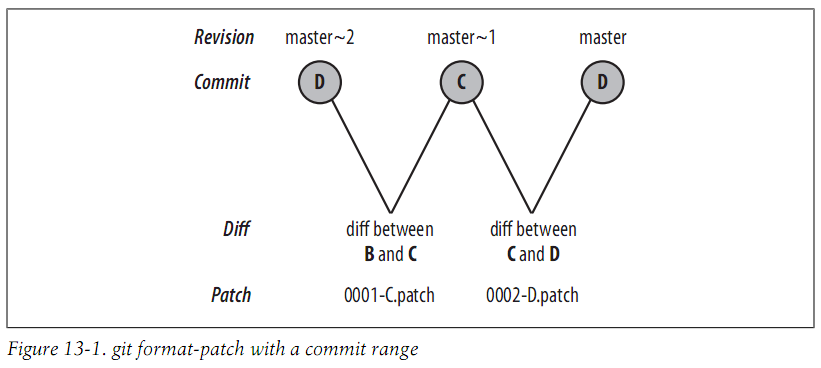
你也可以指定一个commit range,它会为每个提交生成一个patch文件
$ git format-patch master~2..master

0001-C.patch

0002-D.patch
每个文件都是一个单独的email
$ cat 0001-C.patch

From 6433985c17a4ee1611426f93b2abd2e3ac63877e Mon Sep 17 00:00:00 2001

From: Jianlong Chen <jianlong99@gmail.com>

Date: Sun, 9 Feb 2014 20:31:43 +0800

Subject: [PATCH 1/2] C

---

file | 1 +

1 file changed, 1 insertion(+)

diff --git a/file b/file

index 35d242b..b1e6722 100644

--- a/file

+++ b/file

@@ -1,2 +1,3 @@

A

B

+C

--

1.8.0.msysgit.0
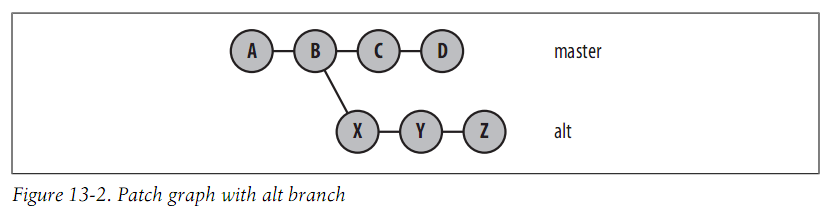
让我们继续这个例子,然后添加一个从B开始的分支alt
$ git log --format=oneline

a7466c2046a08fb30058c3f8cfdd5f1c6391e1e5 D

6433985c17a4ee1611426f93b2abd2e3ac63877e C

3a1aad8ab445f8d5430e30978d22cc6154c649a5 B

0408b034f6c7ab4a906f033133f7273133675ca0 A

$ git checkout -b alt 3a1aad

Switched to a new branch 'alt'

$ echo X >> file ; git commit -mX file

$ echo Y >> file ; git commit -mY file

$ echo Z >> file ; git commit -mZ file
现在commit graph如下:
假设master分支合并alt分支到提交E,然后添加一个提交F
$ git checkout master

Switched to branch 'master'

$ git merge alt

Auto-merging file

CONFLICT (content): Merge conflict in file

Automatic merge failed; fix conflicts and then commit the result.

# 解决冲突

$ cat file

A

B

C

D

X

Y

Z

$ git add file

$ git commit -m"All lines"

[master 9aa63f4] All lines

$ echo F >> file ; git commit -mF file

[master 4a1be4b] F

1 file changed, 1 insertion(+)
现在的commit graph如下:
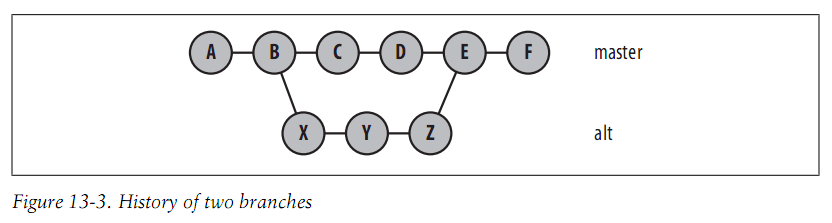
$ git show-branch --more=10

! [alt] Z

* [master] F

--

* [master] F

+* [alt] Z

+* [alt^] Y

+* [alt~2] X

* [master~2] D

* [master~3] C

+* [master~4] B

+* [master~5] A
现在你需要特别注意指定commit range,特别是包含merge提交的时候,比如你指定D..F
$ git format-patch master~2..master

0001-X.patch

0002-Y.patch

0003-Z.patch

0004-F.patch
D..F表示D到F的所有提交,但是不包括合并的提交。
如果你指定一个提交表示这个提交到HEAD的所有提交
$ git branch

  alt

* master

$ git format-patch master~5

0001-B.patch

0002-C.patch

0003-D.patch

0004-X.patch

0005-Y.patch

0006-Z.patch

0007-F.patch

$ git checkout alt

Switched to branch 'alt'

$ git format-patch master~5

0001-B.patch

0002-X.patch

0003-Y.patch

0004-Z.patch
默认情况下,不会包括第一个提交,可以通过以下方法包括:
$ git format-patch --root end-commit
发送Patches
你可以通过git send-email来发送patches或者其他任何方法来发送
应用Patches
你可以使用git apply或者git am来应用patch,git apply只会修改你的工作目录,你仍需要手动提交。
我们通过继续上面的例子来演示:
$ git checkout master

Switched to branch 'master'

$ git format-patch -o /tmp/patches master~5

/tmp/patches/0001-B.patch

/tmp/patches/0002-C.patch

/tmp/patches/0003-D.patch

/tmp/patches/0004-X.patch

/tmp/patches/0005-Y.patch

/tmp/patches/0006-Z.patch

/tmp/patches/0007-F.patch

$ mkdir /tmp/am

$ cd /tmp/am

$ git init

Initialized empty Git repository in /tmp/am/.git/

$ echo A >> file

$ git add file

$ git commit -mA

[master (root-commit) d053f2b] A

1 file changed, 1 insertion(+)

create mode 100644 file

$ git am /tmp/patches/*

Applying: B

Applying: C

Applying: D

Applying: X

error: patch failed: file:1

error: file: patch does not apply

Patch failed at 0004 X

The copy of the patch that failed is found in:

  /tmp/am/.git/rebase-apply/patch

When you have resolved this problem, run "git am --resolved".

If you prefer to skip this patch, run "git am --skip" instead.

To restore the original branch and stop patching, run "git am --abort".
应用patch失败了,为什么呢?你可以通过查看.git/rebase-apply/patch来查看应用失败的patch的内容
$ cat .git/rebase-apply/patch

---

file | 1 +

1 file changed, 1 insertion(+)

diff --git a/file b/file

index 35d242b..7f9826a 100644

--- a/file

+++ b/file

@@ -1,2 +1,3 @@

A

B

+X

--

1.8.0.msysgit.0

$ git show 35d242b

A

B

$ cat file

A

B

C

D
可以看到期待file的内容和目录file的内容不一样,Git不能正确地解决这个冲突。 可以通过使用git am -3来临时暂停应用patch,让你来手动解决这个冲突。
首先,回退到合并之前的状态:
$ rm -rf .git/rebase-apply/

$ git log --format=oneline

74270afa12617364616cacd9a9c0b9b221f973bf D

8d72e7bfd9bfec4e574d0cdd16908da9d146e24c C

50d6c249a1bb3a2817783d0c4117c8bcdb248aae B

d053f2bda3d2d9d4685e27a8e59433739cccaca3 A

$ git reset --hard d053f2

HEAD is now at d053f2b A

$ git show-branch --more=10

[master] A
现在来再次应用patch:
$ git am -3 /tmp/patches/*

Applying: B

Applying: C

Applying: D

Applying: X

Using index info to reconstruct a base tree...

M       file

Falling back to patching base and 3-way merge...

Auto-merging file

CONFLICT (content): Merge conflict in file

Failed to merge in the changes.

Patch failed at 0004 X

The copy of the patch that failed is found in:

  /tmp/am/.git/rebase-apply/patch

When you have resolved this problem, run "git am --resolved".

If you prefer to skip this patch, run "git am --skip" instead.

To restore the original branch and stop patching, run "git am --abort".

$ git status

# On branch master

# You are in the middle of an am session.

#   (fix conflicts and then run "git am --resolved")

#   (use "git am --skip" to skip this patch)

#   (use "git am --abort" to restore the original branch)

#

# Unmerged paths:

#   (use "git reset HEAD <file>..." to unstage)

#   (use "git add <file>..." to mark resolution)

#

#       both modified:      file

#

no changes added to commit (use "git add" and/or "git commit -a")
解决冲突然后继续:
$ vim file

$ cat file

A

B

C

D

X

$ git add file

$ git am -3 --resolved

Applying: X

Applying: Y

Using index info to reconstruct a base tree...

M       file

Falling back to patching base and 3-way merge...

Auto-merging file

Applying: Z

Using index info to reconstruct a base tree...

M       file

Falling back to patching base and 3-way merge...

Auto-merging file

Applying: F
OK,成功。
$ cat file

A

B

C

D

X

Y

Z

F
跟我一起学Git (十) Patches【转】的更多相关文章
- 三分钟教你学Git(十六) - 统计
有时候想统计仓库的情况,比方代码量.贡献者之类的. 1 统计某人的commit数量 git log --author="$(git config --get user.name)" ...
- 三分钟教你学Git(十八) - 重写历史
git filter-branch 同意你使用一个单一命令来大范围地更改历史.所以这个命令要慎用. 1假如你想对全部的commits删除一个文件. git filter-branch --tree-f ...
- 三分钟教你学Git(十二) 之 fast-forward
什么是fast forward, 顾名思义,就是高速向前进,Git怎么做到高速的呢? 原来假设Git判定能够fast forward的时候,直接改动当前HEAD指针的指向然后再改动当前HEAD指针.说 ...
- 三分钟教你学Git(十四) 之 线下传输仓库
有时候还有一个人不能从远程直接clone仓库或者说由于非常大,clone非常慢或其他原因.我们能够使用bundle命令将Git仓库打包,然后通过U盘或者是其他介质拷贝给他,这样他拿到打包好的仓库后能够 ...
- Mina、Netty、Twisted一起学(十):线程模型
要想开发一个高性能的TCP服务器,熟悉所使用框架的线程模型非常重要.MINA.Netty.Twisted本身都是高性能的网络框架,如果再搭配上高效率的代码,才能实现一个高大上的服务器.但是如果不了解它 ...
- 沉浸式学 Git
沉浸式学 Git cover — contents — about 目录 设置 再谈设置 创建项目 检查状态 做更改 暂存更改 暂存与提交 提交更改 更改而非文件 历史 别名 获得旧版本 给版本打标签 ...
- 看日记学git摘要~灰常用心的教程
看日记学git linux 命令行 cd ls / ls -a clear mkdir rmdir echo "hi, good day" > hi.txt touch he ...
- 从头开始学JavaScript (十二)——Array类型
原文:从头开始学JavaScript (十二)--Array类型 一.数组的创建 注:ECMAscript数组的每一项都可以保存任何类型的数据 1.1Array构造函数 var colors = ne ...
- 从头开始学JavaScript (十)——垃圾收集
原文:从头开始学JavaScript (十)--垃圾收集 一.垃圾收集 1.1javascript垃圾收集机制: 自动垃圾收集,执行环境会负责管理代码执行过程中的使用的内存.而在C和C++之类的语言中 ...
随机推荐
- 关于异步请求AJAX的具体解释
1,异步请求的方法步骤: 1,推断当前用户支持的浏览器类型 XMLHttpRequest:推断是否支持非IE浏览器,相应的创建方法:xmlhttp = new XMLHttpRequest(); wi ...
- CNN卷积神经网络新想法
近期一直在看卷积神经网络,想改进改进弄出点新东西来.看了好多论文,写了一篇综述.对深度学习中卷积神经网络有了一些新认识,和大家分享下. 事实上卷积神经网络并非一项新兴的算法.早在上世纪八十年代就已经被 ...
- Locust压力测试Odoo
Table of Contents 编写测试任务集 TaskSet 运行 Locust 分布式 运行 master 运行 slave. Locust 是个伸缩性很好的压力测试框架,OdooLo ...
- SAS学习经验总结分享:篇二—input语句
SAS编程语言中input语句的应用 SAS数据步的建立离不开input语句,在读入外部数据或cards语句后面的数据块时需要通过input语句定义变量.下面介绍input语句定义变量 ...
- iOS 一些struct类型的NSLog输出
我们经常会输出一些坐标尺寸信息之类的,比如view的frame,是CGRect类型的,用frame.oringial.x 和frame.size.width来做NSLog参数好麻烦,还好苹果对这些常用 ...
- (十)jQuery对表单、表格的操作
一.表单应用 1.HTML中的表单大致由三部分组成 (1).表单标签:包含处理表单数据所用的服务端程序URL,以及数据提交到服务器的方法. (2).表单域:包含文本框.密码框.隐藏域.多行文本框.复选 ...
- SQL Server -使用表触发器记录表插入,更新,删除行数
1.如何使用sql获取当前session用户名和机器名 Select CURRENT_USER,Host_name() 2.如何在表触发器中获取当前表名称 SELECT OBJECT_SCHEMA_N ...
- 【Wechall.net挑战】Anderson Application Auditing
Wechall.net是一个国外用于练习CTF和攻防的网站,国内资料writeup不多,只有个别几篇.作为小白,近日玩了几道有意思的题目,在此分享 题目地址:http://www.wechall.ne ...
- 新装上线 年度精品 XP,32/64位Win7,32/64位Win10系统【电脑城版】
随着Windows 10Build 10074 Insider Preview版发布,有理由相信,Win10离最终RTM阶段已经不远了.看来稍早前传闻的合作伙伴透露微软将在7月底正式发布Win10的消 ...
- iOS 可选择的购物车
最近看了淘宝的购物车,于是做了一个可选择的购物车模板. 如果有好的建议请提出,带我日后更新.