
Why containers? Why should we care? 新旧容器的对比
https://kubernetes.io/docs/concepts/overview/what-is-kubernetes/
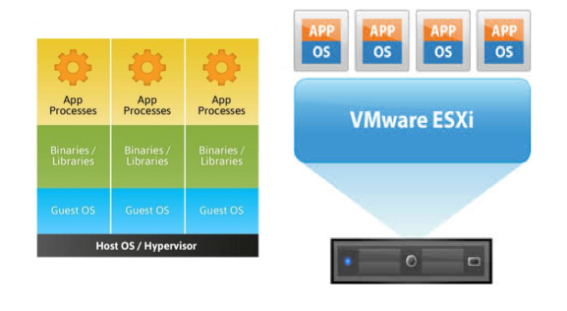
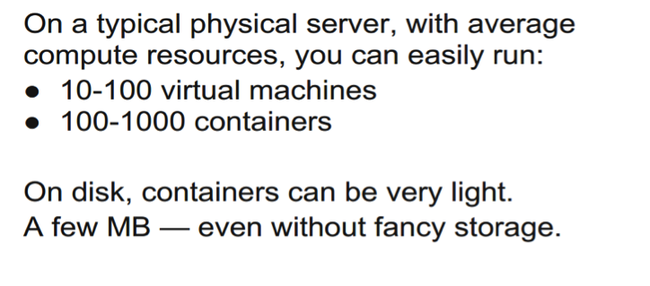
The Old Way to deploy applications was to install the applications on a host using the operating system package manager. This had the disadvantage of entangling the applications’ executables, configuration, libraries, and lifecycles with each other and with the host OS. One could build immutable virtual-machine images in order to achieve predictable rollouts and rollbacks, but VMs are heavyweight and non-portable.
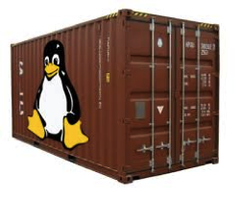
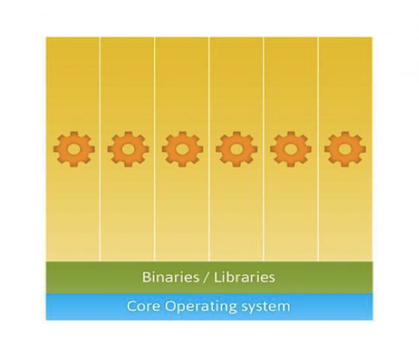
The New Way is to deploy containers based on operating-system-level virtualization rather than hardware virtualization. These containers are isolated from each other and from the host: they have their own filesystems, they can’t see each others’ processes, and their computational resource usage can be bounded. They are easier to build than VMs, and because they are decoupled from the underlying infrastructure and from the host filesystem, they are portable across clouds and OS distributions.
Because containers are small and fast, one application can be packed in each container image. This one-to-one application-to-image relationship unlocks the full benefits of containers. With containers, immutable container images can be created at build/release time rather than deployment time, since each application doesn’t need to be composed with the rest of the application stack, nor married to the production infrastructure environment. Generating container images at build/release time enables a consistent environment to be carried from development into production. Similarly, containers are vastly more transparent than VMs, which facilitates monitoring and management. This is especially true when the containers’ process lifecycles are managed by the infrastructure rather than hidden by a process supervisor inside the container. Finally, with a single application per container, managing the containers becomes tantamount to managing deployment of the application.
Summary of container benefits:
- Agile application creation and deployment: Increased ease and efficiency of container image creation compared to VM image use.
- Continuous development, integration, and deployment: Provides for reliable and frequent container image build and deployment with quick and easy rollbacks (due to image immutability).
- Dev and Ops separation of concerns: Create application container images at build/release time rather than deployment time, thereby decoupling applications from infrastructure.
- Environmental consistency across development, testing, and production: Runs the same on a laptop as it does in the cloud.
- Cloud and OS distribution portability: Runs on Ubuntu, RHEL, CoreOS, on-prem, Google Container Engine, and anywhere else.
- Application-centric management: Raises the level of abstraction from running an OS on virtual hardware to run an application on an OS using logical resources.
- Loosely coupled, distributed, elastic, liberated micro-services: Applications are broken into smaller, independent pieces and can be deployed and managed dynamically – not a fat monolithic stack running on one big single-purpose machine.
- Resource isolation: Predictable application performance.
- Resource utilization: High efficiency and density.
https://aucouranton.com/2014/06/13/linux-containers-parallels-lxc-openvz-docker-and-more/
A container (Linux Container) at its core is an allocation, portioning, and assignment of host (compute) resources such as CPU Shares, Network I/O, Bandwidth, Block I/O, and Memory (RAM) so that kernel level constructs may jail-off, isolate or “contain” these protected resources so that specific running services (processes) and namespaces may solely utilize them without interfering with the rest of the system. These processes could be lightweight Linux hosts based on a Linux image, multiple web severs and applications, a single subsystem like a database backend, to a single process such as ‘echo “Hello”’ with little to no overhead.
Commonly known as “operating system-level virtualization” or “OS Virtual Environments” containers differ from hypervisor level virtualization. The main difference is that the container model eliminates the hypervisor layer, redundant OS kernels, binaries, and libraries needed to typically run workloads in a VM.
基于操作系统而非硬件 based on operating-system-level virtualization rather than hardware virtualization
独立文件系统filesystems,进程互补可见 processes
Why containers? Why should we care? 新旧容器的对比的更多相关文章
- Arcgis API For IOS扩展AGSDynamicLayer新旧版API对比
AGSDynamicLayer(ForSubclassEyesOnly) Category Reference Description This category organizes the meth ...
- Android新旧版本Notification
Android新旧版本Notification 在notification.setLatestEventInfo() 过时了 以前: NotificationManager mn = (Notific ...
- Matlab神经网络函数newff()新旧用法差异
摘要 在Matlab R2010a版中,如果要创建一个具有两个隐含层.且神经元数分别为5.3的前向BP网络,使用旧的语法可以这样写: net1 = newff(minmax(P), [5 3 1]); ...
- [ACM_数学] Taxi Fare [新旧出租车费差 水 分段函数]
Description Last September, Hangzhou raised the taxi fares. The original flag-down fare in Hangzhou ...
- Flex布局新旧混合写法详解(兼容微信)
原文链接:https://www.usblog.cc/blog/post/justzhl/Flex布局新旧混合写法详解(兼容微信) flex是个非常好用的属性,如果说有什么可以完全代替 float 和 ...
- 浅谈 angular新旧版本问题
一直在学习angularJs,之前用的版本比较老,前些天更新了一下angularJs的版本,然后发现了一些问题,希望和大家分享一下. 在老的版本里控制器直接用函数定义就可以 比如: 在angularJ ...
- css弹性盒子新旧兼容
前言:本篇随笔是对弹性盒子有了解的人来写的这篇文章,具体属性产生的效果这里不做说明,基础的东西去查文档.这里只是总结. 时至今日,css3的flex弹性盒子在移动端基本上都是支持的,但不排除有些些低版 ...
- spring加载配置新旧方式对比
老方式 1.首先要配置配置文件,如beans.xml,内容如下: <?xml version="1.0" encoding="UTF-8"?> &l ...
- Flex布局新旧混合写法详解
flex是个非常好用的属性,如果说有什么可以完全代替 float 和 position ,那么肯定是非它莫属了(虽然现在还有很多不支持 flex 的浏览器).然而国内很多浏览器对 Flex 的支持都不 ...
随机推荐
- Objective_C与Swift混编遇到的坑(一)
swift推出已经很长一段时间了,前段时间突然想尝试一些简单的类用swift编写于是便开始了混编的路程. 1.在oc代码里引用swift类:找了很多资料需要添加头文件格式为 #import " ...
- ScrollView 嵌套WebView 的问题优化
一.布局样式 <?xml version="1.0" encoding="utf-8"?><LinearLayout xmlns:androi ...
- 51nod 1092 回文字符串【LCS】
1092 回文字符串 基准时间限制:1 秒 空间限制:131072 KB 分值: 10 难度:2级算法题 收藏 关注 回文串是指aba.abba.cccbccc.aaaa这种左右对称的字符串.每个字符 ...
- 可能是全网最详细的express--middleware
写在前面 hello,小伙伴们,我是你们的pubdreamcc,本篇博文出至于我的GitHub仓库node学习教程资料,欢迎小伙伴们点赞和star,你们的点赞是我持续更新的动力. GitHub仓库地址 ...
- 谈谈 ServletConfig 和 ServletContext
目录 一.ServletConfig 和 ServletContext 的概念 二.ServletConfig 和 SerlvetContext 代码表示 一.ServletConfig 和 Serv ...
- ArrayList和LinkedList学习
摘要 ArrayList和LinkedList是对List接口的不同数据结构的实现.它们都是线程不安全的,线程不安全往往出现在数组的扩容.数据添加的时候. 一.ArrayList和LinkedList ...
- 高性能内存池NedAlloc
http://www.nedprod.com/programs/portable/nedmalloc/ http://blog.sina.com.cn/s/blog_6f5b220601012x4t. ...
- java后4位打成*显示
/** * [固定电话] 后四位,其他隐藏<例子:****1234> * * @param num * @return */ public static String fixedPhone ...
- TIdHTTPServer制作REST中间件
TIdHTTPServer制作REST中间件 使用DELPHI7+INDY9开发 // 陈新光 2017-2-21// LIS数据同步服务器// 浏览器输入:http://127.0.0.1:8000 ...
- 【UI】为项目添加类似于淘宝筛选列表勾选的ui-choose
jQuery下载的地址:http://www.htmleaf.com/jQuery/Form/201512182916.html GitHub地址:https://github.com/wangxin ...