
EasyPusher实现Android手机屏幕桌面直播,实时推送操作画面,用于手游直播等应用
本文转自EasyDarwin开源团队成员John的博客:http://blog.csdn.net/jyt0551/article/details/52651194
由于Android 5.0提供了捕获当前屏幕画面的SDK,基于该SDK,EasyPusher实现了实时推送手机屏幕画面的功能。经测试,效果很不错,延迟也比较低,画面也比较流畅。该功能可运用到小型会议PPT演示、手游直播等行业。
具体来说,MediaProjection 类可以将当前屏幕画面采集到一个surface里面,而MediaCodec可以从一个surface里面获取视频数据源。我们让MediaProjection投射到MediaCodec创建的Surface,MediaCodec就可以获取到MediaProjection投射的视频了。如图所示:
在这里就不再详细描述代码的实现,主要介绍下两个接口:
VirtualDisplay createVirtualDisplay (String name,

                int width,

                int height,

                int dpi,

                int flags,

                Surface surface,

                VirtualDisplay.Callback callback,

                Handler handler)

Creates a VirtualDisplay to capture the contents of the screen.

Parameters

name    String: The name of the virtual display, must be non-empty.

要创建的投射器的名称,非空

width   int: The width of the virtual display in pixels. Must be greater than 0.

投射后视频的宽度,这里的宽度就是实际上后面MediaCodec初始化的宽度.

height  int: The height of the virtual display in pixels. Must be greater than 0.

投射后视频的高度,这里的宽度就是实际上后面MediaCodec初始化的高度.

dpi int: The density of the virtual display in dpi. Must be greater than 0.

投射器的像素密度,未理解啥意思,我们直接用DisplayMetrics的densityDpi即可.

flags   int: A combination of virtual display flags. See DisplayManager for the full list of flags.

我们传

DisplayManager.VIRTUAL_DISPLAY_FLAG_AUTO_MIRROR|DisplayManager.VIRTUAL_DISPLAY_FLAG_PUBLIC|DisplayManager.VIRTUAL_DISPLAY_FLAG_PRESENTATION 即可。

surface Surface: The surface to which the content of the virtual display should be rendered, or null if there is none initially.

投射器要投射到的Surface

callback    VirtualDisplay.Callback: Callback to call when the virtual display's state changes, or null if none.

投射器更改后的状态回调,我们这里不需要,传null即可。

handler Handler: The Handler on which the callback should be invoked, or null if the callback should be invoked on the calling thread's main Looper.

回调函数将在该Handler所在的线程调用,我们也不需要,传null即可。- 1
- 2
- 3
- 4
- 5
- 6
- 7
- 8
- 9
- 10
- 11
- 12
- 13
- 14
- 15
- 16
- 17
- 18
- 19
- 20
- 21
- 22
- 23
- 24
- 25
- 26
- 27
- 28
- 1
- 2
- 3
- 4
- 5
- 6
- 7
- 8
- 9
- 10
- 11
- 12
- 13
- 14
- 15
- 16
- 17
- 18
- 19
- 20
- 21
- 22
- 23
- 24
- 25
- 26
- 27
- 28
createInputSurface

Surface createInputSurface ()

Requests a Surface to use as the input to an encoder, in place of input buffers.

该接口创建一个作为编码器输入的Surface。- 1
- 2
- 3
- 4
- 5
- 6
- 1
- 2
- 3
- 4
- 5
- 6
然后,将后者得到的Surface作为第6个参数传给前者,前者就可以获取到屏幕数据了~
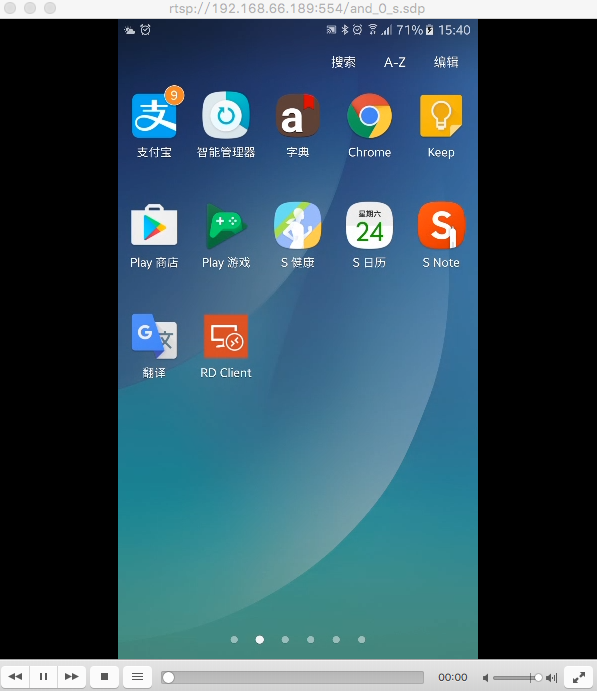
如下图所示,在VLC访问RTSP地址,即可看到屏幕直播。
EasyPusher项目见:https://github.com/EasyDarwin/EasyPusher
获取更多信息
Copyright © EasyDarwin.org 2012-2016

EasyPusher实现Android手机屏幕桌面直播,实时推送操作画面,用于手游直播等应用的更多相关文章
- 基于EasyDarwin EasyPusher实现Android手机直播推送功能
EasyPusher直播推送在之前就已经稳定支持了Windows.Linux.ARM上的RTSP直播推送功能,配合EasyDarwin开源流媒体服务器,延时基本在1s以内,这个技术方案经过一年多时间, ...
- 获取Android 手机屏幕宽度和高度以及获取Android手机序列号
1.获取Android 手机屏幕宽度 1 DisplayMetrics dm = new DisplayMetrics(); 2 this.getWindowManager().getDefaultD ...
- Unity3D Android手机屏幕分辨率问题
Android手机屏幕分辨率五花八门,导致开发时不好把握,还好各个引擎对这个屏幕分辨率问题都有较好的处理方式:unity3D 也为我们提供了一个不错的解决方案. 在Unity3D 进行 android ...
- 熊猫ios手游直播教程 苹果投屏电脑
如今手游越来越火热,不管是大人小孩都喜欢在闲暇时刻玩一玩游戏,手机屏幕终归还是有点小的,所以有的小伙伴想要将手机投屏到电脑上,岂不是一件很好的事情,iPhone是有镜像投屏功能的,下面给大家分享熊猫i ...
- 基于Node.js的实时推送 juggernaut
基于Node.js的实时推送 juggernaut Juggernaut 基于 Node.js 构建.为浏览器和服务器端提供一个实时的连接,可在客户端和服务器端进行数据的实时推送,适合多角色游戏.聊天 ...
- 使用SignalR ASP.NET Core来简单实现一个后台实时推送数据给Echarts展示图表的功能
什么是 SignalR ASP.NET Core ASP.NET Core SignalR 是一种开放源代码库,可简化将实时 web 功能添加到应用程序的功能. 实时 web 功能使服务器端代码可以立 ...
- 【原创】node+express+socket搭建一个实时推送应用
技术背景 Web领域的实时推送技术,也被称作Realtime技术.这种技术要达到的目的是让用户不需要刷新浏览器就可以获得实时更新. 应用场景: 监控系统:后台硬件热插拔.LED.温度.电压发生变化 即 ...
- SignalR实时推送
SignalR 的实现机制与 .NET WCF 或 Remoting 是相似的,都是使用远程代理来实现.在具体使用上,有两种不同目的的接口:PersistentConnection 和 Hubs,其中 ...
- HTML5 WebSocket 实时推送信息测试demo
测试一下HTML5的websocket功能,实现了客户端→服务器实时推送信息到客户端,包括推送图片: websocket实现MessageInbound类 onTextMessage()/onBina ...
随机推荐
- 【CF1015A】Points in Segments(签到)
题意:有一条上面有n个点的数轴,给定m次操作,每次覆盖(x[i],y[i]),求最后没有被覆盖过的点的数量与他们的编号 n,m<=100 思路: #include<cstdio> # ...
- postgresql 10 ltree 使用说明
官方文档 https://www.postgresql.org/docs/10/static/ltree.html ltree是俄罗斯Teodor Sigaev和Oleg Bartunov共同开发的P ...
- python,django,mysql学习之环境安装配置
参考:https://docs.djangoproject.com/en/1.6/intro/tutorial01/ http://rainyang.blog.51cto.com/469543/115 ...
- Delphi 之Copyrect的使用
http://cqujsjcyj.iteye.com/blog/380970 Copyrect的使用(图片复制.放大.以及做图片放大镜等)一.从一个选取一个区域中的图象到另一个图象组件中的固定区域pr ...
- IP分段小记
192.168.0.1 个人电脑:0.2-0.50 硬件开发板:0.51-0.100 机器人工控机:0.101-0.200 激光雷达:192.168.254.51~100 编码器板子:192.168. ...
- spring mvc利用MultipartResolver解析Multipart/form-data进行文件上传
之前的表单数据都是文本数据,现记录:利用MultipartResolver进行文件上传. ①首先,需引入commons-fileUpload和commons-io jar包,pom.xml文件的坐标: ...
- luogu P2066 机器分配
题目背景 无 题目描述 总公司拥有高效设备M台,准备分给下属的N个分公司.各分公司若获得这些设备,可以为国家提供一定的盈利.问:如何分配这M台设备才能使国家得到的盈利最大?求出最大盈利值.其中M≤15 ...
- Java集合——概述
Java集合——概述 摘要:本文主要介绍了几种集合类型以及有关的一些知识点. 集合类图 类图 类图说明 所有集合类都位于java.util包下.Java的集合类主要由两个接口派生而出:Collecti ...
- IntelliJ IDEA版本:Ultimate、Community、EAP版本的区别
Community: 社区版,免费,但是功能有限制,Android Studio就是基于这个版本定制的. http://idea-intellij.com/intellij-community/ Ul ...
- [IOS笔记] - 动画animation
//移动 - (IBAction)translation:(id)sender { CABasicAnimation *traslation = [CABasicAnimation animation ...