
nginx 反向代理实现负载均衡*配置实战
重要点:
1配置反向代理多虚拟主机节点服务器
2经过反向代理后的节点服务器记录用户IP
3与反向代理配置相关的更多参数说明
4根据URL目录地址转发
(1)根据URL中的目录地址实现代理转发(动静分离)
(2)根据客户端的设备(user_agent)转发实践需求(分业务)
(3)根据文件扩展名实现代理转发
5Nginx负载均衡检测节点状态
(接理论篇)
查看lb01的配置文件如下:

cat /usr/local/nginx/conf/nginx.conf

worker_processes  ;

events {

    worker_connections  ;

}

http {

    include       mime.types;

    default_type  application/octet-stream;

    sendfile        on;

    keepalive_timeout  ;

    upstream www_server_pools {     #默认调度算法wrr,即权重轮询算法

#虽然定义的www服务器池但是这个服务器池也可以作为BBS等业务的服务器池。因为nginx负载均衡转发不转发http头部的url.
无法做location匹配,只能默认访问第一个

    server 192.168.50.163: weight=;

    server 192.168.50.164: weight=;

}

    server {

        listen       ;

        server_name  www.wk.com;

        location / {

        proxy_pass http://www_server_pools;
#通过proxy_pass功能把用过户的请求交给上面反向代理upstream定义的www_server_pools服务器池处理。

        }

    }

}
#这种反向代理因为无法转发url所以无法代理多虚拟主机节点服务器
反向代理多虚拟主机节点服务器
反向代理向下面节点重新发起请求时,默认并没有在请求头里告诉节点服务器要找哪台虚拟主机,所以,Web节点服务器接收到请求后发现没有主机头信息,因此,就把节点服务器的第一个虚拟主机发给了反向代理了(节点上第一个虚拟主机放置的是故意这样放置的bbs)。解决这个问题的方法,就是当反向代理向后重新发起请求时,要携带主机头信息,以明确告诉节点服务器要找哪个虚拟主机。具体的配置在Nginx代理www服务虚拟主机配置里增加如下一行配置:
proxy_set_header host $host;
在代理向后端服务器发送的http请求头中加入host字段信息后,若后端服务器配置有多个虚拟主机,它就可以识别代理的是哪个虚拟主机。这是节点服务器多虚拟主机时的关键配置。整个Nginx代理配置为:
worker_processes  ;

events {

    worker_connections  ;

}

http {

    include       mime.types;

    default_type  application/octet-stream;

    sendfile        on;

    keepalive_timeout  ;

    upstream www_server_pools {

    server 192.168.50.163: weight=;

    server 192.168.50.164: weight=;

}

    server {

        listen       ;

        server_name  www.wk.com;

        location / {

        proxy_pass http://www_server_pools;

        proxy_set_header host $host;      #在代理向后端服务器发送的http请求头中加入host字段信息,
用于当后端服务器配置有多个虚拟主机时,可以识别代理的是哪个虚拟主机。这是节点服务器多虚拟主机时的关键配置。

        }

    }

}
此时,再重新加载Nginx服务就可已根据域名匹配到不同的虚拟主机
经过反向代理后的节点服务器记录用户IP
节点服务器对应的WWW虚拟主机的访问日志的第一个字段记录的并不是客户端的IP,而是反向代理服务器的IP,最后一个字段也是“-”!
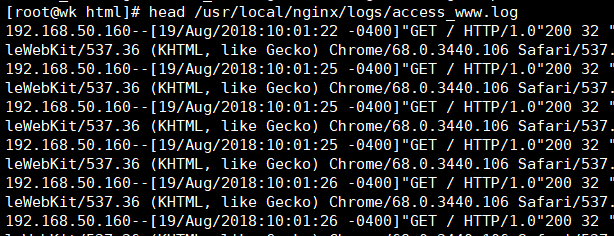
由上图可见 access.log日志记录的客户端IP为nginx反向代理的IP
解决虚拟主机的访问日志的第一个字段记录的不是客户端的IP增加如下一行参数:
proxy_set_header X-Forwarded-For $remote_addr;

#这是反向代理时,节点服务器获取用户真实IP的必要功能配置
在反向代理请求后端节点服务器的请求头中增加获取的客户端IP的字段信息,然后节点后端可以通过程序或者相关的配置接收X-Forwarded-For传过来的用户真实IP的信息。
解决上述问题的整个Nginx代理配置为:
worker_processes  ;

events {

    worker_connections  ;

}

http {

    include       mime.types;

    default_type  application/octet-stream;

    sendfile        on;

    keepalive_timeout  ;

    upstream www_server_pools {

    server 192.168.50.163: weight=;

    server 192.168.50.164: weight=;

}

    server {

        listen       ;

        server_name  www.wk.com;

        location / {

        proxy_pass http://www_server_pools;

        proxy_set_header host $host;

        proxy_set_header X-Forwarded-For $remote_addr;

#在代理向后端服务器发送的http请求头中加入X-Forwarded-For字段信息,用于后端服务器程序,
日志等接收记录真实用户的IP,而不是代理服务器的IP

        }

    }

}
重新加载Nginx反向代理服务:
/usr/local/nginx/sbin/nginx -s reload
节点服务器需要的访问日志如果要记录用户的真实IP,还必须进行日志格式配置,这样才能把代理传过来的X-Forwarded-For头信息记录下来,具体配置为:
#注意:这里是客户端Web01的配置
worker_processes  ;

events {

    worker_connections  ;

}

http {

    include       mime.types;

    default_type  application/octet-stream;

    sendfile        on;

    keepalive_timeout  ;

    log_format main '$remote_addr-$remote_user[$time_local]"$request"'

    '$status $body_bytes_sent "$http_referer"'

    '"$http_user_agent""$http_x_forwarded_for"';

#就是这里的“$http_x_forwarded_for”参数,如果希望在第一行显示,可以替换掉第一行的$remote_addr变量。

    server {

        listen       ;

        server_name  bbs.wk.com;

        location / {

            root   html/bbs;

            index  index.html index.htm;

        }

    access_log logs/access_bbs.log main;

    }

    server {

        listen       ;

        server_name  www.wk.com;

        location / {

            root   html/www;

            index  index.html index.htm;

        }

    access_log logs/access_www.log main;

    }

}
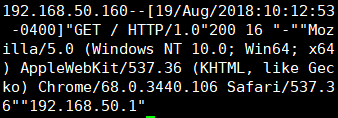
头部为代理IP 尾部为客户IP 一般直接把 头部参数模块换掉
| Nginx反向代理重要参数 | 解释说明 |
| proxy_ pass http://server_ pools; | 通过proxy_pass功能把用户的请求转向到反向代理定义的upstream服务器池 |
| proxy_ set_ header Host $host; | 在代理向后端服务器发送的http请求头中加人host字段信息,用于当 后端服务器配置有多个虚拟主机时,可以识别代理的是哪个虚拟主机。这是节点服务器多虚拟主机时的关键配置 |
| proxy_ set_ header X-Forwarded-For Sremote_ addr ; | 在代理向后端服务器发送的http请求头中加人X-Forwarded-For字段信息,用于后端服务器程序、日志等接收记录真实用户的IP,而不是代理 服务器的IP。这是反向代理时,节点服务器获取用户真实IP的必要功能配置 |
与反向代理配置相关的更多参数说明
#参数说明 见上篇基础部分
除了具有多虚拟主机代理以及节点服务器记录真实用户IP的功能外,Nginx软件还提供了相当多的作为反向代理和后端节点服务器对话的相关控制参数,具体见前面proxy模块时提供的图表。
由于参数众多,最好把这些参数放到一个配置文件里,然后用include方式包含到虚拟主机配置里,效果如下:
vim /usr/local/nginx/conf/nginx.conf

worker_processes  ;

events {

    worker_connections  ;

}

http {

    include       mime.types;

    default_type  application/octet-stream;

    sendfile        on;

    keepalive_timeout  ;

    upstream www_server_pools {

    server 192.168.50.163: weight=;

    server 192.168.50.164: weight=;

    }

    server {

        listen       ;

        server_name  www.wk.com;

        location / {

        proxy_pass http://www_server_pools;

        include proxy.conf;         #这就是包含的配置,具体配置内容见下文

        }

    }

}

cat proxy.conf

proxy_set_header host $host;

proxy_set_header x-forwarded-for $remote_addr;

proxy_connect_timeout ;

proxy_send_timeout ;

proxy_read_timeout ;

proxy_buffer_size 4k;

proxy_buffers  32k;

proxy_busy_buffers_size 64k;

proxy_temp_file_write_size 64k;
更多Nginx反向代理参数说明:
http://nginx.org/en/docs/http/ngx_http_proxy_module.html
根据URL目录地址转发的应用场景
在企业中,有时希望只用一个域名对外提供服务,不希望使用多个域名对应同一个产品业务,此时就需要在代理服务器上通过配置规则,使得匹配不同规则的请求会交给不同的服务器池处理
这类业务有:
- 业务的域名没有拆封或者不希望拆分,但希望实现动静分离,多业务分离,这在前面已经讲解过案例了。
- 不同的客户端设备(例如:手机和PC端)使用同一个域名访问同一个业务网站,就需要根据规则将不同设备的用户请求交给后端不同的服务器处理,以便得到最佳用户体验。这也是非常重要的.
根据URL中的目录地址实现代理转发(动静分离)
通过Nginx实现动静分离,即通过Nginx反向代理配置规则实现让动态资源和静态资源及其他业务分别由不同的服务器解析,以解决网站性能,安全,用户体验等重要问题。
先进行企业案例需求梳理:
当用户请求www.wk.com/upload/*地址时,实现由upload上传服务器池处理请求。
当用户请求www.wk.com/static/*地址时,实现由静态服务器池处理请求。
除此以外,对于其他访问请求,全都由默认的动态服务器池处理请求。
再添加一台nginx3 IP为192.168.50.165
进行upstream模块服务器池的配置
    upstream static_pools {

        server 192.168.50.163: weight=;

        }

#static_pools为静态服务器池,有一个服务器,地址为192.168.40.163,端口为80.

    upstream upload_pools {

        server 192.168.50.164: weight=;

        }

#upload_pools为上传服务器池,有一个服务器地址为192.168.50.164,端口为80.

    upstream default_pools {

        server 192.168.50.165: weight=;

        }

#default_pools为默认的服务器池,即动态服务器池,有一个服务器,地址为192.168.50.165,端口为80.
方案1:以location方案实现
        location /static/ {

        proxy_pass http://static_pools;

        include proxy.conf;

    }

#将符合static的请求交给静态服务器池static_pools,配置如下:

        location /upload/ {

        proxy_pass http://upload_pools;

        include proxy.conf;

        }

#将符合upload的请求交给上传服务器池upload_pools,配置如下:

        location / {

        proxy_pass http://default_pools;

        include proxy.conf;

        }

#不符合上述规则的请求,默认全部交给动态服务器池default_pools,配置如下:
方案2:以if语句实现。
if ($request_uri ~* "^/static/(.*)$")

{

proxy_pass http://static_pools/$1;

}

if ($request_uri ~* "^/upload/(.*)$")

{

proxy_pass http://upload_pools/$1;

}

location / {

proxy_pass http://default_pools;

include proxy.conf;

}
以方案1为例进行讲解,Nginx反向代理的完整配置如下:
worker_processes  ;

events {

    worker_connections  ;

}

http {

    include       mime.types;

    default_type  application/octet-stream;

    sendfile        on;

    keepalive_timeout  ;

    upstream static_pools {

    server 192.168.50.163: weight=;

    }

    upstream upload_pools {

    server 192.168.50.164: weight=;

    }

    upstream default_pools {

    server 192.168.50.165: weight=;

    }

}

    server {

        listen       ;

        server_name  www.wk.com;

    location /static/ {

    proxy_pass http://static_pools;

    include proxy.conf;

    }

    location /upload/ {

    proxy_pass http://upload_pools;

    include proxy.conf;

    }

    location / {

    proxy_pass http://default_pools;

    include proxy.conf;

    }

}
重新加载配置生效
nginx -t

nginx -s reload
分别在nginx1 nginx 2 nginx 3上做测试页
nginx1
cd /usr/local/nginx/html/www/

mkdir static

echo "static_pools" >> static/index.html
nginx2
cd /usr/local/nginx/html/www/

mkdir upload

echo "upload_pools" >> upload/index.html
nginx3
echo "wwwwwwwwwwww" >> /nginx/html/www/index.html
| 节点 | IP及端口 | 测试地址 | 代表业务 |
| nginx1 | 192.168.50.163:80 | http://www.wk.com/static/ | static_pools |
| nginx2 | 192.168.50.164:80 | http://www.wk.com/upload/ | upload_pools |
| nginx3 | 192.168.50.165:80 | http://www.wk.com/ | default_pools |
测试结果:
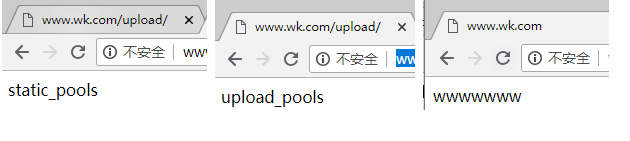
根据客户端的设备(user_agent)转发实践需求(分业务)
在企业中,为了让不同的客户端设备用户访问有更好的体验,需要在后端架设不同服务器来满足不同的客户端访问,例如:移动客户端访问网站,就需要部署单独的移动服务器及程序,体验才能更好,而且移动端还分苹果,安卓,Ipad等.
第7层负载均衡解决方案
在第7层负载均衡架构下,通过获取用户请求中的设备信息(利用$http_user_agent获取),根据这些信息转给后端合适的服务器处理,
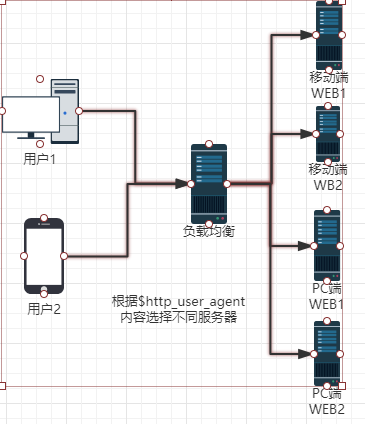
根据客户端设备(user_agent)转发请求实践
    server {

        listen       ;

        server_name  www.wk.com;

        location / {

        if ($http_user_agent ~* "MSIE")

        #如果请求的浏览器为微软IE浏览器(MSIE),则让请求由static_pools池处理

        {

        proxy_pass http://static_pools;

        }

        if ($http_user_agent ~* "Chrome")

        #如果请求的浏览器为谷歌浏览器(Chrome),则让请求由upload_pools池处理

        {

        proxy_pass http://upload_pools;

        }

        proxy_pass http://default_pools;

        #其他客户端,由default_pools处理

        include proxy.conf;

        }

}

}
除了针对浏览器外,上述“$http_user_agent”变量也可针对移动端,比如安卓,苹果,Ipad设备进行匹配,去请求指定的服务器,具体细节配置如下:
location / {

if ($http_user_agent ~* "android")

{

proxy_pass http://android_pools;    #这里是android服务器池

}

if ($http_user_agent ~* "iphone")

{

proxy_pass http://iphone_pools;    #这里是iphone服务器池

}

proxy_pass http://pc_pools;     #这里是默认的pc服务器池

include extra/proxy.conf;

}
提前修改对应的infex.html网页
由于IE无法测试 这里只测试google和其他
结果
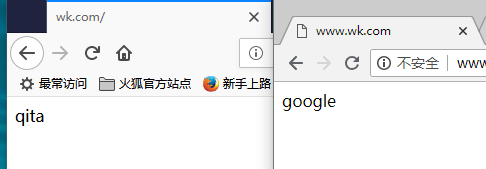
各nginx访问日志

192.168.50.160--[20/Aug/2018:00:02:35 -0400]"GET / HTTP/1.0"304 0 "-""Mozilla/5.0
(Windows NT 10.0; Win64; x64; rv:61.0) Gecko/20100101 Firefox/61.0""192.168.50.1"

#PC端 火狐浏览器的访问日志


192.168.50.160--[20/Aug/2018:00:09:40 -0400]"GET / HTTP/1.0"304 0 "-""Mozilla/5.0
(Windows NT 10.0; Win64; x64) AppleWebKit/537.36 (KHTML, like Gecko) Chrome/68.0.
3440.106 Safari/537.36""192.168.50.1"

#PC端 google浏览器


192.168.50.163--[28/Jul/2017:02:12:22 -0400]"GET / HTTP/1.1"200 18 "-""Mozilla/5.0
(iPhone; CPU iPhone OS 10_3_3 like Mac OS X) AppleWebKit/603.3.8 (KHTML, like Gecko)
Version/10.0 Mobile/14G60 Safari/602.1""-"

#苹果iphone6手机设备访问的日志。
根据文件扩展名实现代理转发
相关server配置
#先看看location方法的匹配规则,如下:

location ~ .*\.(gif|jpg|jpeg|png|bmp|swf|css|js)$ {

proxy_pass http://static_pools;

include proxy.conf;

}

#下面是if语句方法的匹配规则:

if ($request_uri ~* ".*\.(php|php5)$")

{

proxy_pass http://php_server_pools;

}

if ($request_uri ~* ".*\.(jsp|jsp*|do|do*)$")

{

proxy_pass http://java_server_pools;

}
根据扩展名转发的应用场景
可根据扩展名实现资源的动静分离访问,如图片,视频等请求静态服务器池,PHP,JSP等请求动态服务器池。
location ~ .*\.(gif|jpg|jpeg|png|bmp|swf|css|js)$ {      #静态

proxy_pass http://static_pools;

include proxy.conf;

}

location ~ .*\.(php|php3|php5)$ {                #动态

proxy_pass http://dynamic_pools;

include proxy.conf

}
在开发无法通过程序实现动静分离的时候,运维可以根据资源实体进行动静分离,而不依赖于开发,具体实现策略是先把后端的服务器分成不同的组。注意,每组服务器的程序都是相同的,因为开发没有把程序拆开,分组后,在前端代理服务器上通过讲解过的路径,扩展名进行规则匹配,从而实现请求的动静分离。
Nginx负载均衡检测节点状态
淘宝技术团队开发了一个Tengine(Nginx的分支)模块Nginx_upstream_check_module,用于提供主动式后端服务器健康检查。通过它可以检测后端realserver的健康状态,如果后端realserver不可用,则所有的请求就不会转发到该节点上。
Tengine原生支持这个模块,而Nginx则需要通过打补丁的方式将该模块添加到Nginx中。补丁下载地址:https://github.com/yaoweibin/nginx_upstream_check_module。
使用这个模块
(1)安装nginx_upstream_check_module模块 #这里不懂nginx1.14打补丁用哪个文件,所以改用nginx1.16版本
#下载补丁包

wget https://codeload.github.com/yaoweibin/nginx_upstream_check_module/zip/master

unzip master      #解压

mv ~/nginx_upstream_check_module-master /usr/src/

cd /usr/src/nginx-1.16./

patch -p1 < /usr/src/nginx_upstream_check_module-master/check_1.5.12+.patch    #打补丁没有报错成功

patching file src/http/modules/ngx_http_upstream_ip_hash_module.c

patching file src/http/modules/ngx_http_upstream_least_conn_module.c

patching file src/http/ngx_http_upstream_round_robin.c

patching file src/http/ngx_http_upstream_round_robin.h


#编译安装编译的参数要和以前一致,最后加上 --add-module=/usr/src/nginx_upstream_check_module-master/

./configure --prefix=/usr/local/nginx --user=nginx --group=nginx --with-http_ssl_module --with-http_stub_status_module --add-module=/usr/src/nginx_upstream_check_module-master/;make;make install

#查看版本及模块 多了--add-module=/usr/src/nginx_upstream_check_module-master/模块

/usr/local/nginx/sbin/nginx -V

nginx version: nginx/1.6.

built by gcc 4.8.  (Red Hat 4.8.-) (GCC)

TLS SNI support enabled

configure arguments: --prefix=/usr/local/nginx --user=nginx --group=nginx --with-http_ssl_module --with-http_stub_status_module --add-module=/usr/src/nginx_upstream_check_module-master/
配置Nginx健康检查,如下:
worker_processes  ;

events {

    worker_connections  ;

}

http {

    include       mime.types;

    default_type  application/octet-stream;

    sendfile        on;

    keepalive_timeout  ;

    upstream static_pools {

    server 192.168.50.163: weight=;

    server 192.168.50.164: weight=;

    server 192.168.50.165: weight=;

    check interval= rise= fall= timeout= type=http;      #对static服务器池开启健康监测

    }

 server {

        listen       ;

        server_name  www.wk.com;

         location /status {

         check_status;           #启动健康检查模块

        access_log off;         #关闭此location的访问日志记录

        }

}

}
check interval=3000 rise=2 fall=5 timeout=1000 type=http;
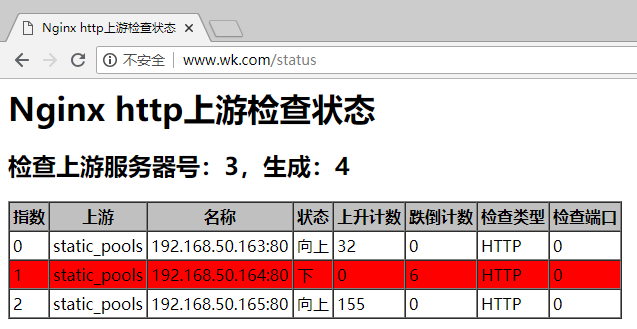
上面配置的意思时,对static_pools这个负载均衡条目中的所有节点,每隔3秒检测一次,请求2次正常则标记realserver状态为up,如果检测5次都失败,则标记realserver的状态为down,超时时间为1秒,检查的协议是HTTP。
重启lb1的nginx服务
/usr/local/nginx/sbin/nginx -s reload
访问页面时,显示如下图所示: 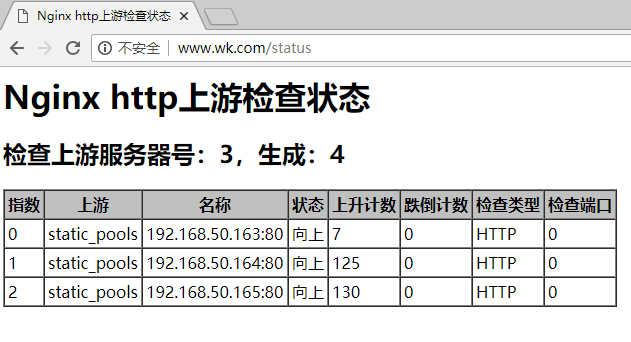
关闭nginx2节点 显示
proxy_next_upstream 参数补充
当Nginx接收后端服务器返回proxy_next_upstream参数定义的状态码时,会将这个请求转发给正常工作的后端服务器,例如500,502,503,504,此参数可以提升用户的访问体验,具体配置如下:
server {

listen ;

server_name www.yunjisuan.com;

location / {

proxy_pass http://static_pools;

proxy_next_upstream error timeout invalid_header http_500 http_502 http_503 http_504;

include proxy.conf;

}

}
nginx 反向代理实现负载均衡*配置实战的更多相关文章
- Nginx反向代理实现负载均衡配置图解
Nginx反向代理实现负载均衡配置图解 [导读] 负载均衡配置是超大型机器需要考虑的一些问题,同时也是数据安全的一种做法,下面我来介绍在nginx中反向代理 负载均衡配置图解,大家可参考本文章来操作. ...
- Nginx反向代理以及负载均衡配置
项目地址:http://git.oschina.net/miki-long/nginx 前提:最近在研究nginx的用法,在windows上小试了一下,由于windows下不支持nginx缓存配置,所 ...
- Nginx反向代理,负载均衡配置
主配置文件:nginx.conf # For more information on configuration, see: # * Official English Documentation: h ...
- 练手nginx反向代理和负载均衡apache实战
先说下原理性的 什么是反向代理 用户访问域名 域名的指向到nginx nginx把请求转发到apache apache处理后 返回给用户 整套的逻辑 对于用户来说 就是访问域名 然后返回 没 ...
- nginx反向代理与负载均衡
一:nginx反向代理与负载均衡配置思路与用法 1.nginx反向代理:就是你去相亲时,媒婆就是这里的代理,让媒婆带你去见姑娘 2.nginx负载均衡:就是有很多的媒婆经过商量给你选出最适合你的姑娘, ...
- Nginx反向代理与负载均衡应用实践(二)
Nginx反向代理与负载均衡应用实践(二) 链接:https://pan.baidu.com/s/1xB20bnuanh0Avs4kwRpSXQ 提取码:migq 复制这段内容后打开百度网盘手机App ...
- Nginx反向代理,负载均衡,redis session共享,keepalived高可用
相关知识自行搜索,直接上干货... 使用的资源: nginx主服务器一台,nginx备服务器一台,使用keepalived进行宕机切换. tomcat服务器两台,由nginx进行反向代理和负载均衡,此 ...
- 【转】Nginx反向代理和负载均衡
原文链接:http://www.cnblogs.com/shuoer/p/7820899.html Nginx反向代理和负载均衡 环境说明 由于我使用的是windows系统,所以我用虚拟机虚拟出来了3 ...
- 谁说前端不需要懂-Nginx反向代理与负载均衡
转:https://juejin.im/post/5b01336af265da0b8a67e5c9 学到老活到老 前端圈一直很新,一直要不停的学习,而且在进入大厂的路上,还要求熟悉一门后台语言等等.用 ...
随机推荐
- 第二章、前端之css
目录 第二章.前端之css 一.css介绍 二.css语法 三.css几种引入方式 四.css选择器 五.css属性相关 六.css盒子模型 第二章.前端之css 一.css介绍 css(Cascad ...
- Flutter——Row组件(水平布局组件)
Row组件的常用属性 属性 说明 mainAxisAlignment 主轴的排序方式 crossAxisAlignment 次轴的排序方式 children 组件子元素 import 'package ...
- Mysql(七):视图、触发器、事务、存储过程、函数
一 视图 视图是一个虚拟表(非真实存在),其本质是[根据SQL语句获取动态的数据集,并为其命名],用户使用时只需使用[名称]即可获取结果集,可以将该结果集当做表来使用. 使用视图我们可以把查询过程中的 ...
- go mod 解决 Go 语言的包依赖问题
转:https://testerhome.com/topics/16980 https://testerhome.com/ -------------------------------------- ...
- DAG及拓扑排序
1.有向无环图和拓扑排序 有向无环图(Directed Acyclic Graph,简称DAG):拓扑排序指的对DAG一个有序的线性排列.即每次选出一个没有入度的节点,然后输出该点并将节点和其相关连的 ...
- python不换行输出
python默认的print是换行输出的.要想实现不换行输出,方法如下: python 2.X版本: print('要在print后面加个逗号-> , '), python 3.X版本: pri ...
- HDU 6046 - hash | 2017 Multi-University Training Contest 2
思路来自题解和一些博客 最麻烦的是样例没啥用- - /* HDU 6046 - hash [ hash,鸽巢 ] | 2017 Multi-University Training Contest 2 ...
- HDU 6063 - RXD and math | 2017 Multi-University Training Contest 3
比赛时候面向过题队伍数目 打表- - 看了题解发现确实是这么回事,分析能力太差.. /* HDU 6063 - RXD and math [ 数学,规律 ] | 2017 Multi-Universi ...
- [Python自学] day-19 (1) (FBV和CBV、路由系统)
一.获取表单提交的数据 在 [Python自学] day-18 (2) (MTV架构.Django框架)中,我们使用过以下方式来获取表单数据: user = request.POST.get('use ...
- MyEclipse运行项目出现 The user operation is waiting for "Building workspace" to complete
如图所示 解决方式 1.选择菜单栏的“Project”,然后把菜单栏中“Build Automatically”前面的对钩去掉. 2.当你修改或添加代码后,选择菜单栏的“Project”,然后选择菜单 ...