
LVS集群之NAT模式
集群的分类:
(1)HA:高可用集群,有叫双机热备
原理:两台机器A、B,正常是A提供服务,当A机宕机或者服务有问题时,会切换到B机继续提供服务
常用的高了永软件:heartbeat和keepalived(可以做负载均衡)
(2)LB:负载均衡集群。
(3)HPC:高性能计算集群
咱们这里讲负载均衡集群。
负载均衡的实现方式:
1:通过硬件的实现:F5负载均衡器
2:软件的实现。LVS(四层,传输层),nginx反向代理(七层,应用层)
LVS的实现由三种方式:
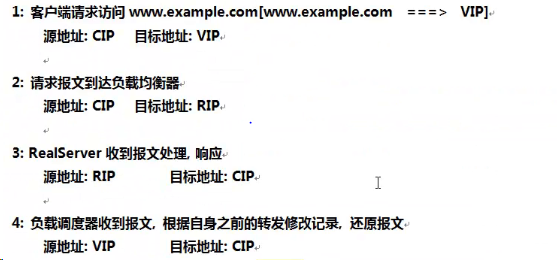
(a)NAT(网络地址映射):通过网络地址转换的方法来实现调度
下面来搭建LVS-NAT模式集群实现负载均衡。
环境:
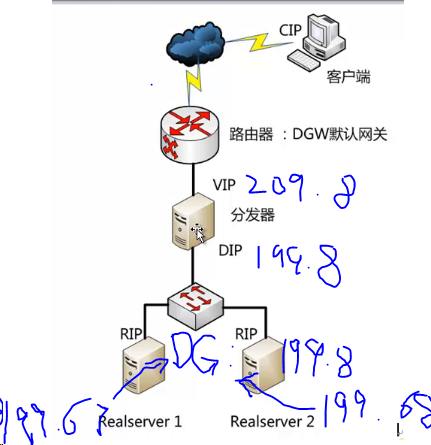
| 主机名 | IP | 系统 | 角色 |
| dir | 192.168.199.8/192.168.209.8 | rhel7.4 | 分发器 |
| node1 | 192.168.199.67 | rhel6.5 | real server1 |
| node2 | 192.168.199.68 | rhel6.5 | real server1 |
dip:192.168.199.8
vip:192.168.209.8
rip1:192.168.199.67
rip2:192.168.199.68
分发器配置:
分发器有两个网卡,一个网卡和内网连接,一个网卡和外网连接
- ens33:192.168.199.8:这张网卡对应一个封闭的内网,不能访问外网资源,外网也不能直接通过这个IP访问这台主机;(这台主机不用配置网关)
- ens37:192.168.209.8:这张网卡设置的IP可以访问外网,也可以被外网访问。
1、安装lvs核心软件包:
[root@dir ~]# yum install ipvsadm -y
2、写脚本管理(开启路由转发,添加虚拟服务,添加虚拟服务后端的real server)
[root@dir ~]# vim lvs_nat.sh
#!/bin/bash
echo 1 > /proc/sys/net/ipv4/ip_forward
echo 0 > /proc/sys/net/ipv4/conf/all/send_redirects
echo 0 > /proc/sys/net/ipv4/conf/default/send_redirects
echo 0 > /proc/sys/net/ipv4/conf/ens33/send_redirects
echo 0 > /proc/sys/net/ipv4/conf/ens37/send_redirects
iptables -t nat -F
iptables -t nat -X
iptables -t nat -A POSTROUTING -s 192.168.199.0/24 -j MASQUERADE
IPVSADM='/sbin/ipvsadm'
$IPVSADM -C
$IPVSADM -A -t 192.168.209.8:80 -s rr
$IPVSADM -a -t 192.168.209.8:80 -r 192.168.199.67:80 -m
$IPVSADM -a -t 192.168.209.8:80 -r 192.168.199.68:80 -m
参数说明:
查看规则:
IP Virtual Server version 1.2.1 (size=4096)
Prot LocalAddress:Port Scheduler Flags
-> RemoteAddress:Port Forward Weight ActiveConn InActConn
TCP 192.168.209.8:80 rr
-> 192.168.199.67:80 Masq 1 0 0
-> 192.168.199.68:80 Masq 1 0 0
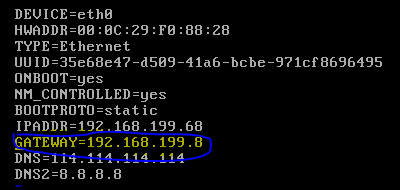
rs1和rs2都这样配置
2、重启网卡使配置生效
测试:
在rs1和rs2上安装Apache服务,然后下一个测试页面
rs1:echo 'this is 192.168.199.67' > /var/www/html/index.html
rs2: echo 'this is 192.168.199.68' > /var/www/html/index.html
在dir上访问vip:
1、不设置权重进行测试(上面的脚本就是这样):
[root@dir ~]# curl 192.168.209.8
this is 192.168.199.68
[root@dir ~]# curl 192.168.209.8
this is 192.168.199.67
[root@dir ~]# curl 192.168.209.8
this is 192.168.199.68
[root@dir ~]# curl 192.168.209.8
this is 192.168.199.67
[root@dir ~]# curl 192.168.209.8
this is 192.168.199.68
[root@dir ~]# curl 192.168.209.8
this is 192.168.199.67
2、设置权重进行测试(rs1:3,rs2:1),修改一下脚本
$IPVSADM -A -t 192.168.209.8:80 -s wrr
$IPVSADM -a -t 192.168.209.8:80 -r 192.168.199.67:80 -m -w 3
$IPVSADM -a -t 192.168.209.8:80 -r 192.168.199.68:80 -m -w 1

[root@dir ~]# ./lvs_nat.sh
[root@dir ~]# ipvsadm -ln
IP Virtual Server version 1.2.1 (size=4096)
Prot LocalAddress:Port Scheduler Flags
-> RemoteAddress:Port Forward Weight ActiveConn InActConn
TCP 192.168.209.8:80 wrr
-> 192.168.199.67:80 Masq 3 0 0
-> 192.168.199.68:80 Masq 1 0 0
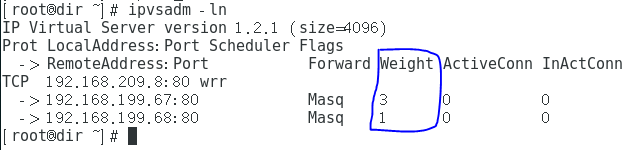
查看结果:
[root@dir ~]# curl 192.168.209.8
this is 192.168.199.68
[root@dir ~]# curl 192.168.209.8
this is 192.168.199.67
[root@dir ~]# curl 192.168.209.8
this is 192.168.199.67
[root@dir ~]# curl 192.168.209.8
this is 192.168.199.67
[root@dir ~]# curl 192.168.209.8
this is 192.168.199.68
[root@dir ~]# curl 192.168.209.8
this is 192.168.199.67
[root@dir ~]# curl 192.168.209.8
this is 192.168.199.67
[root@dir ~]# curl 192.168.209.8
this is 192.168.199.67
完美结束。
下一篇讲LVS的其他模式,希望对大家有所帮助。
最后在说一句啊。当有问题的时候怎么清空规则呢???
[root@dir ~]# ipvsadm -C
[root@dir ~]# ipvsadm -ln
IP Virtual Server version 1.2.1 (size=4096)
Prot LocalAddress:Port Scheduler Flags
-> RemoteAddress:Port Forward Weight ActiveConn InActConn
[root@dir ~]#
LVS集群之NAT模式的更多相关文章
- LVS集群之NAT模式实现
LVS集群之NAT模式实现 一.集群的种类 集群系统主要分为 1.HA:高可用集群,又叫双机热备. (a)原理 2台机器A,B,正常是A提供服务,B待命闲置,当A宕机或服务宕掉,会切换至 ...
- Linux系统(四)负载均衡LVS集群之NAT模式
序言 提到LVS,就从章文嵩博士开始吧,反正也不知道如何下笔来写这一篇.章大博士,读博时候创建这个lvs软件项目,但是他提倡开源精神,在用户的建议和反馈中,这个花了他两周时间开发的开源软件不断得到改建 ...
- LVS集群之NAT模式实例(3)
LVS集群NAT模式实例 1. 实验拓扑图 DS 必须有两块网卡,需要在上面做NAT. 2. 实验环境 3台CentOS6.4 64bit的服务器. 类型 IP DR eth0:10.20.73.20 ...
- Linux系统(五)负载均衡LVS集群之DR模式
序言 DR模式是lvs集群中三种负载均衡模式的其中一种,那么上一篇中我写啦关于NAT模式的搭建与原理,为什么还要有DR模式与IP隧道模式呢? 首先我们来看3张图.LVS/NAT模式如下图: LVS/I ...
- LVS集群之DR模式 实现
ps:做 dr 模式 之前,先把之前做过的操作清空掉 1.ipvsadm -ln 查看规则 2.ipvsadm -C 清空规则 3.ipvsadm -ln 确认 4.iptables -t nat - ...
- LB负载均衡集群及NAT模式配置
一.LB(load balance)负载均衡集群 负载均衡集群常用的有: 1.软件实现的 nginx(工作在OSI第七层应用层) lvs+keepalived(工作在OSI第四层传输层) 2.硬件实现 ...
- LVS集群之DR模式
今天来讲LVS-DR模式集群实现负载均衡的搭建方法 环境 主机名 IP 系统 角色 dir DIP:192.168.199.9 VIP:192.168.199.8 rhel7.4 集群服务器 no ...
- Linux系统(四)LVS集群负载均衡NAT模式
序言 提到LVS,就从章文嵩博士开始吧,反正也不知道如何下笔来写这一篇.章大博士,读博时候创建这个lvs软件项目,但是他提倡开源精神,在用户的建议和反馈中,这个花了他两周时间开发的开源软件不断得到改建 ...
- centos LB负载均衡集群 三种模式区别 LVS/NAT 配置 LVS/DR 配置 LVS/DR + keepalived配置 nginx ip_hash 实现长连接 LVS是四层LB 注意down掉网卡的方法 nginx效率没有LVS高 ipvsadm命令集 测试LVS方法 第三十三节课
centos LB负载均衡集群 三种模式区别 LVS/NAT 配置 LVS/DR 配置 LVS/DR + keepalived配置 nginx ip_hash 实现长连接 LVS是四层LB ...
随机推荐
- java lesson14Homework
/** * 1. 本程序找出字符串数组 String[] arr = {“welcome”, “china”, “hi”, “congratulation”, “great”} 中的长度最大的元素,并 ...
- Sharepoint 开启App 配置App
如果没有Enable app,打开app store的时候出出现错误: Sorry, apps are turned off. If you know who runs the server, tel ...
- 【vue】computed 和 watch
计算属性:computed 监听多个变量且变量是在vue实例中(依赖某个变量,变量发生改变就会触发) 侦听器: watch 监听一个变量的变化 使用场景:watch(异步场景) ...
- O033、Terminate Instance 操作详解
参考https://www.cnblogs.com/CloudMan6/p/5486066.html 本节通过日志详细分析 Nova Terminate 操作.Terminate 操作就是删除 i ...
- 1 .net将xml反序列化
public static T XmlToObject<T>(string str) where T : class { using (Stream stream = new Memory ...
- vue项目 时间戳转 格式
项目用了 element UI的日期插件,修改时 时间回显不了,打印出来是换行了,因此要转换 changeTime(value){ let date = new Date(value); let y ...
- element table切换分页不勾选的自带方法
场景一:没有回显勾选的情况 table表格加row-key标识选中行唯一标识,多选框加reserve-selection设置为true <template> <el-table v- ...
- C# 列表中查找大小比较
列表中查找大小比较
- linux基础—课堂随笔06_软件包管理
软件包管理 rpm 包和包管理器 包的组成: 二进制文件.库文件.配置文件.帮助文件 程序包管理器: debian: deb文件,dpkg包管理器 redhat:rpm文件,rpm包管理器 r ...
- Jmeter (二) 参数化
一.数据 用户 参数化 1.添加 用户参数 添加——>前置处理器 ——>用户参数 2.设置 目标参数 3.变量代替 ${name} 4.线程组 设置循环次数,查看结果数中查看结果 thre ...