
java-mybaits-013-mybatis-Interceptor-拦截器执行顺序
一、概述
已知拦截器能够拦截四种类型:Executor、ParameterHandler、ResultSetHandler、StatementHandler。
1.1、不同类型拦截器的执行顺序
背景:不同类型
项目地址:https://github.com/bjlhx15/mybatis.git 中的mybatis-interceptor-001 基础项目
顺序【Executor→StatementHandler→ParameterHandler→ResultSetHandler】
1、编写拦截器代码
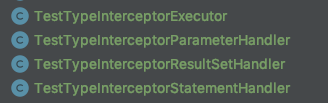
2、mybatis.xml配置
    <plugins>

        <!-- 拦截器配置 -->

        <plugin interceptor="com.github.bjlhx15.mybatis.readwrite.split.mybatisinterceptor.TestTypeInterceptorParameterHandler"/>

        <plugin interceptor="com.github.bjlhx15.mybatis.readwrite.split.mybatisinterceptor.TestTypeInterceptorResultSetHandler"/>

        <plugin interceptor="com.github.bjlhx15.mybatis.readwrite.split.mybatisinterceptor.TestTypeInterceptorStatementHandler"/>

        <plugin interceptor="com.github.bjlhx15.mybatis.readwrite.split.mybatisinterceptor.TestTypeInterceptorExecutor"/>

    </plugins>
3、执行测试输出
TestTypeInterceptorExecutor

[2019-07-29 10:37:25:540-http-nio-8080-exec-1] [INFO] - com.alibaba.druid.pool.DruidDataSource.init(DruidDataSource.java:930) - {dataSource-1} inited

TestTypeInterceptorStatementHandler

[2019-07-29 10:37:29:827-http-nio-8080-exec-1] [DEBUG] - org.apache.ibatis.logging.jdbc.BaseJdbcLogger.debug(BaseJdbcLogger.java:145) - ==>  Preparing: select 'true' as QUERYID, id, name, version, balance from accountbalance

TestTypeInterceptorParameterHandler

[2019-07-29 10:37:31:177-http-nio-8080-exec-1] [DEBUG] - org.apache.ibatis.logging.jdbc.BaseJdbcLogger.debug(BaseJdbcLogger.java:145) - ==> Parameters:

TestTypeInterceptorResultSetHandler
可以看到不论配置文件如何,执行顺序如下:【Executor→StatementHandler→ParameterHandler→ResultSetHandler】
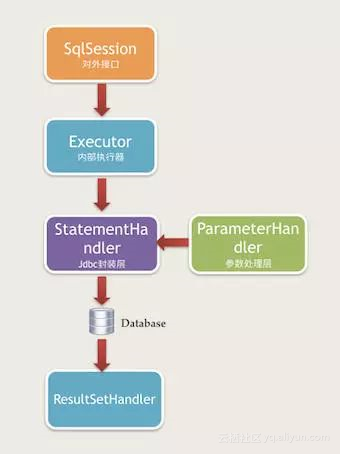
1.2、同类型位置不同
背景:同类型位置不同
项目地址:https://github.com/bjlhx15/mybatis.git 中的mybatis-interceptor-002 基础项目
顺序:数组上下位置倒序【3拦截前处理 > 2拦截前处理 > 1拦截前处理 > executor.query() > 1拦截后处理 > 2拦截后处理 > 3拦截后处理】
1、编写拦截器
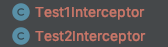
2、编写xml
    <plugins>

        <!-- 拦截器配置 -->

        <plugin interceptor="com.github.bjlhx15.mybatis.readwrite.split.mybatisinterceptor.Test1Interceptor"/>

        <plugin interceptor="com.github.bjlhx15.mybatis.readwrite.split.mybatisinterceptor.Test2Interceptor"/>

    </plugins>
3、执行测试输出
Test2Interceptor

Test1Interceptor
4、why
查看mybatis配置org.apache.ibatis.session.Configuration。中创建
    public Executor newExecutor(Transaction transaction, ExecutorType executorType) {

        executorType = executorType == null ? this.defaultExecutorType : executorType;

        executorType = executorType == null ? ExecutorType.SIMPLE : executorType;

        Object executor;

        if (ExecutorType.BATCH == executorType) {

            executor = new BatchExecutor(this, transaction);

        } else if (ExecutorType.REUSE == executorType) {

            executor = new ReuseExecutor(this, transaction);

        } else {

            executor = new SimpleExecutor(this, transaction);

        }

        if (this.cacheEnabled) {

            executor = new CachingExecutor((Executor)executor);

        }

        Executor executor = (Executor)this.interceptorChain.pluginAll(executor);

        return executor;

    }
interceptorChain是在Configuration类中new出来的。它等价于mybatis-config中的<plugins></plugins>
查看 pluginAll添加顺序
    private final List<Interceptor> interceptors = new ArrayList();

    public InterceptorChain() {

    }

    public Object pluginAll(Object target) {

        Interceptor interceptor;

        for(Iterator i$ = this.interceptors.iterator(); i$.hasNext(); target = interceptor.plugin(target)) {

            interceptor = (Interceptor)i$.next();

        }

        return target;

    }
可以看到 interceptorChain 拦截器顺序就是 配置顺序
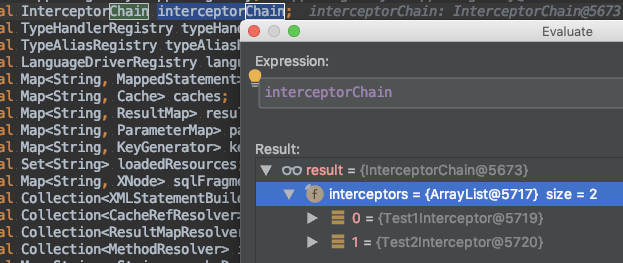
但是在经过代理后,

3拦截前处理 > 2拦截前处理 > 1拦截前处理 > executor.query() > 1拦截后处理 > 2拦截后处理 > 3拦截后处理
1.3、同类型不同配置位置
背景:有spring中配置,还有mybatis中配置
项目地址:https://github.com/bjlhx15/mybatis.git 中的mybatis-interceptor-002 基础项目
顺序:数组上下位置倒序【mybatis配置拦截器2 > mybatis配置拦截器1 > spring配置拦截器2 >spring配置拦截器1 > executor.query() > spring配置拦截器1 > spring配置拦截器2 > mybatis配置拦截器1 > mybatis配置拦截器2 】
1、编写拦截器

2、spring中xml配置
    <bean id="wrSqlSessionFactory" class="org.mybatis.spring.SqlSessionFactoryBean">

        <!-- 实例化sqlSessionFactory时需要使用上述配置好的数据源以及SQL映射文件 -->

        <property name="dataSource" ref="wrDataSource"/>

        <property name="mapperLocations" value="classpath:mapper/auto/**/*.xml"/>

        <!--    mybatis的全局配置文件 如没有特需 可以不配置    -->

        <property name="plugins">

            <array>

                <bean class="com.github.bjlhx15.mybatis.readwrite.split.mybatisinterceptor.TestnterceptorIString1"/>

                <bean class="com.github.bjlhx15.mybatis.readwrite.split.mybatisinterceptor.TestnterceptorIString2"/>

            </array>

        </property>

        <property name="configLocation" value="classpath:mybatis.xml"/>

    </bean>
mybatis中配置
<?xml version="1.0"  encoding="UTF-8"  ?>

<!DOCTYPE configuration PUBLIC  "-//mybatis.org//DTD Config 3.0//EN"

        "http://mybatis.org/dtd/mybatis-3-config.dtd">

<configuration>

    <plugins>

        <!-- 拦截器配置 -->

        <plugin interceptor="com.github.bjlhx15.mybatis.readwrite.split.mybatisinterceptor.TestInterceptorMybatis1"/>

        <plugin interceptor="com.github.bjlhx15.mybatis.readwrite.split.mybatisinterceptor.TestInterceptorMybatis2"/>

    </plugins>

</configuration>
3、输出
TestInterceptorMybatis2

TestInterceptorMybatis1

TestnterceptorIString2

TestnterceptorIString1
可以调整 spring中configLocation和plugins上下位置,输出一致
但是
java-mybaits-013-mybatis-Interceptor-拦截器执行顺序的更多相关文章
- Mybatis Interceptor 拦截器原理 源码分析
Mybatis采用责任链模式,通过动态代理组织多个拦截器(插件),通过这些拦截器可以改变Mybatis的默认行为(诸如SQL重写之类的),由于插件会深入到Mybatis的核心,因此在编写自己的插件前最 ...
- mybatis Interceptor拦截器代码详解
mybatis官方定义:MyBatis 是一款优秀的持久层框架,它支持定制化 SQL.存储过程以及高级映射.MyBatis 避免了几乎所有的 JDBC 代码和手动设置参数以及获取结果集.MyBatis ...
- SpringMVC自定义多个拦截器执行顺序
一.正常流程下的拦截器(全部放行) 1.springMVC中拦截器实现这个接口HandlerInterceptor 第一个拦截器 HandlerInterceptor1 public class ...
- Struts2的默认拦截器执行顺序
我们在写Struts2的时候package属性默认都是差不多这样吧 <package name="packageName" namespace="/" e ...
- Springmvc的拦截器执行顺序及各方法作用
实现HandlerInterceptor接口或者继承HandlerInterceptor的子类,比如Spring 已经提供的实现了HandlerInterceptor 接口的抽象类HandlerInt ...
- Mybatis拦截器执行过程解析
上一篇文章 Mybatis拦截器之数据加密解密 介绍了 Mybatis 拦截器的简单使用,这篇文章将透彻的分析 Mybatis 是怎样发现拦截器以及调用拦截器的 intercept 方法的 小伙伴先按 ...
- SpringMVC 中的Interceptor 拦截器
1.配置拦截器 在springMVC.xml配置文件增加: <mvc:interceptors> <!-- 日志拦截器 --> <mvc:interceptor> ...
- Mybatis之拦截器原理(jdk动态代理优化版本)
在介绍Mybatis拦截器代码之前,我们先研究下jdk自带的动态代理及优化 其实动态代理也是一种设计模式...优于静态代理,同时动态代理我知道的有两种,一种是面向接口的jdk的代理,第二种是基于第三方 ...
- MyBatis实现拦截器分页功能
1.原理 在mybatis使用拦截器(interceptor),截获所执行方法的sql语句与参数. (1)修改sql的查询结果:将原sql改为查询count(*) 也就是条数 (2)将语句sql进行拼 ...
- Spring中的Interceptor 拦截器 专题
spring-webmvc-4.3.14.RELEASE.jar org.springframework.web.servlet.DispatcherServlet#doDispatch /** * ...
随机推荐
- Redis 从入门到放弃
Redis 从入门到放弃 http://www.iocoder.cn/Fight/Redis-went-from-getting-started-to-quitting/
- 【FRDM-K64F学习笔记】使用ARM mbed和Keil MDK下载你的第一个程序
FRDM-K64F开发平台采用MK64FN1M0VLL12微控制器.该控制器包含一个带有浮点单元的ARM Cortex-M4内核.其最高工作频率为120MHz,具有256KB的RAM.1MB闪存以及许 ...
- JDK环境变量配置window
下面开始配置环境变量,右击[我的电脑]---[属性]-----[高级]---[环境变量],如图: 选择[新建系统变量]--弹出“新建系统变量”对话框,在“变量名”文本框输入“JAVA_HOME”,在 ...
- Git----常见工作管理总结
1.工作流程模式: 首先,可以试图用git push origin branch-name推送自己的修改 如果推送失败,则因为远程分支比你的本地更新,需要先用git pull试图合并 如果合并有冲突, ...
- vue npm,Git随笔
下载模块: npm install <package-name> --save-dev 上线: npm run build 基本使用流程:1. npm install vue-cli - ...
- GIL 信号量 event事件 线程queue
GIL全局解释器锁 官方解释: In CPython, the global interpreter lock, or GIL, is a mutex that prevents multiple n ...
- pandas 数据类型研究(一)数据转换
当利用pandas进行数据处理的时候,经常会遇到数据类型的问题,当拿到数据的时候,首先需要确定拿到的是正确类型的数据,一般通过数据类型的转化,这篇文章就介绍pandas里面的数据类型(data typ ...
- git忽略.idea文件
只需要在.gitignore文件增加.idea如果你已经推送到远程仓库,那需要执行git rm -r --cached .idea去掉已经托管的文件
- day 50 jquary 终极版本
jQuary 一.jquary对象和dom对象 jquary找到的标签对象成为-- jquary对象 原生js找到的标签对象成为 -- dom对象 dom对象只能使用dom对象的方法,不能使用jque ...
- sql server 存储过程 output 和return的使用 方法,详解
SQL Server目前正日益成为WindowNT操作系统上面最为重要的一种数据库管理系统,随着 SQL Server2000的推出,微软的这种数据库服务系统真正地实现了在WindowsNT/2000 ...