
国产龙芯服务器源码安装PostgreSQL数据库的方法
1. 公司最近有一些国产化项目的需求, 要求在国产CPU的服务器上面安装pg数据库等.
2.. 但是差查了下中标麒麟的官网,在龙芯MIPS的操作系统包源里面仅有 postgreSQL 9.2 版本的rpm包, 但是要求最低版本是10.x 所以没办法就采取源码安装的方式进行安装.
3. 安装过程.(备注arm的CPU 不管是 飞腾的还是华为的过程应该都是一模一样的)
3.1 下载源码包
百度搜索postgreslq的官网,然后下载源码即可.
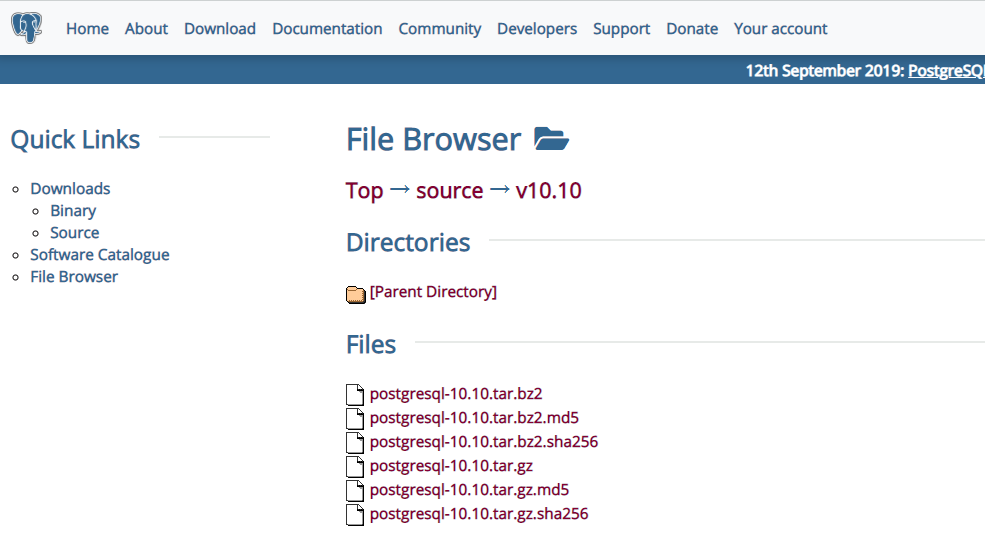
https://www.postgresql.org/ftp/source/v10.10/

具体的下载地址为:
https://ftp.postgresql.org/pub/source/v10.10/postgresql-10.10.tar.gz
界面效果:
3.2 linux上面创建文件夹
[root@neoky01 ~]# mkdir /pg10

[root@neoky01 ~]# useradd postgres

[root@neoky01 ~]# mkdir /pgdata

[root@neoky01 ~]# chown postgres:root /pgdata

第一步创建 存放 PG源码的文件夹
第二步创建 运行postgreSQL数据库的用户
第三步创建 存放postgreSQL数据库数据文件的目录
第四步修改 存放postgreSQL数据库数据文件的目录的属主
3.3 将postgresql的源码上传至服务器的/pg10 目录中
3.4 解压缩然后进行安装.
tar -zxvf 解压缩文件压缩包

cd .. 进入到解压缩后的文件夹

执行如下命令进行配置.

./configure --without-readline  --without-zlib

执行 make && make install 进行安装

龙芯3吖000的机器大约耗时: 900s
15:01 到 15:16

然后进入到 源文件的 contrib 的目录下面 执行命令
make && make install
大约耗时: 120s
15:19 到 15:21
3.5 修改环境变量
postgresql 源码安装默认安装到

/usr/local/pgsql/bin

这个目录中, 为了简单起见. 可以修改一下 环境变量便于使用.

vim /etc/profile.d/pg.sh

增加上一行内容即可

export PATH=$PATH:/usr/local/pgsql/bin

然后使之生效

source  /etc/profile.d/pg.sh
3.6 初始化数据库
需要切换用户

su - postgres

执行命令:

 initdb -D /pgdata

就完成了数据库的创建过程.
一般的提示信息为:
[root@neoky01 bin]# su - postgres

[postgres@neoky01 ~]$ initdb -D /pgdata

The files belonging to this database system will be owned by user "postgres".

This user must also own the server process.

The database cluster will be initialized with locale "zh_CN.UTF-8".

The default database encoding has accordingly been set to "UTF8".

initdb: could not find suitable text search configuration for locale "zh_CN.UTF-8"

The default text search configuration will be set to "simple".

Data page checksums are disabled.

fixing permissions on existing directory /pgdata ... ok

creating subdirectories ... ok

selecting default max_connections ...

selecting default shared_buffers ... 128MB

selecting default timezone ... PRC

selecting dynamic shared memory implementation ... posix

creating configuration files ... ok

running bootstrap script ... ok

performing post-bootstrap initialization ... ok

syncing data to disk ... ok

WARNING: enabling "trust" authentication for local connections

You can change this by editing pg_hba.conf or using the option -A, or

--auth-local and --auth-host, the next time you run initdb.

Success. You can now start the database server using:

    pg_ctl -D /pgdata -l logfile start
3.7 使用systemd 设置为daemon 服务启动
注意 需要使用root 用户进行编辑

vim /etc/systemd/system/pg.service

插入内容:

[Unit]

Description=pg

[Service]

User=postgres

ExecStart=/usr/local/pgsql/bin/postmaster -D /pgdata

Restart=always

[Install]

WantedBy=multi-user.target
设置服务自动启动还有开启服务
systemctl enable pg

systemctl restart pg
3.8 查看服务状态以及修改安全配置
systemctl status pg

需要修改安全配置, 注意 数据库的配置文件就在/pgdata 里面
3.放开监听以及修改连接数等.
vim /pgdata/postgresql.conf

主要修改如下内容:

# - Connection Settings -

listen_addresses = '*'          # what IP address(es) to listen on;

                                        # comma-separated list of addresses;

                                        # defaults to 'localhost'; use '*' for all

                                        # (change requires restart)

port =                              # (change requires restart)

max_connections =                   # (change requires restart)
修改安全配置
vim /pgdata/pg_hba.conf

在ipv4 下面增加一行记录

host    all             all             0.0.0.0/              md5

注意 md5 必须使用密码登录 trust 可以不使用密码登录 非常不安全 所以强烈不建议使用trust ..
3.9 设置 postgres 数据库用户的密码
linux 下面执行命令

su - postgres
然后执行命令
psql
进入postgreSQL数据库的操作界面, 一般的提示信息如:
然后执行命令
alter role postgres with password 'Test6530';
注意 一定要有 分号, 并且湖之一要有具体的提示信息才可以.
[root@neoky01 bin]# su - postgres
[postgres@neoky01 ~]$ psql
psql (10.10)
Type "help" for help.
postgres=# alter role postgres with password 'Test6530';
ALTER ROLE
postgres=#
出现alter role 即可.
3.10 重启postgresql 数据库,并且验证是否可以连接
systemctl restart pg
然后使用 navicat 进行连接测试.

安装完成.
国产龙芯服务器源码安装PostgreSQL数据库的方法的更多相关文章
- 源码安装postgresql数据库
一般情况下,postgresql由非root用户启动. 1.创建postgres用户 groupadd postgres useradd -g postgres postgres 下面的操作都在pos ...
- CentOS7 源码安装 PostgreSQL 12
PostgreSQL 12 源码安装 Table of Contents 1. 下载 2. 准备环境 3. 编译安装 4. 设置环境变量 5. 初始化数据库 6. 配置参数文件 6.1. postgr ...
- 记录一个源码安装mysql5.6的方法
https://www.jb51.net/article/118853.htm 如果之前源码安装过mysql5.6的话,卸载方法如下:rm -rf /var/lib/mysql/rm -rf /usr ...
- linux源码安装软件的一般方法
rhel系统貌似安装不了xmgrace,配置的时候居然说要那个M*tif库.百度了一下,需要openmotif库,然后用root账户想要用yum安装一下这个库,搞了好久没搞懂.后面搞明白了,原因竟是因 ...
- Linux环境下源码安装PostgreSQL
1.下载PostgreSQL源码包,并保存到Linux操作系统的一个目录下 2.解压PostgreSQL源码包 :tar zxvf postgresql-9.2.4.tar.gz 或 tar jxvf ...
- Centos7 源码安装PostgreSQL Citus集群 (转载)
citus的分布式集群目前在苏宁大规模应用,苏宁陈华军也做了很多技术分享和博客介绍.目前所有的教程都是rpm和pg一起安装,个人不喜欢,毕竟citus定位是个插件,我想在我已安装的pg上源码装一个ci ...
- linux 源码安装postgresql
下载源码包 --安装所需要的系统软件包 yum groupinstall -y "Development tools" yum install -y bison flex read ...
- samba服务器源码安装(非rpm)
首先我们创建一个文档,边安装配置samba,边写教程. 从www.samba.org下载samba最新源码包,我下载的是samba-3.0.7.tar.gz,把它放在我的目录的中/root/lova/ ...
- PostGreSQL(1)-源码安装
目录 简述 一.格式化磁盘 二.源码安装 PostGreSql 1. 安装 readline-devel 2. 安装 PostGresql 3. 设置环境变量 三. 初始化 1. 设置运行用户 2. ...
随机推荐
- Windows10下安装Ubuntu18.04LTS详细教程
这篇文章分享自己在Windows10系统下安装VMware虚拟机,然后在VMware中安装Ubuntu 18.04 LTS的详细过程.之所以选择在虚拟机中安装Ubuntu,主要是可以不影响自己电脑的正 ...
- Java 【打印俄文的英文字母】
俄文的的字符可以用 'A' 到 'Я '. public class main { public static void main(String args[]) { char S = 'А', C = ...
- BP神经网络原理及在Matlab中的应用
一.人工神经网络 关于对神经网络的介绍和应用,请看如下文章 神经网络潜讲 如何简单形象又有趣地讲解神经网络是什么 二.人工神经网络分类 按照连接方式--前向神经网络.反馈(递归)神经网络 按照 ...
- ELF格式说明
ELF file header (ELF文件头) /* The ELF file header. This appears at the start of every ELF file. */ #de ...
- P1069 细胞分裂——数学题,质因数分解
P1069 细胞分裂 我们求的就是(x^k)|(m1^m2) k的最小值: 先给m1分解质因数,再给每个细胞分解: 如果m1有的质因数,细胞没有就跳过: 否则就记录答案: 注意整数除法下取整的原则: ...
- Atcoder ABC 141
Atcoder ABC 141 A - Weather Prediction SB题啊,不讲. #include<iostream> #include<cstdio> #inc ...
- zookpeer 和 redis 集群内一致性协议 及 选举 对比
zookeeper 使用的是zab协议,类似 raft 的 Strong Leader 模式 redis 的哨兵 在 崩溃选举的时候采用的是 raft的那一套term. 因为redis 采用的是异步 ...
- What is the use of c# “Yield” keyword ?
What is the use of c# “Yield” keyword ? “Yield keyword helps us to do custom stateful iteration over ...
- 网络中的tarpit/tar pit
最近看haproxy源码,里面有个TARPIT的概念不能理解,找了很久才找到对应的意思.特此记录. tarpit 本意是“沼泽地.地洼地”,这里显然把它引申为“捕获或者困住某个物体”. 在网络语义中提 ...
- 解决Mac系统IDEA debug卡顿问题
查询资料发现,跟JDK8以及hosts设置有关. vim /private/etc/hosts 在127.0.0.1 localhost后面加上主机名即可,如<your hostname> ...