
国产龙芯服务器源码安装PostgreSQL数据库的方法
1. 公司最近有一些国产化项目的需求, 要求在国产CPU的服务器上面安装pg数据库等.
2.. 但是差查了下中标麒麟的官网,在龙芯MIPS的操作系统包源里面仅有 postgreSQL 9.2 版本的rpm包, 但是要求最低版本是10.x 所以没办法就采取源码安装的方式进行安装.
3. 安装过程.(备注arm的CPU 不管是 飞腾的还是华为的过程应该都是一模一样的)
3.1 下载源码包
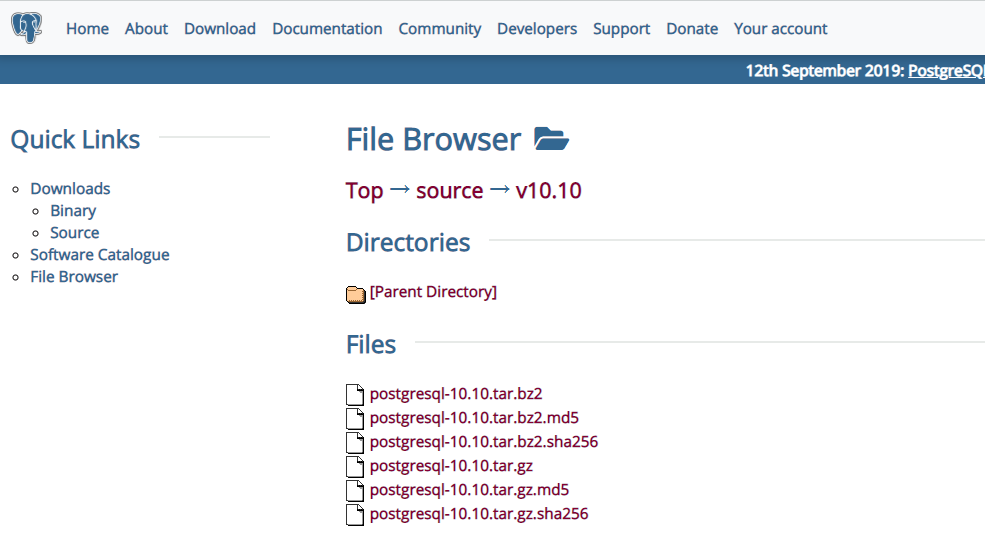
百度搜索postgreslq的官网,然后下载源码即可.
https://www.postgresql.org/ftp/source/v10.10/

具体的下载地址为:
https://ftp.postgresql.org/pub/source/v10.10/postgresql-10.10.tar.gz
界面效果:
3.2 linux上面创建文件夹
[root@neoky01 ~]# mkdir /pg10

[root@neoky01 ~]# useradd postgres

[root@neoky01 ~]# mkdir /pgdata

[root@neoky01 ~]# chown postgres:root /pgdata

第一步创建 存放 PG源码的文件夹
第二步创建 运行postgreSQL数据库的用户
第三步创建 存放postgreSQL数据库数据文件的目录
第四步修改 存放postgreSQL数据库数据文件的目录的属主
3.3 将postgresql的源码上传至服务器的/pg10 目录中
3.4 解压缩然后进行安装.
tar -zxvf 解压缩文件压缩包

cd .. 进入到解压缩后的文件夹

执行如下命令进行配置.

./configure --without-readline  --without-zlib

执行 make && make install 进行安装

龙芯3吖000的机器大约耗时: 900s
15:01 到 15:16

然后进入到 源文件的 contrib 的目录下面 执行命令
make && make install
大约耗时: 120s
15:19 到 15:21
3.5 修改环境变量
postgresql 源码安装默认安装到

/usr/local/pgsql/bin

这个目录中, 为了简单起见. 可以修改一下 环境变量便于使用.

vim /etc/profile.d/pg.sh

增加上一行内容即可

export PATH=$PATH:/usr/local/pgsql/bin

然后使之生效

source  /etc/profile.d/pg.sh
3.6 初始化数据库
需要切换用户

su - postgres

执行命令:

 initdb -D /pgdata

就完成了数据库的创建过程.
一般的提示信息为:
[root@neoky01 bin]# su - postgres

[postgres@neoky01 ~]$ initdb -D /pgdata

The files belonging to this database system will be owned by user "postgres".

This user must also own the server process.

The database cluster will be initialized with locale "zh_CN.UTF-8".

The default database encoding has accordingly been set to "UTF8".

initdb: could not find suitable text search configuration for locale "zh_CN.UTF-8"

The default text search configuration will be set to "simple".

Data page checksums are disabled.

fixing permissions on existing directory /pgdata ... ok

creating subdirectories ... ok

selecting default max_connections ...

selecting default shared_buffers ... 128MB

selecting default timezone ... PRC

selecting dynamic shared memory implementation ... posix

creating configuration files ... ok

running bootstrap script ... ok

performing post-bootstrap initialization ... ok

syncing data to disk ... ok

WARNING: enabling "trust" authentication for local connections

You can change this by editing pg_hba.conf or using the option -A, or

--auth-local and --auth-host, the next time you run initdb.

Success. You can now start the database server using:

    pg_ctl -D /pgdata -l logfile start
3.7 使用systemd 设置为daemon 服务启动
注意 需要使用root 用户进行编辑

vim /etc/systemd/system/pg.service

插入内容:

[Unit]

Description=pg

[Service]

User=postgres

ExecStart=/usr/local/pgsql/bin/postmaster -D /pgdata

Restart=always

[Install]

WantedBy=multi-user.target
设置服务自动启动还有开启服务
systemctl enable pg

systemctl restart pg
3.8 查看服务状态以及修改安全配置
systemctl status pg

需要修改安全配置, 注意 数据库的配置文件就在/pgdata 里面
3.放开监听以及修改连接数等.
vim /pgdata/postgresql.conf

主要修改如下内容:

# - Connection Settings -

listen_addresses = '*'          # what IP address(es) to listen on;

                                        # comma-separated list of addresses;

                                        # defaults to 'localhost'; use '*' for all

                                        # (change requires restart)

port =                              # (change requires restart)

max_connections =                   # (change requires restart)
修改安全配置
vim /pgdata/pg_hba.conf

在ipv4 下面增加一行记录

host    all             all             0.0.0.0/              md5

注意 md5 必须使用密码登录 trust 可以不使用密码登录 非常不安全 所以强烈不建议使用trust ..
3.9 设置 postgres 数据库用户的密码
linux 下面执行命令

su - postgres
然后执行命令
psql
进入postgreSQL数据库的操作界面, 一般的提示信息如:
然后执行命令
alter role postgres with password 'Test6530';
注意 一定要有 分号, 并且湖之一要有具体的提示信息才可以.
[root@neoky01 bin]# su - postgres
[postgres@neoky01 ~]$ psql
psql (10.10)
Type "help" for help.
postgres=# alter role postgres with password 'Test6530';
ALTER ROLE
postgres=#
出现alter role 即可.
3.10 重启postgresql 数据库,并且验证是否可以连接
systemctl restart pg
然后使用 navicat 进行连接测试.

安装完成.
国产龙芯服务器源码安装PostgreSQL数据库的方法的更多相关文章
- 源码安装postgresql数据库
一般情况下,postgresql由非root用户启动. 1.创建postgres用户 groupadd postgres useradd -g postgres postgres 下面的操作都在pos ...
- CentOS7 源码安装 PostgreSQL 12
PostgreSQL 12 源码安装 Table of Contents 1. 下载 2. 准备环境 3. 编译安装 4. 设置环境变量 5. 初始化数据库 6. 配置参数文件 6.1. postgr ...
- 记录一个源码安装mysql5.6的方法
https://www.jb51.net/article/118853.htm 如果之前源码安装过mysql5.6的话,卸载方法如下:rm -rf /var/lib/mysql/rm -rf /usr ...
- linux源码安装软件的一般方法
rhel系统貌似安装不了xmgrace,配置的时候居然说要那个M*tif库.百度了一下,需要openmotif库,然后用root账户想要用yum安装一下这个库,搞了好久没搞懂.后面搞明白了,原因竟是因 ...
- Linux环境下源码安装PostgreSQL
1.下载PostgreSQL源码包,并保存到Linux操作系统的一个目录下 2.解压PostgreSQL源码包 :tar zxvf postgresql-9.2.4.tar.gz 或 tar jxvf ...
- Centos7 源码安装PostgreSQL Citus集群 (转载)
citus的分布式集群目前在苏宁大规模应用,苏宁陈华军也做了很多技术分享和博客介绍.目前所有的教程都是rpm和pg一起安装,个人不喜欢,毕竟citus定位是个插件,我想在我已安装的pg上源码装一个ci ...
- linux 源码安装postgresql
下载源码包 --安装所需要的系统软件包 yum groupinstall -y "Development tools" yum install -y bison flex read ...
- samba服务器源码安装(非rpm)
首先我们创建一个文档,边安装配置samba,边写教程. 从www.samba.org下载samba最新源码包,我下载的是samba-3.0.7.tar.gz,把它放在我的目录的中/root/lova/ ...
- PostGreSQL(1)-源码安装
目录 简述 一.格式化磁盘 二.源码安装 PostGreSql 1. 安装 readline-devel 2. 安装 PostGresql 3. 设置环境变量 三. 初始化 1. 设置运行用户 2. ...
随机推荐
- $noip2018$游记+考后总结
游记部分 Day-5 - Day0 敲了敲模板,打了几场模拟赛,都在颓废,其他什么都没做 Day1 早上继续写模板,水了会QQ,其他什么都没做 中午试图背模板,没成功(其实下午才发现敲的模板一个没用上 ...
- Poj 2104 K-th Number(主席树&&整体二分)
K-th Number Time Limit: 20000MS Memory Limit: 65536K Case Time Limit: 2000MS Description You are wor ...
- 前端武器库之DOM练习
1.模态对话框 <!DOCTYPE html> <html lang="en"> <head> <meta charset="U ...
- 如何用Python删除一个文件?
删除文件 path,删除时候如果path是一个目录, 抛出 OSError错误. remove() 同 unlink() 的功能是一样的 os.remove('a.txt') 如果remove文件夹就 ...
- SSO单点登录实例
单点登录流程图 系统登陆拦截器 // // Source code recreated from a .class file by IntelliJ IDEA // (powered by Fernf ...
- Hadoop Aggregate Resource Allocation解释
1.在hadoop里面运行程序的时候,查看某个任务的具体信息如下: [hadoop@master monitor]$ yarn application -list 如上图,这里面的Aggregate ...
- 小程序tabBar的使用
这个selectedIconPath一定要写,否则选中的那个图片是不会显示的 下面是不写的现象: onTabItemTap的使用---下面的现象说明:只有tab值向哪个页面才会触发.
- Java核心复习——线程池ThreadPoolExecutor源码分析
一.线程池的介绍 线程池一种性能优化的重要手段.优化点在于创建线程和销毁线程会带来资源和时间上的消耗,而且线程池可以对线程进行管理,则可以减少这种损耗. 使用线程池的好处如下: 降低资源的消耗 提高响 ...
- 常用的etl工具比较
ETL是什么? ETL,是英文 Extract-Transform-Load 的缩写,用来描述将数据从来源端经过抽取(extract).转换(transform).加载(load)至目的端的过程.(数 ...
- 【Java】能提高日常工作效率的一些Java函数
自编工具总是临时抱佛脚来得顺溜,宜常备手边以提高工作效率: package com.hy; import java.io.File; /** * 日常工作常用的一些工具方法 * @author 逆火 ...