
阿里云 elasticsearch 增删改查
kibana 控制台
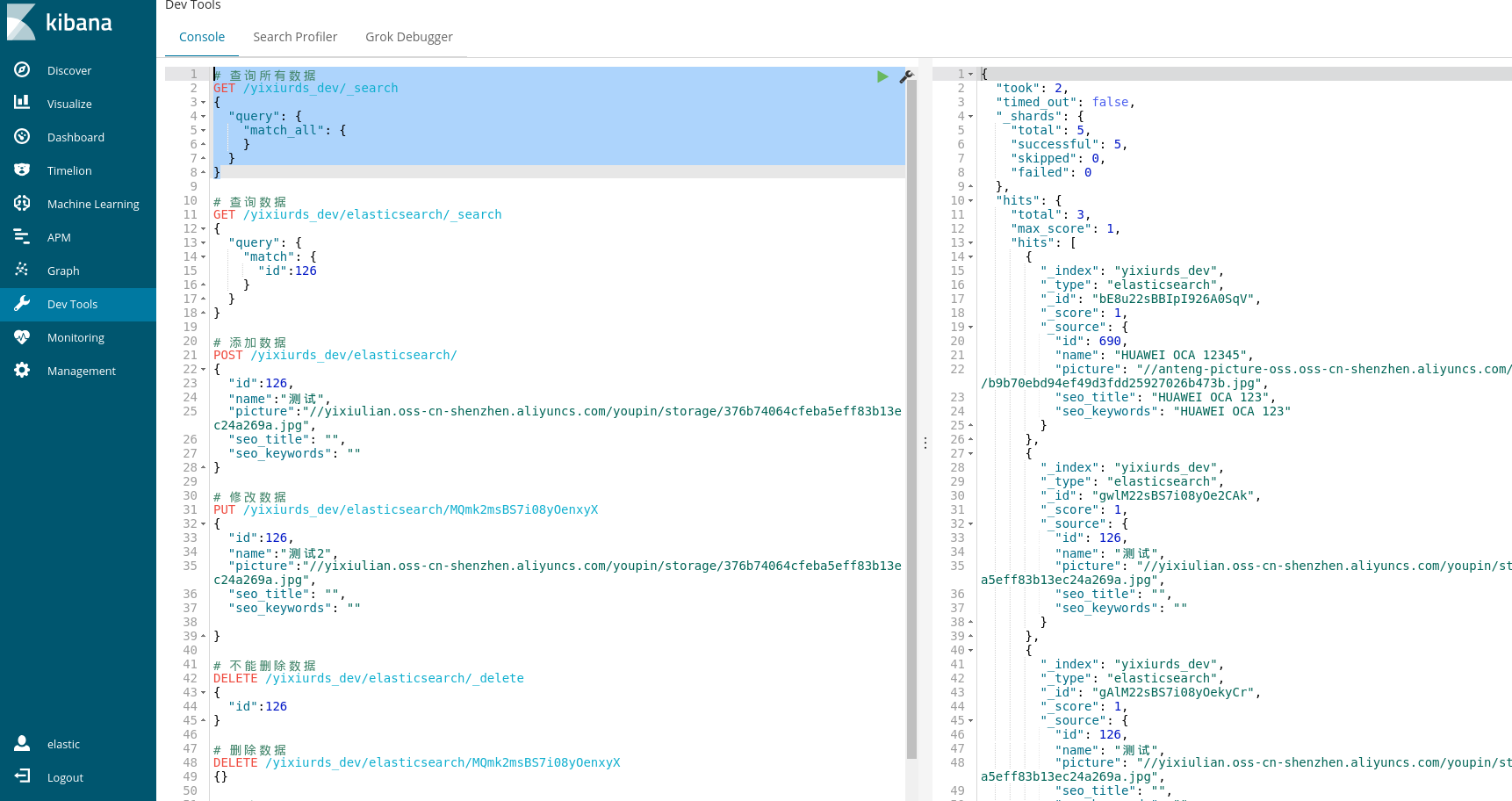
# 查询所有数据

GET /yixiurds_dev/_search

{

  "query": {

    "match_all": {

    }

  }

}

# 查询数据

GET /yixiurds_dev/elasticsearch/_search

{

  "query": {

    "match": {

      "id":126

    }

  }

}

# 添加数据

POST /yixiurds_dev/elasticsearch/

{

  "id":126,

  "name":"测试",

  "picture":"//yixiulian.oss-cn-shenzhen.aliyuncs.com/youpin/storage/376b74064cfeba5eff83b13ec24a269a.jpg",

  "seo_title": "",

  "seo_keywords": ""

}

# 修改数据

PUT /yixiurds_dev/elasticsearch/MQmk2msBS7i08yOenxyX

{

  "id":126,

  "name":"测试2",

  "picture":"//yixiulian.oss-cn-shenzhen.aliyuncs.com/youpin/storage/376b74064cfeba5eff83b13ec24a269a.jpg",

  "seo_title": "",

  "seo_keywords": ""

}

# 不能删除数据

DELETE /yixiurds_dev/elasticsearch/_delete

{

  "id":126

}

# 删除数据

DELETE /yixiurds_dev/elasticsearch/MQmk2msBS7i08yOenxyX

{}

# 删除索引

DELETE /yixiurds_dev

# 创建索引

PUT /yixiurds_dev
代码示例
@Component

public class ElasticsearchUtils {

    private static final Logger logger = LoggerFactory.getLogger(ElasticsearchUtils.class);

    private static String elasticHostName;

    private static String elasticUserName;

    private static String elasticPassword;

    private static String elasticIndex;

    private static RestClient restClient;

    private static RestClient getRestClient() {

        if (restClient == null) {

            synchronized (ElasticsearchUtils.class) {

                if (restClient == null) {

                    CredentialsProvider credentialsProvider = new BasicCredentialsProvider();

                    credentialsProvider.setCredentials(AuthScope.ANY, new UsernamePasswordCredentials(elasticUserName, elasticPassword));

                    restClient = RestClient.builder(new HttpHost(elasticHostName, 9200))

                            .setHttpClientConfigCallback(httpClientBuilder -> httpClientBuilder.setDefaultCredentialsProvider(credentialsProvider)).build();

                }

                return restClient;

            }

        } else {

            return restClient;

        }

    }

    /**

     * 更新搜索的商品

     */

    public static void updateGoodsList(List<Goods> goodsList) {

        RestClient restClient = getRestClient();

        goodsList.forEach(goods -> {

            GoodsEsResp goodsEsResp = getGoods(goods.getId());

            List<String> esIds = goodsEsResp.getEsIds();

            if (CollectionUtils.isEmpty(esIds)) {

                return;

            }

            esIds.forEach(esId -> {

                String method = "PUT";

                String endpoint = "/" + elasticIndex + "/elasticsearch/" + esId;

                HttpEntity entity = new NStringEntity(

                        "{\n" +

                                "    \"id\" : " + goods.getId() + ",\n" +

                                "    \"name\" : \"" + goods.getName()+ "\",\n" +

                                "    \"picture\" : \"" + goods.getPicture() + "\",\n" +

                                "    \"seo_title\" : \"" + goods.getSeoTitle() + "\",\n" +

                                "    \"seo_keywords\" : \"" + goods.getSeoKeywords() + "\"\n" +

                                "}", ContentType.APPLICATION_JSON);

                Response response = null;

                try {

                    response = restClient.performRequest(method, endpoint, Collections.<String, String>emptyMap(), entity);

                    logger.info(JSON.toJSONString(response));

                } catch (IOException e) {

                    logger.error(e.toString());

                }

            });

        });

    }

    /**

     * 添加搜索的商品

     */

    public static void addGoodsList(List<Goods> goodsList) {

        RestClient restClient = getRestClient();

        goodsList.forEach(goods -> {

            String method = "POST";

            String endpoint = "/" + elasticIndex + "/elasticsearch/";

            HttpEntity entity = new NStringEntity(

                    "{\n" +

                            "    \"id\" : " + goods.getId() + ",\n" +

                            "    \"name\" : \"" + goods.getName()+ "\",\n" +

                            "    \"picture\" : \"" + goods.getPicture() + "\",\n" +

                            "    \"seo_title\" : \"" + goods.getSeoTitle() + "\",\n" +

                            "    \"seo_keywords\" : \"" + goods.getSeoKeywords() + "\"\n" +

                            "}", ContentType.APPLICATION_JSON);

            Response response = null;

            try {

                response = restClient.performRequest(method, endpoint, Collections.<String, String>emptyMap(), entity);

                logger.info(JSON.toJSONString(response));

            } catch (IOException e) {

                logger.error(e.toString());

            }

        });

    }

    /**

     * 删除搜索的商品

     */

    public static void delGoodsList(List<Goods> goodsList) {

        RestClient restClient = getRestClient();

        goodsList.forEach(goods -> {

            GoodsEsResp goodsEsResp = getGoods(goods.getId());

            List<String> esIds = goodsEsResp.getEsIds();

            if (CollectionUtils.isEmpty(esIds)) {

                return;

            }

            esIds.forEach(esId -> {

                String method = "DELETE";

                String endpoint = "/" + elasticIndex + "/elasticsearch/" + esId;

                HttpEntity entity = new NStringEntity(

                        "{}", ContentType.APPLICATION_JSON);

                Response response = null;

                try {

                    response = restClient.performRequest(method, endpoint, Collections.<String, String>emptyMap(), entity);

                    logger.info(JSON.toJSONString(response));

                } catch (IOException e) {

                    logger.error(e.toString());

                }

            });

        });

    }

    /**

     * 获取搜索的商品

     */

    public static GoodsEsResp getGoods(Long goodsId) {

        GoodsEsResp goodsEsResp = new GoodsEsResp();

        RestClient restClient = getRestClient();

        String method = "GET";

        String endpoint = "/" + elasticIndex + "/elasticsearch/_search";

        HttpEntity entity = new NStringEntity("{\n" +

                "  \"query\": {\n" +

                "    \"match\": {\n" +

                "      \"id\":" + goodsId + "\n" +

                "    }\n" +

                "  }\n" +

                "}", ContentType.APPLICATION_JSON);

        Response response = null;

        try {

            response = restClient.performRequest(method, endpoint, Collections.<String, String>emptyMap(), entity);

            JSONObject jsonObject = JSON.parseObject(EntityUtils.toString(response.getEntity()));

            Object hits = jsonObject.get("hits");

            JSONArray jsonArray = (JSONArray) ((JSONObject) hits).get("hits");

            List<String> esIds = new ArrayList<>();

            jsonArray.forEach(o -> {

                String esId = (String) ((JSONObject) o).get("_id");

                if (StringUtils.isNotBlank(esId)) {

                    esIds.add(esId);

                }

            });

            goodsEsResp.setEsIds(esIds);

            logger.info(JSON.toJSONString(response));

        } catch (IOException e) {

            logger.error(e.toString());

        }

        return goodsEsResp;

    }

    public String getElasticHostName() {

        return elasticHostName;

    }

    @Value("${aliyun_elasticsearch_host}")

    public void setElasticHostName(String elasticHostName) {

        ElasticsearchUtils.elasticHostName = elasticHostName;

    }

    public String getElasticUserName() {

        return elasticUserName;

    }

    @Value("${aliyun_elasticsearch_username}")

    public void setElasticUserName(String elasticUserName) {

        ElasticsearchUtils.elasticUserName = elasticUserName;

    }

    public String getElasticPassword() {

        return elasticPassword;

    }

    @Value("${aliyun_elasticsearch_password}")

    public void setElasticPassword(String elasticPassword) {

        ElasticsearchUtils.elasticPassword = elasticPassword;

    }

    public String getElasticIndex() {

        return elasticIndex;

    }

    @Value("${aliyun_elasticsearch_index}")

    public void setElasticIndex(String elasticIndex) {

        ElasticsearchUtils.elasticIndex = elasticIndex;

    }

}
指定ID代替自动生成的_id可以节省一次查询
# 添加数据

POST /index_test/type_test/127

{

  "id":127,

  "name":"测试",

  "picture":"//yixiulian.oss-cn-shenzhen.aliyuncs.com/youpin/storage/376b74064cfeba5eff83b13ec24a269a.jpg",

  "seo_title": "",

  "seo_keywords": ""

}
查询所有:
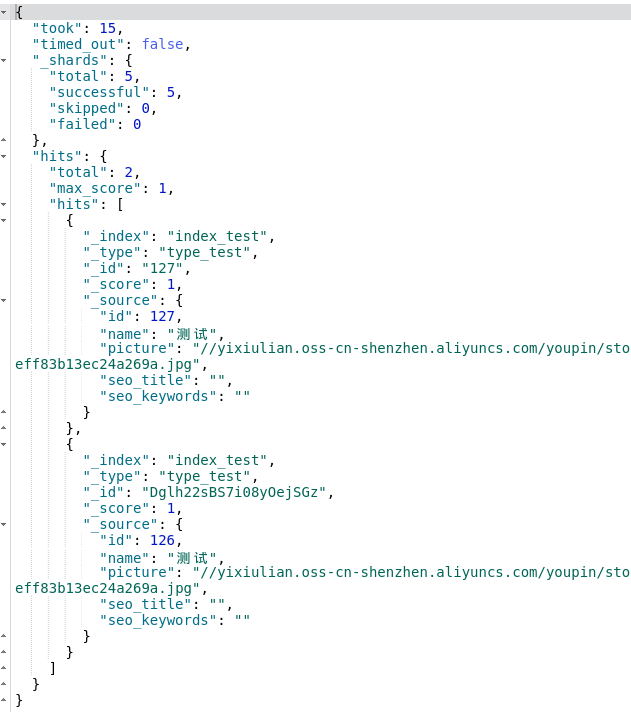
# id查询数据

GET /index_test/type_test/127
批量同步
DataWorks定时同步数据库的数据到ES
一个index 对应多个type:
PUT /index_test4

{

  "mappings":{

            "type_1":{

                        "_all" : {"enabled" : true},

                        "properties":{

                                    "field_1":{ "type":"string"},

                                    "field_2":{ "type":"long"}

                        }

            },

            "type_2":{

                        "properties":{

                                    "field_3":{ "type":"string"},

                                    "field_4":{ "type":"date"}

                        }

            }

  }

}
阿里云 elasticsearch 增删改查的更多相关文章
- elasticsearch增删改查crudp-----1
Elasticsearch一些增删改查的总结 环境Centos7+Es 5.x 简单介绍下ES的原理: 1,索引 --相当于传统关系型数据库的database或schema 2,类型 --相当于传 ...
- elasticsearch 增删改查底层原理
elasticsearch专栏:https://www.cnblogs.com/hello-shf/category/1550315.html 一.预备知识 在对document的curd进行深度分析 ...
- Elasticsearch增删改查 之 —— mget多文档查询
之前说过了针对单一文档的增删改查,基本也算是达到了一个基本数据库的功能.本篇主要描述的是多文档的查询,通过这个查询语法,可以根据多个文档的查询条件,返回多个文档集合. 更多内容可以参考我整理的ELK文 ...
- ES 17 - (底层原理) Elasticsearch增删改查索引数据的过程
目录 1 增删改document的流程 1.1 协调节点 - Coordinating Node 1.2 增删改document的流程 2 查询document的流程 1 增删改document的流程 ...
- Elasticsearch增删改查 之 —— Get查询
GET API是Elasticsearch中常用的操作,一般用于验证文档是否存在:或者执行CURD中的文档查询.与检索不同的是,GET查询是实时查询,可以实时查询到索引结果.而检索则是需要经过处理,一 ...
- Elasticsearch增删改查 之 —— Delete删除
删除文档也算是常用的操作了...如果把Elasticsearch当做一款普通的数据库,那么删除操作自然就很常用了.如果仅仅是全文检索,可能就不会太常用到删除. Delete API 删除API,可以根 ...
- Java之Elasticsearch 增删改查
<!--ELK --> <dependency> <groupId>org.elasticsearch.client</groupId> <art ...
- elasticsearch增删改查操作
目录 1. 插入数据 2. 更改数据 3. 删除数据 4. 检索文档 1. 插入数据 关于下面的代码如何使用,可以借助于kibana的console,浏览器打开地址: http://xxx.xxx.x ...
- ElasticSearch 增删改查
HTTP 协议本身语义:GET 获取资源.POST 新建资源(也可以用于更新资源).PUT 更新资源.DELETE 删除资源. ES通过HTTP Restful方式管理数据:1.格式:#操作 /ind ...
随机推荐
- react-native-swiper设定高度的方法(设置rn轮播图所占高度)
效果图: 直接上解决方案: 1.在Swiper标签外套一层View <View style={styles.container}> <Swiper style={styles.wra ...
- WebServer_简单例子
#-*-coding:utf-8-*- importwebimportjson urls=("/.*","index")app=web.application( ...
- Java内部类(2):普通的成员内部类
在成员内部类中要注意两点 第一:成员内部类中不能存在任何static的变量和方法: 第二:成员内部类是依附于外围类的,所以只有先创建了外围类才能够创建内部类. 接下来是两个例子(关键字:.this . ...
- JAVA 面向对象编程 --自我总结
子系统 系统结构是指由系统多个子系统组成,以及子系统由多个更小的子系统组成的结构.那么子系统又具备哪些特点呢? 特点: 1.结构的稳定性 :软件在设计阶段,在把一个系统划分成更小的子系统时,设计合理, ...
- C语言链表之两数相加
题目描述 给出两个 非空 的链表用来表示两个非负的整数.其中,它们各自的位数是按照 逆序 的方式存储的,并且它们的每个节点只能存储 一位 数字. 如果,我们将这两个数相加起来,则会返回一个新的链表来表 ...
- 关于kail的远程连接
昨天开始学关于网络攻防的一下知识,虚拟机的镜像用的是kail,对自己造成了很多不适应的地方,有点自闭了. 最近会和大家分享一些关于kail的问题或者说网络攻防方面.这次就说一下kail的远程服务. k ...
- 【计算机视觉】Vibe Vibe+
ViBe是一种像素级的背景建模.前景检测算法,该算法主要不同之处是背景模型的更新策略,随机选择需要替换的像素的样本,随机选择邻域像素进行更新.在无法确定像素变化的模型时,随机的更新策略,在一定程度上可 ...
- IDEA 2019.2.2破解激活方法(激活到2089年8月,亲测有效)
本来笔者这边是有个正版激活码可以使用的,但是,2019.9月3号的时候,一些小伙伴反映这个注册码已经失效了,于是拿着自己的 IDEA, 赶快测试了一下,果不其然,已然是不能用了. 好在,笔者又找到了新 ...
- windows环境jar包部署到linux服务器,一键操作(帮助说明)
背景:在上次https://www.cnblogs.com/shexunyu/p/11165282.html发布了第一个版本后,后面增加了相关功能 需求:做下简单的说明文档 下载:https://fi ...
- row_number()、rank()、dense_rank()排序方式的区别
1.row_number() 排序策略,连续排序,它会为查询出来的每一行记录生成一个序号,依次排序且不会重复,例如1,2,3,4 SELECT names,dept,row_number() OV ...