
阿里云 elasticsearch 增删改查
kibana 控制台
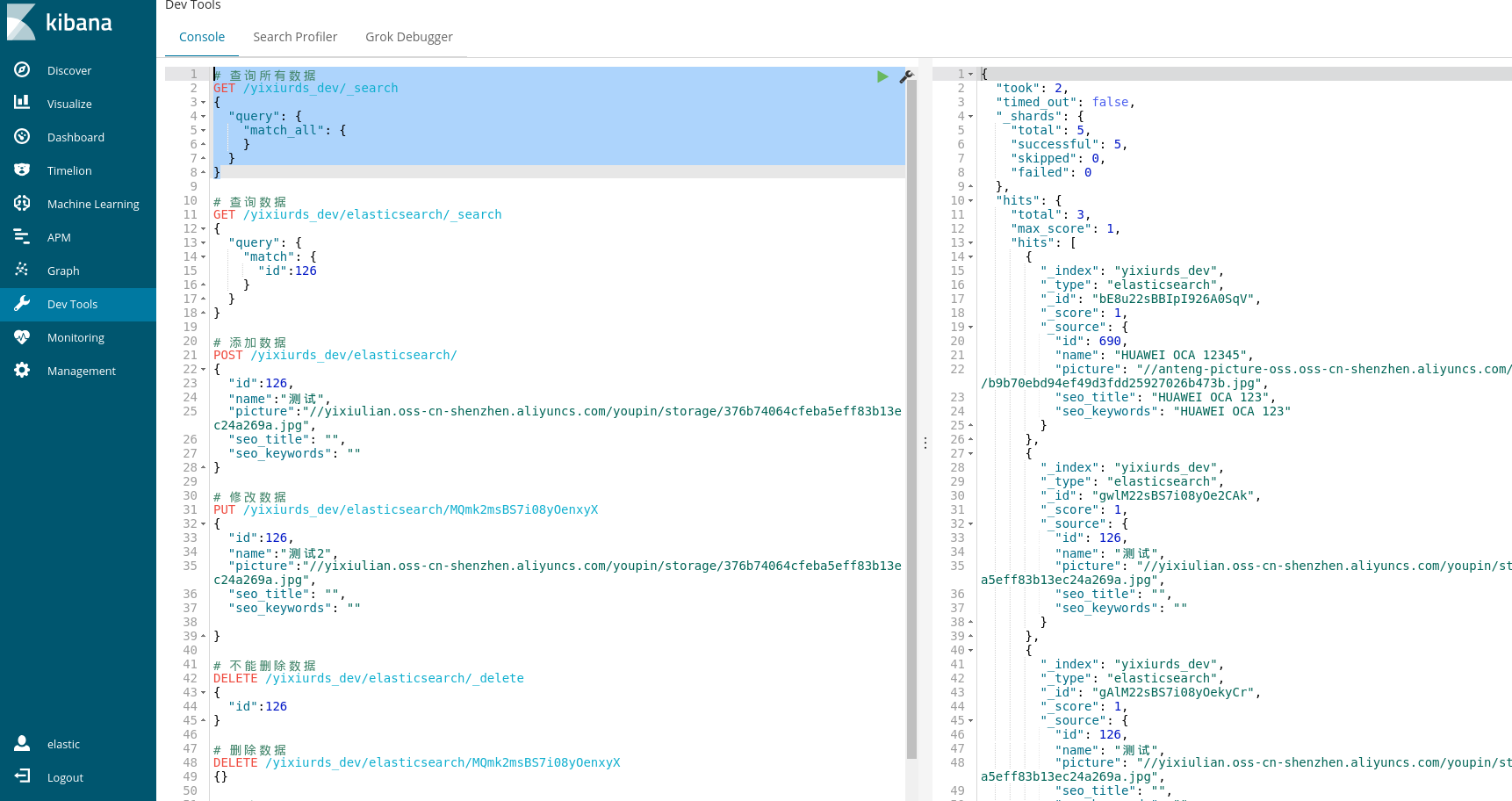
# 查询所有数据

GET /yixiurds_dev/_search

{

  "query": {

    "match_all": {

    }

  }

}

# 查询数据

GET /yixiurds_dev/elasticsearch/_search

{

  "query": {

    "match": {

      "id":126

    }

  }

}

# 添加数据

POST /yixiurds_dev/elasticsearch/

{

  "id":126,

  "name":"测试",

  "picture":"//yixiulian.oss-cn-shenzhen.aliyuncs.com/youpin/storage/376b74064cfeba5eff83b13ec24a269a.jpg",

  "seo_title": "",

  "seo_keywords": ""

}

# 修改数据

PUT /yixiurds_dev/elasticsearch/MQmk2msBS7i08yOenxyX

{

  "id":126,

  "name":"测试2",

  "picture":"//yixiulian.oss-cn-shenzhen.aliyuncs.com/youpin/storage/376b74064cfeba5eff83b13ec24a269a.jpg",

  "seo_title": "",

  "seo_keywords": ""

}

# 不能删除数据

DELETE /yixiurds_dev/elasticsearch/_delete

{

  "id":126

}

# 删除数据

DELETE /yixiurds_dev/elasticsearch/MQmk2msBS7i08yOenxyX

{}

# 删除索引

DELETE /yixiurds_dev

# 创建索引

PUT /yixiurds_dev
代码示例
@Component

public class ElasticsearchUtils {

    private static final Logger logger = LoggerFactory.getLogger(ElasticsearchUtils.class);

    private static String elasticHostName;

    private static String elasticUserName;

    private static String elasticPassword;

    private static String elasticIndex;

    private static RestClient restClient;

    private static RestClient getRestClient() {

        if (restClient == null) {

            synchronized (ElasticsearchUtils.class) {

                if (restClient == null) {

                    CredentialsProvider credentialsProvider = new BasicCredentialsProvider();

                    credentialsProvider.setCredentials(AuthScope.ANY, new UsernamePasswordCredentials(elasticUserName, elasticPassword));

                    restClient = RestClient.builder(new HttpHost(elasticHostName, 9200))

                            .setHttpClientConfigCallback(httpClientBuilder -> httpClientBuilder.setDefaultCredentialsProvider(credentialsProvider)).build();

                }

                return restClient;

            }

        } else {

            return restClient;

        }

    }

    /**

     * 更新搜索的商品

     */

    public static void updateGoodsList(List<Goods> goodsList) {

        RestClient restClient = getRestClient();

        goodsList.forEach(goods -> {

            GoodsEsResp goodsEsResp = getGoods(goods.getId());

            List<String> esIds = goodsEsResp.getEsIds();

            if (CollectionUtils.isEmpty(esIds)) {

                return;

            }

            esIds.forEach(esId -> {

                String method = "PUT";

                String endpoint = "/" + elasticIndex + "/elasticsearch/" + esId;

                HttpEntity entity = new NStringEntity(

                        "{\n" +

                                "    \"id\" : " + goods.getId() + ",\n" +

                                "    \"name\" : \"" + goods.getName()+ "\",\n" +

                                "    \"picture\" : \"" + goods.getPicture() + "\",\n" +

                                "    \"seo_title\" : \"" + goods.getSeoTitle() + "\",\n" +

                                "    \"seo_keywords\" : \"" + goods.getSeoKeywords() + "\"\n" +

                                "}", ContentType.APPLICATION_JSON);

                Response response = null;

                try {

                    response = restClient.performRequest(method, endpoint, Collections.<String, String>emptyMap(), entity);

                    logger.info(JSON.toJSONString(response));

                } catch (IOException e) {

                    logger.error(e.toString());

                }

            });

        });

    }

    /**

     * 添加搜索的商品

     */

    public static void addGoodsList(List<Goods> goodsList) {

        RestClient restClient = getRestClient();

        goodsList.forEach(goods -> {

            String method = "POST";

            String endpoint = "/" + elasticIndex + "/elasticsearch/";

            HttpEntity entity = new NStringEntity(

                    "{\n" +

                            "    \"id\" : " + goods.getId() + ",\n" +

                            "    \"name\" : \"" + goods.getName()+ "\",\n" +

                            "    \"picture\" : \"" + goods.getPicture() + "\",\n" +

                            "    \"seo_title\" : \"" + goods.getSeoTitle() + "\",\n" +

                            "    \"seo_keywords\" : \"" + goods.getSeoKeywords() + "\"\n" +

                            "}", ContentType.APPLICATION_JSON);

            Response response = null;

            try {

                response = restClient.performRequest(method, endpoint, Collections.<String, String>emptyMap(), entity);

                logger.info(JSON.toJSONString(response));

            } catch (IOException e) {

                logger.error(e.toString());

            }

        });

    }

    /**

     * 删除搜索的商品

     */

    public static void delGoodsList(List<Goods> goodsList) {

        RestClient restClient = getRestClient();

        goodsList.forEach(goods -> {

            GoodsEsResp goodsEsResp = getGoods(goods.getId());

            List<String> esIds = goodsEsResp.getEsIds();

            if (CollectionUtils.isEmpty(esIds)) {

                return;

            }

            esIds.forEach(esId -> {

                String method = "DELETE";

                String endpoint = "/" + elasticIndex + "/elasticsearch/" + esId;

                HttpEntity entity = new NStringEntity(

                        "{}", ContentType.APPLICATION_JSON);

                Response response = null;

                try {

                    response = restClient.performRequest(method, endpoint, Collections.<String, String>emptyMap(), entity);

                    logger.info(JSON.toJSONString(response));

                } catch (IOException e) {

                    logger.error(e.toString());

                }

            });

        });

    }

    /**

     * 获取搜索的商品

     */

    public static GoodsEsResp getGoods(Long goodsId) {

        GoodsEsResp goodsEsResp = new GoodsEsResp();

        RestClient restClient = getRestClient();

        String method = "GET";

        String endpoint = "/" + elasticIndex + "/elasticsearch/_search";

        HttpEntity entity = new NStringEntity("{\n" +

                "  \"query\": {\n" +

                "    \"match\": {\n" +

                "      \"id\":" + goodsId + "\n" +

                "    }\n" +

                "  }\n" +

                "}", ContentType.APPLICATION_JSON);

        Response response = null;

        try {

            response = restClient.performRequest(method, endpoint, Collections.<String, String>emptyMap(), entity);

            JSONObject jsonObject = JSON.parseObject(EntityUtils.toString(response.getEntity()));

            Object hits = jsonObject.get("hits");

            JSONArray jsonArray = (JSONArray) ((JSONObject) hits).get("hits");

            List<String> esIds = new ArrayList<>();

            jsonArray.forEach(o -> {

                String esId = (String) ((JSONObject) o).get("_id");

                if (StringUtils.isNotBlank(esId)) {

                    esIds.add(esId);

                }

            });

            goodsEsResp.setEsIds(esIds);

            logger.info(JSON.toJSONString(response));

        } catch (IOException e) {

            logger.error(e.toString());

        }

        return goodsEsResp;

    }

    public String getElasticHostName() {

        return elasticHostName;

    }

    @Value("${aliyun_elasticsearch_host}")

    public void setElasticHostName(String elasticHostName) {

        ElasticsearchUtils.elasticHostName = elasticHostName;

    }

    public String getElasticUserName() {

        return elasticUserName;

    }

    @Value("${aliyun_elasticsearch_username}")

    public void setElasticUserName(String elasticUserName) {

        ElasticsearchUtils.elasticUserName = elasticUserName;

    }

    public String getElasticPassword() {

        return elasticPassword;

    }

    @Value("${aliyun_elasticsearch_password}")

    public void setElasticPassword(String elasticPassword) {

        ElasticsearchUtils.elasticPassword = elasticPassword;

    }

    public String getElasticIndex() {

        return elasticIndex;

    }

    @Value("${aliyun_elasticsearch_index}")

    public void setElasticIndex(String elasticIndex) {

        ElasticsearchUtils.elasticIndex = elasticIndex;

    }

}
指定ID代替自动生成的_id可以节省一次查询
# 添加数据

POST /index_test/type_test/127

{

  "id":127,

  "name":"测试",

  "picture":"//yixiulian.oss-cn-shenzhen.aliyuncs.com/youpin/storage/376b74064cfeba5eff83b13ec24a269a.jpg",

  "seo_title": "",

  "seo_keywords": ""

}
查询所有:
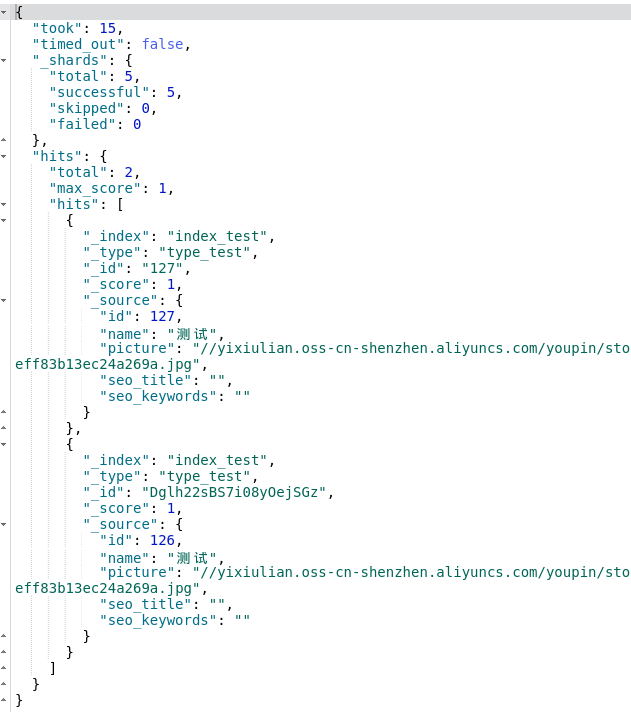
# id查询数据

GET /index_test/type_test/127
批量同步
DataWorks定时同步数据库的数据到ES
一个index 对应多个type:
PUT /index_test4

{

  "mappings":{

            "type_1":{

                        "_all" : {"enabled" : true},

                        "properties":{

                                    "field_1":{ "type":"string"},

                                    "field_2":{ "type":"long"}

                        }

            },

            "type_2":{

                        "properties":{

                                    "field_3":{ "type":"string"},

                                    "field_4":{ "type":"date"}

                        }

            }

  }

}
阿里云 elasticsearch 增删改查的更多相关文章
- elasticsearch增删改查crudp-----1
Elasticsearch一些增删改查的总结 环境Centos7+Es 5.x 简单介绍下ES的原理: 1,索引 --相当于传统关系型数据库的database或schema 2,类型 --相当于传 ...
- elasticsearch 增删改查底层原理
elasticsearch专栏:https://www.cnblogs.com/hello-shf/category/1550315.html 一.预备知识 在对document的curd进行深度分析 ...
- Elasticsearch增删改查 之 —— mget多文档查询
之前说过了针对单一文档的增删改查,基本也算是达到了一个基本数据库的功能.本篇主要描述的是多文档的查询,通过这个查询语法,可以根据多个文档的查询条件,返回多个文档集合. 更多内容可以参考我整理的ELK文 ...
- ES 17 - (底层原理) Elasticsearch增删改查索引数据的过程
目录 1 增删改document的流程 1.1 协调节点 - Coordinating Node 1.2 增删改document的流程 2 查询document的流程 1 增删改document的流程 ...
- Elasticsearch增删改查 之 —— Get查询
GET API是Elasticsearch中常用的操作,一般用于验证文档是否存在:或者执行CURD中的文档查询.与检索不同的是,GET查询是实时查询,可以实时查询到索引结果.而检索则是需要经过处理,一 ...
- Elasticsearch增删改查 之 —— Delete删除
删除文档也算是常用的操作了...如果把Elasticsearch当做一款普通的数据库,那么删除操作自然就很常用了.如果仅仅是全文检索,可能就不会太常用到删除. Delete API 删除API,可以根 ...
- Java之Elasticsearch 增删改查
<!--ELK --> <dependency> <groupId>org.elasticsearch.client</groupId> <art ...
- elasticsearch增删改查操作
目录 1. 插入数据 2. 更改数据 3. 删除数据 4. 检索文档 1. 插入数据 关于下面的代码如何使用,可以借助于kibana的console,浏览器打开地址: http://xxx.xxx.x ...
- ElasticSearch 增删改查
HTTP 协议本身语义:GET 获取资源.POST 新建资源(也可以用于更新资源).PUT 更新资源.DELETE 删除资源. ES通过HTTP Restful方式管理数据:1.格式:#操作 /ind ...
随机推荐
- matlab处理矩阵
1.提取大矩阵的一列.一行元素:一列元素: A(:,j)表示提取A矩阵的第j列全部元素一行元素: A(i,:)表示提取A矩阵的第i行元素,于是我们有,A(i, j)表示提取A矩阵的第i行第j列的元 ...
- 9Patch图
NinePatch是一种很有用的PNG图片格式,它可以在特定区域随文字大小进行缩放. - 上边线控制水平拉伸- 左边线控制竖直拉伸- 右边线和下边线控制内容区域 如下: 背景图片的中间区域会随着文字的 ...
- TCP怎么保证证包有序传输的,TCP的慢启动,拥塞避免,快速重传,快速恢复
TCP提供了最可靠的数据传输,它给发送的每个数据包做顺序化(这看起来非常烦琐),然而,如果TCP没有这样烦琐的操作,那么,可能会造成更多的麻烦.如造成数据包的重传.顺序的颠倒甚至造成数据包的丢失. 那 ...
- 小D课堂-SpringBoot 2.x微信支付在线教育网站项目实战_5-6.微信扫码登录回调本地域名映射工具Ngrock
笔记 6.微信扫码登录回调本地域名映射工具Ngrock 简介:讲解微信扫码回调本地域名ngrock讲解 1.为什么要用这个,微信扫码需要配置回调,需要配置对应的域名 ...
- 一百一十三:CMS系统之前台注册界面
html {% from 'common/_macros.html' import static %}<!DOCTYPE html><html lang="en" ...
- 如何访问pod(6)
一.通过 Service 访问 Pod: 我们不应该期望 Kubernetes Pod 是健壮的,而是要假设 Pod 中的容器很可能因为各种原因发生故障而死掉.Deployment 等 control ...
- Linux下高cpu解决方案(转载)
Linux下高cpu解决方案(转载 1.用top命令查看哪个进程占用CPU高gateway网关进程14094占用CPU高达891%,这个数值是进程内各个线程占用CPU的累加值. PID USER ...
- 转 - JS 中 call 和 apply 以及 bind 的区别
转自 https://blog.csdn.net/wyyandyou_6/article/details/81488103
- 牛客练习赛53 A-E
牛客联系赛53 A-E 题目链接:Link A 超越学姐爱字符串 题意: 长度为N的字符串,只能有C,Y字符,且字符串中不能连续出现 C. 思路: 其实就是DP,\(Dp[i][c]\) 表示长度为 ...
- Linux文件权限实践
用户测试准备: groupadd incahome ##一个家庭(dongdaxia的家) useradd dongdaxia -g incahome ##让家庭主人dongdaxia属于incaho ...