
9Flutter GridView组件 以及动态GridView
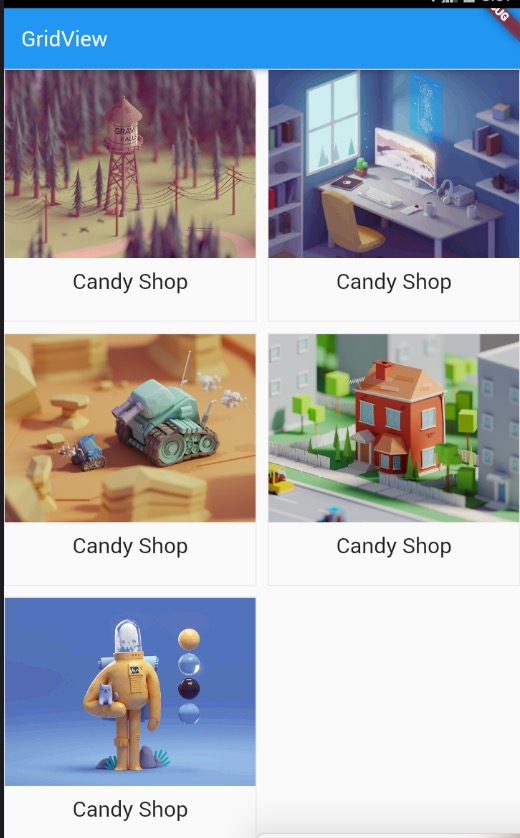
main.dart
import 'package:flutter/material.dart';

import 'res/listData.dart';

/*

      GridView :

      通过GridView.count实现网格布局

      通过GridView.builder实现网格布局

      scrollDirction  Axis 滚动方法

      padding  EdgeInsetsGeometry 内边距

      resolve  bool  组件反向排序

      crossAxisSpacing  double 水平子Widget之间间距

      mainAxisSpacing  double垂直子Widget之间间距

      crossAxisCount  int 一行的Widget数量

      childAspectRatio  double  子Wiget宽高比例

*/

void main() {

  runApp(MyApp());

}

class MyApp extends StatelessWidget {

  @override

  Widget build(BuildContext context) {

    // TODO: implement build

    return MaterialApp(

      home: Scaffold(

        appBar: AppBar(

          title: Text('GridView'),

        ),

        body: HomeContent(),

      ),

    );

  }

}

class HomeContent extends StatelessWidget {

  //GridView.count

  //自定义方法:

  // List<Widget> _getListData() {

  //   // List<Widget> list=new List();

  //   // for(var i=0;i<20;i++){

  //   //   list.add(Container(

  //   //     alignment: Alignment.center,

  //   //     child: Text(

  //   //       "这是第${i}条数据",

  //   //       style: TextStyle(color: Colors.white,fontSize:20 ),

  //   //     ),

  //   //     color: Colors.blue,

  //   //   ));

  //   // }

  //   // return list;

  //   var tempList = listData.map((value) {

  //     return Container(

  //       child: Column(

  //         children: <Widget>[

  //           Image.network(value['imageUrl']),

  //           SizedBox(height: 10),

  //           Text(

  //             value['title'],

  //             textAlign: TextAlign.center,

  //             style: TextStyle(fontSize: 20),

  //           )

  //         ],

  //       ),

  //       decoration: BoxDecoration(

  //         border: Border.all(

  //           color: Color.fromRGBO(233,233,233,0.9),

  //           width: 1

  //         )

  //       ),

  //     );

  //   });

  //   return tempList.toList();

  // }

  // @override

  // Widget build(BuildContext context) {

  //   return GridView.count(

  //     crossAxisSpacing: 10.0, //水平子Widget之间间距

  //     mainAxisSpacing: 10.0, //垂直Widget之间的间距

  //     padding: EdgeInsets.all(10),

  //     crossAxisCount: 2,

  //     // childAspectRatio: 0.7, //宽度和高度的比例

  //     children: this._getListData(),

  //   );

  // }

  //GridView.builder动态网格;

  Widget _getListData(context, index) {

    return Container(

      child: Column(

        children: <Widget>[

          Image.network(listData[index]['imageUrl']),

          SizedBox(height: ),

          Text(

            listData[index]['title'],

            textAlign: TextAlign.center,

            style: TextStyle(fontSize: ),

          )

        ],

      ),

      decoration: BoxDecoration(

          border:

              Border.all(color: Color.fromRGBO(, , , 0.9), width: )),

    );

  }

  @override

  Widget build(BuildContext context) {

    return GridView.builder(

      gridDelegate:SliverGridDelegateWithFixedCrossAxisCount(

        crossAxisSpacing: 10.0,

        mainAxisSpacing: 10.0,

        crossAxisCount:

      ),

      itemCount: listData.length,

      itemBuilder: this._getListData,

    );

  }

}
res/listData.dart
List listData=[

  {

    "title":"Candy Shop",

    "author":"Mohamed Chahin",

    "imageUrl":"https://www.itying.com/images/flutter/1.png",

  },

  {

    "title":"Candy Shop",

    "author":"Mohamed Chahin",

    "imageUrl":"https://www.itying.com/images/flutter/2.png",

  },

  {

    "title":"Candy Shop",

    "author":"Mohamed Chahin",

    "imageUrl":"https://www.itying.com/images/flutter/3.png",

  },

  {

    "title":"Candy Shop",

    "author":"Mohamed Chahin",

    "imageUrl":"https://www.itying.com/images/flutter/4.png",

  },{

    "title":"Candy Shop",

    "author":"Mohamed Chahin",

    "imageUrl":"https://www.itying.com/images/flutter/5.png",

  }

];
9Flutter GridView组件 以及动态GridView的更多相关文章
- GridView 列表组件 以及动态 GridView
1.通过 GridView.builder 实现网格布局 Widget getList(context, index) { return Container( margin: EdgeInse ...
- Flutter——GridView组件(网格列表组件)
GridView组件的常用参数: 名称 类型 说明 scrollDirection Axis 滚动方法 padding EdgeInsetsGeometry 内边距 resolve bool 组件反向 ...
- 第30讲 UI组件之 GridView组件
第30讲 UI组件之 GridView组件 1.网格布局组件GridView GridView是一个ViewGroup(布局控件),可使用表格的方式显示组件,可滚动的控件.一般用于显示多张图片,比如实 ...
- Flutter中打造多行列列表GridView组件的使用
GridView组件.一个可滚动的二维空间数组. 在使用无限加载滚动列表的时候,最先使用的还是ListView组件.但若是要一行显示2列或者更多列的滚动列表,GridView组件更为方便.如下 在向服 ...
- 安卓开发笔记——GridView组件
1.什么是GridView? GridView(网格视图)是按照行列的方式来显示内容的,一般用于显示图片,图片等内容,比如实现九宫格图,用GridView是首选,也是最简单的. 2.正文 GridVi ...
- Qt Quick 组件和动态创建的对象具体的解释
在<Qt Quick 事件处理之信号与槽>一文中介绍自己定义信号时,举了一个简单的样例.定义了一个颜色选择组件,当用户在组建内点击鼠标时,该组件会发出一个携带颜色值的信号,当时我使用 Co ...
- Vue.js递归组件实现动态树形菜单
使用Vue递归组件实现动态菜单 现在很多项目的菜单都是动态生成的,之前自己做项目也是遇到这种需求,翻看了官网案例,和网上大神的案例.只有两个感觉,官网的案例太简洁,没有什么注释,看起来不太好理解,大神 ...
- Vue组件的操作-自定义组件,动态组件,递归组件
作者 | Jeskson 来源 | 达达前端小酒馆 v-model双向绑定 创建双向数据绑定,v-model指令用来在input,select,checkbox,radio等表单控件.v-model指 ...
- vue组件上动态添加和删除属性
1.vue组件上动态添加和删除属性 // 添加 this.$set(this.obj, 'propName', val) // 删除 this.$delete(this.obj, 'propName' ...
随机推荐
- SPI、I2C、I2S
1. SPI总线 1.1 基础概念: 技术性能 SPI接口是Motorola 首先提出的全双工三线同步串行外围接口,采用主从模式(Master Slave)架构:支持多slave模式应用,一般仅支持单 ...
- Atollic TrueSTUDIO编译选项-优化设置
最近在玩stm32f407,比较懒,就直接使用Atollic TrueSTUDIO,官方版本,还免费,但是编译后,一直感觉代码添加了优化,语句执行顺序和代码不一致,在线调试时,有些变量的数值被优化了, ...
- 关于HA(双机冗余接口)
HA是双机接口,即说明这款防火墙支持双机冗余并行运行模式,可以用同型号的两台机器同时接上联和下联线路,并用线路将两台机器的HA口连接起来,达到协同工作,并行运行的功能. 高可用性H.A.(High A ...
- 数列分段`Section II`(二分
https://www.luogu.org/problemnew/show/P1182 洛谷上的题目. 以后如果遇到1e5什么的 用二分试试! #include<iostream> # ...
- Windows Dialog对话框
一.MessageBox弹出框 MessageBox.Show(<字符串> Text, <字符串> Title, <整型> nType,MessageBoxIcon ...
- 用python做数据分析4|pandas库介绍之DataFrame基本操作
原文地址 怎样删除list中空字符? 最简单的方法:new_list = [ x for x in li if x != '' ] 今天是5.1号. 这一部分主要学习pandas中基于前面两种数据结构 ...
- vs 2017 无法安装任何 nuget package,提示“库没有注册。。。”
vs 2017 无法安装任何 nuget package,提示“库没有注册(异常来自 HRESULT: 0x8002801D (TYPE_E_LIBNOTREGISTERED))” 各种百度谷歌都没有 ...
- Docker搭建Redis一主两从三哨兵
作者:oscarwin juejin.im/post/5d26b03de51d454fa33b1960 这次实验准备了三台云主机,系统为Debian,ip分别为:35.236.172.131 ,35. ...
- MyBatisPLus入门项目实战各教程目录汇总
https://blog.csdn.net/BADAO_LIUMANG_QIZHI/column/info/37194 http://www.imooc.com/article/details/id/ ...
- Bzoj 1208: [HNOI2004]宠物收养所(splay)
1208: [HNOI2004]宠物收养所 Time Limit: 10 Sec Memory Limit: 162 MB Description 最近,阿Q开了一间宠物收养所.收养所提供两种服务:收 ...