
CSS基础学习 21.CSS居中总结
注意:*在IE中并不代表通配符的意思,是代表根元素的意思,所以为了匹配适应各种浏览器,进行页面初始化
 <style>

    *{

     margin:0;

     padding:0;

      }

 </style>
用以下形式代替
 <style>

    html,body{

     margin:0;

     padding:0;

      }

 </style>
1.盒子居中 margin:0 auto;
 <!doctype html>

 <html lang="en">

 <head>

     <meta charset="UTF-8">

     <title>Document</title>

     <style type="text/css">

         html,body{

             margin: 0;

             padding: 0;

         }

         .container{

             width: 100%;

             min-width: 996px;/*设置最小宽度,缩小到最小宽度996px的时候就不再压缩内容了*/

             height: 70px;

             background-color: aquamarine;

         }

         .header{

             width: 80%;

             height: 70px;

             background-color: blueviolet;

             min-width: 996px;

         }

     </style>

 </head>

 <body>

     <div class="container">

         <div class="header"></div>

     </div>

 </body>

 </html>

设置margin:0 auto;让盒子居中
 <!doctype html>

 <html lang="en">

 <head>

     <meta charset="UTF-8">

     <title>Document</title>

     <style type="text/css">

         html,body,ul{

             margin: 0;

             padding: 0;

         }

         .container{

             width: 100%;

             min-width: 996px;/*设置最小宽度,缩小到最小宽度996px的时候就不再压缩内容了*/

             height: 70px;

             background-color: aquamarine;

         }

         .header{

             width: 80%;

             height: 70px;

             background-color: blueviolet;

             min-width: 996px;

             margin:0 auto;    /*上下为0,左右为自适应*/

         }

     </style>

 </head>

 <body>

     <div class="container">

         <div class="header">

         </div>

     </div>

 </body>

 </html>

2.文字居中 line-height;text-align:center;
 <!doctype html>

 <html lang="en">

 <head>

     <meta charset="UTF-8">

     <title>Document</title>

     <style type="text/css">

         html,body,ul{

             margin: 0;

             padding: 0;

         }

         .container{

             width: 100%;

             min-width: 996px;/*设置最小宽度,缩小到最小宽度996px的时候就不再压缩内容了*/

             height: 70px;

             background-color: aquamarine;

         }

         .header{

             width: 80%;

             height: 70px;

             background-color: blueviolet;

             min-width: 996px;

             margin:0 auto;    /*上下为0,左右为自适应*/

         }

         ul li{

             display: inline-block;/*内联块级元素和其他元素都在一行上*/

             list-style-type: none;

         }

     </style>

 </head>

 <body>

     <div class="container">

         <div class="header">

             <ul>

                 <li>列表项目</li>

                 <li>列表项目</li>

                 <li>列表项目</li>

                 <li>列表项目</li>

             </ul>

         </div>

     </div>

 </body>

 </html>

line-height;text-align:center;设置文字居中
 <!doctype html>

 <html lang="en">

 <head>

     <meta charset="UTF-8">

     <title>Document</title>

     <style type="text/css">

         html,body,ul{

             margin: 0;

             padding: 0;

         }

         .container{

             width: 100%;

             min-width: 996px;/*设置最小宽度,缩小到最小宽度996px的时候就不再压缩内容了*/

             height: 70px;

             background-color: aquamarine;

         }

         .header{

             width: 80%;

             height: 70px;

             background-color: blueviolet;

             min-width: 996px;

             margin:0 auto;    /*上下为0,左右为自适应*/

             text-align: center;/*水平居中*/

         }

         ul{

             line-height: 70px;/*垂直居中*/

         }

         ul li{

             /*float: left;*//*会脱离文档流,这时不能用text-align: center;设置水平居中*/

             display: inline-block;/*内联块级元素和其他元素都在一行上*/

             list-style-type: none;

         }

     </style>

 </head>

 <body>

     <div class="container">

         <div class="header">

             <ul>

                 <li>列表项目</li>

                 <li>列表项目</li>

                 <li>列表项目</li>

                 <li>列表项目</li>

             </ul>

         </div>

     </div>

 </body>

 </html>

3.由table演变来的一种居中
 <!doctype html>

 <html lang="en">

 <head>

     <meta charset="UTF-8">

     <title>Document</title>

     <style type="text/css">

         .t{

             width: 200px;

             height: 200px;

             background-color: aquamarine;

         }

     </style>

 </head>

 <body>

     <div class="t">

         <p>哈哈</p>

     </div>

 </body>

 </html>
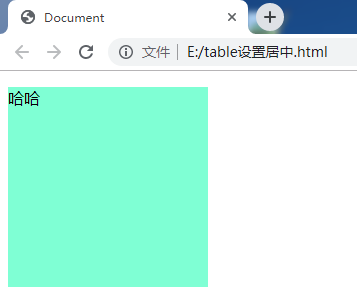
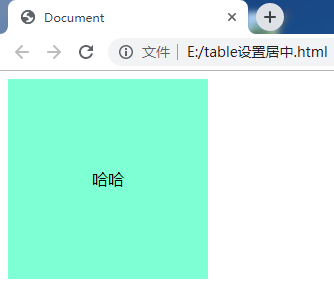
用table设置水平垂直居中
 <!doctype html>

 <html lang="en">

 <head>

     <meta charset="UTF-8">

     <title>Document</title>

     <style type="text/css">

         .t{

             display: table;/*外层div变为table*/

             width: 200px;

             height: 200px;

             background-color: aquamarine;

         }

         p{

             display: table-cell;/*设置为单元格*/

             text-align: center;/*水平居中*/

             vertical-align: middle;/*垂直居中*/

         }

     </style>

 </head>

 <body>

     <div class="t">

         <p>哈哈</p>

     </div>

 </body>

 </html>
4.利用伸缩盒居中
 <!doctype html>

 <html lang="en">

 <head>

     <meta charset="UTF-8">

     <title>Document</title>

     <style type="text/css">

         .outer{

             width: 200px;

             height: 200px;

             background-color: aquamarine;

         }

         .inner{

             width: 100px;

             height: 100px;

             background-color: antiquewhite;

         }

     </style>

 </head>

 <body>

     <div class="outer">

         <div class="inner">

             哈哈

         </div>

     </div>

 </body>

 </html>
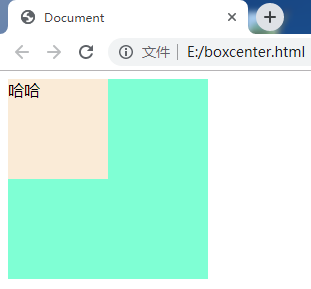
 <!doctype html>

 <html lang="en">

 <head>

     <meta charset="UTF-8">

     <title>Document</title>

     <style type="text/css">

         .outer{

             display: -webkit-box;/*设置为盒子*/

             width: 200px;

             height: 200px;

             background-color: aquamarine;

             -webkit-box-pack:center;/*水平居中*/

             -webkit-box-align:center;/*垂直居中*/

         }

         .inner{

             width: 100px;

             height: 100px;

             background-color: antiquewhite;

         }

     </style>

 </head>

 <body>

     <div class="outer">

         <div class="inner">

             哈哈

         </div>

     </div>

 </body>

 </html>
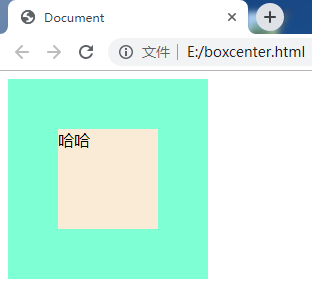
接下来设置文字居中
 <!doctype html>

 <html lang="en">

 <head>

     <meta charset="UTF-8">

     <title>Document</title>

     <style type="text/css">

         .outer{

             display: -webkit-box;/*设置为盒子*/

             width: 200px;

             height: 200px;

             background-color: aquamarine;

             -webkit-box-pack:center;/*水平居中*/

             -webkit-box-align:center;/*垂直居中*/

         }

         .inner{

             display: -webkit-box;/*设置为盒子*/

             -webkit-box-pack:center;/*水平居中*/

             -webkit-box-align:center;/*垂直居中*/

             width: 100px;

             height: 100px;

             background-color: antiquewhite;

         }

     </style>

 </head>

 <body>

     <div class="outer">

         <div class="inner">

             哈哈

         </div>

     </div>

 </body>

 </html>

CSS基础学习 21.CSS居中总结的更多相关文章
- CSS基础学习 20.CSS媒体查询
- CSS基础学习 19.CSS hack
- CSS基础学习 18.CSS多列
四种常见的浏览器内核:
- CSS基础学习 17.CSS动画
- CSS基础学习 16.CSS过渡
- CSS基础学习-15-1.CSS 浏览器内核
- CSS基础学习-14 CSS visibility与overflow属性
- CSS基础学习-13.CSS 浮动
如果前一个元素设置浮动属性,则之后的元素也会继承float属性,我觉得这里说是继承不太对,可以理解为会影响到之后的元素,所以在设置浮动元素之后的元素要想不被影响就需要清除浮动.元素设置左浮动,则清除左 ...
- CSS基础学习-12.CSS position
绝对定位 position:absolute,元素脱离文档流,然后使用left.right.top.bottom属性相对于其最接近的一个具有定位属性的祖先元素进行绝对定位.如果不存在这样的祖先元素,则 ...
随机推荐
- 利用先电云iaas平台搭建apache官方大数据平台(ambari2.7+hdp3.0)
一.ambari架构解析 二.基础环境配置 以两台节点为例来组件Hadoop分布式集群,这里采用的系统版本为Centos7 1511,如下表所示: 主机名 内存 硬盘 IP地址 角色 master 8 ...
- ES6 var,const , let三者区别
每天学一点,知识涨一张 var 默认是会变量提升的,变量可以修改: let 定义变量,变量可以修: const 定义必须有常量值,const的值一但写上不可更改:let 与const相同之处:1> ...
- VSCode插件Prettier配置
参考链接:https://blog.csdn.net/wengou3033/article/details/88749448 Prettier格式化配置
- spring中的BeanDefinitionRegistryPostProcessor
spring中的BeanDefinitionRegistryPostProcessor是BeanFactoryPostProcessor的子接口,BeanFactoryPostProcessor的作用 ...
- 洛谷 题解 P1133 【教主的花园】
$n<=10^5 $ O(n)算法 状态 dp[i][j][k]表示在第i个位置,种j*10的高度的树,且这棵树是否比相邻两棵树高 转移 dp[i][1][0]=max(dp[i-1][2][1 ...
- 数据库连接池——C3P0&Druid(快速入门)
数据库连接池--C3P0&Druid (一) 数据库连接池 每一个事物都有其存在的意义,在初学jdbc的时候,我们建立数据库连接对象后,会对其进行释放,但是数据库连接的建立和关闭是非常消耗资源 ...
- Spring中@Component与@Bean的区别
@Component和@Bean的目的是一样的,都是注册bean到Spring容器中. @Component VS @Bean @Component 和 它的子类型(@Controller, @S ...
- (一)springMvc 底层运作流程
目录 什么是 springMvc SpringMVC的底层运作流程 什么是 springMvc springMvc 是spring 框架的一个模块,这也就意味着二者不需要通过整合层(整合包)进行整合 ...
- C - Co-prime
Given a number N, you are asked to count the number of integers between A and B inclusive which are ...
- mysqldump原理及实战
使用mysqldump命令行工具创建逻辑备份: 注意mysqldump的版本和路径mysqldump命令创建的是逻辑备份,结果集有两种格式:一种是将数据转换成标准的SQL语句(一堆CREATE,DRO ...