
导出 VuePress构建的网站为 PDF
前言
学 Rust 也有一段时间了,网上也有不少官方文档的中文翻译版,但是似乎只有 Rust中文网站 文档一直是最新的,奈何并没有 PDF 供直接下载,是在是不太方便,为了方便阅读以及方便后续文档更新,决定用 Python 写一个爬虫将网页下载下来保持为 PDF. 最后完成结果如下:

是的没错,将官网样式也保留下来成功转为 PDF,接下来分享一下整个爬虫的过程,最终的爬虫可以导出任意 VuePress 搭建的网站为 PDF.
爬虫
依赖库的选定
- requests
- BeautifulSoup4
- pdfkit
关于 requests 和 BeautifulSoup4 库这里就不做介绍了, 写过爬虫的基本上都接触过, 重点说一下 pdfkit 库, 毫无疑问,它就是导出 PDF 的关键,简单说一下它的用法
PdfKit
PdfKit 库是对 Wkhtmltopdf 工具包的封装类,所以在使用之前,需要去官网下载相应的安装包安装到电脑上, 下载地址
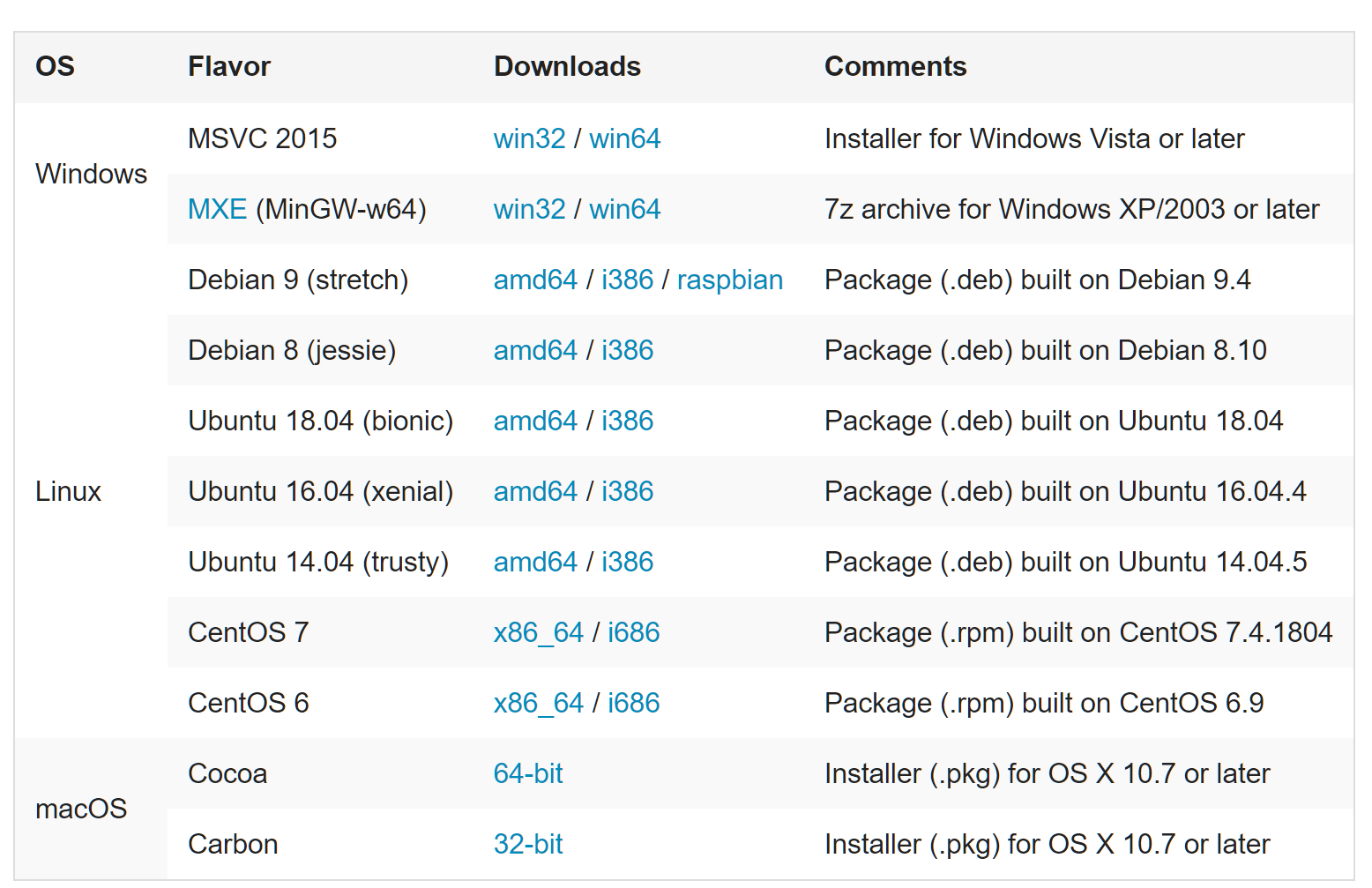
可选: 安装完成之后可以 Windows 下可以将安装路径添加到系统环境变量中
安装完成之后,说一下 PdfKit 的常用方法,常用方法有三个
from_url
def from_url(url, output_path, options=None, toc=None, cover=None,

             configuration=None, cover_first=False):

    """

    Convert file of files from URLs to PDF document

    :param url: URL or list of URLs to be saved

    :param output_path: path to output PDF file. False means file will be returned as string.

    :param options: (optional) dict with wkhtmltopdf global and page options, with or w/o '--'

    :param toc: (optional) dict with toc-specific wkhtmltopdf options, with or w/o '--'

    :param cover: (optional) string with url/filename with a cover html page

    :param configuration: (optional) instance of pdfkit.configuration.Configuration()

    :param configuration_first: (optional) if True, cover always precedes TOC

    Returns: True on success

    """

    r = PDFKit(url, 'url', options=options, toc=toc, cover=cover,

               configuration=configuration, cover_first=cover_first)

    return r.to_pdf(output_path)
从函数名上就很容易理解这个函数的作用,没错就是根据 url 下载网页为 PDF
from_file()
def from_file(input, output_path, options=None, toc=None, cover=None, css=None,

              configuration=None, cover_first=False):

    """

    Convert HTML file or files to PDF document

    :param input: path to HTML file or list with paths or file-like object

    :param output_path: path to output PDF file. False means file will be returned as string.

    :param options: (optional) dict with wkhtmltopdf options, with or w/o '--'

    :param toc: (optional) dict with toc-specific wkhtmltopdf options, with or w/o '--'

    :param cover: (optional) string with url/filename with a cover html page

    :param css: (optional) string with path to css file which will be added to a single input file

    :param configuration: (optional) instance of pdfkit.configuration.Configuration()

    :param configuration_first: (optional) if True, cover always precedes TOC

    Returns: True on success

    """

    r = PDFKit(input, 'file', options=options, toc=toc, cover=cover, css=css,

               configuration=configuration, cover_first=cover_first)

    return r.to_pdf(output_path)
这个则是从文件中生成 PDF, 也是我最后选择的方案,至于为什么没有选择 from_url(),稍后等我分析完,就会明白了.
from_string
def from_string(input, output_path, options=None, toc=None, cover=None, css=None,

                configuration=None, cover_first=False):

    """

    Convert given string or strings to PDF document

    :param input: string with a desired text. Could be a raw text or a html file

    :param output_path: path to output PDF file. False means file will be returned as string.

    :param options: (optional) dict with wkhtmltopdf options, with or w/o '--'

    :param toc: (optional) dict with toc-specific wkhtmltopdf options, with or w/o '--'

    :param cover: (optional) string with url/filename with a cover html page

    :param css: (optional) string with path to css file which will be added to a input string

    :param configuration: (optional) instance of pdfkit.configuration.Configuration()

    :param configuration_first: (optional) if True, cover always precedes TOC

    Returns: True on success

    """

    r = PDFKit(input, 'string', options=options, toc=toc, cover=cover, css=css,

               configuration=configuration, cover_first=cover_first)

    return r.to_pdf(output_path)
这个方法则是从字符串中生成 PDF,很明显没有办法保持网页样式,所以不考虑.关于更多 PdfKit 的用法,可以去 wkhtmltopdf文档 查看
分析目标网页
依赖库选定完毕,接下来就是分析目标网页,开始写爬虫的过程了.
测试 PdfKit
PdfKit 自带一个 from_url 生成 PDF 的功能,如果可以生成合适的 PDF,那我们只需要获取所有网页链接就可以了,可以节省很多时间,先测试一下生成的效果
import pdfkit

pdfkit.from_url("https://rustlang-cn.org/office/rust/book/", 'out.pdf', configuration=pdfkit.configuration(

                wkhtmltopdf="path/to/wkhtmltopdf.exe"))
导出结果如下:
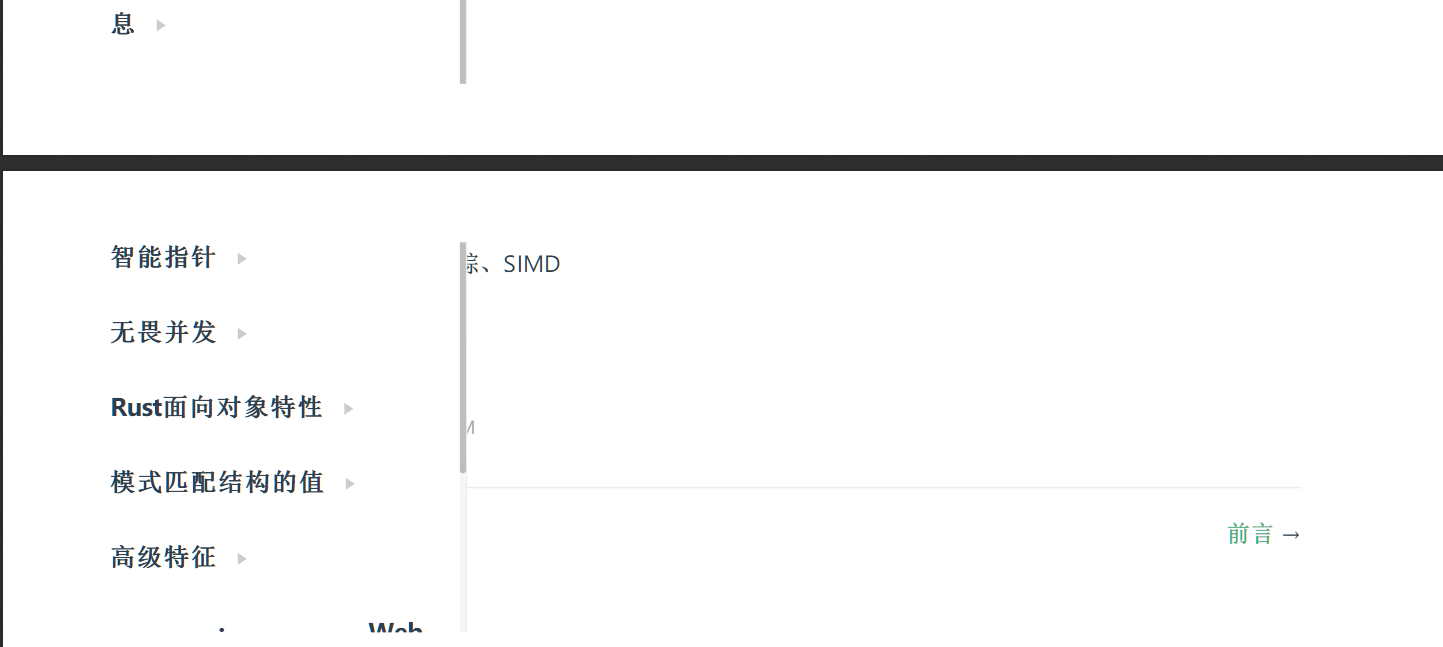
从结果不难看出,网页的样式保存下来了,但是侧边栏,顶部和底边导航栏也都被保留下来了,并且侧边栏还挡住了主要内容,所以使用 from_url 这个方法就被排除了.
最终方案
通过测试,我们得知不能使用 from_url 那么只能通过使用 from_file 去导出了, 并且在我们将网页下载下来保存到本地之前,我们需要修改网页内容,移除顶部导航栏,侧边栏,以及底部导航栏
获取相应元素
现在让我们先获取页面下一页链接,打开浏览器调试模式,审查一下网页元素,不难发现所有下一页导航,都处于 之下的超链接 中,如下图:
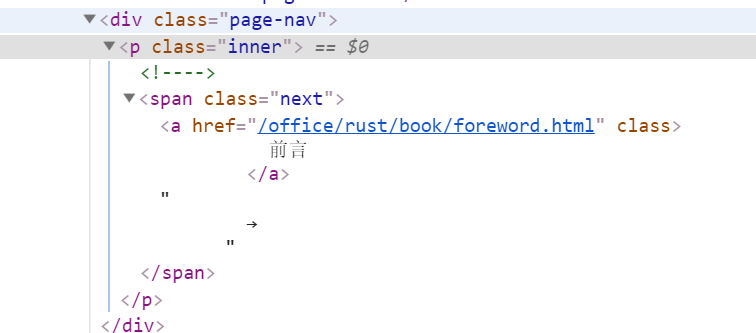
通过同样的方法,不难发现顶部导航栏,侧边栏,以及底部导航栏对应的元素,依次为
<div class="navbar"></div>

<div class="sidebar"></div>

<div class="page-edit"></div>
找到对应的元素接着就是获取链接和销毁不必要元素
class DownloadVuePress2Pdf:

    def get_content_and_next_url(self, content): # content 为网页内容

         # 获取链接和销毁不必要元素

        navbar = soup.select('.navbar')

        if len(navbar):

            navbar[0].decompose()

        sidebar = soup.select('.sidebar')

        if len(sidebar):

            sidebar[0].decompose()

        page_edit = soup.select('.page-edit')

        if len(page_edit):

            page_edit[0].decompose()

        # 注意下一页链接在底部导航栏元素中,

        # 要先获取链接后,才能销毁元素,顺序不能颠倒

        next_span = soup.select(".next")

        if len(next_span):

            next_span_href = next_span[0].a['href']

        else:

            next_span_href = None

        page_nav = soup.select('.page-nav')

        if len(page_nav):

            page_nav[0].decompose()
保持导出 PDF 样式
为了使得导出 PDF 的样式和网页一致,我们有俩种方法:
- 根据源码在对应目录建立本地 css 文件,显然这种方法不具有普遍性,不能每导出一个网站,我们就新建一个 css 文件
- 既然本地的不行,那我们就将网页中的 css 链接 href 地址指向远程 css
在上述代码中添加如下代码:
for link in links:

     if not link['href'].startswith("http"):

        link['href'] = css_domain + link['href'] # css_domain 为 css 默认域名,需要设置,获取方式可见下图

导出
通过上述的方式,我们将网页下载下来保存到本地,全部下载完成之后,最后就是导出为 PDF 了,通过 from_file() 方法很容易完成导出这个操作
pdfkit.from_file([文件列表], "导出的文件名称.pdf", options=options, configuration=config)
至此导出 Rust 官网文档为 PDF 的过程全部完成,效果如开头展示的那样
注意: 由于 VuePress 搭建的网站基本上布局格式一样, 所以上面的代码同样可以用来导出其他由 VuePress 构建的网站
完整代码
搜索公众号 LeeTao,回复 20190509 即可获得
导出 VuePress构建的网站为 PDF的更多相关文章
- jQuery Masonry构建pinterest网站布局注意要点(转)
在愚人码头的博客上看到有关于如何构建pinterest网站的文章,其实就是“图片瀑布流显示”,我试着在本地做了一个,没有什么问题,但是放到公司的网站上就问题多多.一是定位不准确,二是图片显示不完整.但 ...
- LNMP构建动态网站WordPress
LNMP构建动态网站wordpress 一.部署LNMP架构 1.安装nginx #配置nginx源 cat>/etc/yum.repos.d/nginx.repo<<-EOF [N ...
- 随心所欲导出你的 UI 界面到 PDF 文件
使用 C1PDF 控件可以导出文件到 PDF 文件,结合 .NET 平台特性你可以在任何客户端生成自定义报表.你可以打印任何 UI 界面,例如 DataGrid 导出到 PDF. 在本篇文章中我们将阐 ...
- DataTable导出为word,excel,html,csv,pdf,.txt
using System; using System.Data; using System.Configuration; using System.Collections; using System. ...
- [tools]hugo&github构建静态网站/百度统计
hugo/github构建网站基本原理 1.hugo是一个静态化的工具,你写md,然后他把md转换成对应样式的html, 2.并给html嵌入百度统计的script.然后你将html放到github上 ...
- ASP.NET 构建高性能网站 架构设计
Web前端系统 为了达到不同应用的服务器共享.避免单点故障.集中管理.统一配置等目的,不以应用划分服 务器,而是将所有服务器做统一使用,每台服务器都可以对多个应用提供服务,当某些应用访问量升高时,通过 ...
- Docker自学纪实(五) 使用Dockerfile构建php网站环境镜像
一般呢,docker构建镜像容器的方式有两种:一种是pull dockerhub仓库里面的镜像,一种是使用Dockerfile自定义构建镜像. 很多时候,公司要求的镜像并不一定符合dockerhub仓 ...
- Azure 项目构建 - 构建 WordPress 网站
本课程主要介绍了如何基于 Azure Web 应用和 WordPress 快速构建网站,实践讲解如何使用 Azure Web 应用,创建并连接 MySQL Database on Azure, 使用 ...
- Altium Designer 只导出PCB元器件及标号的PDF文件的方法
版权声明:本文为博主原创文章,遵循CC 4.0 BY-SA 版权协议,转载请附上原文出处链接及本声明. 作者:struct_mooc 博客地址:https://www.cnblogs.com/stru ...
随机推荐
- Hibernate初探之单表映射——Hibernate概念及插件的安装
什么是ORM ORM(Object/Relationship Mapping):对象/关系映射 为什么要有ORM? 利用面向对象思想编写的数据库应用程序最终都是把对象信息保存在关系型数据库中,于是要编 ...
- Jmeter+Jenkins持续集成(三、集成到Jenkins)
1.Jenkins全局工具配置 登录jenkins->系统管理->Global Tool Configuration (1)JDK配置 (2)Ant配置 配置信息按照机器上实际安装的来填写 ...
- xld特征
halcon中什么是xld? xld(eXtended Line Descriptions) 扩展的线性描述,它不是基于像素的,人们称它是亚像素,只不过比像素更精确罢了,可以精确到像素内部的一种描述. ...
- 28-SQLServer带见证服务器的镜像搭建
一.注意点 1.数据库的模式要是完整模式. 2.要对数据库完整备份和事务日志备份,分别还原到镜像库上,使用NORECOVERY模式. 3.镜像数据库是不允许删除和操作,即便查看属性也不行. 4.先删除 ...
- 题解 [51nod1753] 相似子串
题解 [51nod1753] 相似子串 题面 解析 先考虑相等的时候怎么办, 我们考虑求出每个字母的贡献,这样字母相等的问题就可以用并查集来解决. 具体来说,我们先对于每个字母,把S中等于它的标为1, ...
- bat批处理运用
一.简单批处理内部命令简介 1.Echo 命令 –显示 打开回显或关闭请求回显功能,或显示消息.如果没有任何参数,echo 命令将显示当前回显设置. 语法: echo [{on│off}] [mess ...
- 51nod 1434
首先可以得出一个性质:LCM(1,2,3,4,...,N-1,N) 中质因子k的出现的次数为t,则有k^t<=n 根据这个性质我们先筛出素数,然后枚举每个质数,求出对应的k和t,然后找出倍数j( ...
- 解决vue多个路由共用一个页面的问题
在日常的vue开发中我们可能会遇见多个路由需要共用一个页面的需求,特别是当路由是通过动态添加的,不同的路由展示的东西只是数据不同其他没有变化.例如: ? 1 2 3 4 5 6 7 8 9 10 11 ...
- python math.asin
import mathmath.asin(x) x : -1 到 1 之间的数值.如果 x 是大于 1,会产生一个错误. #!/usr/bin/pythonimport math print &quo ...
- GitLab安装及备份迁移数据
centos7安装GitLab 下载相应版本rpm包 https://mirrors.tuna.tsinghua.edu.cn/gitlab-ce/yum/el7/ 我此处下载9.3.6版本. # w ...