
WPF入门(4)——资源
引用《深入浅出WPF》对资源的解读:
每个WPF的界面元素都具有一个名为Resources的属性,这个属性继承自FrameworkElement类,其类型为ResourceDictionary。ResourceDictionary能够以“键-值”对的形式存储资源(注:可以是实例,如一个类的实例;也可以是基本类型如字符串),当需要使用某个资源时,使用“键-值”对可以索引到资源对象。
——刘铁猛.深入浅出WPF(Kindle位置2580-2582).中国水利水电出版社.Kindle版本.
wpf的资源字典是FrameworkElement的一个字段,任何继承自FrameworkElement的类都拥有该属性。
我们可以把一些实例对象保存到资源字典中,为之设置一个key,当使用这些对象的时候直接在xaml中<Button Style="{StaticResource TransparentButton}">即可。TransparentButton就是保存在资源字典中的实例对象。
有一点要注意,public class Application : DispatcherObject, IHaveResources, IQueryAmbient,这个application类也有自己的资源字典属性,它并不是继承自FrameworkElement。
简单的资源使用
参考 https://www.cnblogs.com/zhili/p/WPFResourceAndStyle.html
下面的示例为window添加了资源字典。
<Window x:Class="ResourceDemo.ResourceUse"

        xmlns="http://schemas.microsoft.com/winfx/2006/xaml/presentation"

        xmlns:x="http://schemas.microsoft.com/winfx/2006/xaml"

        Title="REsource" Height="100" Width="350"

        xmlns:sys="clr-namespace:System;assembly=mscorlib">

    <Window.Resources>

        <!--定义一个字符串资源-->

        <sys:String x:Key="nameStr">

            LearningHard博客:http://www.cnblogs.com/zhili/

        </sys:String>

    </Window.Resources>

    <StackPanel>

        <!--通过资源key来对资源进行使用-->

        <TextBlock Text="{StaticResource nameStr}" Margin="10"/>

    </StackPanel>

</Window>
这样使用没什么难度,动态资源与静态资源这里也不赘述。
资源字典
下面的示例为Application类添加了资源字典,他是全局的,所有该应用下的类都能使用,如下面的示例
    <Application.Resources>

        <ResourceDictionary>

            <!--ResourceDictionary的MergedDictionaries属性是个集合,资源字典的集合,这里面的每一个元素都是一个资源字典-->

            <ResourceDictionary.MergedDictionaries>

                <!--这里就指定了一些资源字典添加到MergedDictionaries集合中,这些被添加的资源字典都作为Application对象的资源字典使用,可以直接用每个字典中的key引用字典中与之对应的实例-->

                <ResourceDictionary Source="/Resources/Str.xaml"/>

                <ResourceDictionary Source="/Themes/ControlStyle.xaml"/>

                <ResourceDictionary Source="/Resources/Colors.xaml"/>

            </ResourceDictionary.MergedDictionaries>

        </ResourceDictionary>

    </Application.Resources>
msdn解释:
MergedDictionaries
获取 ResourceDictionary 字典的集合,这些字典构成了合并字典中的各种资源字典。
MergeDictionaries中每一个字典与字典之间的key可以重复。
典型应用是全球化。
https://docs.microsoft.com/zh-cn/dotnet/framework/wpf/advanced/wpf-globalization-and-localization-overview
https://www.bbsmax.com/A/gGdXAWPQz4/
以ScreenToGit项目为例,作者做国际化就是定义了n种语言实现的字符串:
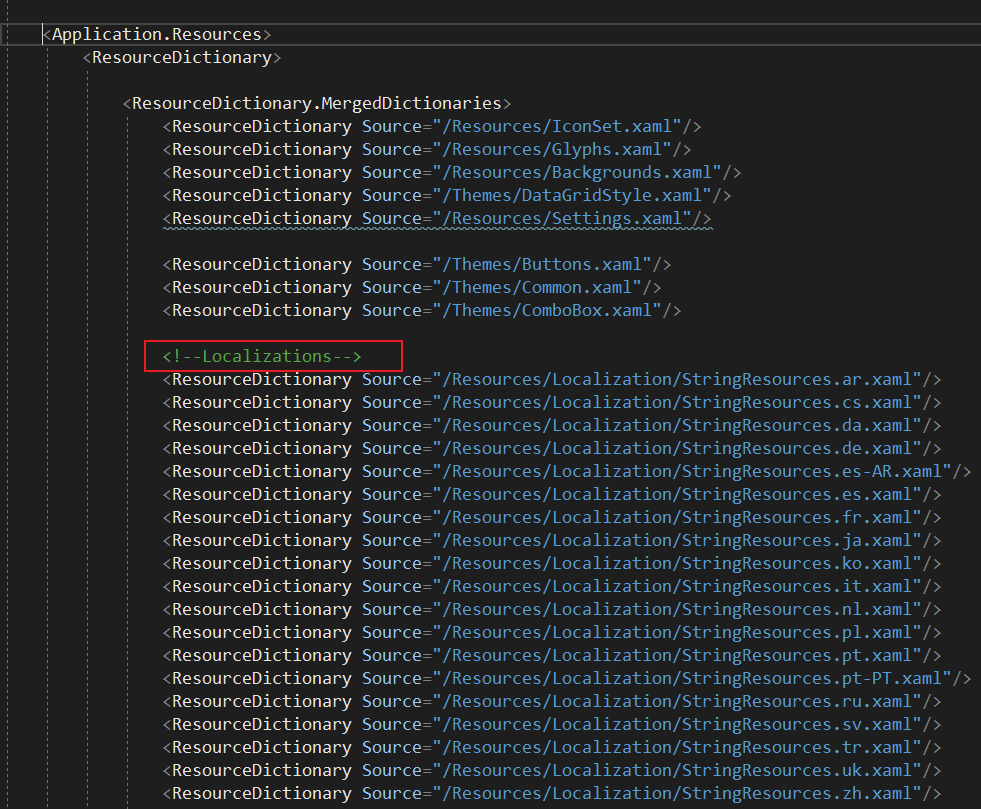
切换语言的时候实际上是切换资源字典,代码则完全不用修改。
下面的代码是摘抄自ScreenToGif的StringResources.zh.xaml文件
<ResourceDictionary xmlns="http://schemas.microsoft.com/winfx/2006/xaml/presentation"

                    xmlns:x="http://schemas.microsoft.com/winfx/2006/xaml"

                    xmlns:s="clr-namespace:System;assembly=mscorlib"

                    xml:space="preserve">

    <!--To use a new line:
-->

    <!--Or CarriageReturn + NewLine:
 or
-->

    <!--Special texts like {0}, are place holders for dynamic values, such as numbers.-->

    <!--General-->

    <s:String x:Key="Ok">确定</s:String>

    <s:String x:Key="Back">返回</s:String>

    <s:String x:Key="Cancel">取消</s:String>

    <s:String x:Key="Yes">是</s:String>

    <s:String x:Key="No">否</s:String>

    <s:String x:Key="Frame">帧</s:String>

    <s:String x:Key="Suppress">隐藏</s:String>

    <s:String x:Key="Preview">预览</s:String>

    <s:String x:Key="S.Add">添加</s:String>

    <s:String x:Key="S.Edit">编辑</s:String>

    <s:String x:Key="S.Id">标识</s:String>

    <s:String x:Key="S.Title">标题</s:String>

    <s:String x:Key="S.Description">描述</s:String>

    <s:String x:Key="S.SelectColor">单击此处选择颜色。</s:String>

</ResourceDictionary>
使用方式(同样摘自ScreenToGif):
<!--Options-->

<StackPanel Grid.Row="0" Grid.Column="0" Grid.RowSpan="2" x:Name="OptionsStackPanel" Margin="0" MaxWidth="180">

	<n:ImageRadioButton x:Name="AppRadio" Text="{DynamicResource Application}" Content="{StaticResource Vector.Application}" TextWrapping="WrapWithOverflow" IsChecked="True"

						Padding="1,3,5,3" FontSize="17" FontFamily="Segoe UI Semilight" Cursor="Hand" MaxSize="24" HorizontalContentAlignment="Left"/>

	<n:ImageRadioButton x:Name="InterfaceRadio" Text="{DynamicResource Interface}" Content="{StaticResource Vector.Colors}" TextWrapping="WrapWithOverflow"

						Padding="1,3,5,3" FontSize="17" FontFamily="Segoe UI Semilight" Cursor="Hand" MaxSize="24" HorizontalContentAlignment="Left"/>

	<n:ImageRadioButton x:Name="AutomaticRadio" Text="{DynamicResource S.AutoTasks}" Content="{StaticResource Vector.Encoder}" TextWrapping="WrapWithOverflow"

						Padding="1,3,5,3" FontSize="17" FontFamily="Segoe UI Semilight" Cursor="Hand" MaxSize="24" HorizontalContentAlignment="Left"/>

	<n:ImageRadioButton x:Name="ShortcutsRadio" Text="{DynamicResource S.Shortcuts}" Content="{StaticResource Vector.Keyboard}" TextWrapping="Wrap"

						Padding="1,3,5,3" FontSize="17" FontFamily="Segoe UI Semilight" Cursor="Hand" MaxSize="24" HorizontalContentAlignment="Left"/>

	<n:ImageRadioButton x:Name="LanguageRadio" Text="{DynamicResource Language}" Content="{StaticResource Vector.Translate}"  TextWrapping="Wrap"

						Padding="1,3,5,3" FontSize="17" FontFamily="Segoe UI Semilight" Cursor="Hand" MaxSize="24" HorizontalContentAlignment="Left"/>

	<n:ImageRadioButton x:Name="TempRadio" Text="{DynamicResource TemporaryFiles}" Content="{StaticResource Vector.Temporary}" TextWrapping="Wrap"

						Padding="1,3,5,3" FontSize="17" FontFamily="Segoe UI Semilight" Cursor="Hand" MaxSize="24" HorizontalContentAlignment="Left"/>

	<n:ImageRadioButton x:Name="CloudRadioButton" Text="{DynamicResource Clouds}" Content="{StaticResource Vector.Web}" TextWrapping="Wrap"

						Padding="1,3,5,3" FontSize="17" FontFamily="Segoe UI Semilight" Cursor="Hand" MaxSize="24" HorizontalContentAlignment="Left"/>

	<n:ImageRadioButton x:Name="ExtrasRadioButton" Text="{DynamicResource Extras}" Content="{StaticResource Vector.Extras}" TextWrapping="Wrap"

						Padding="1,3,5,3" FontSize="17" FontFamily="Segoe UI Semilight" Cursor="Hand" MaxSize="24" HorizontalContentAlignment="Left"/>

	<n:ImageRadioButton x:Name="DonateRadio" Text="{DynamicResource Donate}" Content="{StaticResource Vector.Money}" TextWrapping="Wrap"

						Padding="1,3,5,3" FontSize="17" FontFamily="Segoe UI Semilight" Cursor="Hand" MaxSize="24" HorizontalContentAlignment="Left"/>

	<n:ImageRadioButton x:Name="AboutRadio" Text="{DynamicResource About}" Content="{StaticResource Vector.Info}"  TextWrapping="Wrap"

						Padding="1,3,5,3" FontSize="17" FontFamily="Segoe UI Semilight" Cursor="Hand" MaxSize="24" HorizontalContentAlignment="Left"/>

</StackPanel>
最后附上ScreenToGif切换字典的函数:
public static void SelectCulture(string culture)

{

	#region Validation

	//If none selected, fallback to english.

	if (string.IsNullOrEmpty(culture))

		culture = "en";

	if (culture.Equals("auto") || culture.Length < 2)

	{

		var ci = CultureInfo.InstalledUICulture;

		culture = ci.Name;

	}

	#endregion

	//Copy all MergedDictionarys into a auxiliar list.

	var dictionaryList = Application.Current.Resources.MergedDictionaries.ToList();

	#region Selected Culture

	//Search for the specified culture.

	var requestedCulture = $"/Resources/Localization/StringResources.{culture}.xaml";

	var requestedResource = dictionaryList.FirstOrDefault(d => d.Source?.OriginalString == requestedCulture);

	#endregion

	#region Generic Branch Fallback

	//Fallback to a more generic version of the language. Example: pt-BR to pt.

	while (requestedResource == null && !string.IsNullOrEmpty(culture))

	{

		culture = CultureInfo.GetCultureInfo(culture).Parent.Name;

		requestedCulture = $"/Resources/Localization/StringResources.{culture}.xaml";

		requestedResource = dictionaryList.FirstOrDefault(d => d.Source?.OriginalString == requestedCulture);

	}

	#endregion

	#region English Fallback

	//If not present, fall back to english.

	if (requestedResource == null)

	{

		culture = "en";

		requestedCulture = "/Resources/Localization/StringResources.en.xaml";

		requestedResource = dictionaryList.FirstOrDefault(d => d.Source?.OriginalString == requestedCulture);

	}

	#endregion

	//If we have the requested resource, remove it from the list and place at the end.

	//Then this language will be our current string table.

	Application.Current.Resources.MergedDictionaries.Remove(requestedResource);

	Application.Current.Resources.MergedDictionaries.Add(requestedResource);

	//Inform the threads of the new culture.

	Thread.CurrentThread.CurrentCulture = new CultureInfo(culture);

	Thread.CurrentThread.CurrentUICulture = new CultureInfo(culture);

	#region English Fallback of the Current Language

	//Only non-English resources need a fallback, because the English resource is evergreen. TODO

	if (culture.StartsWith("en"))

		return;

	var englishResource = dictionaryList.FirstOrDefault(d => d.Source?.OriginalString == "/Resources/Localization/StringResources.en.xaml");

	if (englishResource != null)

	{

		Application.Current.Resources.MergedDictionaries.Remove(englishResource);

		Application.Current.Resources.MergedDictionaries.Insert(Application.Current.Resources.MergedDictionaries.Count - 1, englishResource);

	}

	#endregion

	GC.Collect(0);

	if (!UserSettings.All.CheckForTranslationUpdates)

		return;

	//Async, fire and forget.

	Task.Factory.StartNew(() => CheckForUpdates(culture));

}
一个示例
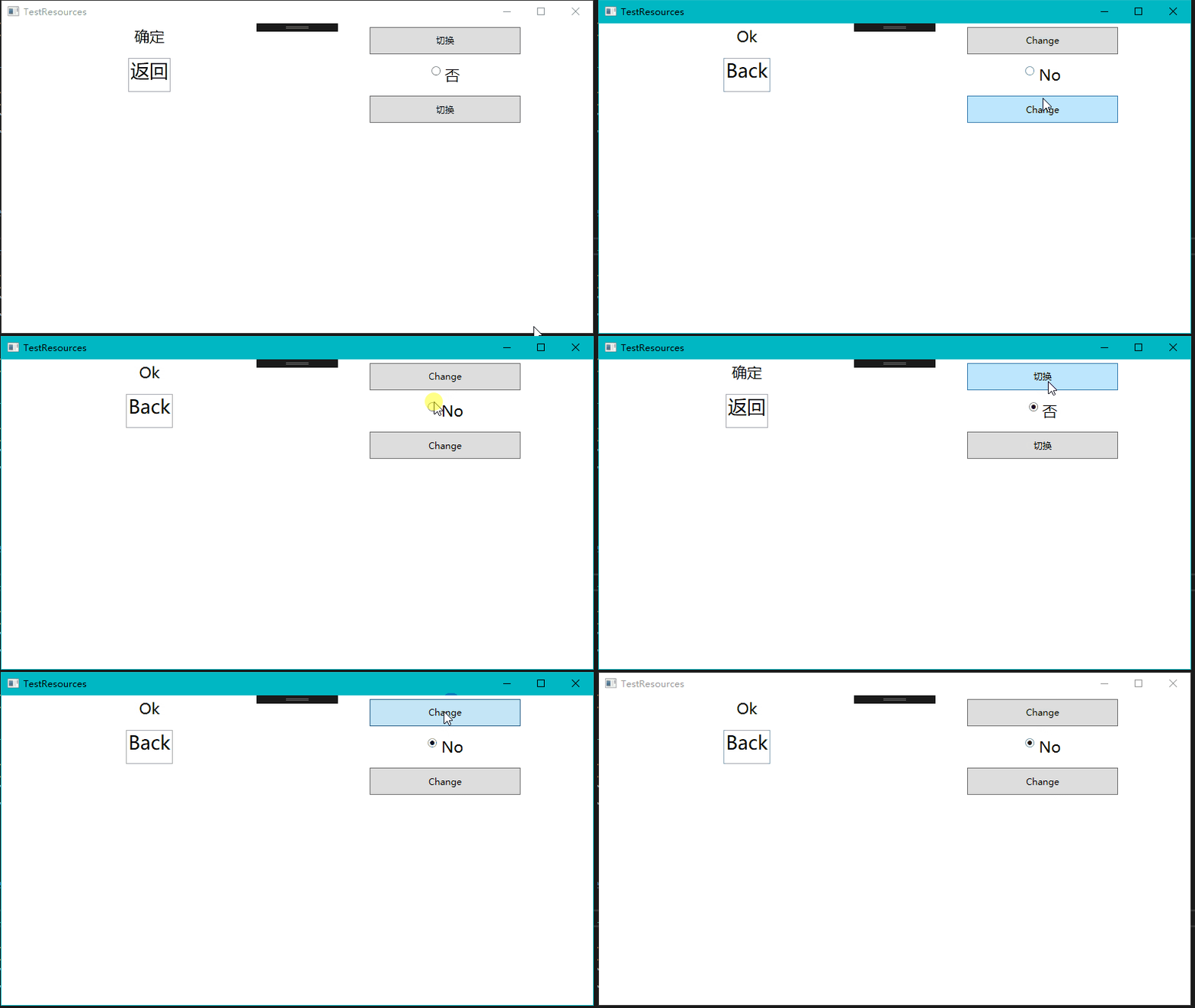
工程上传到github :https://github.com/feipeng8848/WPF-Demo
WPF入门(4)——资源的更多相关文章
- WPF入门教程系列三——Application介绍(续)
接上文WPF入门教程系列二——Application介绍,我们继续来学习Application 三.WPF应用程序的关闭 WPF应用程序的关闭只有在应用程序的 Shutdown 方法被调用时,应用程序 ...
- WPF入门教程系列二——Application介绍
一.Application介绍 WPF和WinForm 很相似, WPF与WinForm一样有一个 Application对象来进行一些全局的行为和操作,并且每个 Domain (应用程序域)中仅且只 ...
- ArcGIS for WPF 访问外部资源
原文 http://www.cnblogs.com/wdysunflower/archive/2011/07/14/2105584.html ArcGIS for WPF 访问外部资源 应用背景: 因 ...
- WPF入门:数据绑定
上一篇我们将XAML大概做了个了解 ,这篇将继续学习WPF数据绑定的相关内容 数据源与控件的Binding Binding作为数据传送UI的通道,通过INotityPropertyChanged接口的 ...
- WPF入门教程系列二十三——DataGrid示例(三)
DataGrid的选择模式 默认情况下,DataGrid 的选择模式为“全行选择”,并且可以同时选择多行(如下图所示),我们可以通过SelectionMode 和SelectionUnit 属性来修改 ...
- WPF入门教程系列(二) 深入剖析WPF Binding的使用方法
WPF入门教程系列(二) 深入剖析WPF Binding的使用方法 同一个对象(特指System.Windows.DependencyObject的子类)的同一种属性(特指DependencyProp ...
- WPF入门教程系列(一) 创建你的第一个WPF项目
WPF入门教程系列(一) 创建你的第一个WPF项目 WPF基础知识 快速学习绝不是从零学起的,良好的基础是快速入手的关键,下面先为大家摞列以下自己总结的学习WPF的几点基础知识: 1) C#基础语法知 ...
- WPF学习之资源-Resources
WPF学习之资源-Resources WPF通过资源来保存一些可以被重复利用的样式,对象定义以及一些传统的资源如二进制数据,图片等等,而在其支持上也更能体现出这些资源定义的优越性.比如通过Resour ...
- WPF中的资源简介、DynamicResource与StaticResource的区别(转)
什么叫WPF的资源(Resource)?资源是保存在可执行文件中的一种不可执行数据.在WPF的资源中,几乎可以包含图像.字符串等所有的任意CLR对象,只要对象有一个默认的构造函数和独立的属性. 也就是 ...
随机推荐
- Integer面试连环炮以及源码分析(转)
场景: 昨天有位朋友去面试,我问他面试问了哪些问题,其中问了Integer相关的问题,以下就是面试官问的问题,还有一些是我对此做了扩展. 问:两个new Integer 128相等吗? 答:不.因 ...
- centos7 windows7 双系统重新构建引导和启动顺序
安装centos后无法引导启动windows7的解决方法 在电脑Windows7系统上安装Centos7,安装后找不到Windows7引导菜单. 原因:因为CentOS 7已采用新式的grub2系统, ...
- 原生app是什么意思?
原生的就是用 Android 和ios 写的 完全符合手机系统 其他的都是通过各种工具对代码转换为手机系统可以识别
- Java 8 Lambda表达式学习和理解
Java 8 Lambda表达式和理解 说明:部分资料来源于网络 时间:20190704 Lambda 表达式,也可称为闭包,它是推动 Java 8 发布的最重要新特性.Lambda 允许把函数作为一 ...
- mysql无法导入函数和存储过程解决方法
1. mysql> SET GLOBAL log_bin_trust_function_creators = 1; 2. 系统启动时 --log-bin-trust-function-creat ...
- div和span显示在同一行
div和span标签的区别 div 是块级元素标签,独占一行,后面跟的内容换行显示 span 是内联元素标签,后面可以跟其他显示内容,不独占一行 display属性可以改变内联元素和块级元素的状态 ...
- PAT 甲级 1043 Is It a Binary Search Tree (25 分)(链表建树前序后序遍历)*不会用链表建树 *看不懂题
1043 Is It a Binary Search Tree (25 分) A Binary Search Tree (BST) is recursively defined as a bina ...
- 【pep8规范】arc diff 不符合 pep 8 规范
arc land 的时候,arc报错提示代码不符合pep8规范: 1.单行代码过长(括号中的换行不需要加 /) python代码换行加 / https://blog.csdn.net/codechel ...
- 【ARTS】01_35_左耳听风-201900708~201900714
ARTS: Algrothm: leetcode算法题目 Review: 阅读并且点评一篇英文技术文章 Tip/Techni: 学习一个技术技巧 Share: 分享一篇有观点和思考的技术文章 Algo ...
- lvs整理
LVS是Linux Virtual Server的简写,即Linux虚拟服务器,是一个虚拟的服务器集群系统.通过LVS提供的负载均衡技术和Linux操作系统实现一个高性能.高可用的服务器群集,它具有良 ...