
Linux CentOS 7 防火墙与端口设置操作
CentOS升级到7之后用firewall代替了iptables来设置Linux端口,
下面是具体的设置方法:
[]:选填
<>:必填
[<zone>]:作用域(block、dmz、drop、external、home、internal、public、trusted、work)
<port>:端口号
[-<port>]:或者端口范围
<protocol>:端口协议(tcp、udp)协议目前支持这四种类型
[<seconds>]:过期时间,使用N秒后自动关闭(秒)
[--permanent]:永久设置,在重启后依然保证设置可用,如果不加此项,重启后端口会恢复关闭状态
注:设置端口后要重启防火墙使其生效 firewall-cmd --complete-reload
1、检查端口状态
yes:已开通
no:未开通
firewall-cmd --query-port=<port>[-<port>]/<protocol>
firewall-cmd [--zone=<zone>] --query-port=<port>[-<port>]/<protocol>
firewall-cmd [--permanent] [--zone=<zone>] --query-port=<port>[-<port>]/<protocol>


查看已开放的端口
firewall-cmd --zone=public --list-ports

2、启用端口
success:执行成功
warning:警告xxx
firewall-cmd --add-port=<port>[-<port>]/<protocol>
firewall-cmd [--zone=<zone>] --add-port=<port>[-<port>]/<protocol> [--timeout=<seconds>]
firewall-cmd [--permanent] [--zone=<zone>] --add-port=<port>[-<port>]/<protocol>



3、禁用端口
success:执行成功
warning:警告xxx
firewall-cmd --remove-port=<port>[-<port>]/<protocol>
firewall-cmd [--zone=<zone>] --remove-port=<port>[-<port>]/<protocol>
firewall-cmd [--permanent] [--zone=<zone>] --remove-port=<port>[-<port>]/<protocol>



4、防火墙重启
--reload:不改变状态的条件下重启防火墙
--complete-reload:状态信息将会丢失,当防火墙有问题时可以使用,如,状态信息和防火墙规则都正常却无法建立任何链接的情况等
firewall-cmd --reload

firewall-cmd --complete-reload
例子


6、查看防火墙状态
命令1:firewall-cmd --state

命令2:systemctl status firewalld

7、查看、打开、关闭应急模式
(应急模式阻断所有网络连接,防止出现紧急状况)
firewall-cmd --query-panic

firewall-cmd --panic-on

firewall-cmd --panic-off
8、打开、关闭、重启防火墙
systemctl stop firewalld

systemctl start firewalld

systemctl restart firewalld

9、开启/关闭 开机自启动防火墙
systemctl enable firewalld

systemctl disable firewalld

查询防火墙服务是否开机启动:
systemctl is-enabled firewalld

10、其他操作

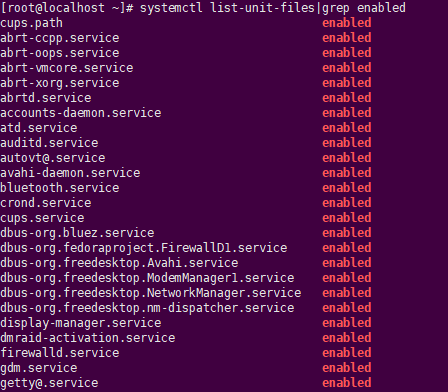
查询启动失败的服务列表:systemctl --failed

Linux CentOS 7 防火墙与端口设置操作的更多相关文章
- 物理机连接虚拟机中的数据库及Windows添加防火墙允许端口详细操作步骤
公司项目中因为会使用到SQL server数据库,但是自己电脑无论安装2008R2或者2014版本都不成功,我想可能是和之前安装的一些Windows的软件存在冲突. 于是便单独创建了一台虚拟机,在虚拟 ...
- CentOS 7 防火墙和端口配置
centos 7 防火墙和端口配置--解决 RHEL 7/ CentOS 7/Fedora 出现Unit iptables.service failed to load # 第一步,关闭firewal ...
- Linux CentOS中防火墙的关闭及开启端口
注:CentOS7之前用来管理防火墙的工具是iptable,7之后使用的是Firewall 样例:在CentOS7上安装tomcat后,在linux本机上可以访问tomcat主页,http://ip: ...
- centos7 防火墙与端口设置、linux端口范围
防火墙 启动防火墙: systemctl start firewalld 查看防火墙状态: systemctl status firewalld 关闭防火墙: systemctl stop firew ...
- CentOS 7防火墙开放端口快速方法
这篇文章主要为大家详细介绍了Centos7.1防火墙开放端口的快速方法,具有一定的参考价值,感兴趣的小伙伴们可以参考一下 例如安装Nagios后,要开放5666端口与服务器连接,命令如下: [ro ...
- linux CentOS中文输入法安装及设置
摘自百度空间,不错,一次搞定! centos 6.3用yum安装中文输入法 1.需要root权限,所以要用root登录 ,或su root 2.yum install "@Chinese S ...
- Linux CentOS 7 防火墙/端口设置
CentOS升级到7之后用firewall代替了iptables来设置Linux端口, 下面是具体的设置方法: []:选填 <>:必填 [<zone>]:作用域(block.d ...
- Linux CentOS 7 防火墙/端口设置【转发】
CentOS升级到7之后用firewall代替了iptables来设置Linux端口, 下面是具体的设置方法: []:选填 <>:必填 [<zone>]:作用域(block.d ...
- linux防火墙与端口设置
1.编辑iptables文件 # sudo vi /etc/sysconfig/iptables 添加如下一行 -A INPUT -p tcp -m state --state NEW -m tcp ...
随机推荐
- ECS Samples概述
本文档介绍了Unity 面向数据的技术堆栈(DOTS)的三个主要方面:实体包,Unity C#作业系统和Unity Burst编译器所涵盖的Unity实体 - 组件系统(ECS).由于实体是DOTS中 ...
- VMware 虚拟机安装Mac OS X 10.10
有图有真相,哈哈 一.下载以上文件 1. vm百度软件下载即可,版本都能满足需要,随意好了 2. unlocker 207 3. Mac OS X 10.10镜像 二.基本步骤 1. 虚拟机的安装 下 ...
- 论文阅读及复现 | Improved Semantic Representations From Tree-Structured Long Short-Term Memory Networks
两种形式的LSTM变体 Child-Sum Tree-LSTMs N-ary Tree-LSTMs https://paperswithcode.com/paper/improved-semantic ...
- Linux系统定时任务介绍
定时任务Crond介绍 1)crond是什么? 守护进程:持续运行的程序,不退出的进程. 为什么要使用crond定时任务呢? 1)Linux下定时任务的种类 at crontab anacron 2 ...
- 基于SpringBoot从零构建博客网站 - 整合ehcache和开发注册登录功能
对于程序中一些字典信息.配置信息应该在程序启动时加载到缓存中,用时先到缓存中取,如果没有命中,再到数据库中获取同时放到缓存中,这样做可以减轻数据库层的压力.目前暂时先整合ehcache缓存,同时预留了 ...
- 小记--------SparkContext初始化原理机制图解
- C++多线程基础学习笔记(九)
一.std::atomic续谈 上一章说到std::atomic是针对一个变量的,这里补充一下针对的变量操作一般是++,+=,--,&=等等运算 .以下这种不可取:a=a+1; 二.std:: ...
- PAT A1002 A+B for Polynomials(25)
AC代码 转载自https://www.cnblogs.com/zjutJY/p/9413766.html #include <stdio.h> #include<string.h& ...
- C语言 --- 初级指针
1.内存的访问:直接访问,间接访问. 直接访问:int a = 0;直接对a赋值.选一个内存地址,让他存20这个数. a += 10; ...
- php 一些常用函数
1.var_export() var_export — 输出或返回一个变量的字符串表示此函数返回关于传递给该函数的变量的结构信息,它和 var_dump() 类似,不同的是其返回的表示是合法的 PHP ...