
springboot2.0结合freemarker生成静态化页面
使用freemarker将页面生成html文件,本节测试html文件生成的方法:
1、使用模板文件静态化
定义模板文件,使用freemarker静态化程序生成html文件。
2、使用模板字符串静态化
定义模板字符串,使用freemarker静态化程序生成html文件。
1. pom.xml配置
<?xml version="1.0" encoding="UTF-8"?>

<project xmlns="http://maven.apache.org/POM/4.0.0" xmlns:xsi="http://www.w3.org/2001/XMLSchema-instance"

         xsi:schemaLocation="http://maven.apache.org/POM/4.0.0 https://maven.apache.org/xsd/maven-4.0.0.xsd">

    <modelVersion>4.0.0</modelVersion>

    <parent>

        <groupId>org.springframework.boot</groupId>

        <artifactId>spring-boot-starter-parent</artifactId>

        <version>2.2.2.RELEASE</version>

        <relativePath/> <!-- lookup parent from repository -->

    </parent>

    <groupId>com.example</groupId>

    <artifactId>demo</artifactId>

    <version>0.0.1-SNAPSHOT</version>

    <name>demo</name>

    <description>Demo project for Spring Boot</description>

    <properties>

        <java.version>1.8</java.version>

    </properties>

    <dependencies>

        <dependency>

            <groupId>org.springframework.boot</groupId>

            <artifactId>spring-boot-starter-web</artifactId>

        </dependency>

        <dependency>

            <groupId>org.springframework.boot</groupId>

            <artifactId>spring-boot-starter-freemarker</artifactId>

        </dependency>

        <dependency>

            <groupId>org.projectlombok</groupId>

            <artifactId>lombok</artifactId>

        </dependency>

        <dependency>

            <groupId>org.apache.commons</groupId>

            <artifactId>commons-io</artifactId>

            <version>1.3.2</version>

        </dependency>

        <dependency>

            <groupId>org.springframework.boot</groupId>

            <artifactId>spring-boot-starter-test</artifactId>

            <scope>test</scope>

            <exclusions>

                <exclusion>

                    <groupId>org.junit.vintage</groupId>

                    <artifactId>junit-vintage-engine</artifactId>

                </exclusion>

            </exclusions>

        </dependency>

    </dependencies>

    <build>

        <plugins>

            <plugin>

                <groupId>org.springframework.boot</groupId>

                <artifactId>spring-boot-maven-plugin</artifactId>

            </plugin>

        </plugins>

    </build>

</project>
2. application.yml配置
server:

  port: 8088

spring:

  application:

    name: test-freemarker

  #    freemarker配置

  freemarker:

    cache: false  #关闭模板缓存,方便测试

    settings:

      template_update_delay: 0  #检查模板更新延迟时间,设置为0表示立即检查,如果时间大于0会有缓存不方便进行模板测试

    template-loader-path: classpath:/templates

    charset: UTF-8

    check-template-location: true

    suffix: .ftl

    content-type: text/html

    expose-request-attributes: true

    expose-session-attributes: true

    request-context-attribute: request
3. 使用模板文件静态化
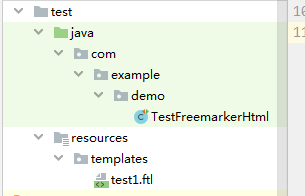
3.1 创建测试类,编写测试方法
package com.example.demo;

import freemarker.template.Configuration;

import freemarker.template.Template;

import freemarker.template.TemplateException;

import org.apache.commons.io.IOUtils;

import org.junit.jupiter.api.Test;

import org.springframework.boot.test.context.SpringBootTest;

import org.springframework.ui.freemarker.FreeMarkerTemplateUtils;

import java.io.File;

import java.io.FileOutputStream;

import java.io.IOException;

import java.io.InputStream;

import java.util.HashMap;

import java.util.Map;

/**

 * @author john

 * @date 2019/12/20 - 19:09

 */

@SpringBootTest

public class TestFreemarkerHtml {

    //基于模板生成静态化文件

    @Test

    public void testGenerateHtml() throws IOException, TemplateException {

        //创建配置类

        Configuration configuration = new Configuration(Configuration.getVersion());

//设置模板路径

        String classpath = this.getClass().getResource("/").getPath();

        configuration.setDirectoryForTemplateLoading(new File(classpath + "/templates/"));

        //设置字符集

        //configuration.setDefaultEncoding("UTF‐8");

        //加载模板

        Template template = configuration.getTemplate("test1.ftl");

        //数据模型

        Map<String, Object> map = new HashMap<>();

        map.put("name", "john");

        //静态化

        String content = FreeMarkerTemplateUtils.processTemplateIntoString(template, map);

        //静态化内容

        System.out.println(content);

        InputStream inputStream = IOUtils.toInputStream(content);

        //输出文件

        FileOutputStream fileOutputStream = new FileOutputStream(new File("d:/test/test1.html"));

        int copy = IOUtils.copy(inputStream, fileOutputStream);

    }

}
编写模板
<html>

<head>

    <title>hello world!</title>

</head>

<body>

${name}<br/>

<#assign text="{'bank':'工商银行','account':'10101920201920212'}" />

<#assign data=text?eval />

开户行:${data.bank} 账号:${data.account}

</body>

</html>
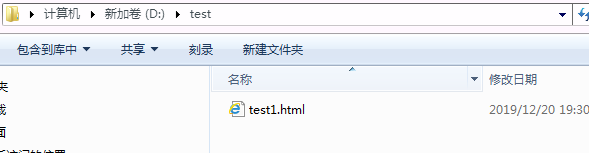
生成文件
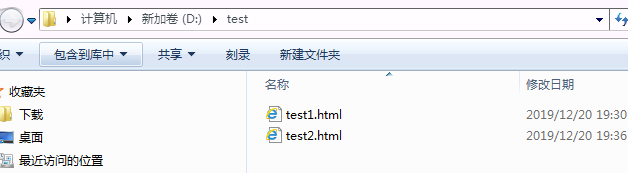
3.2 使用模板字符串静态化
package com.example.demo;

import freemarker.cache.StringTemplateLoader;

import freemarker.template.Configuration;

import freemarker.template.Template;

import freemarker.template.TemplateException;

import org.apache.commons.io.IOUtils;

import org.junit.jupiter.api.Test;

import org.springframework.boot.test.context.SpringBootTest;

import org.springframework.ui.freemarker.FreeMarkerTemplateUtils;

import java.io.File;

import java.io.FileOutputStream;

import java.io.IOException;

import java.io.InputStream;

import java.util.HashMap;

import java.util.Map;

/**

 * @author john

 * @date 2019/12/20 - 19:09

 */

@SpringBootTest

public class TestFreemarkerHtml {

    //基于模板字符串生成静态化文件

    @Test

    public void testGenerateHtmlByString() throws IOException, TemplateException {

        //创建配置类

        Configuration configuration = new Configuration(Configuration.getVersion());

        //模板内容,这里测试时使用简单的字符串作为模板

        String templateString = "" +

                "<html>\n" +

                "  <head></head>\n" +

                "  <body>\n" +

                "  名称:${name}\n" +

                "  </body>\n" +

                "</html>";

        //模板加载器

        StringTemplateLoader stringTemplateLoader = new StringTemplateLoader();

        stringTemplateLoader.putTemplate("template", templateString);

        configuration.setTemplateLoader(stringTemplateLoader);

        //得到模板

        Template template = configuration.getTemplate("template", "utf‐8");

        //数据模型

        Map<String, Object> map = new HashMap<>();

        map.put("name", "john");

        //静态化

        String content = FreeMarkerTemplateUtils.processTemplateIntoString(template, map);

        //静态化内容

        System.out.println(content);

        InputStream inputStream = IOUtils.toInputStream(content);

        //输出文件

        FileOutputStream fileOutputStream = new FileOutputStream(new File("d:/test/test2.html"));

        IOUtils.copy(inputStream, fileOutputStream);

    }

}
springboot2.0结合freemarker生成静态化页面的更多相关文章
- 利用PHP的ob函数实现生成静态化页面
之前用过一些开源的CMS管理系统,当时就很好奇后台中的生成HTML静态文件是怎么实现的.今天和同事讨论了下,没想到同事之前做过这类的生成静态页面的功能,果断向他请教了下. 经他讲解后,才知道其实生成静 ...
- java使用freemarker生成静态html页面
1. 模板文件static.html <!DOCTYPE html PUBLIC "-//W3C//DTD HTML 4.01 Transitional//EN" " ...
- DJANGO-天天生鲜项目从0到1-007-首页静态化与缓存
本项目基于B站UP主‘神奇的老黄’的教学视频‘天天生鲜Django项目’,视频讲的非常好,推荐新手观看学习 https://www.bilibili.com/video/BV1vt41147K8?p= ...
- SpringBoot2中,怎么生成静态文档
SpringBoot2中,怎么生成静态文档 在实际开发过程中,我们通过swagger就可以生成我们的接口文档,这个文档就可以提供给前端人员开发使用的.但是,有时候,我们需要把我们的接口文档,提供给第三 ...
- JSP生成静态Html页面
[转载]JSP生成静态Html页面 在网站项目中,为了访问速度加快,为了方便百度爬虫抓取网页的内容,需要把jsp的动态页面转为html静态页面.通常有2种常用的方式: 1.伪静态,使用URL Rewr ...
- 网页静态化解决方案:Freemarker生成简单html页面
FreeMarker 是一个用 Java 语言编写的模板引擎,它基于模板来生成文本输出.FreeMarker与 Web 容器无关,即在 Web 运行时,它并不知道 Servlet 或 HTTP.它不仅 ...
- 使用freemarker生成静态页面
一 说明 需要在spring mvc项目中加入下列包: <dependency> <groupId>org.freemarker</groupId> <art ...
- 首页自动生成静态化html
由于平台老是出现间歇性502.排查发现,php死进程过多耗费大量系统资源. 除了优化代码之外,静态化可以减少php进程.缓解一下服务器压力. 把首页生成html后,出现问题频率下降.所以需要做首页静态 ...
- Freemarker生成静态代码实例
1.static.html <!DOCTYPE html PUBLIC "-//W3C//DTD HTML 4.01 Transitional//EN" "http ...
随机推荐
- MySQL 5.7半同步复制技术
一.复制架构衍生史 在谈这个特性之前,我们先来看看MySQL的复制架构衍生史. 在2000年,MySQL 3.23.15版本引入了Replication.Replication作为一种准实时同步方式, ...
- 初学mysql 如何删除数据库 如何安装mysql
廖老师官网链接 这两个表格有个映射关系,就是根据Grade_ID可以在班级表中查找到对应的所有班级: 也就是Grade表的每一行对应Class表的多行,在关系数据库中,这种基于表(Table)的一对多 ...
- shell 从键盘读取输入时删除输入的字符
[参考文章]:stty命令的用法全解 [参考文章]:shell——read时退格异常(shell修改删除符) stty srase ^h read -p "请输入参数信息" 在 ...
- mybatis 批量将list数据插入到数据库
随着业务需要,有时我们需要将数据批量添加到数据库,mybatis提供了将list集合循环添加到数据库的方法.具体实现代码如下: 1.mapper层中创建 insertForeach(List < ...
- Laravel 代码开发最佳实践
我们这里要讨论的并不是 Laravel 版的 SOLID 原则(想要了解更多 SOLID 原则细节查看这篇文章)亦或是设计模式,而是 Laravel 实际开发中容易被忽略的最佳实践. 内容概览 单一职 ...
- 【论文学习】Is the deconvolution layer the same as a convolutional layer
结合上升采样upsample和卷积操作.Sub-piexl convolution. Efficient Sub-pixel-convolutional-layers. LR network,即低分辨 ...
- 【SR汇总】效果对比
算法时间效率 -见 https://www.cnblogs.com/wxl845235800/p/10826957.html 1.SRCNN <Learning a Deep Convoluti ...
- LC 275. H-Index II
Given an array of citations sorted in ascending order (each citation is a non-negative integer) of a ...
- Android中代码优化
两个基本准则: 1.不要做冗余的工作 2.尽量避免次数过多的内存分配操作 Handler和内部类的正确使用 正确使用Context 正确使用Java四种引用方式:软引用,弱引用,虚引用,强引用 避免创 ...
- 001-tomcat下载、解压、启动、开机启动
一.tomcat作用 Tomcat就是Servlet容器 下载解压 下载:找到合适版本下载使用即可 http://tomcat.apache.org/ window 下载zip解压 linux上使用 ...