
react-native 横向滚动的商品展示
在app中会有这种页面
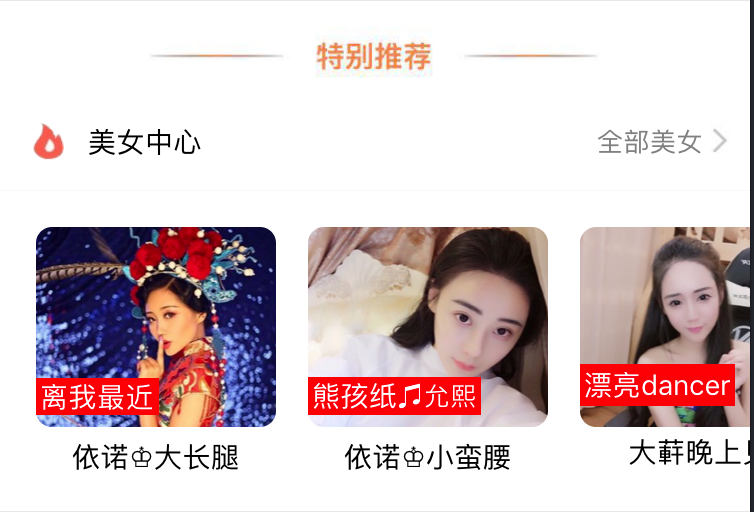
像这样商品是横向的,而且要滚动,思路是利用 ScrollView 横向的滚动
思路:
(a): 横向滚动的整体作为一个组件 ShopCenter
{/*** 横向滚动 ***/}

                    <ShopCenter

                        popToHomeView = {(smid) => this.pushToShopCenterDetail(smid)}

                    />
其中:(讨论梳理整体的链接跳转方法)
popToHomeView 这个函数是从组建中一级级传出来到父页面的,在父页面中让这个函数等价于 函数
pushToShopCenterDetail
// 横向滚动 跳转到购物中心详情页

    pushToShopCenterDetail(smid){

        const { navigate } = this.props.navigation;

        navigate('Detail', {id: smid})

    }
这些都是在父页面中写的。
(b):在组件页面中
es6写法代码
/* 组件 cell */

import React from 'react';

import {

    StyleSheet,

    Text,

    View,

    Image,

    TouchableOpacity,

    ScrollView

} from 'react-native';

// navigator

import { StackNavigator } from 'react-navigation';

// 获取设备宽高

var Dimensions = require('Dimensions');

var {width, height} = Dimensions.get('window');

// 引入外部的json数据

import Home_D5 from '../../../date/scrollCenter.json';

export default class ShopCenter extends React.Component {

    // props 传值,默认传的值 默认商品 id 为1.

    static defaultProps = {

        popToHomeView:

    }

    render() {

        return (

            <View style={styles.container}>

                <ScrollView

                    style={styles.scrollViewStyle}

                    horizontal={true} // 横向

                    showsHorizontalScrollIndicator={false}  // 此属性为true的时候,显示一个水平方向的滚动条。

                    >

                    {this.renderAllItem()}

                </ScrollView>

            </View>

        );

    }

    // 返回下部分所有的Item

    renderAllItem(){

        // 定义组件数组

        var itemArr = [];

        // 取出数据

        var shopData= Home_D5.data;

        // 遍历

        for (var i=; i<shopData.length; i++){

           // 取出单个数据

            var data = shopData[i];

           // 创建组件装入数组

            itemArr.push(

                <ShopCenterItem

                    shopImage = {data.img}

                    shopSale = {data.showtext.text}

                    shopName = {data.name}

                    detailurl = {data.detailurl}

                    smid = {data.smid}

                    key={i}

                    // 将id再次封装传递下去

                    popTopShopCenter = {(smid)=>this.popTopHome(smid)}

                />

            );

        }

        // 返回

        return itemArr;

    }

    popTopHome(smid){

        // 判断

        //if (this.props.smid == null) return;

        // 执行回调函数 将跳转地址传递下去

        this.props.popToHomeView(smid);

    }

}

// 每一个商场

export class ShopCenterItem extends React.Component{

    static defaultProps = {

        shopImage: '',

        shopSale:'',

        shopName: '',

        detailurl: '',

        smid: '',

        popTopShopCenter: null

    }

    render(){

        return(

            <TouchableOpacity

                onPress={()=>this.clickItem(this.props.smid)}

            >

               <View style={styles.itemViewStyle}>

                   <Image source={{uri: this.props.shopImage}} style={styles.imageStyle}/>

                   <Text style={styles.shopSaleStyle}>{this.props.shopSale}</Text>

                   <Text style={styles.shopNameStyle}>{this.props.shopName}</Text>

               </View>

           </TouchableOpacity>

        );

    }

    clickItem(smid){

        // 判断

        if (this.props.smid == null) return;

        // 执行回调函数 再次接受传递的id

        this.props.popTopShopCenter(smid);

    }

};
这种组件中又拆分,跳转的时候带过去参数方法思路:一直将要传递的参数进行传递,最后在父页面中进行控制跳转传递参数就行。
es5写法
import React, { Component } from 'react';

import {

    AppRegistry,

    StyleSheet,

    Text,

    View,

    ScrollView,

    Image,

    TouchableOpacity

} from 'react-native';

// 引入外部的组件类

var CommonCell = require('./XMGBottomCommonCell');

// 引入外部的json数据

var Home_D5 = require('../../LocalData/XMG_Home_D5.json');

var ShopCenter = React.createClass({

  // es5 默认数据处理

    getDefaultProps(){

        // 回调函数

        return{

            popToHomeView: null

        }

    },

    render() {

        return (

            <View style={styles.container}>

                {/*上部分*/}

               <CommonCell

                   leftIcon="gw"

                   leftTitle="购物中心"

                   rightTitle={Home_D5.tips}

               />

                {/*下部分*/}

                <ScrollView

                    style={styles.scrollViewStyle}

                    horizontal={true} // 横向

                    showsHorizontalScrollIndicator={false}

                    >

                    {this.renderAllItem()}

                </ScrollView>

            </View>

        );

    },

    // 返回下部分所有的Item

    renderAllItem(){

        // 定义组件数组

        var itemArr = [];

        // 取出数据

        var shopData= Home_D5.data;

        // 遍历

        for (var i=; i<shopData.length; i++){

           // 取出单个数据

            var data = shopData[i];

           // 创建组件装入数组

            itemArr.push(

                <ShopCenterItem

                    shopImage = {data.img}

                    shopSale = {data.showtext.text}

                    shopName = {data.name}

                    detailurl = {data.detailurl}

                    key={i}

                    popTopShopCenter = {(url)=>this.popTopHome(url)}

                />

            );

        }

        // 返回

        return itemArr;

    },

    popTopHome(url){

        // 判断

        if (this.props.popToHomeView == null) return;

        // 执行回调函数

        this.props.popToHomeView(url);

    }

});

// 每一个商场

var ShopCenterItem = React.createClass({

    getDefaultProps(){

        return{

            shopImage: '',

            shopSale:'',

            shopName: '',

            detailurl: '',

            popTopShopCenter: null

        }

    },

    render(){

        return(

           <TouchableOpacity onPress={()=>this.clickItem(this.props.detailurl)}>

               <View style={styles.itemViewStyle}>

                   <Image source={{uri: this.props.shopImage}} style={styles.imageStyle}/>

                   <Text style={styles.shopSaleStyle}>{this.props.shopSale}</Text>

                   <Text style={styles.shopNameStyle}>{this.props.shopName}</Text>

               </View>

           </TouchableOpacity>

        );

    },

    clickItem(url){

        // 判断

        if (this.props.detailurl == null) return;

        // 执行回调函数

        this.props.popTopShopCenter(url);

    }

});

const styles = StyleSheet.create({

    container: {

       marginTop:

    },

    welcome: {

        fontSize: ,

        textAlign: 'center',

        margin: ,

    },

    imageStyle:{

        width:,

        height:,

        borderRadius:

    },

    scrollViewStyle:{

        flexDirection:'row',

        backgroundColor:'white',

        padding:

    },

    itemViewStyle:{

        margin:

    },

    shopSaleStyle:{

        // 绝对定位

        position:'absolute',

        left:,

        bottom:,

        backgroundColor:'red',

        color:'white',

        padding:

    },

    shopNameStyle:{

        textAlign:'center',

        marginTop:

    }

});

// 输出组件类

module.exports = ShopCenter;
使用的时候导入一个Json数据就可以直接使用
json

{

  "count": ,

  "data": [

    {

      "detailurl": "imeituan://www.meituan.com/web/?url=http://i.meituan.com/shoppingmall/smDetail/4374715",

      "promotionIcon": "",

      "name": "依诺♔大长腿",

      "img": "https://vi3.6rooms.com/live/2017/02/11/23/1010v1486825491140350116_s.jpg",

      "showtext": {

        "text": "离我最近",

        "count": ,

        "color": ""

      },

      "longitude": 113.327086,

      "latitude": 23.131909,

      "smid": ,

      "promotionText": "送福利 商品低至1.5折"

    },

    {

      "detailurl": "imeituan://www.meituan.com/web/?url=http://i.meituan.com/shoppingmall/smDetail/50606658",

      "promotionIcon": "",

      "name": "依诺♔小蛮腰",

      "img": "https://vi3.6rooms.com/live/2017/07/20/12/1010v1500526250183630933_s.jpg",

      "showtext": {

        "text": "熊孩纸♫允熙",

        "count": ,

        "color": ""

      },

      "longitude": 113.26605,

      "latitude": 23.17151,

      "smid": ,

      "promotionText": "春来花开 满100最高减60"

    },

    {

      "detailurl": "imeituan://www.meituan.com/web/?url=http://i.meituan.com/shoppingmall/smDetail/75813274",

      "promotionIcon": "",

      "name": "大蓒晚上见",

      "img": "https://vi0.6rooms.com/live/2017/03/26/23/1010v1490542518707536335_s.jpg",

      "showtext": {

        "text": "漂亮dancer",

        "count": ,

        "color": ""

      },

      "longitude": 113.269668,

      "latitude": 23.1818,

      "smid": ,

      "promotionText": "新春送福利 购物满额有好礼"

    },

      "longitude": 113.232008,

      "latitude": 23.397758,

      "smid": ,

      "promotionText": "48家品牌优惠中:瑞可爷爷的店每满30减5,全单9折(买单立享)"

    }

  ],

  "tips": "全部5家",

  "jumpto": "imeituan://www.meituan.com/web/?url=http://i.meituan.com/shoppingmall/smList?sid=@geodist:asc"

}
react-native 横向滚动的商品展示的更多相关文章
- [RN] React Native 自定义导航栏随滚动渐变
React Native 自定义导航栏随滚动渐变 实现效果预览: 代码实现: 1.定义导航栏 NavPage.js import React, {Component} from 'react'; im ...
- [RN] React Native 滚动跳转到指定位置
React Native 滚动跳转到指定位置 一.结构 <ScrollView horizontal={true} ref={(view) => { this.myScrollView = ...
- React Native学习(七)—— FlatList实现横向滑动列表效果
本文基于React Native 0.52 Demo上传到Git了,有需要可以看看,写了新内容会上传的.Git地址 https://github.com/gingerJY/React-Native-D ...
- React Native之ListView使用
前言 学习本系列内容需要具备一定 HTML 开发基础,没有基础的朋友可以先转至 HTML快速入门(一) 学习 本人接触 React Native 时间并不是特别长,所以对其中的内容和性质了解可能会有所 ...
- React Native组件之ScrollView 和 StatusBar和TabBarIos
React Native中的组件ScrollView类似于iOS中的UIScrollView,其基本的使用方法和熟悉如下: /** * Sample React Native App * https: ...
- 腾讯优测优分享 | 探索react native首屏渲染最佳实践
腾讯优测是专业的移动云测试平台,旗下的优分享不定时提供大量移动研发及测试相关的干货~ 此文主要与以下内容相关,希望对大家有帮助. react native给了我们使用javascript开发原生app ...
- 探索react native首屏渲染最佳实践
文 / 腾讯 龚麒 0.前言 react native给了我们使用javascript开发原生app的能力,在使用react native完成兴趣部落安卓端发现tab改造后,我们开始对由react n ...
- Qzone React Native改造
Android Qzone 6.1版本在情侣空间涉水React Native,以动态插件方式将情侣空间进行React Natived的改造.在情侣空间基础上,Android Qzone 6.2版本以融 ...
- React Native常用组件之ScrollView
1. 两个要点 1.1 ScrollView必须有一个确定的高度才能正常工作 它实际上所做的就是将一系列不确定高度的子组件装进一个确定高度的容器(通过滚动操作) 通常有两种做法: 第一种: 直接给该S ...
随机推荐
- ssl_error_weak_server_ephemeral_dh_key
1. http://blog.csdn.net/mmoooodd/article/details/50264559 2. http://blog.csdn.net/zhu19774279/articl ...
- TOYS POJ 2318 计算几何 叉乘的应用
Time Limit: 2000MS Memory Limit: 65536K Total Submissions: 15060 Accepted: 7270 Description Calc ...
- [bzoj1047][HAOI2007]理想的正方形_动态规划_单调队列
理想的正方形 bzoj-1047 HAOI-2007 题目大意:有一个a*b的整数组成的矩阵,现请你从中找出一个n*n的正方形区域,使得该区域所有数中的最大值和最小值的差最小. 注释:$2\le a, ...
- springcloud(十一):服务网关Zuul高级篇
时间过的很快,写springcloud(十):服务网关zuul初级篇还在半年前,现在已经是2018年了,我们继续探讨Zuul更高级的使用方式. 上篇文章主要介绍了Zuul网关使用模式,以及自动转发机制 ...
- JQuery获取select选中值和清除选中状态(转)
1.获取值 var provinceSearch = $("#loc_province_search").find("option:selected").att ...
- python network programming--connect()
首先我们看一段python client/server代码. server端: >>> import sys,socket >>> s = socket.socke ...
- qt on android之GPS信号的获取
0. 写在最前面 本人參考安晓辉大侠的一篇博文后.做了Qt on android的GSP相关的实验.为了后面不时之需.故而记录下来. 1. Qt on Android GPS系统流 ...
- Android 开发 ContentProvider 获取歌曲列表和联系人的样例
ContentProvider(内容提供者)是Android中的四大组件之中的一个. 主要用于对外共享数据.也就是通过ContentProvider把应用中的数据共享给其它应用訪问.其它应用能够通过C ...
- Android 中View的绘制机制源代码分析 一
尊重原创: http://blog.csdn.net/yuanzeyao/article/details/46765113 差点儿相同半年没有写博客了,一是由于工作比較忙,二是认为没有什么内容值得写, ...
- STL_算法_逆转(reverse,reverse_copy)
C++ Primer 学习中.. . 简单记录下我的学习过程 (代码为主) //全部容器适用 reverse(b,e) //逆转区间数据 reverse_copy(b,e,b2) /** ...