
vim利器:vundle 管理器和NERDTree插件
vundle 和nerdtree
vundle git: https://github.com/VundleVim/Vundle.vim.git
nerdtree git : https://github.com/scrooloose/nerdtree.git
注意 :vundle 是一个插件管理器,我们知道,vim的插件都在~/.vim/bundle/目录下,只要你下载了vundle,你就可以,利用vundle去下载别的插件了,比如: nerdtree
Vundle
利用Vundle 安装NERDTree plugin
首先就是要安装Vundle
下载Vundle:
$ git clone https://github.com/VundleVim/Vundle.vim.git ~/.vim/bundle/Vundle.vim
vimrc中配置Vundle
- 下载完毕 Vundle后,紧跟着要做的就是,修改
~/.vimrc文件,将Vundle配置到vim中; - 如何配置Vundle 可以参考git帮助:
https://github.com/muahao/Vundle.vim - 这里需要注意的是vundle的语法
利用Vundle安装安装插件
打开一个vim, 运行:BundleInstall
或者在命令行运行 vim +BundleInstall +qall
安装完成后插件就能用了
vundle其它常用命令:
更新插件:BundleUpdate

清除不再使用的插件:BundleClean,

列出所有插件:BundleList

查找插件:BundleSearch
nerdtree
NERDTree的作用就是列出当前路径的目录树,一般IDE都是有的。可以方便的浏览项目的总体的目录结构和创建删除重命名文件或文件名。
安装方法1:直接自己git clone
git clone https://github.com/scrooloose/nerdtree.git ~/.vim/bundle/nerdtree
安装方法2: 利用vundle
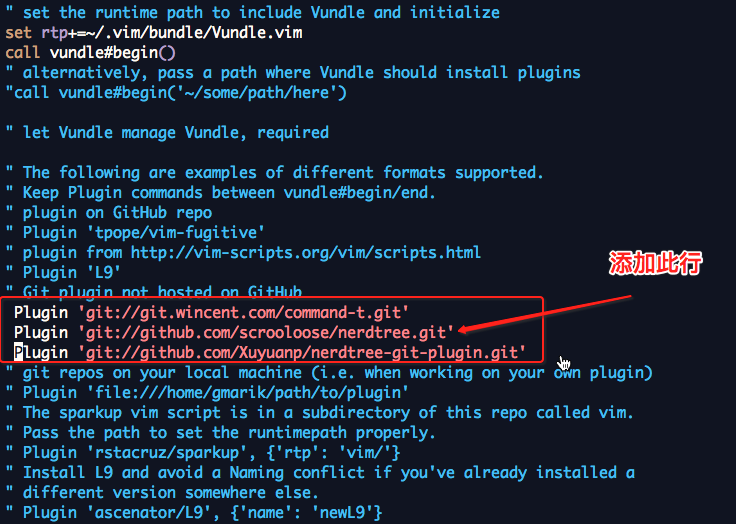
两种安装方法,都会在/.vim/bundle/目录下产生一个 nerdtree目录
[ahao.mah@jiangyi01.sqa.zmf /home/ahao.mah]

$ll ~/.vim/bundle/

total 20

drwxr-xr-x 13 ahao.mah users 4096 May  7 14:36 command-t

drwxr-xr-x 10 ahao.mah users 4096 May  7 14:54 nerdtree

drwxr-xr-x  6 ahao.mah users 4096 May  7 14:37 sparkup

drwxr-xr-x  5 ahao.mah users 4096 May  7 14:36 vim-fugitive

drwxr-xr-x  8 ahao.mah users 4096 May  7 14:34 Vundle.vim
使用nerdtree
报错1: 脑残的执行 source ~/.vimrc 后,会出现bash报错,其实原因是这样的,在 shell 里不能 source vim 配置文件,vimrc的语法又不是跟shell一样的。你改了.vimrc的内容,重新用vim打开一个文件vimrc就生效了,根本不用source,又不是shell脚本.
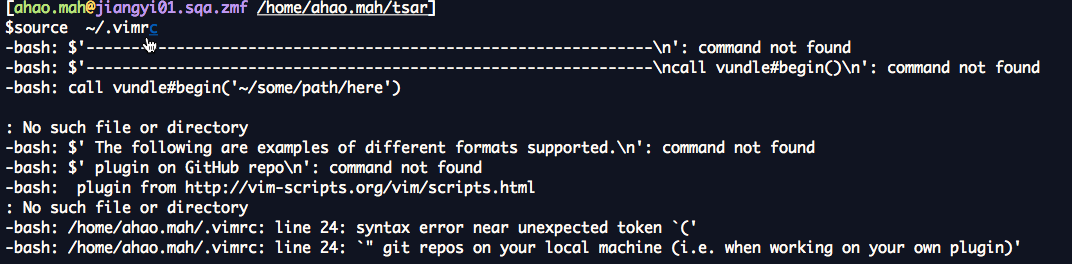
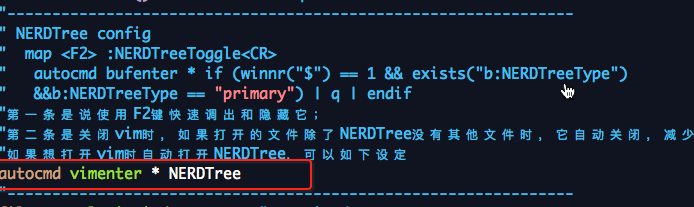
vim默认开启nerdtree:
在~/.vimrc中添加
autocmd vimenter * NERDTree
vimrc配置
$cat   ~/.vimrc

set nocompatible              " be iMproved, required

filetype off                  " required

"---------------------------------------------------------------

" set the runtime path to include Vundle and initialize

set rtp+=~/.vim/bundle/Vundle.vim

"---------------------------------------------------------------

call vundle#begin()

" alternatively, pass a path where Vundle should install plugins

"call vundle#begin('~/some/path/here')

" let Vundle manage Vundle, required

" The following are examples of different formats supported.

" Keep Plugin commands between vundle#begin/end.

" plugin on GitHub repo

" Plugin 'tpope/vim-fugitive'

" plugin from http://vim-scripts.org/vim/scripts.html

" Plugin 'L9'

" Git plugin not hosted on GitHub

 Plugin 'git://git.wincent.com/command-t.git'

 Plugin 'git://github.com/scrooloose/nerdtree.git'

 Plugin 'git://github.com/Xuyuanp/nerdtree-git-plugin.git'

" git repos on your local machine (i.e. when working on your own plugin)

" Plugin 'file:///home/gmarik/path/to/plugin'

" The sparkup vim script is in a subdirectory of this repo called vim.

" Pass the path to set the runtimepath properly.

" Plugin 'rstacruz/sparkup', {'rtp': 'vim/'}

" Install L9 and avoid a Naming conflict if you've already installed a

" different version somewhere else.

" Plugin 'ascenator/L9', {'name': 'newL9'}

" All of your Plugins must be added before the following line

call vundle#end()            " required

"---------------------------------------------------------------

" NERDTree config

"  map <F2> :NERDTreeToggle<CR>

"   autocmd bufenter * if (winnr("$") == 1 && exists("b:NERDTreeType")

"   &&b:NERDTreeType == "primary") | q | endif

"第一条是说使用F2键快速调出和隐藏它;

"第二条是关闭vim时,如果打开的文件除了NERDTree没有其他文件时,它自动关闭,减少多次按:q!。

"如果想打开vim时自动打开NERDTree,可以如下设定

autocmd vimenter * NERDTree

"---------------------------------------------------------------

filetype plugin indent on    " required

" To ignore plugin indent changes, instead use:

"filetype plugin on

"

" Brief help

" :PluginList       - lists configured plugins

" :PluginInstall    - installs plugins; append `!` to update or just :PluginUpdate

" :PluginSearch foo - searches for foo; append `!` to refresh local cache

" :PluginClean      - confirms removal of unused plugins; append `!` to auto-approve removal

"

" see :h vundle for more details or wiki for FAQ

" Put your non-Plugin stuff after this line
nerdtree-git-plugin
$git clone https://github.com/Xuyuanp/nerdtree-git-plugin.git ~/.vim/bundle/nerdtree-git-plugin
REF
http://www.cnblogs.com/lexus/archive/2012/11/04/2753187.html
http://www.xinxingzhao.com/blog/2016/05/15/vim-NERDTree.html
vim利器:vundle 管理器和NERDTree插件的更多相关文章
- Vim使用Vundle管理插件(转)
转自:http://os.51cto.com/art/201507/484174.htm Vim是Linux上一款用途广泛的轻量级文本编辑工具.虽然对普通的Linux用户来说开始学用起来难度相当大,但 ...
- Vim使用Vundle安装代码补全插件(YouCompleteMe)
安装 Vundle 它的使用方法很简单,安装一个插件只需要在 ~/.vimrc 按照规则中添加 Plugin 的名称,某些需要添加路径,之后在 Vim 中使用:PluginInstall既可以自动化安 ...
- Vim插件之插件管理器Vundle
Vim插件之插件管理器Vundle 1.介绍下载 相比Sublime.Text2等现代编辑器,Vim缺乏默认的插件管理器,所有插件的文件都散布在~/.vim下的几个文件夹中,配置Vim的过程, 就是在 ...
- vim插件管理器:Vundle的介绍及安装(很全)(转载)
转载自:https://blog.csdn.net/zhangpower1993/article/details/52184581 背景 Vim缺乏默认的插件管理器,所有插件的文件都散布在~/.vim ...
- 使用Vim-plug作为Vim 插件管理器
ref: https://www.cnblogs.com/jiftle/p/6918157.html - vundle是一款老款的插件管理工具- vim-plug相对较新,特点是支持异步加载,相比vu ...
- Linux基础(六) Vim之vundle插件
背景 Vim缺乏默认的插件管理器,所有插件的文件都散布在~/.vim下的几个文件夹中,插件的安装与更新与删除都需要自己手动来,既麻烦费事,又可能出现错误. Vundle简介 Vundle 是 Vim ...
- Jmeter常用插件:梯度加压/插件管理器
一.Jmeter梯度加压的 jar:Stepping Thread Group,下载方法如下: 1.访问网网站:https://jmeter-plugins.org/downloads/old/ 2. ...
- 将Vim改造为强大的IDE—Vim集成Ctags/Taglist/Cscope/Winmanager/NERDTree/OmniCppComplete(有图有真相)(转)
1.安装Vim和Vim基本插件首先安装好Vim和Vim的基本插件.这些使用apt-get安装即可:lingd@ubuntu:~/arm$sudo apt-get install vim vim-scr ...
- Vim Vundle 插件管理器
/********************************************************************** * Vim Vundle 插件管理器 * 说明: * 话 ...
随机推荐
- elasticsearch6.4中文文档
男朋友翻译的,我这边做一个查看入口,分享给大家,O(∩_∩)O哈哈~ 版权声明:本文为博主原创文章,无需授权即可转载,甚至无需保留以上版权声明,转载时请务必注明作者. https://blog.csd ...
- 外网联接内网mssql
參考地址:http://www.nat123.com/Pages_8_266.jsp 方法例如以下: 1.注冊一个账号,同一时候进入nat123官网加入dns域名解析 点击确认保存,刚刚加入的域名解析 ...
- javascript中的Base64.UTF8编码与解码详解
javascript中的Base64.UTF8编码与解码详解 本文给大家介绍的是javascript中的Base64.UTF8编码与解码的函数源码分享以及使用范例,十分实用,推荐给小伙伴们,希望大家能 ...
- HTTP详解工作原理
1. HTTP简介 HTTP协议(HyperText Transfer Protocol,超文本传输协议)是用于从WWW服务器传输超文本到本地浏览器的传送协议.它可以使浏览器更加高效,使网络传输减少. ...
- wpf Listbox 设置ItemContainerStyle后,ItemTemplateSelector不能触发
解决方案: 将Listbox 的ItemTemplateSelector 改为 ItemContainerStyle中ContentPresenter ContentTemplateSelector ...
- element-UI中table表格的row-click事件怎么获取一行数据的id
<el-table :data="tableData" style="width: 100%" @row-click="openDetails( ...
- spring属性的三种注入方法
(1)使用set方法: public class Book { private String bookname;public void setBookname(String bookname) { ...
- Linux下清屏的方法
转自“https://blog.csdn.net/lis_12/article/details/54943626” clear,刷新屏幕,本质上是让终端显示页向后翻了一页,如果向上滚动屏幕还可以看到之 ...
- 用fiddler不能抓取https及证书无法导出
本次说的不是首次安装fiddler 1.不管有没有安装成功,先查看有没有安装过证书,有的话删除,重新进行安装 打开fiddler,找到Tools-HTTPS-Athons-Open windows C ...
- Map初始化
转载至:http://blog.csdn.net/dujianxiong/article/details/54849079 第一种方法:static块初始化 public class Demo{ pr ...