
java 监听控制台输入
分享一下我写的java监听控制台输入并可以给出响应的功能。
很多时候需要监听控制台的输入内容,相当于信号监听,根据输入的内容做出相应的动作,这里给出我的一个简单实现。
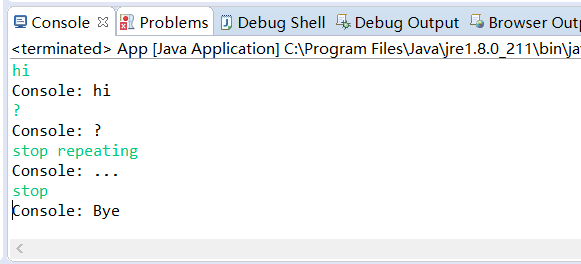
要注意的是:监听得到的消息中前后的空格和中间连续的多个空格会被忽略只保留一个空格,不区分大小写。
package com.idealisan.cores;

import java.util.HashMap;

import java.util.Scanner;

public class ConsoleListener {

    HashMap<String, Action> answers = new HashMap<String, ConsoleListener.Action>();

    Scanner scanner;

    Action defaultAction;

    /**

     * Add an action for a message.

     * @param message A string trimed. Ignore case. It has no inner space sequence of two spaces or more.

     * Example:"close connection"

     * @param action The method action.act() will be called when scanner get the message.

     */

    public void addAction(String message, Action action) {

        answers.put(message.toLowerCase(), action);

    }

    /**

     *

     * @param scanner Usually new Scanner(System.in).

     * Will not be closed after listening.

     * @param defaultAction The defaultAction.act() method will be called if an action is not added for a message.

     */

    public ConsoleListener(Scanner scanner, Action defaultAction) {

        this.scanner = scanner;

        this.defaultAction = defaultAction;

        if (scanner == null || defaultAction == null) {

            throw new NullPointerException("null params for ConsoleListener");

        }

    }

    public void removeAction(String message, Action action) {

        answers.remove(message, action);

    }

    public Action replaceAction(String message, Action action) {

        return answers.replace(message, action);

    }

    public void listenInNewThread() {

        Thread t = new Thread() {

            public void run() {

                listen();

            }

        };

        t.start();

    }

    /**

     * Use listenInNewThread() instead.

     * Listen to console input in current thread. It blocks the thread.

     */

    public void listen() {

        while (true) {

            String line = scanner.nextLine();

            String msg = line.replaceAll("[\\s]+", " ");

            msg = msg.trim().toLowerCase();

            Action action = answers.get(msg);

            if (action == null) {

                action = defaultAction;

            }

            action.act(line);

        }

    }

    public static interface Action {

        public void act(String msg);

    }

}
演示:
package com.idealisan.test;

import java.util.Scanner;

import com.idealisan.cores.ConsoleListener;

/**

 * Hello world!

 *

 */

public class App {

    public static void main(String[] args) {

        ConsoleListener cs = new ConsoleListener(new Scanner(System.in), new ConsoleListener.Action() {

            public void act(String msg) {

                System.out.println("Console: " + msg);

            }

        });

        cs.addAction("stop", new ConsoleListener.Action() {

            public void act(String msg) {

                System.out.println("Console: Bye");

                System.exit(0);

            }

        });

        cs.addAction("stop repeating", new ConsoleListener.Action() {

            public void act(String msg) {

                System.out.println("Console: ...");

            }

        });

        cs.listenInNewThread();

        while (true) {

            try {

                Thread.sleep(1);

            } catch (InterruptedException e) {

                // TODO Auto-generated catch block

                e.printStackTrace();

            }

        }

    }

}
java 监听控制台输入的更多相关文章
- Android EditText的输入监听,输入字符的动态获取
http://itindex.net/detail/38974-android-edittext-%E7%9B%91%E5%90%AC 有时候我们可能会用到时时的监听EditText输入字符的时时监听 ...
- 实时监听input输入内容的N种方法
现在有一个需求,需要我们实时监听input输入框中的内容,从而带来更好的用户体验,而不是等我们全部输入完毕才告诉我们格式不对首先我们创建一个input输入框 <form name='loginF ...
- Java监听模式
说明 生活中,监听无处不在.比如说,手机播放音乐功能,也是一种监听:你不点击播放按钮,手机就不放歌,当你点击时,手机就播放音乐.即触发某种行为,便执行相应的动作. 组成 Java监听模式右三个部分组成 ...
- java监听事件
2014年2月23日 09:51:54 成功添加了打开官网的事件, 回头研究下,那个打开url的类 java的System.getProperty()方法可以获取的值 ################ ...
- 使用jQuery监听扫码枪输入并禁止手动输入的实现方法
@(知识点总结)[jquery|扫码抢] 基于jQuery的扫码枪监听.如果只是想实现监听获取条码扫码信息,可以直接拿来使用,如果有更多的条码判断处理逻辑需要自己扩展. 一.功能需求 使用扫码枪扫描条 ...
- 微信小程序监听input输入并取值
小程序的事件分为两种,冒泡和非冒泡事件,像<form/>的submit事件,<input/>的input事件,<scroll-view/>的scroll事件等非冒泡 ...
- 实时监听input输入的变化(兼容主流浏览器)【转】
遇到如此需求,首先想到的是change事件,但用过change的都知道只有在input失去焦点时才会触发,并不能满足实时监测的需求,比如监测用户输入字符数. 在经过查阅一番资料后,欣慰的发现firef ...
- [转] 实时监听input输入的变化(兼容主流浏览器)
遇到如此需求,首先想到的是change事件,但用过change的都知道只有在input失去焦点时才会触发,并不能满足实时监测的需求,比如监测用户输入字符数. 在经过查阅一番资料后,欣慰的发现firef ...
- java 监听文件或者文件夹变化的几种方式
1.log4j的实现的文件内容变化监听 package com.jp.filemonitor; import org.apache.log4j.helpers.FileWatchdog; public ...
随机推荐
- Nexus私服的搭建
1.nexus 介绍 是开源的,用该框架架设maven私有服务器 2.nexus私服环境搭建 把nexus.war包放到tomcat的webapps下面 浏览且登录 ...
- 百度之星2014复赛 - 1002 - The Query on the Tree
先上题目: The Query on the Tree Time Limit: 2000/1000 MS (Java/Others) Memory Limit: 32768/32768 K (J ...
- [bzoj3680]吊打XXX_模拟退火
吊打XXX bzoj-3680 题目大意:在平面上给定n个点,每个点有一个权值.请在平面上找出一个点(不一定在这n个点内找)使得这个点到n个点的距离*权值最小,即求这n个点的重心. 注释:$1\le ...
- 新安装的wampserver怎么使用本机已有的mysql作为数据库
一般在一台没有安装mysql的机器上安装好wamp后,能够直接在wamp的phpMyAdmin中打开集成的mysql并设置用户信息. 而假设之前已经安装配置好mysql(实usernamepasswo ...
- Notepad++ 设置执行 lua 和 python
Notepad++ 设置执行 lua 和 python 一.设置 run -> 设置 cmd /k lua "$(FULL_CURRENT_PATH)" & PAUS ...
- 安装10gR2的硬件要求
1.至少1G的RAM. 2.RAM与swap关系: RAM swap 512M以上 2*RAM (非常奇怪.至少1G的RAM.还写512的 ...
- XTU OJ 1207 Welcome to XTCPC (字符串签到题)
Problem Description Welcome to XTCPC! XTCPC start today, you are going to choose a slogan to celebra ...
- 利用scrapy抓取网易新闻并将其存储在mongoDB
好久没有写爬虫了,写一个scrapy的小爬爬来抓取网易新闻,代码原型是github上的一个爬虫,近期也看了一点mongoDB.顺便小用一下.体验一下NoSQL是什么感觉.言归正传啊.scrapy爬虫主 ...
- pip3使用
安装好python3.5,在D:\study\python\python35\Scripts目录下打开命令行 执行命令pip3 list 查看已经安装的东西,提示需要升级,执行命令python -m ...
- 【cl】Red Hat Linux虚拟机安装Vmware Tools
1.选择虚拟机,选中导航栏虚拟机>VMware Tool安装 选择右键>extract to 选择/home,新建了自己的文件夹,然后点击extract 一直enter,一直到 然后reb ...