
java 监听控制台输入
分享一下我写的java监听控制台输入并可以给出响应的功能。
很多时候需要监听控制台的输入内容,相当于信号监听,根据输入的内容做出相应的动作,这里给出我的一个简单实现。
要注意的是:监听得到的消息中前后的空格和中间连续的多个空格会被忽略只保留一个空格,不区分大小写。
package com.idealisan.cores;

import java.util.HashMap;

import java.util.Scanner;

public class ConsoleListener {

    HashMap<String, Action> answers = new HashMap<String, ConsoleListener.Action>();

    Scanner scanner;

    Action defaultAction;

    /**

     * Add an action for a message.

     * @param message A string trimed. Ignore case. It has no inner space sequence of two spaces or more.

     * Example:"close connection"

     * @param action The method action.act() will be called when scanner get the message.

     */

    public void addAction(String message, Action action) {

        answers.put(message.toLowerCase(), action);

    }

    /**

     *

     * @param scanner Usually new Scanner(System.in).

     * Will not be closed after listening.

     * @param defaultAction The defaultAction.act() method will be called if an action is not added for a message.

     */

    public ConsoleListener(Scanner scanner, Action defaultAction) {

        this.scanner = scanner;

        this.defaultAction = defaultAction;

        if (scanner == null || defaultAction == null) {

            throw new NullPointerException("null params for ConsoleListener");

        }

    }

    public void removeAction(String message, Action action) {

        answers.remove(message, action);

    }

    public Action replaceAction(String message, Action action) {

        return answers.replace(message, action);

    }

    public void listenInNewThread() {

        Thread t = new Thread() {

            public void run() {

                listen();

            }

        };

        t.start();

    }

    /**

     * Use listenInNewThread() instead.

     * Listen to console input in current thread. It blocks the thread.

     */

    public void listen() {

        while (true) {

            String line = scanner.nextLine();

            String msg = line.replaceAll("[\\s]+", " ");

            msg = msg.trim().toLowerCase();

            Action action = answers.get(msg);

            if (action == null) {

                action = defaultAction;

            }

            action.act(line);

        }

    }

    public static interface Action {

        public void act(String msg);

    }

}
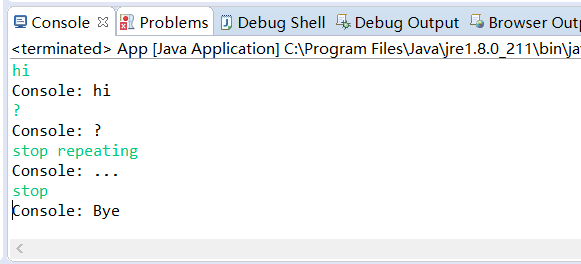
演示:
package com.idealisan.test;

import java.util.Scanner;

import com.idealisan.cores.ConsoleListener;

/**

 * Hello world!

 *

 */

public class App {

    public static void main(String[] args) {

        ConsoleListener cs = new ConsoleListener(new Scanner(System.in), new ConsoleListener.Action() {

            public void act(String msg) {

                System.out.println("Console: " + msg);

            }

        });

        cs.addAction("stop", new ConsoleListener.Action() {

            public void act(String msg) {

                System.out.println("Console: Bye");

                System.exit(0);

            }

        });

        cs.addAction("stop repeating", new ConsoleListener.Action() {

            public void act(String msg) {

                System.out.println("Console: ...");

            }

        });

        cs.listenInNewThread();

        while (true) {

            try {

                Thread.sleep(1);

            } catch (InterruptedException e) {

                // TODO Auto-generated catch block

                e.printStackTrace();

            }

        }

    }

}
java 监听控制台输入的更多相关文章
- Android EditText的输入监听,输入字符的动态获取
http://itindex.net/detail/38974-android-edittext-%E7%9B%91%E5%90%AC 有时候我们可能会用到时时的监听EditText输入字符的时时监听 ...
- 实时监听input输入内容的N种方法
现在有一个需求,需要我们实时监听input输入框中的内容,从而带来更好的用户体验,而不是等我们全部输入完毕才告诉我们格式不对首先我们创建一个input输入框 <form name='loginF ...
- Java监听模式
说明 生活中,监听无处不在.比如说,手机播放音乐功能,也是一种监听:你不点击播放按钮,手机就不放歌,当你点击时,手机就播放音乐.即触发某种行为,便执行相应的动作. 组成 Java监听模式右三个部分组成 ...
- java监听事件
2014年2月23日 09:51:54 成功添加了打开官网的事件, 回头研究下,那个打开url的类 java的System.getProperty()方法可以获取的值 ################ ...
- 使用jQuery监听扫码枪输入并禁止手动输入的实现方法
@(知识点总结)[jquery|扫码抢] 基于jQuery的扫码枪监听.如果只是想实现监听获取条码扫码信息,可以直接拿来使用,如果有更多的条码判断处理逻辑需要自己扩展. 一.功能需求 使用扫码枪扫描条 ...
- 微信小程序监听input输入并取值
小程序的事件分为两种,冒泡和非冒泡事件,像<form/>的submit事件,<input/>的input事件,<scroll-view/>的scroll事件等非冒泡 ...
- 实时监听input输入的变化(兼容主流浏览器)【转】
遇到如此需求,首先想到的是change事件,但用过change的都知道只有在input失去焦点时才会触发,并不能满足实时监测的需求,比如监测用户输入字符数. 在经过查阅一番资料后,欣慰的发现firef ...
- [转] 实时监听input输入的变化(兼容主流浏览器)
遇到如此需求,首先想到的是change事件,但用过change的都知道只有在input失去焦点时才会触发,并不能满足实时监测的需求,比如监测用户输入字符数. 在经过查阅一番资料后,欣慰的发现firef ...
- java 监听文件或者文件夹变化的几种方式
1.log4j的实现的文件内容变化监听 package com.jp.filemonitor; import org.apache.log4j.helpers.FileWatchdog; public ...
随机推荐
- 微信小程序获取登录手机号
小程序获取登录用户手机号. 因为需要用户主动触发才能发起获取手机号接口,所以该功能不由 API 来调用,需用 <button> 组件的点击来触发. 首先,放置一个 button 按钮,将 ...
- BZOJ 3329 Xorequ (数位DP、矩阵乘法)
手动博客搬家: 本文发表于20181105 23:18:54, 原地址https://blog.csdn.net/suncongbo/article/details/83758728 题目链接 htt ...
- lucene_05_solr配置
什么是solr Solr.是Apache 下的一个顶级开源项目,采用Java 开发,它是基于Lucene 的全文搜索服务器.Solr 提供了比Lucene 更为丰富的查询语言,同时实现了可配置.可扩展 ...
- POJ 4046 Sightseeing
Sightseeing Time Limit: 5000ms Memory Limit: 65536KB This problem will be judged on PKU. Original ID ...
- Spring Boot-定义拦截器(七)
在web项目 我们常常使用拦截器做权限验证和登陆验证 1.创建一个拦截器实现类 标注@Componet @Component public class LoginInterceputer implem ...
- 执行计划中Using filesort,Using temporary相关语句的优化解决
昨天听开发人员提到,相关的彩票网页当中一个页面刷新的很慢,特别是在提取数据的时候,今天早上一到,便去找开发人员要去相关的也没进行浏览,窥探哪些数据出现了问题,开发人员使用PHP开发,所以我用IE很容易 ...
- [MySQL]--查询性能分析工具-explain关键字
explain显示了MySQL如何使用索引来处理select语句以及连接表.可以帮助选择更好的索引和写出更优化的查询语句. explain的使用方法很简单,只需要在select查询语句前面加上expl ...
- 阶梯博弈&POJ 1704
阶梯博弈: 先借用别人的一幅图片.(1阶梯之前还有一个0阶梯未画出) 阶梯博弈的最初定义是这样的:每一个阶梯只能向它的前一个阶梯移动本阶梯的点,直至最后无法移动的为输. 那么,利用NIM,只计算奇数级 ...
- vbs 脚本2
一些很恶作剧的vbs程序代码 作者: 字体:[增加 减小] 类型:转载 时间:2013-01-16我要评论 恶作剧的vbs代码,这里提供的都是一些死循环或导致系统死机的vbs对机器没坏处,最多关机重启 ...
- 关于PHP浮点数之 intval((0.1+0.7)*10) 为什么是7
PHP是一种弱类型语言, 这样的特性, 必然要求有无缝透明的隐式类型转换, PHP内部使用zval来保存任意类型的数值, zval的结构如下(5.2为例): struct _zval_struct { ...