
urllib2使用总结
keywords:
- urllib2,BeautifulSoup,cookielib
题外话:
小弟是编程爱好者,各位看官轻拍。
最近在使用urllib2抓取网页内容,在学习的过程中也查阅了不少资料,并从中收获很多。在查阅资料的过程中,我发现大部分资料都是建立在对urllib2的熟悉基础之上,程序的细节并未顾及到新手看到这份资料会产生怎样的困惑。在接下来的内容中,我会写到我碰到的疑问以及解决方法。如果你也碰到类似的困惑,希望给予你帮助。
一.urllib2简介
urllib2提供一个基础函数urlopen,通过向指定的URL发出请求来获取数据。最简单的形式就是
- import urllib2
- response=urllib2.urlopen('http://www.douban.com')
- html=response.read()
这个过程就是我们平时刷网页的代码表现形式,它基于请求-响应模型。
- response=urllib2.urlopen('http://www.douban.com')
实际上可以看作两个步骤:
我们指定一个域名并发送请求
1.
- request=urllib2.request('http://www.douban.com')
接着服务端响应来自客户端的请求
2.
- response=urllib2.urlopen(request)
也许你会注意到,我们平时除了刷网页的操作,还有向网页提交数据。这种提交数据的行为,urllib2会把它翻译为:
- import urllib
- import urllib2
- url = 'http://www.douban.com'
- info = {'name' : 'Michael Foord',
- 'location' : 'Northampton'}
- data = urllib.urlencode(info) #info 需要被编码为urllib2能理解的格式,这里用到的是urllib
- req = urllib2.Request(url, data)
- response = urllib2.urlopen(req)
- the_page = response.read()
有时你会碰到,程序也对,但是服务器拒绝你的访问。这是为什么呢?问题出在请求中的头信息(header)。
有的服务端有洁癖,不喜欢程序来触摸它。这个时候你需要将你的程序伪装成浏览器来发出请求。请求的方式就包含在header中。
常见的情形:
- import urllib
- import urllib2
- url = 'http://www.someserver.com/cgi-bin/register.cgi'
- user_agent = 'Mozilla/4.0 (compatible; MSIE 5.5; Windows NT)'# 将user_agent写入头信息
- values = {'name' : 'Michael Foord',
- 'location' : 'Northampton',
- 'language' : 'Python' }
- headers = { 'User-Agent' : user_agent }
- data = urllib.urlencode(values)
- req = urllib2.Request(url, data, headers)
- response = urllib2.urlopen(req)
- the_page = response.read()
二.示例
模拟一个利用cookie登录人人网的过程 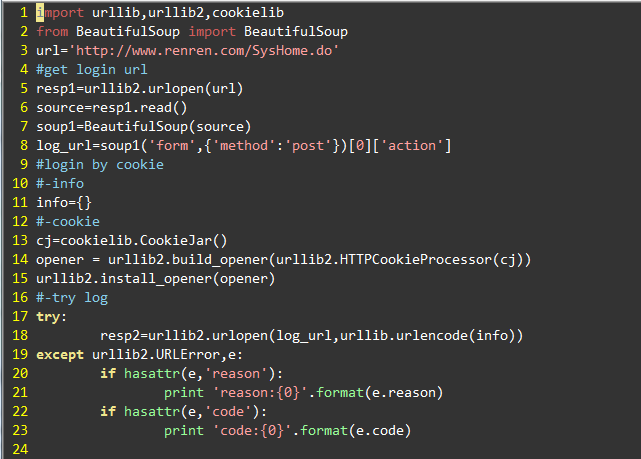
2012-03-07 21:34 上传
说明:
1.人人网的登录地址需要用BeautifulSoup来抓取。
2.个人信息存在info中。info是一个字典{'email':'xx','password':'xx'}.key的命名需要根据实际网页中定义,比如豆瓣的定义是{'form_email':'xx','form_password':'xx'}
3.使用cookie的好处在于,登录之后你可以使用cookie中保存的信息作为头信息的一部分,利用已经保存的头信息接着访问网站。
参考:
HOWTO Fetch Internet Resources Using urllib2
Beautiful Soup 中文文档
How to use Python to login to a webpage and retrieve cookies for later usage?
urllib2使用总结的更多相关文章
- 【Python网络爬虫二】使用urllib2抓去网页内容
在Python中通过导入urllib2组件,来完成网页的抓取工作.在python3.x中被改为urllib.request. 爬取具体的过程类似于使用程序模拟IE浏览器的功能,把URL作为HTTP请求 ...
- Python urllib2 调试
#!/usr/bin/env python # coding=utf-8 __author__ = 'zhaoyingnan' import urllib import urllib2 import ...
- 使用urllib2打开网页的三种方法
#coding:utf-8 import urllib2 import cookielib url="http://www.baidu.com" print '方法 1' resp ...
- No module named 'urllib2'
import urllib2 response = urllib2.urlopen('http://www.baidu.com/') html = response.read() print html ...
- Python自动化测试 (九)urllib2 发送HTTP Request
urllib2 是Python自带的标准模块, 用来发送HTTP Request的. 类似于 .NET中的, HttpWebRequest类 urllib2 的优点 Python urllib2 ...
- urllib2抓取HTML存入Excel
通过urllib2抓取HTML网页,然后过滤出包含特定字符的行,并写入Excel文件: # -*- coding: utf-8 -*- import sys #import urllib import ...
- [Python] urllib2.HTTPError: HTTP Error 403: Forbidden
搬运自http://www.2cto.com/kf/201309/242273.html,感谢原作. 之所以出现上面的异常,是因为如果用 urllib.request.urlopen 方式打开一个UR ...
- python urllib2 发起http请求post
使用urllib2发起post请求 def GetCsspToken(): data = json.dumps({"userName":"wenbin", &q ...
- cookielib和urllib2模块相结合模拟网站登录
1.cookielib模块 cookielib模块的主要作用是提供可存储cookie的对象,以便于与urllib2模块配合使用来访问Internet资源.例如可以利用 本模块的CookieJar类的对 ...
- 使用python标准库urllib2访问网页
#访问不需要登录的网页import urllib2target_page_url='http://10.224.110.118/myweb/view.jsp' f = urllib2.urlopen( ...
随机推荐
- vc弹出USB的方法. 附试验通过的代码!
vc弹出USB的方法. 附试验通过的代码! http://blog.sina.com.cn/s/blog_4fcd1ea30100qrzn.html (2011-04-15 10:09:48) boo ...
- 【3005】拦截导弹问题(noip1999)
Time Limit: 3 second Memory Limit: 2 MB 某国为了防御帝国的导弹袭击,开发出一种导弹拦截系统,但是这种拦截系统有一个缺陷:虽然他的第一发炮弹能达到任意的高度,但是 ...
- [Angular] Show a loading indicator in Angular using *ngIf/else, the as keyword and the async pipe
The network may be unreliable and loading data may take time. Thus it is important to give the user ...
- window下利用navicat访问Linux下的mariadb数据库
1.再Linux上成功安装mariadb数据库后,不管是在dos(敲命令mysql -h192.168.136.8 -uroot -p)下或者是navicat(创建连接)下连接mariadb数据库,会 ...
- boost::any的一般使用方法
01.#include <iostream> 02.#include <list> 03.#include <boost/any.hpp> 04. ...
- Hadoop常见异常及其解决方案 分类: A1_HADOOP 2014-07-09 15:02 4187人阅读 评论(0) 收藏
1.Shell$ExitCodeException 现象:运行hadoop job时出现如下异常: 14/07/09 14:42:50 INFO mapreduce.Job: Task Id : at ...
- 翻译 | Qt研发副总裁分享2018年工作计划
原文作者:TuukkaTurunen,高级研发副总裁 翻译校审:Haipeng.Yulong和Ryan 引言:2018年,我们将继续完善Qt 5.9 LTS,现在我们正在为5月份发布Qt 5.11进行 ...
- Android 使用Canvas在图片上绘制文字
一个小应用,在图片上绘制文字,以下是绘制文字的方法,并且能够实现自动换行,字体自动适配屏幕大小 private void drawNewBitmap(ImageView imageView, Stri ...
- [Angular] Scrolling the Message List To the Bottom Automatically Using OnChanges
Let's say the message list can Input (messages) from parent component, and what we want to do is whe ...
- 【t019】window(线段树做法)
Time Limit: 2 second Memory Limit: 256 MB [问题描述] 给你一个长度为N 的数组,一个长为K的滑动的窗体从最左移至最右端,你只能见到窗口的K个数,每次窗体向右 ...