
[Asp.net 5] Configuration-新一代的配置文件(神奇的Binder)
关于配置文件的目录:[Asp.net 5] Configuration-新一代的配置文件
之前看过MVC4.0的源码,里面就有Binder。作用是将前台页面传递过来的键值对/字典表绑定到特定的对象。此处的Binder几乎是同样的作用——将IConfiguration映射为特定的类型<T>.
我们进入正文之前还是看一个例子比较好,这样能充分了解Binder。
public class ComplexOptions

{

    public ComplexOptions()

    {

        Virtual = "complex";

    }

    public int Integer { get; set; }

    public bool Boolean { get; set; }

    public virtual string Virtual { get; set; }

}

public class Test

{

    public IConfiguration BuildConfiguration()

    {

        var dic = new Dictionary<string, string>

                 {

                     {"Integer", "-2"},

                     {"Boolean", "TRUe"},

                     {"Nested:Integer", ""}

                };

        var builder = new ConfigurationBuilder(new MemoryConfigurationSource(dic));

        return config = builder.Build();

    }

    public void BinderTest()

    {

        var config = BuildConfiguration();

        var options = ConfigurationBinder.Bind<ComplexOptions>(config);

        Assert.True(options.Boolean);

        Assert.Equal(-, options.Integer);

    }

}
上面例子比较简单,实际上对象可能是复合对象(对象的属性还是对象),也可能是数组、枚举、结构体等。所以我们创建的过程中需要对属性遍历,如果是复合对象,还涉及到递归的过程,所以我把整个过程绘制成类似流程图的图标。如下图所示:
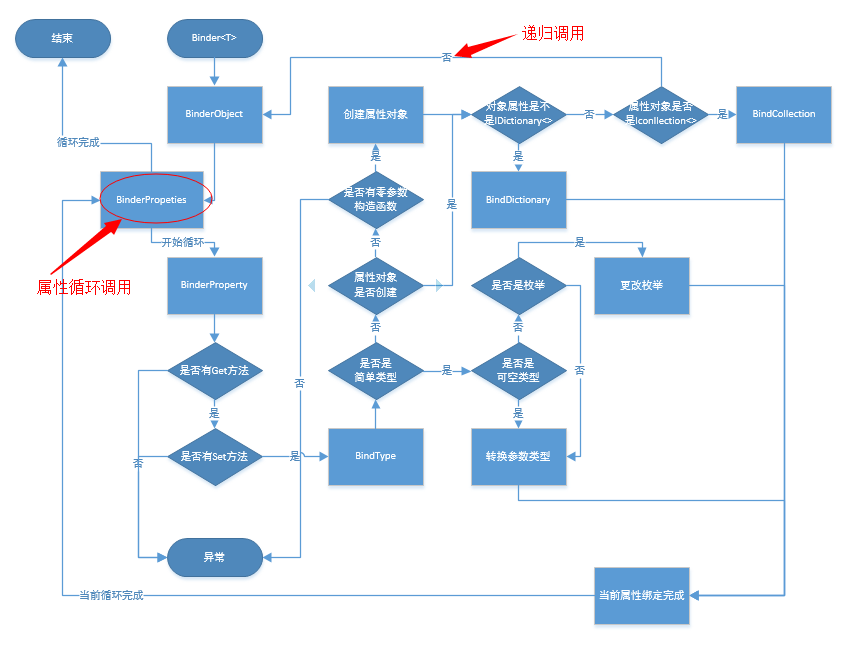
下面我们正式介绍工程的源码,按照惯例还是上工程结构图(就那么一个文件,搞什么搞)
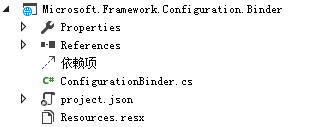
整个工程只有ConfigurationBinder这一个类,调用过程上面“流程图”已经画出来了。
 public static class ConfigurationBinder

    {

        public static TModel Bind<TModel>(IConfiguration configuration) where TModel : new()

        {

            var model = new TModel();

            Bind(model, configuration);

            return model;

        }

        public static void Bind(object model, IConfiguration configuration)

        {

            if (model == null)

            {

                return;

            }

            BindObjectProperties(model, configuration);

        }

        private static void BindObjectProperties(object obj, IConfiguration configuration)

        {

            foreach (var property in GetAllProperties(obj.GetType().GetTypeInfo()))

            {

                BindProperty(property, obj, configuration);

            }

        }

        private static void BindProperty(PropertyInfo property, object propertyOwner, IConfiguration configuration)

        {

            configuration = configuration.GetConfigurationSection(property.Name);

            if (property.GetMethod == null || !property.GetMethod.IsPublic)

            {

                // We don't support set only properties

                return;

            }

            var propertyValue = property.GetValue(propertyOwner);

            var hasPublicSetter = property.SetMethod != null && property.SetMethod.IsPublic;

            if (propertyValue == null && !hasPublicSetter)

            {

                // Property doesn't have a value and we cannot set it so there is no

                // point in going further down the graph

                return;

            }

            propertyValue = BindType(

                property.PropertyType,

                propertyValue,

                configuration);

            if (propertyValue != null && hasPublicSetter)

            {

                property.SetValue(propertyOwner, propertyValue);

            }

        }

        private static object BindType(Type type, object typeInstance, IConfiguration configuration)

        {

            var configValue = configuration.Get(null);

            var typeInfo = type.GetTypeInfo();

            if (configValue != null)

            {

                // Leaf nodes are always reinitialized

                return CreateValueFromConfiguration(type, configValue, configuration);

            }

            else

            {

                var subkeys = configuration.GetConfigurationSections();

                if (subkeys.Count() != )

                {

                    if (typeInstance == null)

                    {

                        if (typeInfo.IsInterface || typeInfo.IsAbstract)

                        {

                            throw new InvalidOperationException(Resources.FormatError_CannotActivateAbstractOrInterface(type));

                        }

                        bool hasParameterlessConstructor = typeInfo.DeclaredConstructors.Any(ctor => ctor.IsPublic && ctor.GetParameters().Length == );

                        if (!hasParameterlessConstructor)

                        {

                            throw new InvalidOperationException(Resources.FormatError_MissingParameterlessConstructor(type));

                        }

                        try

                        {

                            typeInstance = Activator.CreateInstance(type);

                        }

                        catch (Exception ex)

                        {

                            throw new InvalidOperationException(Resources.FormatError_FailedToActivate(type), ex);

                        }

                    }

                    var collectionInterface = GetGenericOpenInterfaceImplementation(typeof(IDictionary<,>), type);

                    if (collectionInterface != null)

                    {

                        // Dictionary

                        BindDictionary(typeInstance, collectionInterface, configuration);

                    }

                    else

                    {

                        collectionInterface = GetGenericOpenInterfaceImplementation(typeof(ICollection<>), type);

                        if (collectionInterface != null)

                        {

                            // ICollection

                            BindCollection(typeInstance, collectionInterface, configuration);

                        }

                        else

                        {

                            // Something else

                            BindObjectProperties(typeInstance, configuration);

                        }

                    }

                }

                return typeInstance;

            }

        }

        private static void BindDictionary(object dictionary, Type iDictionaryType, IConfiguration configuration)

        {

            var iDictionaryTypeInfo = iDictionaryType.GetTypeInfo();

            // It is guaranteed to have a two and only two parameters

            // because this is an IDictionary<K,V>

            var keyType = iDictionaryTypeInfo.GenericTypeArguments[];

            var valueType = iDictionaryTypeInfo.GenericTypeArguments[];

            if (keyType != typeof(string))

            {

                // We only support string keys

                return;

            }

            var addMethod = iDictionaryTypeInfo.GetDeclaredMethod("Add");

            var subkeys = configuration.GetConfigurationSections().ToList();

            foreach (var keyProperty in subkeys)

            {

                var keyConfiguration = keyProperty.Value;

                var item = BindType(

                    type: valueType,

                    typeInstance: null,

                    configuration: keyConfiguration);

                if (item != null)

                {

                    addMethod.Invoke(dictionary, new[] { keyProperty.Key, item });

                }

            }

        }

        private static void BindCollection(object collection, Type iCollectionType, IConfiguration configuration)

        {

            var iCollectionTypeInfo = iCollectionType.GetTypeInfo();

            // It is guaranteed to have a one and only one parameter

            // because this is an ICollection<T>

            var itemType = iCollectionTypeInfo.GenericTypeArguments[];

            var addMethod = iCollectionTypeInfo.GetDeclaredMethod("Add");

            var subkeys = configuration.GetConfigurationSections().ToList();

            foreach (var keyProperty in subkeys)

            {

                var keyConfiguration = keyProperty.Value;

                try

                {

                    var item = BindType(

                        type: itemType,

                        typeInstance: null,

                        configuration: keyConfiguration);

                    if (item != null)

                    {

                        addMethod.Invoke(collection, new[] { item });

                    }

                }

                catch

                {

                }

            }

        }

        private static object CreateValueFromConfiguration(Type type, string value, IConfiguration configuration)

        {

            var typeInfo = type.GetTypeInfo();

            if (typeInfo.IsGenericType && type.GetGenericTypeDefinition() == typeof(Nullable<>))

            {

                return CreateValueFromConfiguration(Nullable.GetUnderlyingType(type), value, configuration);

            }

            var configurationValue = configuration.Get(key: null);

            try

            {

                if (typeInfo.IsEnum)

                {

                    return Enum.Parse(type, configurationValue);

                }

                else

                {

                    return Convert.ChangeType(configurationValue, type);

                }

            }

            catch (Exception ex)

            {

                throw new InvalidOperationException(Resources.FormatError_FailedBinding(configurationValue, type), ex);

            }

        }

        private static Type GetGenericOpenInterfaceImplementation(Type expectedOpenGeneric, Type actual)

        {

            var interfaces = actual.GetTypeInfo().ImplementedInterfaces;

            foreach (var interfaceType in interfaces)

            {

                if (interfaceType.GetTypeInfo().IsGenericType &&

                    interfaceType.GetGenericTypeDefinition() == expectedOpenGeneric)

                {

                    return interfaceType;

                }

            }

            return null;

        }

        private static IEnumerable<PropertyInfo> GetAllProperties(TypeInfo type)

        {

            var allProperties = new List<PropertyInfo>();

            do

            {

                allProperties.AddRange(type.DeclaredProperties);

                type = type.BaseType.GetTypeInfo();

            }

            while (type != typeof(object).GetTypeInfo());

            return allProperties;

        }

    }
ConfigurationBinder
我们对其中几个方法,进行简单的说明:
- GetAllProperties。系统获取属性的时候,不光要获取当前类的属性也要获取基类的属性。
- 绑定属性时,将需要被绑定的对象作为参数传入进去,由于是引用类型,所以不用返回值也能更改其属性、类似的还有ArrayList等。
- BindProperty(PropertyInfo property, object propertyOwner, IConfiguration configuration)。此处的propertyOwner值会被调用方法中修改。
- 将字符串转换成枚举的方法:
- Enum.Parse(type, configurationValue);、
- 将对象转变类型的方法:
- Convert.ChangeType(configurationValue, type);
- 判断泛型的方法
-
private static Type GetGenericOpenInterfaceImplementation(Type expectedOpenGeneric, Type actual)

        {

            var interfaces = actual.GetTypeInfo().ImplementedInterfaces;

            foreach (var interfaceType in interfaces)

            {

                if (interfaceType.GetTypeInfo().IsGenericType &&

                    interfaceType.GetGenericTypeDefinition() == expectedOpenGeneric)

                {

                    return interfaceType;

                }

            }

            return null;

        }
-
[Asp.net 5] Configuration-新一代的配置文件(神奇的Binder)的更多相关文章
- C#/ASP.NET应用程序配置文件app.config/web.config的增、删、改操作,无法为请求的 Configuration 对象创建配置文件。
应用程序配置文件,对于asp.net是 web.config,对于WINFORM程序是 App.Config(ExeName.exe.config). 配置文件,对于程序本身来说,就是基础和依据,其本 ...
- [Asp.net 5] Configuration-新一代的配置文件
微软新一代asp.net(vnext),也叫asp.net 5,开源代码都放在网址https://github.com/aspnet下. 本文介绍的是Configuration工程,下载路径为http ...
- [Asp.net 5] Configuration-新一代的配置文件(接口定义与基础实现)
关于配置文件的目录:[Asp.net 5] Configuration-新一代的配置文件 本系列文章讲的是asp.net 5(Asp.net VNext)中的配置文件部分,工程下载地址为:https: ...
- [Asp.net 5] Configuration-新一代的配置文件(ConfigurationSource的多种实现)
关于配置文件的目录:[Asp.net 5] Configuration-新一代的配置文件 在前面我们介绍了,系统中用IConfigurationSource表示不同配置文件的来源,起到读取.设置.加载 ...
- Asp.net Core 和类库读取配置文件信息
Asp.net Core 和类库读取配置文件信息 看干货请移步至.net core 读取配置文件公共类 首先开一个脑洞,Asp.net core 被使用这么长时间了,但是关于配置文件(json)的读取 ...
- 无法为请求的 Configuration 对象创建配置文件 错误原因
Configuration config = WebConfigurationManager.OpenWebConfiguration("~"); 无法为请求的 Configura ...
- [译]ASP.NET 5 Configuration
原文:https://docs.asp.net/en/latest/fundamentals/configuration.html ASP.NET 5支持多种配置选项. 应用的配置文件可以是JSON, ...
- ASP.NET网站开发中的配置文件
来源:微信公众号CodeL 1.配置文件层次分类 Machine.config: 对.netframework整体的配置 web.config(framework目录下): 对所有项目所公有的应用 ...
- Asp .Net Core 读取appsettings.json配置文件
Asp .Net Core 如何读取appsettings.json配置文件?最近也有学习到如何读取配置文件的,主要是通过 IConfiguration,以及在Program中初始化完成的. ...
随机推荐
- Boyer-Moore 字符串匹配算法
字符串匹配问题的形式定义: 文本(Text)是一个长度为 n 的数组 T[1..n]: 模式(Pattern)是一个长度为 m 且 m≤n 的数组 P[1..m]: T 和 P 中的元素都属于有限的字 ...
- nw.js FrameLess Window下的窗口拖拽与窗口大小控制
nw.js FrameLess Window下的窗口拖拽与窗口大小控制 很多时候,我们觉得系统的Frame框很难看,于是想自定义. 自定义Frame的第一步是在package.config文件中将fr ...
- Matrix Admin 后台模板笔记
一个后台模板用久了就想换一个.上次找到了Matrix Admin.和ACE一样都是Bootstrap风格,比较容易上手.Matrix要更健壮些.感觉拿去做用户界面也是可以的. 整体风格: 1.表单验证 ...
- 如何基于纯GDI实现alpha通道的矢量和文字绘制
今天有人在QQ群里问GDI能不能支持带alpha通道的线条绘制? 大家的答案当然是否定的,很多人推荐用GDI+. 一个基本的图形引擎要包括几个方面的支持:位图绘制,文字绘制,矢量绘制(如矩形,线条). ...
- jQuery 绑定事件到动态创建的元素上
在进入主题之前,我们先来看一个前台页面经常用到的功能:点击页面输入框时自动选择其中文本. 很容易想到利用输入框的focus事件,当输入框获得焦点时,再调用jQuery的select()方法. Okay ...
- [问题解决]安装 SQL Server 无法开启NetFx3.5 的错误
谷歌了一下,该问题是由于系统中缺少.Net3.5相关特性造成的.需要手动安装一下3.5的环境 解决办法: Windows 徽标键+R打开运行窗口 输入Dism /online /enable-feat ...
- Springlake-01 介绍&功能&安装
1. 简介与功能 1)Springlake 是一个企业内容平台SECP 2)是一个可配置的系统,80%内容可以配置 3)允许建立和配置垂直解决方案 4)敏捷和占用空间小,可伸缩 5)端到端的安全性与性 ...
- IOS 公共类-MyMBProgressUtil Progress显示
IOS 公共类-MyMBProgressUtil Progress显示 此公共类用于显示提示框,对MBProgress的进一步封装.可以看下面的代码 接口: @interface MyMBProgre ...
- 如何在 Ubuntu 15.04 上安装带 JSON 支持的 SQLite 3.9
欢迎阅读我们关于SQLite 的文章,SQLite 是当今世界上使用最广泛的 SQL 数据库引擎,它基本不需要配置,不需要设置或管理就可以运行.SQLite 是一个是公开领域(public-domai ...
- require.js 的使用
一.为什么要用require.js 在同一个页面要加载多个js文件时,浏览器会停止网页渲染,加载文件越多,网页失去响应的时间就会越长: 其次,由于js文件之间存在依赖关系,因此必须严格保证加载顺序(比 ...