
用SignalR实现实时查看WebAPI请求日志
实现的原理比较直接,定义一个MessageHandler记录WebAPI的请求记录,然后将这些请求日志推送到客户端,客户端就是一个查看日志的页面,实时将请求日志展示在页面中。
这个例子的目的是演示如何在PersistentConnection类外部给Clients推送消息
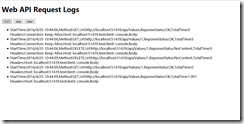
实现过程
一、服务端
服务端同时具备SignalR和WebAPI的功能,通过定义一个记录日志的MessageHandler实现对WebAPI请求的拦截,并生成请求记录,然后推送到客户端
step 1
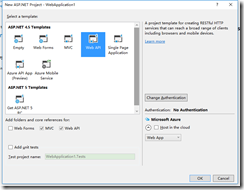
创建一个具备WebAPI功能的站点,为了简化起见,设置Authentication为No Authentication
step 2
创建一个DelegatingHandler,用于记录WebAPI日志,代码如下
下面代码没有涉及到SignalR的功能,日志展示是通过ILoggingDisplay接口传入
public class LoggingHandler : DelegatingHandler

    {

        private static readonly string _loggingInfoKey = "loggingInfo";

        private ILoggingDisplay _loggingDisplay;

        public LoggingHandler(ILoggingDisplay loggingDisplay)

        {

            _loggingDisplay = loggingDisplay;

        }

        public LoggingHandler(HttpMessageHandler innerHandler, ILoggingDisplay loggingDisplay)

            : base(innerHandler)

        {

            _loggingDisplay = loggingDisplay;

        }

        protected override Task<HttpResponseMessage> SendAsync(HttpRequestMessage request, CancellationToken cancellationToken)

        {

            LogRequestLoggingInfo(request);

            return base.SendAsync(request, cancellationToken).ContinueWith(task =>

            {

                var response = task.Result;

                LogResponseLoggingInfo(response);

                return response;

            });

        }

        private void LogRequestLoggingInfo(HttpRequestMessage request)

        {

            var info = new ApiLoggingInfo();

            info.HttpMethod = request.Method.Method;

            info.UriAccessed = request.RequestUri.AbsoluteUri;

            info.IpAddress = HttpContext.Current != null ? HttpContext.Current.Request.UserHostAddress : "0.0.0.0";

            info.StartTime = DateTime.Now;

            ExtractMessageHeadersIntoLoggingInfo(info, request.Headers.ToList());

            request.Properties.Add(_loggingInfoKey, info);

        }

        private void LogResponseLoggingInfo(HttpResponseMessage response)

        {

            object loggingInfoObject = null;

            if (!response.RequestMessage.Properties.TryGetValue(_loggingInfoKey, out loggingInfoObject))

            {

                return;

            }

            var info = loggingInfoObject as ApiLoggingInfo;

            if (info == null)

            {

                return;

            }

            info.HttpMethod = response.RequestMessage.Method.ToString();

            info.ResponseStatusCode = response.StatusCode;

            info.ResponseStatusMessage = response.ReasonPhrase;

            info.UriAccessed = response.RequestMessage.RequestUri.AbsoluteUri;

            info.IpAddress = HttpContext.Current != null ? HttpContext.Current.Request.UserHostAddress : "0.0.0.0";

            info.EndTime = DateTime.Now;

            info.TotalTime = (info.EndTime - info.StartTime).TotalMilliseconds;

            _loggingDisplay.Display(info);

        }

        private void ExtractMessageHeadersIntoLoggingInfo(ApiLoggingInfo info, List<KeyValuePair<string, IEnumerable<string>>> headers)

        {

            headers.ForEach(h =>

            {

                var headerValues = new StringBuilder();

                if (h.Value != null)

                {

                    foreach (var hv in h.Value)

                    {

                        if (headerValues.Length > )

                        {

                            headerValues.Append(", ");

                        }

                        headerValues.Append(hv);

                    }

                }

                info.Headers.Add(string.Format("{0}: {1}", h.Key, headerValues.ToString()));

            });

        }

    }
LoggingHandler
step 3
引入SignalR相关packages
Install-Package Microsoft.AspNet.SignalR
新建一个PersistentConnection,代码为空即可(因为不涉及到客户端调用,推送也是在类的外部执行)
public class RequestMonitor : PersistentConnection
{
}
添加一个Startup类
public void Configuration(IAppBuilder app)
{
app.MapSignalR<RequestMonitor>("/monitor");
}
step 4
创建一个类实现ILoggingDisplay接口,用SignalR推送的方式实现这个接口
代码比较关键的部分就是通过GlobalHost.ConnectionManager获取当前应用程序的connectionContext,得到这个context就可以类似在PersistentConnection内部给clients推送消息
public class SignalRLoggingDisplay : ILoggingDisplay

    {

        /// <summary>

        /// PersistentConnection上下文

        /// </summary>

        private static IPersistentConnectionContext connectionContext = GlobalHost.ConnectionManager.GetConnectionContext<RequestMonitor>();

        public void Display(ApiLoggingInfo loggingInfo)

        {

            var message = new StringBuilder();

             message.AppendFormat("StartTime:{0},Method:{1},Url:{2},ReponseStatus:{3},TotalTime:{4}"

                , loggingInfo.StartTime, loggingInfo.HttpMethod, loggingInfo.UriAccessed, loggingInfo.ResponseStatusCode, loggingInfo.TotalTime);

            message.AppendLine();

            message.AppendFormat("Headers:{0},Body:{1}", string.Join(",", loggingInfo.Headers), loggingInfo.BodyContent);

            connectionContext.Connection.Broadcast(message.ToString());

        }
SignalRLoggingDisplay
step 5
在WebApiConfig的Register方法中添加自定义的handler
public static void Register(HttpConfiguration config)

       {

           config.MapHttpAttributeRoutes();

           config.Routes.MapHttpRoute(

               name: "DefaultApi",

               routeTemplate: "api/{controller}/{id}",

               defaults: new { id = RouteParameter.Optional }

           );

           config.MessageHandlers.Add(new LoggingHandler(new SignalRLoggingDisplay()));

       }
RegisterHandler
到此完成服务端的功能实现
二、客户端
客户端只需要一个监控页面,html页面足矣,其主要功能是提供开始监控、停止监控功能,其他都是接收服务端的推送并展示功能代码。
<!DOCTYPE html>

<html>

<head>

    <title>Web API页面实时请求监控</title>

    <meta charset="utf-8" />

</head>

<body>

    <h1>Web API Request Logs</h1>

    <div>

        <input type="button" value="start" id="btnStart"/>

        <input type="button" value="stop" id="btnStop"/>

        <input type="button" value="clear" id="btnClear"/>

    </div>

    <ul id="requests"></ul>

    <script src="/Scripts/jquery-1.10.2.min.js"></script>

    <script src="/Scripts/jquery.signalR-2.2.0.min.js"></script>

    <script>

        $(function () {

            var requests = $("#requests");

            var startButton = $("#btnStart");

            var stopButton = $("#btnStop");

            var connection = null;

            enable(stopButton, false);

            enable(startButton, true);

            startButton.click(function () {

                startConnection();

                enable(stopButton, true);

                enable(startButton, false);

            });

            $("#btnClear").click(function () {

                $("#requests").children().remove();

            });

            stopButton.click(function () {

                stopConnection();

                enable(stopButton, false);

                enable(startButton, true);

            });

            function startConnection() {

                stopConnection();

                connection = $.connection("/monitor");

                connection.start()

                    .fail(function () {

                        console.log("connect failed");

                    });

                connection.received(function (data) {

                    data = data.replace(/\r\n/g, "<br/>")

                    data = data.replace(/\n/g, "<br/>");

                    requests.append("<li>" + data + "</li>");

                });

            }

            function stopConnection() {

                if (connection != null){

                    connection.stop();

                }

            }

            function enable(button, enabled) {

                if (enabled) {

                    button.removeAttr("disabled");

                }

                else {

                    button.attr("disabled", "disabled");

                }

            }

        });

    </script>

</body>

</html>
Monitor
示例代码下载
用SignalR实现实时查看WebAPI请求日志的更多相关文章
- 实时查看docker容器日志
实时查看docker容器日志 $ sudo docker logs -f -t --tail 行数 容器名 例:实时查看docker容器名为s12的最后10行日志 $ sudo docker logs ...
- linux下打开、关闭tomcat,实时查看tomcat执行日志
启动:通常是运行sh tomcat/bin/startup.sh 停止:通常是运行sh tomcat/bin/shutdown.sh脚本命令 查看:运行ps -ef |grep tomc ...
- 查看 redis 请求日志
转: 查看 redis 请求日志 2019-05-29 15:34:41 打卤 阅读数 1980更多 分类专栏: other 版权声明:本文为博主原创文章,遵循CC 4.0 BY-SA版权协议,转 ...
- 如何实时查看Linux下日志
以下以Tomcat为例子,其他WEB服务器目录自己灵活修改即可: 1.先切换到:cd usr/local/tomcat5/logs2.tail -f catalina.out3.这样运行时就可以实时查 ...
- 【linux】linux重启tomcat + 实时查看tomcat启动日志
linux重启tomcat命令: http://www.cnblogs.com/plus301/p/6237468.html linux查看toncat实时的启动日志: https://www.cnb ...
- nginx查看post请求日志
在http段加上 log_format access '$remote_addr - $remote_user [$time_local] "$request" $status $ ...
- ASP.NET Web API 2系列(三):查看WebAPI接口的详细说明及测试接口
引言 前边两篇博客介绍了Web API的基本框架以及路由配置,这篇博客主要解决在前后端分离项目中,为前端人员提供详细接口说明的问题,主要是通过修改WebApi HelpPage相关代码和添加WebAp ...
- linux下查看tomcat的日志
工作期间有碰到服务器日志相关的,需要看tomcat运行日志,简单搜了下,摘为随笔,以供参考 一种是利用docker查看 1.使用dockerdocker logs -f -t --since=&quo ...
- SignalR实现实时日志监控
.net SignalR实现实时日志监控 摘要 昨天吃饭的时候,突然想起来一个好玩的事,如果能有个页面可以实时的监控网站或者其他类型的程序的日志,其实也不错.当然,网上也有很多成熟的类似的监控系统 ...
随机推荐
- MultiWiiWinGUI 汉化版
已经基本汉化完毕 下载
- 国内固定电话正则验证:'tel': [/0\d{2,3}-\d{7,8}(|([-\u8f6c]{1}\d{1,5}))$/, "请填写有效的电话号码"],
// 验证字段 $('#info_form').validator({ rules : { checkMobile : function(ele) { return checkMobile(ele); ...
- Java线程新特征——Java并发库
一.线程池 Sun在Java5中,对Java线程的类库做了大量的扩展,其中线程池就是Java5的新特征之一,除了线程池之外,还有很多多线程相关的内容,为多线程的编程带来了极大便利.为了编写高效稳定 ...
- Android USB Host与HID通讯
前端时间捣鼓一个HID的硬件, 需要和android通信, 网上搜索了一圈,收获不小. 比较好的文章是: Android USB Host与HID通讯 Android Service创建US ...
- NoSQL数据库笔谈(转)
NoSQL数据库笔谈 databases , appdir , node , paper颜开 , v0.2 , 2010.2 序 思想篇 CAP 最终一致性 变体 BASE 其他 I/O的五分钟法则 ...
- Android中仿淘宝首页顶部滚动自定义HorizontalScrollView定时水平自动切换图片
Android中仿淘宝首页顶部滚动自定义HorizontalScrollView定时水平自动切换图片 自定义ADPager 自定义水平滚动的ScrollView效仿ViewPager 当遇到要在Vie ...
- ReactiveCocoa的一些使用
作为一名iOS开发者, 你写的每一行代码几乎都是对某些事件的反馈:点击button.接收到网络信息. 一个属性的改变(通过KVO监测) 或者 通过CoreLocation监听用户所在位置的变化 以上等 ...
- 第一章.C语言简介
C语言第一章 C语言简介 目录 一.C语言介绍 二.C语言特点 三.Hello World 四.转义符 五.占位符 六.俄罗斯方块游戏 七.文件下载 一.C语言介绍 C是一种通用的编程语言,广泛用 ...
- cordova 打包发布正式版 apk
cordova build android —release 笔者观察了一下新版Cordova,用的是gradle来build项目,所以网上的那些设置ant.properties的解决方法都排除掉,不 ...
- 对魔兽世界、支付宝、Linux三类软件的简单分析
软工第一次作业: 软件有很多种,如工具类软件.游戏类软件.系统类软件,它们的运行方式也各种各样,如以单机方式运行.以网站方式运行或者以APP方式运行在手机端等,请选取三种软件,分析它们各自的特点. 这 ...