
Jersey 2 + Maven + Tomcat + IntelliJ IDEA 搭建RESTful服务
本文参考以下内容:
[1] Starting out with Jersey & Apache Tomcat using IntelliJ
[2] 【Jersey】IntelliJ IDEA + Maven + Jetty + Jersey搭建RESTful服务
感谢两位作者。
网上很多文章都是用Jersey 1 搭建的,不能用Jersey 2的新特性,在此我分享一种Jersey 2的搭建方法。
0. 创建新项目
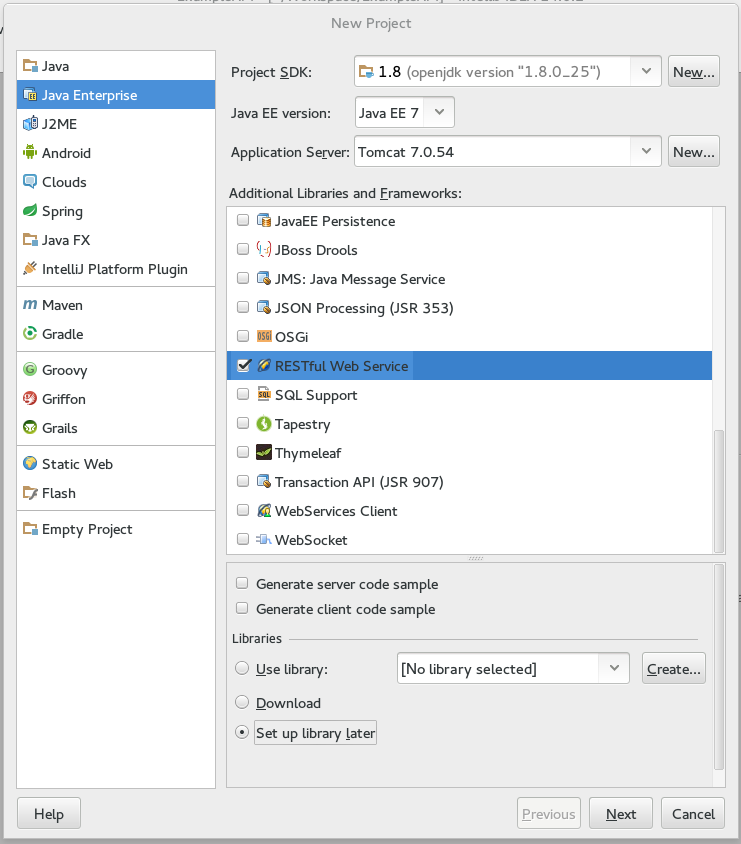
在IntelliJ中创建新项目,选择Java Enterprise -> RESTful Web Service -> Setup libery later.
1. 加入web框架和maven框架
右键单击项目名-> Add Frameworks Support,分别勾选Web Application和Maven。

3. 在maven中加入jersey依赖
在pom.xml中加入:
 <dependency>

     <groupId>org.glassfish.jersey.containers</groupId>

     <artifactId>jersey-container-servlet</artifactId>

     <version>2.9</version>

 </dependency>

 <dependency>

     <groupId>org.glassfish.jersey.core</groupId>

     <artifactId>jersey-client</artifactId>

     <version>2.9</version>

 </dependency>

 <dependency>

     <groupId>org.glassfish.jersey.media</groupId>

     <artifactId>jersey-media-json-jackson</artifactId>

     <version>2.9</version>

 </dependency>
此时,整个pom.xml文档如下。另外使用maven默认的库下载源文件很慢,可以使用国内镜像,方法可见maven国内镜像(maven下载慢的解决方法)。
顺便一提,maven默认的java源值、目标值版本是1.5,可以自行修改成1.8,方法见下面代码。
 <?xml version="1.0" encoding="UTF-8"?>

 <project xmlns="http://maven.apache.org/POM/4.0.0"

          xmlns:xsi="http://www.w3.org/2001/XMLSchema-instance"

          xsi:schemaLocation="http://maven.apache.org/POM/4.0.0 http://maven.apache.org/xsd/maven-4.0.0.xsd">

     <modelVersion>4.0.0</modelVersion>

     <groupId>cn.test</groupId>

     <artifactId>test</artifactId>

     <version>1.0-SNAPSHOT</version>

     <name>test</name>

     <properties>

         <maven.compiler.source>1.8</maven.compiler.source>

         <maven.compiler.target>1.8</maven.compiler.target>

     </properties>

     <dependencies>

         <dependency>

             <groupId>org.glassfish.jersey.containers</groupId>

             <artifactId>jersey-container-servlet</artifactId>

             <version>2.9</version>

         </dependency>

         <dependency>

             <groupId>org.glassfish.jersey.core</groupId>

             <artifactId>jersey-client</artifactId>

             <version>2.9</version>

         </dependency>

         <dependency>

             <groupId>org.glassfish.jersey.media</groupId>

             <artifactId>jersey-media-json-jackson</artifactId>

             <version>2.9</version>

         </dependency>

     </dependencies>

 </project>
4. 创建源文件
在src/java目录下新建包,如com.test.jersey,在包下新建类HelloWorld.java,写上代码:
package com.test.jersey;

import javax.ws.rs.GET;

import javax.ws.rs.Path;

import javax.ws.rs.Produces;

@Path("/hello")

public class HelloWorld {

    //GET注解设置接受请求类型为GET

    @GET

    //Produces表明发送出去的数据类型为text/plain

    // 与Produces对应的是@Consumes,表示接受的数据类型为text/plain

    @Produces("text/plain")

    public String getMessage() {

        return "Hello world!";

    }

}
5. 配置servlet
编辑web/WEB-INF/web.xml,加入代码:
<servlet>

    <servlet-name>test</servlet-name>

    <servlet-class>org.glassfish.jersey.servlet.ServletContainer</servlet-class>

    <init-param>

        <param-name>jersey.config.server.provider.packages</param-name>

        <param-value>com.test.jersey</param-value>

    </init-param>

    <load-on-startup>1</load-on-startup>

</servlet>

<servlet-mapping>

    <servlet-name>test</servlet-name>

    <url-pattern>/*</url-pattern>

</servlet-mapping>
6. 配置Tomcat
点击Run >Edit Configurations… > “+” > Tomcat Server > Local,加入Tomcat,选择Deployment tab, 点击 “+”, 选择唯一的Artifact,点击"OK"即可。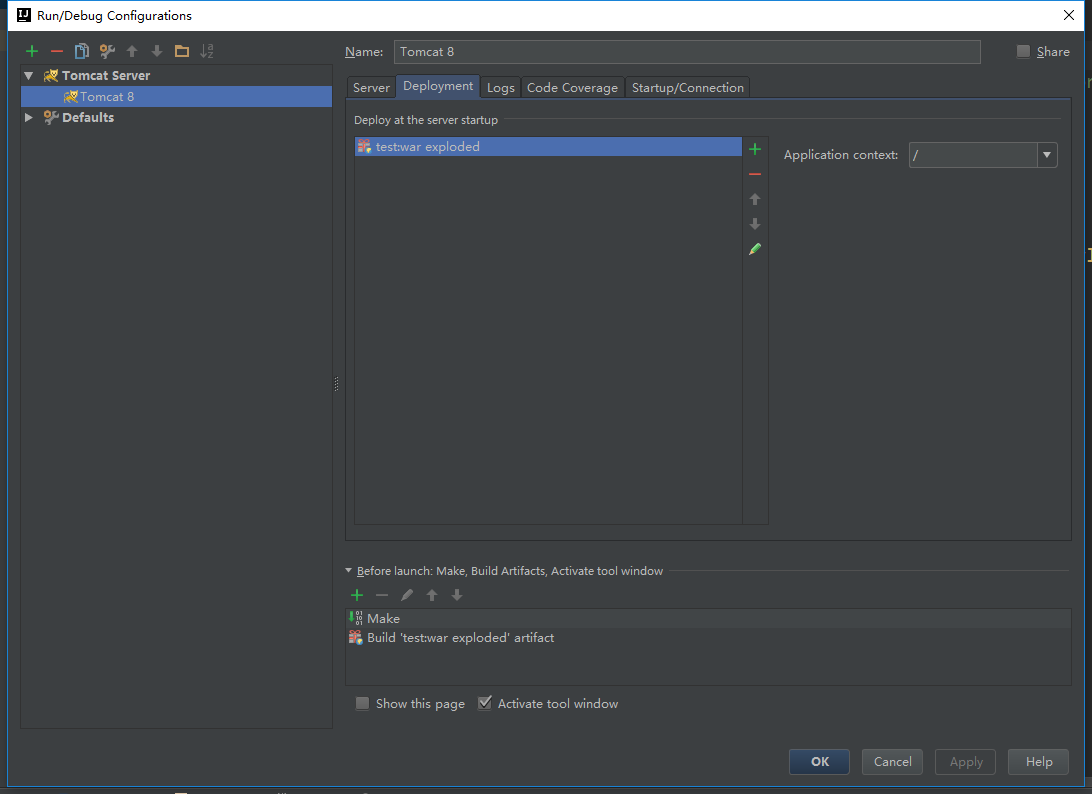
7. 在输出中加入库文件
选择Project Structure,点击Artifacts,可以右侧Available Elements下面有很多库文件没有包含在输出中。依次双击各个文件即可。


8. 运行Tomcat
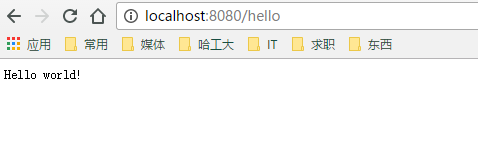
运行Tomcat,在浏览器中输入http://localhost:8080/hello,即可看到以下输出:
Jersey 2 + Maven + Tomcat + IntelliJ IDEA 搭建RESTful服务的更多相关文章
- Maven + Jetty + Jersey搭建RESTful服务
IntelliJ IDEA + Maven + Jetty + Jersey搭建RESTful服务 本文参考以下内容: 使用Jersey实现RESTful风格的webservice(一) Starti ...
- jersey2.26+spring5+jpa一步步搭建restful服务
前言 首先,为什么想选择Jersey做restful服务呢?我个人比较喜欢它的插件化设计,可以方便的注入自己的全局处理逻辑.再一个就是可以生成wadl描述文件,供查询服务方法.所以在学习spring的 ...
- 【Jersey】IntelliJ IDEA + Maven + Jetty + Jersey搭建RESTful服务
本文参考以下内容: 使用Jersey实现RESTful风格的webservice(一) Starting out with Jersey & Apache Tomcat using Intel ...
- IntelliJ IDEA + Maven + Jetty + Jersey搭建RESTful服务
这次参考的是这个博客,完全按照这个我这里会出一些问题,一会再说就是了. https://www.cnblogs.com/puyangsky/p/5368132.html 一.首先新建一个项目,选择Ja ...
- elipse + maven + tomcat + springMVC环境搭建
1. java JDK安装 http://jingyan.baidu.com/article/b24f6c82c989da86bfe5dab2.html 2.eclipse安装 http://jing ...
- Maven+Spirng+Mybatis+CXF搭建WebService服务
https://jingyan.baidu.com/article/39810a23b1de2fb637fda66c.html
- [转]php,使用Slim和Medoo搭建简单restful服务
本文转自:https://www.jianshu.com/p/32b6d0284d97 关于rest和orm框架的组合使用,几年前我就写过使用Slim+Notorm来搭建restful服务,不过看到N ...
- 基于jersey和Apache Tomcat构建Restful Web服务(一)
基于jersey和Apache Tomcat构建Restful Web服务(一) 现如今,RESTful架构已然成为了最流行的一种互联网软件架构,它结构清晰.符合标准.易于理解.扩展方便,所以得到越来 ...
- Jersey+Spring+Maven环境搭建
第一步:创建一个Maven工程.加入Jersey.Spring.Jersey+Spring的依赖包,以及内嵌的Tomcat7插件: pom.xml文件如图所示: <project xmlns=& ...
随机推荐
- SQL UNION 和 UNION ALL 操作符\SQL SELECT INTO 语句\SQL CREATE DATABASE 语句
SQL UNION 操作符 UNION 操作符用于合并两个或多个 SELECT 语句的结果集. 请注意,UNION 内部的 SELECT 语句必须拥有相同数量的列.列也必须拥有相似的数据类型.同时,每 ...
- Redis学习笔记(3)-Hash
package cn.com; import java.util.HashMap; import java.util.List; import java.util.Map; import java.u ...
- TextView无法通过setText设值
因为setText接收的是char序列接口类型实例,假如你在传入int类型的时候一定要String.valueOf: 设值没有成功八成是你传递的为非char序列接口类型!!!!!
- sublime 配置jade高亮显示
1.下载 Package Control.sublime-package 文件放入Packages文件目录下 2.control + shift + p 输入install package 3. ...
- CSS之伪类
1. :link 向未被访问的链接添加样式 :visited 向已被访问的链接添加样式 :hover ...
- 数据结构作业之用队列实现的基数排序(Java版)
题目: 利用队列实现对某一个数据序列的排序(采用基数排序),其中对数据序列的数据(第1和第2条进行说明)和队列的存储方式(第3条进行说明)有如下的要求: 1)当数据序列是整数类型的数据的时候,数据序列 ...
- C++学习笔记 知识集锦(二)
1. 命名规范 2. 代码格式 3. QString的判断 4. 对象的判空 5. 隐式接口&显式接口 6. vector&string 7. static 8. const 9. v ...
- installing mysql,this may take a few minutes,hold on plz wdcp卡住解决办法
centos6安装wdcp时make in progress卡住的解决办法 今天在一台centos6的vps上安装wdcp出现的这个问题,到安装程序滚动至下面这里时出现"卡死". ...
- Issue 2:Introduction 方法论
1 清晰的思路 论文投稿完毕,彻底完事儿后,原本很反感的论文书写过程也有了些许心得:论文就是科研工作的文字总结,知识再提炼的过程. 想要写好Introduction,脑子里的一条主线必须清楚. 1.1 ...
- SVN迁项目
next -> 做为新项目检出,finish -> next -> finish -> 否,是