
android 中IntentService的作用及使用
IntentService是继承于Service并处理异步请求的一个类,在IntentService内有一个工作线程来处理耗时操作,启动IntentService的方式和启动传统Service一样,同时,当任务执行完后,IntentService会自动停止,而不需要我们去手动控制。另外,可以启动IntentService多次,而每一个耗时操作会以工作队列的方式在IntentService的onHandleIntent回调方法中执行,并且,每次只会执行一个工作线程,执行完第一个再执行第二个,以此类推。
IntentService与Service的不同:
(1)直接 创建一个默认的工作线程,该线程执行所有的intent传递给onStartCommand()区别于应用程序的主线程。
(2)直接创建一个工作队列,将一个意图传递给你onHandleIntent()的实现,所以我们就永远不必担心多线程。
(3)当请求完成后自己会调用stopSelf(),所以你就不用调用该方法了。
(4)提供的默认实现onBind()返回null,所以也不需要重写这个方法。so easy啊
(5)提供了一个默认实现onStartCommand(),将意图工作队列,然后发送到你onHandleIntent()实现。真是太方便了
我们需要做的就是实现onHandlerIntent()方法,还有一点就是经常被遗忘的,构造函数是必需的。
简单说呢?第一,我们省去了在Service中手动开线程的麻烦,第二,当操作完成时,我们不用手动停止Service,第三,it's so easy to use!
接下来让我们来看看如何使用,我写了一个Demo来模拟两个耗时操作,Operation1与Operation2,先执行1,2必须等1执行完才能执行:
新建工程,新建一个继承IntentService的类,我这里是IntentServiceDemo.java
 public class IntentServiceDemo extends IntentService {

     public IntentServiceDemo() {

         //必须实现父类的构造方法

         super("IntentServiceDemo");

     }

     @Override

     public IBinder onBind(Intent intent) {

         System.out.println("onBind");

         return super.onBind(intent);

     }

     @Override

     public void onCreate() {

         System.out.println("onCreate");

         super.onCreate();

     }

     @Override

     public void onStart(Intent intent, int startId) {

         System.out.println("onStart");

         super.onStart(intent, startId);

     }

     @Override

     public int onStartCommand(Intent intent, int flags, int startId) {

         System.out.println("onStartCommand");

         return super.onStartCommand(intent, flags, startId);

     }

     @Override

     public void setIntentRedelivery(boolean enabled) {

         super.setIntentRedelivery(enabled);

         System.out.println("setIntentRedelivery");

     }

     @Override

     protected void onHandleIntent(Intent intent) {

         //Intent是从Activity发过来的,携带识别参数,根据参数不同执行不同的任务

         String action = intent.getExtras().getString("param");

         if (action.equals("oper1")) {

             System.out.println("Operation1");

         }else if (action.equals("oper2")) {

             System.out.println("Operation2");

         }

         try {

             Thread.sleep(2000);

         } catch (InterruptedException e) {

             e.printStackTrace();

         }

     }

     @Override

     public void onDestroy() {

         System.out.println("onDestroy");

         super.onDestroy();

     }

 }
我把生命周期方法全打印出来了,待会我们来看看它执行的过程是怎样的。接下来是Activity,在Activity中来启动IntentService:
 public class TestActivity extends Activity {

     /** Called when the activity is first created. */

     @Override

     public void onCreate(Bundle savedInstanceState) {

         super.onCreate(savedInstanceState);

         setContentView(R.layout.main);

         //可以启动多次,每启动一次,就会新建一个work thread,但IntentService的实例始终只有一个

         //Operation 1

         Intent startServiceIntent = new Intent("com.test.intentservice");

         Bundle bundle = new Bundle();

         bundle.putString("param", "oper1");

         startServiceIntent.putExtras(bundle);

         startService(startServiceIntent);

         //Operation 2

         Intent startServiceIntent2 = new Intent("com.test.intentservice");

         Bundle bundle2 = new Bundle();

         bundle2.putString("param", "oper2");

         startServiceIntent2.putExtras(bundle2);

         startService(startServiceIntent2);

     }

 }
最后记得在Android中进行注册,
 <service android:name=".IntentServiceDemo">

             <intent-filter >

                 <action android:name="com.test.intentservice"/>

             </intent-filter>

         </service>
我们来看看结果:
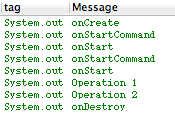
从结果可以看到,onCreate方法只执行了一次,而onStartCommand和onStart方法执行了两次,开启了两个Work Thread,这就证实了之前所说的,启动多次,但IntentService的实例只有一个,这跟传统的Service是一样的。Operation1也是先于Operation2打印,并且我让两个操作间停顿了2s,最后是onDestroy销毁了IntentService。
这就是IntentService,一个方便我们处理业务流程的类,它是一个Service,但是比Service更智能。
android 中IntentService的作用及使用的更多相关文章
- android 中Application的作用
转自:lieren666 博客地址:http://blog.csdn.net/lieren666/article/details/7598288 What is Application Applica ...
- Android中IntentService与Service
Android中的Service是用于后台服务的,当应用程序被挂到后台的时候,问了保证应用某些组件仍然可以工作而引入了Service这个概念,那么这里面要强调的是Service不是独立的进程,也不是独 ...
- android 中IntentService的使用场景
IntentService是继承并处理异步请求的一个类,在IntentService内有一个工作线程来处理耗时操作,启动IntentService的方式和启动传统的Service一样,同时,当任务执行 ...
- [Android Pro] Android中IntentService的原理及使用
转载自:http://blog.csdn.net/ryantang03/article/details/8146154 在Android开发中,我 们或许会碰到这么一种业务需求,一项任务分成几个子任务 ...
- Android中IntentService详解
简单说,IntentService是继承于Service并处理异步请求的一个类,在IntentService内有一个工作线程来处理耗时操作,启动IntentService的方式和启动传统Service ...
- Android中IntentService的原理及使用
在Android开发中,我们或许会碰到这么一种业务需求,一项任务分成几个子任务,子任务按顺序先后执行,子任务全部执行完后,这项任务才算成功.那么,利用几个子线程顺序执行是可以达到这个目的的,但是每个线 ...
- Android 中 IntentService 的优点
简而言之:可以处理异步请求,任务完成会自动停止自己. IntentService是一个通过Context.startService(Intent)启动可以处理异步请求的Service,使用时你只需要 ...
- (转)Android 中LocalBroadcastManager的使用方式
发表于2个月前(2014-11-03 22:05) 阅读(37) | 评论(0) 0人收藏此文章, 我要收藏 赞0 1月10日 #长沙# OSC 源创会第32期开始报名 摘要 android中广播 ...
- Android中Service概述
Service是Android中一种非常重要的组件,一般来说有两种用途:用Service执行长期执行的操作,而且与用户没有UI界面的交互:某个应用程序的Service能够被其它应用程序的组件调用以便提 ...
随机推荐
- html初学者笔记01
一.Html简介 HTML 是一种标记语言 忽略大小写,语法宽松 使用 HTML 标记和元素,可以: 控制页面和内容的外观 发布联机文档 使用 HTML 文档中插入的链接检索联机信息 创建联机表单,收 ...
- JSP计算器
<%@ page language= "java" contentType="text/html;charset=UTF-8" %><html ...
- 安装Linux系统Fedora 23
搭建了一个Linux(Fedora 23)环境,用于学习.实验. [TOC] 1 安装Fedora 以前一直只会光盘安装,刻录了好多个版本的distros,用完即弃在一旁.很浪费. 此次学会了在Lin ...
- Web项目中删错文件怎么办
在开发过程中,有时会因为手误将文件错误删除,会造成很大的困惑,今天看到一个网友分享的一种可以恢复文件的方式特别好用,现在分享给大家. 1.首先在删除文件的路径下创建与原来文件名字相同的文件. 2.在文 ...
- [整理]一个有关Latch(锁存器)的有趣问题
起源 今天诳论坛,突然发现了一个有关latch的问题,由于对D Flip-Flop和Latch还有些疑问,就点击了进去,一看果然有些意思,也挺有学习意义的,于是本文就诞生了.喊出口号~Just not ...
- 安卓开发 想要获取某个View的高度(我是在做滚动浮层的时候用到的)
1.activity中有个onWindowFocusChanged()方法,可以获取控件的大小,别的地方可能会调用过早导致获取不到实际的大小 @Override public void onWindo ...
- Hibernate报错:org.hibernate.ObjectNotFoundException: No row with the given identifier exists 解决办法
报错信息: org.hibernate.event.internal.DefaultLoadEventListener onLoad INFO: HHH000327: Error performing ...
- Java 项目优化实战
https://blog.coding.net/blog/java-coding-performance 1 Visual VM 2 优化一 2.1 背景 2.2 原实现 2.3 剖析 2.4 方案 ...
- 移动端开发库zepto 之我思
1.zepto tap事件的点透事件. 比如有一个bug.那天我大概至少花了一个钟头来找这个错误. 点击一个按钮,出来一个弹框.弹框我这里引入的是boostrap的js组件里的modal组件. 结果我 ...
- SQLMAP 中$与#的区别
在sql配置中比如in(#rewr#) 与in ($rewr$) 在Ibatis中我们使用SqlMap进行Sql查询时需要引用参数,在参数引用中遇到的符号#和$之间的区分为,#可以进行与编译,进行类型 ...