
AngularJs的UI组件ui-Bootstrap分享(九)——Alert
alert指令会在页面上显示一条提示消息,效果是这样:
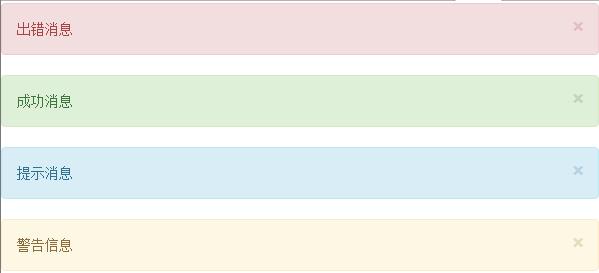
代码为:
 <!DOCTYPE html>

 <html ng-app="ui.bootstrap.demo" xmlns="http://www.w3.org/1999/xhtml">

 <head>

     <meta http-equiv="Content-Type" content="text/html; charset=utf-8" />

     <link href="/Content/bootstrap.css" rel="stylesheet" />

     <title></title>

     <script src="/Scripts/angular.js"></script>

     <script src="/Scripts/ui-bootstrap-tpls-1.3.2.js"></script>

     <script>

         angular.module('ui.bootstrap.demo', ['ui.bootstrap']).controller('AlertDemoCtrl', function ($scope) {

             $scope.alerts = [

               { type: 'danger', msg: '出错消息' },

               { type: 'success', msg: '成功消息' },

             { type: 'info', msg: '提示消息' },

             { type: 'warning', msg: '警告信息' }

             ];

             $scope.addAlert = function () {

                 $scope.alerts.push({ msg: '这是一条消息!' });

             };

             $scope.closeAlert = function (index) {

                 $scope.alerts.splice(index, 1);

             };

             $scope.addTplAlert = function () {

             }

         });

     </script>

     <script type="text/ng-template" id="alert.html">

         <div class="alert" style="background-color:#fa39c3;color:white" role="alert">

             <div ng-transclude></div>

         </div>

     </script>

 </head>

 <body>

     <div ng-controller="AlertDemoCtrl">

         <uib-alert ng-repeat="alert in alerts" type="{{alert.type}}" close="closeAlert($index)">{{alert.msg}}</uib-alert>

         <button type="button" class='btn btn-default' ng-click="addAlert()">Add Alert</button>

         <hr />

         <uib-alert template-url="alert.html">一个使用自定义模板的警告框!</uib-alert>

     </div>

 </body>

 </html>
alert指令可以使用的属性有:
| 属性名 | 默认值 | 备注 |
| close | 提示消息关闭时所触发的函数。如果有这个属性,提示消息的右侧会添加一个关闭按钮 | |
| dismiss-on-timeout | none | 在有close属性的前提下,设置一个自动关闭提示消息的时间(毫秒) |
| template-url | uib/template/alert/alert.html | |
| type | warning | 提示消息的类型。可配置的值有:danger,warning,info,success |
目录:
AngularJs的UI组件ui-Bootstrap分享(一)
AngularJs的UI组件ui-Bootstrap分享(二)——Collapse
AngularJs的UI组件ui-Bootstrap分享(三)——Accordion
AngularJs的UI组件ui-Bootstrap分享(四)——Datepicker Popup
AngularJs的UI组件ui-Bootstrap分享(五)——Pager和Pagination
AngularJs的UI组件ui-Bootstrap分享(六)——Tabs
AngularJs的UI组件ui-Bootstrap分享(七)——Buttons和Dropdown
AngularJs的UI组件ui-Bootstrap分享(八)——Tooltip和Popover
AngularJs的UI组件ui-Bootstrap分享(九)——Alert
AngularJs的UI组件ui-Bootstrap分享(十)——Model
AngularJs的UI组件ui-Bootstrap分享(十一)——Typeahead
AngularJs的UI组件ui-Bootstrap分享(十二)——Rating
AngularJs的UI组件ui-Bootstrap分享(十三)——Progressbar
AngularJs的UI组件ui-Bootstrap分享(十四)——Carousel
AngularJs的UI组件ui-Bootstrap分享(九)——Alert的更多相关文章
- Ionic4.x 中的 UI 组件(UI Components) 侧边栏ion-menu组件以及底部tabs结合 侧边栏 ion-menu
1.侧边栏 ion-menu 组件的基本使用 1.创建项目 ionic start myApp sidemenu 2.配置项目 属性 作用 可选值 side 配置侧边栏的位置 start end me ...
- Ionic4.x 中的 UI 组件(UI Components) 日期组件
1.日期组件的基本使用 官方文档:https://ionicframework.com/docs/api/datetime 模板中: <ion-datetime display-format=& ...
- Ionic4.x 中的 UI 组件(UI Components) Slides 轮播图组件、Searchbar 组件、 Segment 组件
Slides 轮播图组件 Ionic4.x 中的轮播图组件是基于 swiper 插件,所以配置 slides 的属性需要在 swiper 的 api 中 找 Swiper Api:http://ida ...
- Ionic4.x 中的 UI 组件(UI Components)表单相关组件
1.ion-input 单行文本框 2.ion-toggle 开关 3.ion-radio-group.ion-radio 单选按钮组 4.ion-checkbox 多选按钮组 5.ion-selec ...
- 挂号平台首页开发(UI组件部分)
JQ插件模式开发UI组件 JQ插件开发方法: 1.$.extend() 扩展JQ(比较简单,功能略显不足) $.extend({ sayHello:function(){ console.log(&q ...
- AngularJs的UI组件ui-Bootstrap分享(一)
最近几个月学习了AngularJs和扩展的UI组件,并在公司小组内做了一次分享交流,感觉很有收获,在此记录下个人的学习心得. 目录: AngularJs的UI组件ui-Bootstrap分享(一) A ...
- AngularJs的UI组件ui-Bootstrap分享(十四)——Carousel
Carousel指令是用于图片轮播的控件,引入ngTouch模块后可以在移动端使用滑动的方式使用轮播控件. <!DOCTYPE html> <html ng-app="ui ...
- AngularJs的UI组件ui-Bootstrap分享(十三)——Progressbar
进度条控件有两种指令,第一种是uib-progressbar指令,表示单一颜色和进度的一个进度条.第二种是uib-bar和uib-progress指令,表示多种颜色和多个进度组合而成的一个进度条. 这 ...
- AngularJs的UI组件ui-Bootstrap分享(十二)——Rating
Rating是一个用于打分或排名的控件.看一个最简单的例子: <!DOCTYPE html> <html ng-app="ui.bootstrap.demo" x ...
随机推荐
- URi和Url格式
1.主要的区别 url一定是有scheme. uri不一定有scheme,可以是相对和绝对的.(相对是依赖环境的) 2.uri的结构(3种划分) 1)[scheme:]scheme-specific- ...
- python 3次登录
#!/usr/bin/env python #-*- encoding: utf- -*- import sys import os import getpass import platform # ...
- angular学习input输入框筛选
学习angular,看到 angular-phonecat测试用例,照着教程运行了一遍,对于初学者有点不是很理解angular 帅选代码的意思,于是找教材,参考资料,明白了input筛选原来这么简单. ...
- [分享] IT天空的二十二条军规
Una 发表于 2014-9-19 20:25:06 https://www.itsk.com/thread-335975-1-1.html IT天空的二十二条军规 第一条.你不是什么都会,也不是什么 ...
- ios回调函数的标准实现:protocol+delegate
一.项目结构
- NotORM(PHP的ORM框架)
类似Thinkphp映射到表的ORM机制. 网址:http://www.notorm.com/ <?php //require_once ‘init.php’;require_once ‘Not ...
- Css动画形式弹出遮罩层,内容区上下左右居中于不定宽高的容器中
<!DOCTYPE html> <html> <head> </head> <body id="body"> <! ...
- ubuntu16.04安装virtualbox5.1失败 gcc:error:unrecognized command line option ‘-fstack-protector-strong’
系统:ubuntu16.04.1 软件:Virtualbox-5.1 编译器:GCC 4.7.4 在如上环境下安装Vbx5.1提示我在终端执行/sbin/vboxconfig命令 照做 出现如下err ...
- MySQL学习记录--操作时间数据
1.返回日期的时间函数 date_add() : 可以为指定日期增加/减少任意一段时间间隔.下面举例将当前日期增加一个月和减少一个月 mysql month) as add_one_month; +- ...
- linux主要的发行版及其区别和联系
1. 主要发行版 linux主要发行版有3类: (1).Debian (2).Slackware (3).Redhat (1)Debian Ubuntu 针对桌面和服务器 knopix 以安全著称 ( ...