
MVC配置ckeditor+ckfinder
ckeditor当前使用版本:4.5.8
ckfinder当前使用版本:2.6.0
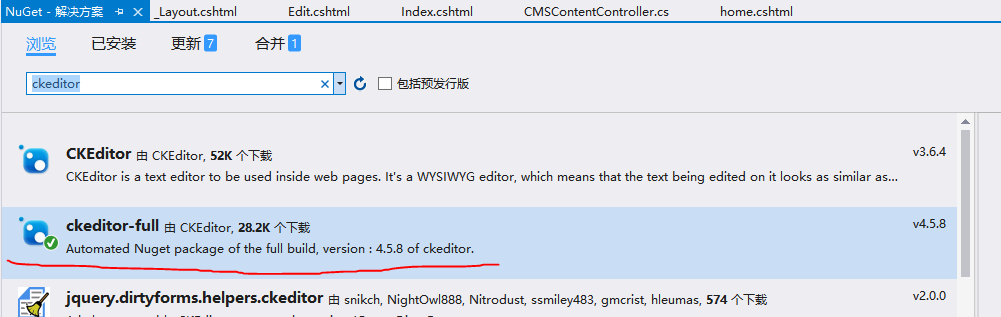
1.Ckeditor配置简单,直接使用Nuget下载就可
2.下载ckfinder
https://cksource.com/ckfinder/download
选择Asp.net版本下载并放在相同的目录下:‘Scripts'
3.添加js引用:
    @Scripts.Render("~/Scripts/ckeditor/ckeditor.js")

    @Scripts.Render("~/Scripts/ckfinder/ckfinder.js")
4.配置:
打开ckeditor目录下config.js文件如下配置:
CKEDITOR.editorConfig = function( config ) {

    // Define changes to default configuration here. For example:

    // config.language = 'fr';

    // config.uiColor = '#AADC6E';

    config.height = ;

    config.skin = 'office2013';

    config.filebrowserBrowseUrl = '/Scripts/ckfinder/ckfinder.html'; //上传文件时浏览服务文件夹

    config.filebrowserImageBrowseUrl = '/Scripts/ckfinder/ckfinder.html?Type=Images'; //上传图片时浏览服务文件夹

    config.filebrowserFlashBrowseUrl = '/Scripts/ckfinder/ckfinder.html?Type=Flash';  //上传Flash时浏览服务文件夹

    config.filebrowserUploadUrl = '/Scripts/ckfinder/core/connector/aspx/connector.aspx?command=QuickUpload&type=Files'; //上传文件按钮(标签)

    config.filebrowserImageUploadUrl = '/Scripts/ckfinder/core/connector/aspx/connector.aspx?command=QuickUpload&type=Images'; //上传图片按钮(标签)

    config.filebrowserFlashUploadUrl = '/Scripts/ckfinder/connector/aspx/connector.aspx?command=QuickUpload&type=Flash'; //上传Flash按钮(标签)

};
打开ckfinder目录下的config.ascx文件配置两个地方
public override bool CheckAuthentication()

    {

        // WARNING : DO NOT simply return "true". By doing so, you are allowing

        // "anyone" to upload and list the files in your server. You must implement

        // some kind of session validation here. Even something very simple as...

        //

        //        return ( Session[ "IsAuthorized" ] != null && (bool)Session[ "IsAuthorized" ] == true );

        //

        // ... where Session[ "IsAuthorized" ] is set to "true" as soon as the

        // user logs on your system.

         // return HttpContext.Current.User.Identity.IsAuthenticated; //登陆用户才能上传
        return true;

    }
public override void SetConfig()

    {

// 上传文件的目录,这个目录必须有访问权限如:

        BaseUrl = "/Content/userfiles/";
5.把ckfinder目录中bin文件,复制到mvc项目中的bin目录中(好处是不用添加引用)
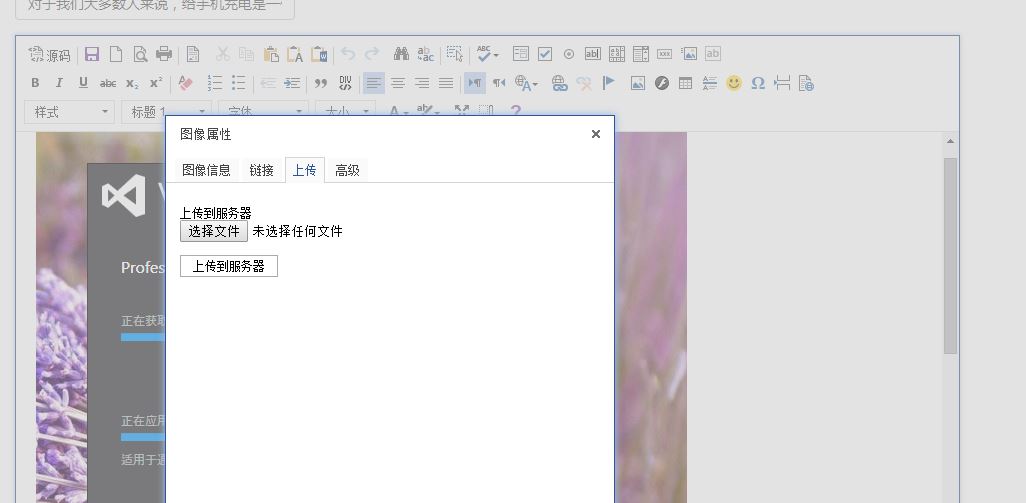
6.测试:
显示一个<textarea>
 <div class="form-group">

            @Html.LabelFor(model => model.Content, htmlAttributes: new { @class = "control-label col-md-2" })

            <div class="col-md-10">

                @Html.TextAreaFor(model => model.Content, , , htmlAttributes:new { @class = "ckeditor"})

                @Html.ValidationMessageFor(model => model.Content, "", new { @class = "text-danger" })

            </div>

        </div>

MVC配置ckeditor+ckfinder的更多相关文章
- ci 配置ckeditor + ckfinder 无图片上传按钮
一:配置路径有问题 {$base_url}assets/js/editor/ckfinder/ckfinder.html --> http://www.cnblogs.com/assets/j ...
- 网络编辑器插件ckeditor+ckfinder配置
原帖地址 另外一个 去掉编辑器的下边栏 在config.js中加入: config.removePlugins = 'elementspath'; config.resize_enabled = fa ...
- (配置)CKEditor+CKFinder+php上传配置,根据年月命名创建文件夹来存放
CKEditor+CKFinder+php上传配置 新版本的CKEditor只提供了基本的文本编辑功能,上传模块由另一个组件CKFinder.这里主要记录CKFinder上传的一些参数配置,能够成功上 ...
- CKEditor + CKFinder 实现编辑上传图片配置 (二)
CKEditor + CKFinder 实现编辑上传图片配置 (二) 上传图片时,如果上传的图片过大,默认情况情况下回自动裁剪,代码如图 \ckfinder\config.php 目录下的配置文件co ...
- Drupal 7 配置ckeditor和ckfinder编辑器实现图片上传--不用wysisyg
注意: 1.这里的ckeditor编辑器是独立模块,不是那个wysiwyg模块. 2.这里的图片上传仅仅为文章内图片,非字段图片. 1.下载文件(1) http://drupal.org/proj ...
- CKEditor && CKFinder 配置
准备 ...
- CKEditor + CKFinder 实现编辑上传图片配置
下载最新版 ckfinder 本人下载的php版本 https://cksource.com/ckfinder/download 下载最新版ckeditor http://ckeditor.com/ ...
- jsp中如何整合CKEditor+CKFinder实现文件上传
最近笔者做了一个新闻发布平台,放弃了之前的FCKEditor编辑器,使用了CKEditor+CKFinder,虽然免费的CKFinder是Demo版本,但是功能完整,而且用户都是比较集中精神发新闻的人 ...
- 在ASP.NET项目中使用CKEditor +CKFinder实现图片上传功能
前言 之前的项目中一直使用的是FCKeditor,昨天突然有个想法:为什么不试一下新的CKEditor呢?于是花了大半天的时间去学习它的用法,现在把我的学习过程与大家分享一下. 谈起FCKeditor ...
随机推荐
- Unity3d使用UGUI实现长按功能
UGUI的Button组件只有OnClick事件的监听,要实现长按功能,要监听按下事件和抬起事件,所以要使用到EventTrigger组件中的OnPointerDown和OnPointerUp来监听. ...
- 使用WWW获取本地文件夹的XML配置文件
Unity3D读取本地文件可以使用Resources.Load来读取放在Resources文件夹下的文件,如果不是放在该文件夹下,则可以通过WWW类来读取. 譬如读取xml的配置文件. /// < ...
- dede判断当前文章
<li><a href="/info/info3.html" class=s >企业文化 </a></li><li> ...
- 安卓中級教程(8):pathbutton中的animation.java研究(1)
src/geniuz/myPathbutton/myAnimations.java package geniuz.myPathbutton; import java.util.ArrayList; i ...
- 前端开发与SEO
前端开发中通过一些小习惯,可以有利于SEO,本着蚊子再小也是肉的原则,能抓住自然不能忽略. 1.控制首页链接数量,不能过多,也不要太少.更不要为了凑数而添加 2.扁平化层次,力争跳转三次可以到任何页面 ...
- 关于datagridview里使用combox的总结
最近写的程序中需要在DataGridView中使用下拉选择的功能,首选方案是列的ColumnType属性 使用EditingControlShowing事件, if (e.Control is Com ...
- C#.Net下的防抖-Debounce和节流阀-Throttle功能实现
C#下的防抖-Debounce.节流阀-Throttle功能实现 防抖-Debounce 连续的多次调用,只有在调用停止之后的一段时间内不再调用,然后才执行一次处理过程. 节流阀-Throttle 连 ...
- Linux常用命令[转]
在博客的草稿箱里一直有一份"Linux命令"的草稿,记录了一些常用的Linux命令,用于需要的时候查询.由于是出于个人使用的目的,所以这个清单并不完整.今天整理了一下这个清单,调整 ...
- 退出recoveyr模式的iOS设备
大致分析了一下几款工具,大概流程是: 使用AMDRestoreRegisterForDeviceNotifications来监听设备的连接. 监听设备连接的回调函数中获取设备的句柄. 调用AMReco ...
- php数据优化
Array ( [0] => Array ( [id] => 19 [receive_id] => 41 [mac] => a4:3d:78:fc:49:50 [staytim ...