
Loadrunner 11在win7录制中失败“the recording of the application was terminated by windows due to window data execution prevention feature"
在录制过程中遇到如下问题:
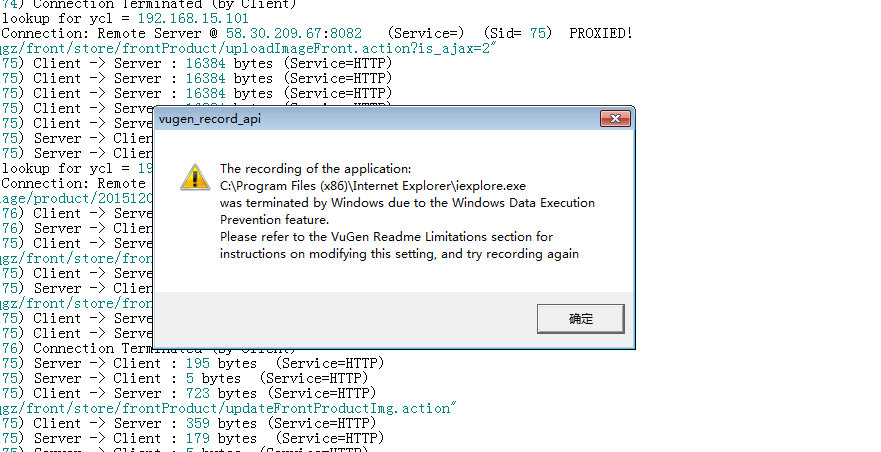
查了下如何Enable, Disable Data Execution Prevention (DEP) in Windows 10/8/7 (http://www.thewindowsclub.com/disable-data-execution-prevention )
Disable Data Execution Prevention
In Windows 7, type cmd in Start Search. Right click on search results ‘cmd’ and click on Run as Administrator. Windows 10/8 users can also open an elevated command prompt window via the WinX menu.
Then, copy paste the following and hit Enter:
bcdedit.exe /set {current} nx AlwaysOff

Reboot.
You will find that Data Execution Prevention has been disable on your Windows computer. You may then, if you wish, verify the status of Data Execution Prevention feature on your system.
Enable Data Execution Prevention
To enable back DEP, type the following in an elevated command prompt and hit Enter:
bcdedit.exe /set {current} nx AlwaysOn

This will enable back Data Execution Prevention.
See this if you receive The boot configuration data could not be opened message.
Enable or Disable Data Execution Prevention DEP for Internet Explorer only
If a code loading from the default heap or stack is detected by DEP or Data Execution Prevention, an exception is raised. It happens since the behavior is indicative of malicious code (legitimate code does not generally load in this manner). This way DEP protects the browser against attacks rendered, for example, via buffer overflow and similar type vulnerabilities.
Although a valuable feature, DEP can sometimes be the cause of certain system issues and error messages. So, if you would like to disable Data Execution Prevention for the Internet Explorer browser only, here is how you can do it :
Disable Data Execution Prevention DEP for Internet Explorer
Open Internet Explorer and go to ‘Tools’. The icon appears as a small gear-shaped icon at the extreme top-right corner of Internet Explorer screen. Click open ‘Tools’ and from the displayed options, select ‘Internet Options’.

Next, click on ‘Advanced’ tab and scroll down until you find the ‘Security’ option. Un-check on Enable memory protection to help mitigate online attacks.

Click Apply / OK. This will disable Data Execution Prevention for Internet Explorer.
To enable Data Execution Prevention, check the check-box instead, click Apply and Exit.
或者尝试如下方法:
- 首先进入控制面板,选择“系统”

- 弹出系统对话框,然后点“高级”

- 再点性能栏里面的“设置”按钮,弹出“性能选项”设置窗口

- 接下来点击“数据执行保护”

- 把选项改“只为关键Windows程序和服务启用数据执行保护”,系统提示重启生效,点确定后完成。
接着只要重启Loadrunner进行录制即可。
Loadrunner 11在win7录制中失败“the recording of the application was terminated by windows due to window data execution prevention feature"的更多相关文章
- LoadRunner 11 的兼容问题及权限问题
1.LoadRunner 11 在服务器系统中可能出现 不兼容问题. 要对 安装目录bin\LRLauncherApp.exe 和 bin\wlrun.exe 右键属性兼容性(视系统定). 2.如果填 ...
- Win7 64位 + LoadRunner 11录制时弹不出IE的解决办法 Win7 64位 + LoadRunner 11录制时弹不出IE的解决办法
Win7 64位 + LoadRunner 11录制时弹不出IE的解决办法 Win7 64位 + LoadRunner 11录制时弹不出IE的解决办法 1. 卸载IE9( 装了Win7 64位后,默认 ...
- LoadRunner 11中Record无法自动生成脚本——解决办法
[问题描述] 安装loadRunner 11, 使用IE为默认浏览器,打开一个页面进行脚本录制:录制完成后,无法生成脚本. [问题现象] 控制台输出如下: ****** Start Log Messa ...
- LoadRunner 11 安装及破解
LoadRunner 11 安装及破解 前提条件: 内存:2G,硬盘空闲空间10G,安装完成后实际只占不到2G 支持winXP SP3;32位与64位win7浏览器支持IE6-8,IE9,fir ...
- LoadRunner 11 安装及破解(转)
前提条件: 内存:2G,硬盘空闲空间10G,安装完成后实际只占不到2G 支持winXP SP3;32位与64位win7浏览器支持IE6-8,IE9,firefox3 若以前安装过LoadRunner ...
- Loadrunner 11检查点使用方法总结
在使用Loadrunner 11进行性能测试中,有时需要对性能测试中的功能是否全部正确进行判断.这里就需要用到“检查点”,本文总结了常用三种协议下检查点的使用方法,希望阅读本文后的小伙伴们能够掌握其使 ...
- 启动loadrunner 11的controller提示试图执行系统不支持的操作(已解决)
启动loadrunner 11的controller提示试图执行系统不支持的操作 分类: loadrunner 2014-05-12 17:33 532人阅读 评论(0) 收藏 举报 win7旗舰版3 ...
- LoadRunner 11简单使用
LoadRunner 11简单使用 开始菜单-->HP LoadRunner-->applications--->virtual user Generator 1>新建--&g ...
- Loadrunner 11 遇到的问题
环境 OS:windows 8.1 64bit LoadRunner版本:11 问题 1. VuGen:开始录制后,火狐浏览器没有反应,不会弹出打开 可能原因一:浏览器版本太高. 解决方案: 1)卸 ...
随机推荐
- 最长周长三角形 O(nlogn)
题意 有根棍子,棍子的长度为.想要从中选出三根棍子组成周长尽可能长的三角形.请输出最大的周长,若无法组成三角形输出0. 思路 很容易想到采用三重循环来枚举所有三角形,复杂度为. 更好的办法 ...
- sqlalchemy和flask-sqlalchemy几种分页操作
sqlalchemy中使用query查询,而flask-sqlalchemy中使用basequery查询,他们是子类与父类的关系 假设 page_index=1,page_size=10:所有分页查询 ...
- 网卡驱动引起openstack的mtu问题
一套Pike版本的openstack测试环境,使用vlan模式的网络,数据网网卡使用的是绿联的usb百兆网卡,遇到了虚拟机网络异常的问题.同一个vlan下,不同宿主机上的两台虚拟机,相互之间可以pin ...
- nginx笔记6-总结
1.轮询(默认)每个请求按时间顺序逐一分配到不同的后端服务器,如果后端服务器down掉,能自动剔除.2.weight指定轮询几率,weight和访问比率成正比,用于后端服务器性能不均的情况.3.ip_ ...
- ajax的缺点
平时我们大多注意的都是ajax给我们所带来的好处诸如用户体验的提升.对ajax所带来的缺陷有所忽视. 下面所阐述的ajax的缺陷都是它先天所产生的. 1.ajax干掉了back按钮,即对浏览器后退机制 ...
- Linux基础二
linux命令分类 内部命令:属于shell解释器 外部命令:独立于shell解释器 检查命令类型 type:检查命令字的类型 [root@localhost ~]# type ls ls 是 `ls ...
- Navicat远程连接阿里云服务器的mysql
问题描述: 本机为win10,mysql安装在阿里云(Ubuntu系统)上,本机使用Navicat远程连接mysql,遇到一些坑,求助于阿里云,最终解决,特此记录一下! 安装mysql sudo ap ...
- 【linux】安裝 PHP时出现error: Cannot find MySQL header files
checking for specified location of the MySQL UNIX socket... no checking for MySQL UNIX socket locati ...
- eclipse中添加Java代码注释模板
eclipse中添加Java代码注释模板 1.Window->Preference->Java->Code Style->Code Template,进入注释编辑界面 2.文件 ...
- Cortex-M3
大家听说过Cortex-M3吗?在嵌入式处理器的世界,cortex-M3是一位人见人爱的后生.它的成本和功耗低,可配置性很高.如今,很多ARM的工程师加入了cortex-M3的学习与开发中,WIZne ...