
pyspider 初次使用
一 安装
pip install pyspider
请安装PhantomJS:http://phantomjs.org/build.html
二 检验是否启动成功
cmd中输入: pyspider
安装问题解决
python版本:3.6

1、启动报错

    raise ValueError("Invalid configuration:\n  - " + "\n  - ".join(errors))

ValueError: Invalid configuration:

  - Deprecated option 'domaincontroller': use 'http_authenticator.domain_control

ler' instead.

解决方法:

将wsgidav替换为2.4.1

•# python -m pip install wsgidav==2.4.1


2、PhantomJS配置

windows:在官网http://phantomjs.org/download.html下载对应版本的程序,然后放到python安装目录的python.exe同级目录下。
pyspider Web预览界面太小的解决方法
完美css代码:

body{margin:0;padding:0;height:100%;overflow:hidden}.warning{color:#f0ad4e}.error{color:#d9534f}#control{z-index:9999;min-width:760px;width:100%;height:35px;position:fixed;left:0;right:0;box-shadow:0 1px 2px #999}#control div{line-height:35px;margin-left:10px;margin-right:10px}#control .webdav-btn{position:relative;float:right;padding:1px 7px 0;line-height:21px;border-radius:5px;border:1px solid #428bca;background:#fff;color:#428bca;cursor:pointer;margin:6px 0 0 10px}#control .webdav-btn:hover{background:#6aa3d5;color:#fff}#control .webdav-btn.active{background:#428bca;color:#fff}#editarea{width:100%;position:fixed;top:37px}#editarea,.debug-panel{left:0;right:0;bottom:0}.debug-panel{position:absolute;top:0}.resize{ padding: 0px; color: rgb(128, 0, 128); line-height: 1.5 !important;">555;cursor:ew-resize}.resize:hover+.debug-panel{border-left:1px dashed #555!important}.overlay{position:absolute;top:0;bottom:0;left:0;right:0;z-index:9999;background:rgba(0,0,0,.4)}.focus .CodeMirror-activeline-background{background:#e8f2ff!important}.CodeMirror-activeline-background{background:transparent!important}#task-panel{height:100%;overflow-x:auto}#run-task-btn{z-index:99;position:absolute;top:0;right:0;background:#5cb85c;border-radius:0 0 0 5px;color:#fff;margin:0;padding:3px 7px 5px 10px;cursor:pointer;font-weight:700;line-height:15px}#run-task-btn:hover{background:#449d44}#undo-redo-btn-group{z-index:99;position:absolute;top:0;right:0;background:#91cf91;border-radius:0 0 0 5px;color:#fff;margin:0;padding:3px 7px 5px 10px;cursor:pointer;font-weight:700;line-height:15px;top:auto;bottom:0;border-radius:5px 0 0 0;padding:5px 0 3px;overflow:hidden}#undo-redo-btn-group:hover{background:#6ec06e;background:#91cf91}#undo-redo-btn-group a{color:#fff;text-decoration:none;padding:5px 7px 3px 10px}#undo-redo-btn-group a:hover{background:#6ec06e}#save-task-btn{z-index:99;position:absolute;top:0;right:0;background:#428bca;border-radius:0 0 0 5px;color:#fff;margin:0;padding:3px 7px 5px 10px;cursor:pointer;font-weight:700;line-height:15px}#save-task-btn:hover{background:#3071a9}#task-editor{position:relative}#task-editor .CodeMirror{height:auto;padding-bottom:3px;background:#c7e6c7}#task-editor .CodeMirror-scroll{overflow-x:auto;overflow-y:hidden}#task-editor.focus .CodeMirror-activeline-background{background:#eaf6ea!important}#tab-control{list-style-type:none;position:absolute;bottom:0;right:0;margin:8px 20px;padding:0}#tab-control li{position:relative;float:right;padding:1px 7px 0;line-height:21px;margin-left:10px;border-radius:5px;border:1px solid #428bca;background:#fff;color:#428bca;cursor:pointer}#tab-control li:hover{background:#6aa3d5;color:#fff}#tab-control li.active{background:#428bca;color:#fff}#tab-control li span{position:absolute;top:-5px;right:-10px;background:#d9534f;color:#fff;font-size:80%;font-weight:700;padding:2px 5px 0;border-radius:10px}#debug-tabs{margin-bottom:45px}#tab-web.fixed{padding-top:24px}#tab-web iframe{border-width:0;width:100%;height:900px !important}#tab-html{margin:0;padding:7px 5px}#tab-html pre{margin:0;padding:0}#tab-follows .newtask{position:relative;height:30px;line-height:30px;background:#fceedb;border-bottom:1px solid #f0ad4e;border-top:1px solid #f0ad4e;margin-top:-1px;padding-left:5px;padding-right:70px;overflow:hidden;white-space:nowrap;text-overflow:ellipsis;cursor:pointer}#tab-follows .newtask:hover,#tab-follows .newtask:hover .task-more{background:#f8d9ac}#tab-follows .newtask .task-callback{color:#ec971f}#tab-follows .newtask .task-url{font-size:95%;text-decoration:underline;font-weight:lighter;color:#428bca}#tab-follows .newtask .task-more{position:absolute;right:33px;top:0;float:right;color:#f0ad4e;padding:0 10px;background:#fceedb;border-radius:10px}#tab-follows .newtask .task-run{position:absolute;right:0;top:0;font-size:80%;padding:0 10px 0 30px;float:right;border-bottom:1px solid #a3d7a3;border-top:1px solid #a3d7a3;background:#80c780;color:#fff;text-shadow:0 0 10px #fff;font-weight:700}#tab-follows .newtask .task-run:hover{background:#5cb85c}#tab-follows .task-show pre{margin:5px 5px 10px}#python-editor{position:absolute;top:0;width:100%;bottom:0}#python-editor .CodeMirror{height:100%;padding-bottom:20px}#python-log{width:100%;min-height:10px;max-height:40%;background:rgba(0,0,0,.6);overflow:auto}#python-log #python-log-show{z-index:89;width:auto;padding-top:5px;background:#d9534f;box-shadow:0 2px 20px #d9534f;cursor:pointer}#python-log pre{margin:0;padding:10px;color:#fff}#css-selector-helper{padding:0;width:100%;height:24px;text-align:right;white-space:nowrap}#css-selector-helper.fixed{position:absolute;top:0}#css-selector-helper button{line-height:16px;vertical-align:2px}span.element{position:relative;height:24px;display:inline-block;padding:0 .2em;cursor:pointer;color:#afafaf;z-index:99999}span.element.invalid{display:none}span.element.selected{color:#000}span.element:hover{ul{display:block}span.element>ul{display:none;margin:0;padding:0;position:absolute;top:24px;left:0;border:1px solid #000;border-top-width:0;color:#afafaf}span.element>ul>li{display:block;text-align:left;white-space:nowrap;padding:0 4px}span.element>ul>li.selected{color:#000}span.element>ul>li:hover{padding:0;border:0;margin:0;padding-right:.2em;font-size:1em;text-align:right;width:100%;margin-left:-100px;background:#eee}
替换/pyspider/webui/static/debug.min.css文件中所有内容
三 入门简介
你的第一个脚本
from pyspider.libs.base_handler import *

class Handler(BaseHandler):

    crawl_config = {

        #配置信息

    }

    #全局变量,获取数据库句柄...

 client=pymongo.MongoClient(host='106.12.108.236',port=27017)

    db=client['trip']

    @every(minutes=24 * 60)

    def on_start(self):

    #程序请求的入口,start_url

        self.crawl('http://scrapy.org/', callback=self.index_page)

    @config(age=10 * 24 * 60 * 60)

    def index_page(self, response):

    #解析start_url获取详情页的url

        for each in response.doc('a[href^="http"]').items():

            self.crawl(each.attr.href, callback=self.detail_page)

    @config(priority=2)

    def detail_page(self, response):

    #获取详情页的信息

        return {

            "url": response.url,

            "title": response.doc('title').text(),

        }
def on_start(self)是脚本的入口点。单击run仪表板上的按钮时将调用它。self.crawl(url, callback=self.index_page)*是这里最重要的API。它将添加一个要爬网的新任务。大多数选项将通过self.crawl参数进行spicified 。def index_page(self, response)得到一个Response*对象。response.doc*是一个pyquery对象,它具有类似jQuery的API来选择要提取的元素。def detail_page(self, response)返回一个dict对象作为结果。结果将resultdb默认捕获。您可以覆盖on_result(self, result)方法来自行管理结果。
四 页面简介

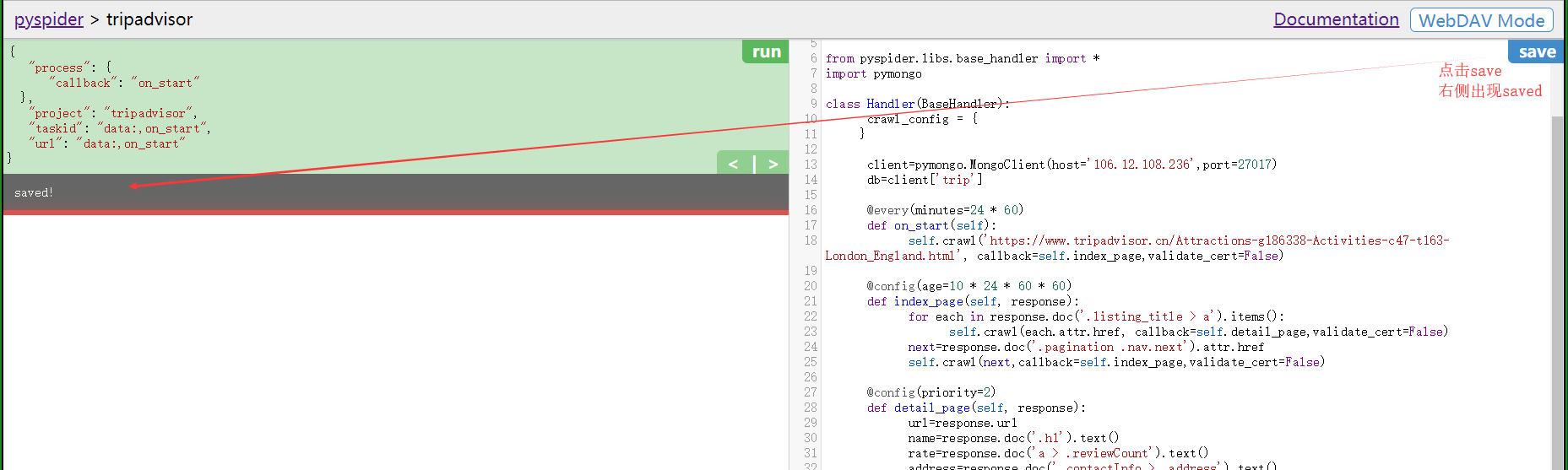
点击save按钮
接下来执行run
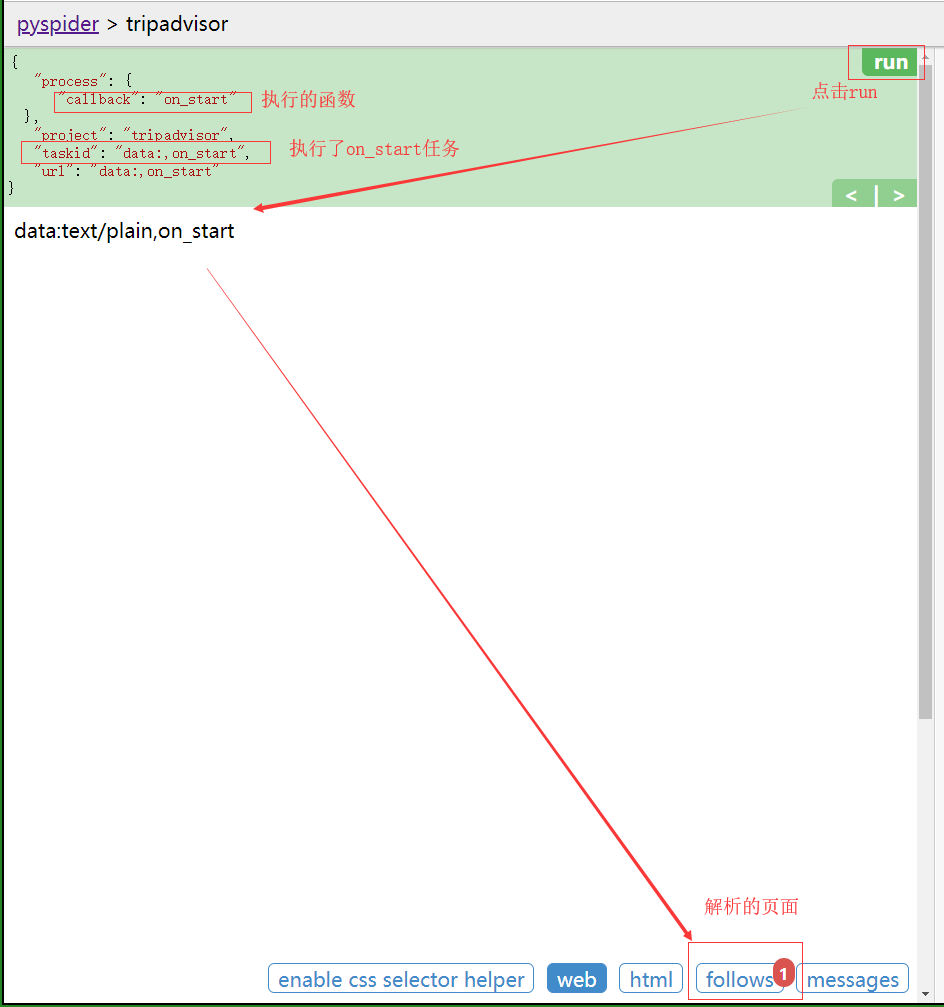
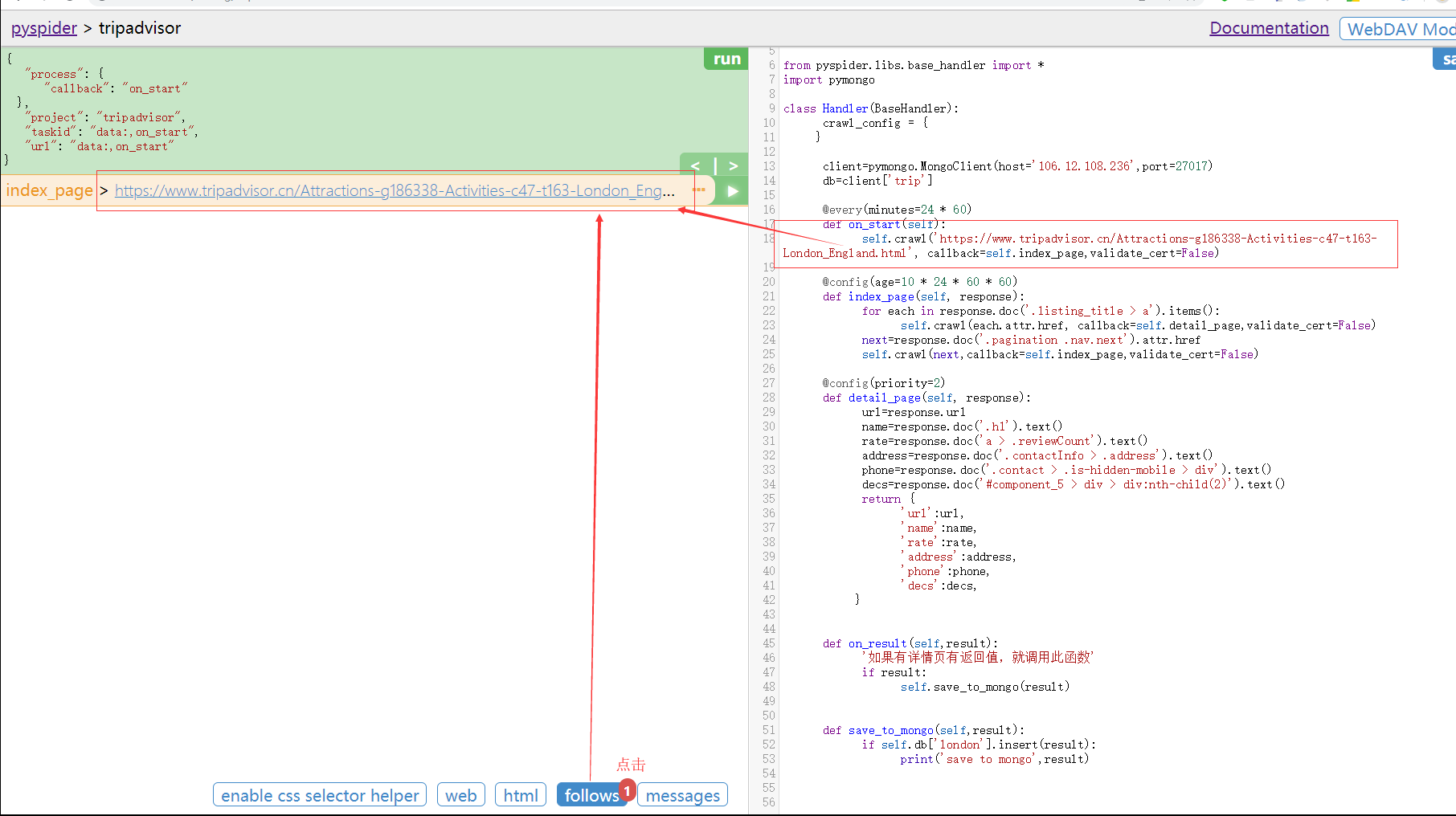
显示当前待解析页面的页面
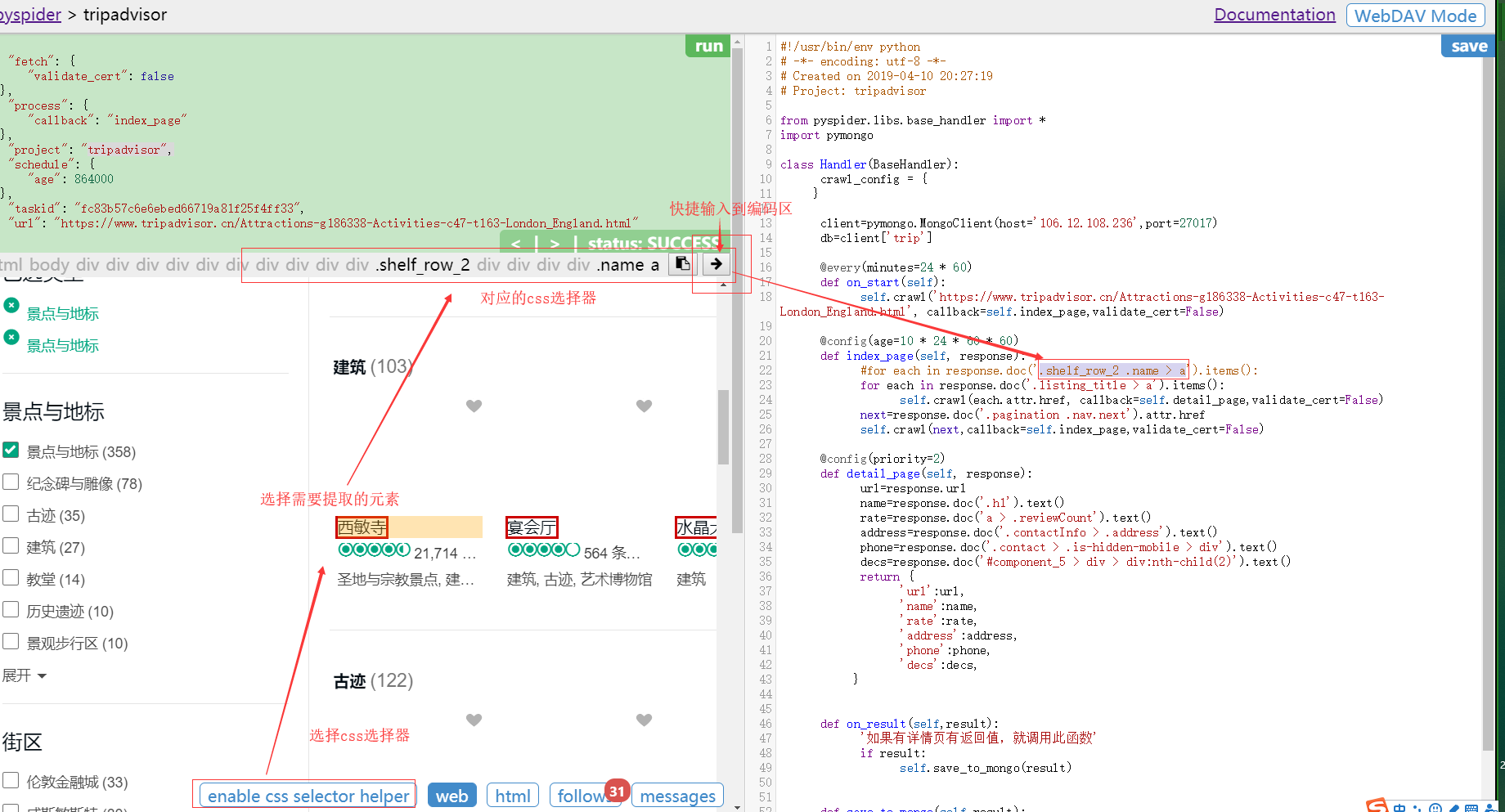
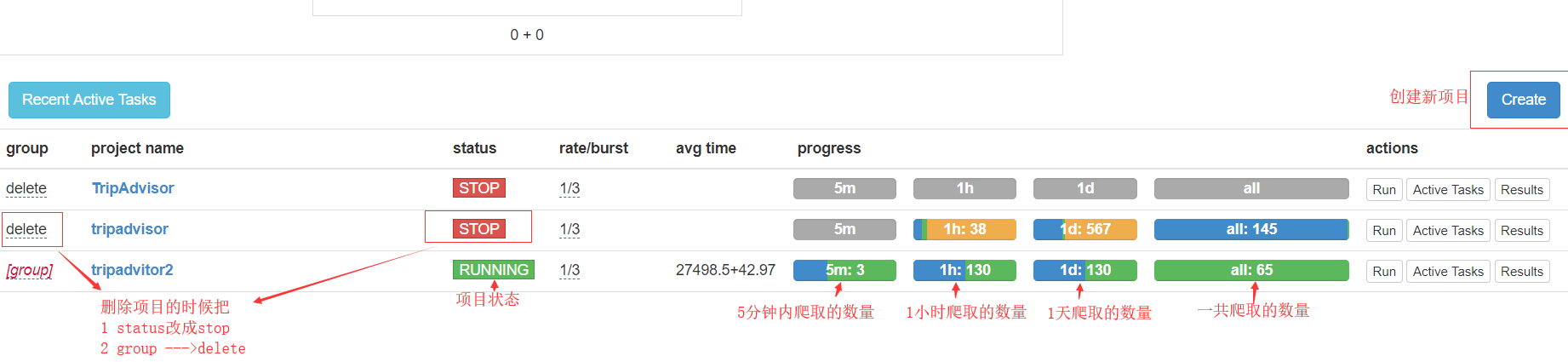
项目启动和删除
五 页面爬取代码
#!/usr/bin/env python
# -*- encoding: utf-8 -*-

# Created on 2019-04-10 20:27:19

# Project: tripadvisor

from pyspider.libs.base_handler import *

import pymongo

class Handler(BaseHandler):

    crawl_config = {

    }

  #连接数据库

    client=pymongo.MongoClient(host='106.12.108.236',port=27017)

    db=client['trip']

    @every(minutes=24 * 60)

    def on_start(self):

        self.crawl('https://www.tripadvisor.cn/Attractions-g186338-Activities-c47-t163-London_England.html', callback=self.index_page,validate_cert=False)

    @config(age=10 * 24 * 60 * 60)

    def index_page(self, response):

        for each in response.doc('.listing_title > a').items():

            self.crawl(each.attr.href, callback=self.detail_page,validate_cert=False)

        next=response.doc('.pagination .nav.next').attr.href

        self.crawl(next,callback=self.index_page,validate_cert=False)

    @config(priority=2)

    def detail_page(self, response):

        url=response.url

        name=response.doc('.h1').text()

        rate=response.doc('a > .reviewCount').text()

        address=response.doc('.contactInfo > .address').text()

        phone=response.doc('.contact > .is-hidden-mobile > div').text()

        decs=response.doc('#component_5 > div > div:nth-child(2)').text()

        return {

            'url':url,

            'name':name,

            'rate':rate,

            'address':address,

            'phone':phone,

            'decs':decs,

        }

    def on_result(self,result):

        '如果有详情页有返回值,就调用此函数'

        if result:

            self.save_to_mongo(result)

    def save_to_mongo(self,result):
     # 保存到数据库

        if self.db['london'].insert(result):

            print('save to mongo',result)
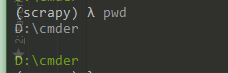
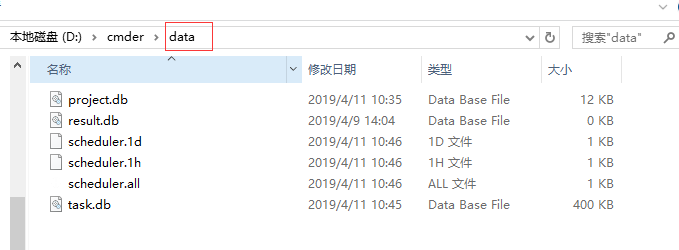
六 查看 pyspider all 执行后产生的本地文件
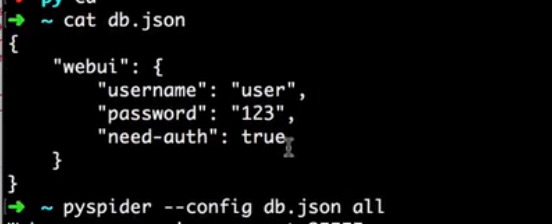
七 设置启动配置
pyspider 初次使用的更多相关文章
- python爬虫框架Pyspider初次接触
pyspider网站地址:http://docs.pyspider.org/en/latest/.文档比较好,安装起来也非常方便.既然是基于python的框架,那么首先得安装python.微软出的一款 ...
- 【pyspider】初次使用pyspider遇到的问题
<python爬虫开发与项目实践>里最后一章介绍了pyspider的使用.然鹅..我刚开始就报错了: Exception: HTTP 599: SSL certificate proble ...
- 用pyspider爬淘宝MM照片
#!/usr/bin/env python # -*- encoding: utf-8 -*- # Created on 2016-12-09 15:24:54 # Project: taobaomm ...
- HashTable初次体验
用惯了数组.ArryList,初次接触到HashTable.Dictionary这种字典储存对于我来说简直就是高大上. 1.到底什么是HashTable HashTable就是哈希表,和数组一样,是一 ...
- 初次启动app校验的活动图和分析
初次启动活动图 version 1 version 2 version 3 根据上图的活动图分析,可能存在较严重的问题: 主线程中如果发现是sdcard的url,则可能进行重命名 FirstEnter ...
- Python爬虫进阶二之PySpider框架安装配置
关于 首先,在此附上项目的地址,以及官方文档 PySpider 官方文档 安装 1. pip 首先确保你已经安装了pip,若没有安装,请参照 pip安装 2. phantomjs PhantomJS ...
- 百度地图API试用--(初次尝试)
2016-03-17: 百度地图API申请key的步骤相对简单,不做过多阐述. 初次使用百度地图API感觉有点神奇,有些功能加进来以后有点问题,注释掉等有空再解决. 代码如下: <%@ page ...
- [masmplus]初次使用报external symbol _start 是配置问题
初次使用masmplus 其中在 codesg segment 使用了 start 标记, 并在end处标明了:end start 但是默认的masmplus 会提示 start 为 不认识的 e ...
- pyspider爬豆瓣电影实例
直接copy官网实例会出现599的错误,百度了很久发现是因为证书的问题 添加这一句忽略证书 validate_cert = False 代码如下: ++++++++++++++++++++++++++ ...
随机推荐
- 批量数据复制SqlBulkCopy使用经验点滴(特别是超时处理)
如果要批量复制大量的数据,用ado.net或者其他orm框架逐条读取并写入,有时会耗时太长,满足不了要求,此时SqlBulkCopy就可以出来大显身手了,相信许多人了解或使用过它. 但实际使用时,还是 ...
- 不一样的 SQL Server 日期格式化
不一样的 SQL Server 日期格式化 Intro 最近统计一些数据,需要按天/按小时/按分钟来统计,涉及到一些日期的格式化,网上看了一些文章大部分都是使用 CONVERT 来转换的,SQL Se ...
- 从Windows转向Linux(在Windows下建立Deepin、Windows10双系统)
我是19年3月转向使用Linux进行开发,没啥特别的理由,就是觉得使用Linux系统是每个程序员必须经历的吧. 选择版本 一开始,在网上了解到现在流行的Linux发行版有基于Redhat的,还有基于d ...
- 记录SoapUI使用说明
一.SoapUI简介 SoapUI是一个开源测试工具,通过soap/http来检查.调用.实现Web Service的功能/负载/符合性测试.该工具既可作为一个单独的测试软件使用,也可利用插件集成到E ...
- 深度优先搜索(DFS)与广度优先搜索(BFS)的Java实现
1.基础部分 在图中实现最基本的操作之一就是搜索从一个指定顶点可以到达哪些顶点,比如从武汉出发的高铁可以到达哪些城市,一些城市可以直达,一些城市不能直达.现在有一份全国高铁模拟图,要从某个城市(顶点) ...
- docker 发布到私有docker registry
1.使用vs发布项目到文件夹: 2.在文件夹中新建dockerfile文件, 内容: FROM mcr.microsoft.com/dotnet/core/aspnet:2.2-stretch-sli ...
- 博客系统typecho的安装与使用
之前用过wordpress和emlog的博客系统,感觉上wordpress功能强大,插件多,而且也不局限博客网站,就是资源占用比较高,emlog比较简单,资源占用少,就是界面不太喜欢,功能相对也少了些 ...
- 使用 coverlet 查看.NET Core应用的测试覆盖率
代码覆盖(Code coverage)是软件测试中的一种度量,描述程式中源代码被测试的比例和程度,所得比例称为代码覆盖率. Visual Studio 2017的企业版可以直接查看测试的代码覆盖率, ...
- java~gradle构建公用包并上传到仓库~使用私有仓库的包
在新的项目里使用仓库的包 上一讲中我们说了java~gradle构建公用包并上传到仓库,如何发布公用的非自启动类的包到私有仓库,而这一讲我们将学习如何使用这些包,就像我们使用spring框架里的功能包 ...
- 初探Parcel
昨天趁有点时间看了前不久很火的构建工具Parcel,这里说下初步使用的感受,尤其是将其放到实际项目中和Webpack进行比较. 一.前言 首先说下笔者目前的技术栈.最近的前端项目主要以管理后台为主,技 ...