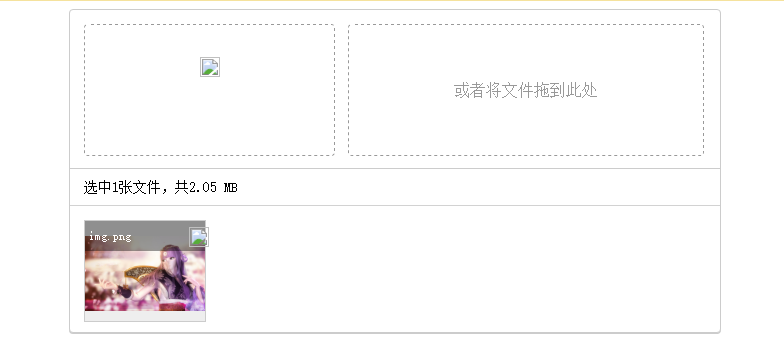
转载

 代码如下:

<!DOCTYPE html>
<html lang="en">
<head>
<meta charset="UTF-8">
<title>Title</title>
<script src="http://www.jq22.com/jquery/vue.min.js"></script>
<style>
.upload_warp_img_div_del {
position: absolute;
top: 6px;
width: 16px;
right: 4px;
}
.upload_warp_img_div_top {
position: absolute;
top: 0;
width: 100%;
height: 30px;
background-color: rgba(0, 0, 0, 0.4);
line-height: 30px;
text-align: left;
color: #fff;
font-size: 12px;
text-indent: 4px;
}
.upload_warp_img_div_text {
white-space: nowrap;
width: 80%;
overflow: hidden;
text-overflow: ellipsis;
}
.upload_warp_img_div img {
max-width: 100%;
max-height: 100%;
vertical-align: middle;
}
.upload_warp_img_div {
position: relative;
height: 100px;
width: 120px;
border: 1px solid #ccc;
margin: 0px 30px 10px 0px;
float: left;
line-height: 100px;
display: table-cell;
text-align: center;
background-color: #eee;
cursor: pointer;
}
.upload_warp_img {
border-top: 1px solid #D2D2D2;
padding: 14px 0 0 14px;
overflow: hidden
}
.upload_warp_text {
text-align: left;
margin-bottom: 10px;
padding-top: 10px;
text-indent: 14px;
border-top: 1px solid #ccc;
font-size: 14px;
}
.upload_warp_right {
float: left;
width: 57%;
margin-left: 2%;
height: 100%;
border: 1px dashed #999;
border-radius: 4px;
line-height: 130px;
color: #999;
}
.upload_warp_left img {
margin-top: 32px;
}
.upload_warp_left {
float: left;
width: 40%;
height: 100%;
border: 1px dashed #999;
border-radius: 4px;
cursor: pointer;
}
.upload_warp {
margin: 14px;
height: 130px;
}
.upload {
border: 1px solid #ccc;
background-color: #fff;
width: 650px;
box-shadow: 0px 1px 0px #ccc;
border-radius: 4px;
}
.hello {
width: 650px;
margin-left: 34%;
text-align: center;
}
</style>
</head>
<body>
<div id="app">
<div class="hello">
<div class="upload">
<div class="upload_warp">
<div class="upload_warp_left" @click="fileClick">
<img src="./upload.png">
</div>
<div class="upload_warp_right" @drop="drop($event)" @dragenter="dragenter($event)" @dragover="dragover($event)">
或者将文件拖到此处
</div>
</div>
<div class="upload_warp_text">
选中{{imgList.length}}张文件,共{{bytesToSize(this.size)}}
</div>
<input @change="fileChange($event)" type="file" id="upload_file" multiple style="display: none"/>
<div class="upload_warp_img" v-show="imgList.length!=0">
<div class="upload_warp_img_div" v-for="(item,index) of imgList">
<div class="upload_warp_img_div_top">
<div class="upload_warp_img_div_text">
{{item.file.name}}
</div>
<img src="./del.png" class="upload_warp_img_div_del" @click="fileDel(index)">
</div>
<img :src="item.file.src">
</div>
</div>
</div>
</div>
</div>
<script>
// import up from './src/components/Hello'
var app = new Vue({
el: '#app',
data () {
return {
imgList: [],
size: 0
}
},
methods: {
fileClick() {
document.getElementById('upload_file').click()
},
fileChange(el) {
if (!el.target.files[0].size) return;
this.fileList(el.target);
el.target.value = ''
},
fileList(fileList) {
let files = fileList.files;
for (let i = 0; i < files.length; i++) {
//判断是否为文件夹
if (files[i].type != '') {
this.fileAdd(files[i]);
} else {
//文件夹处理
this.folders(fileList.items[i]);
}
}
},
//文件夹处理
folders(files) {
let _this = this;
//判断是否为原生file
if (files.kind) {
files = files.webkitGetAsEntry();
}
files.createReader().readEntries(function (file) {
for (let i = 0; i < file.length; i++) {
if (file[i].isFile) {
_this.foldersAdd(file[i]);
} else {
_this.folders(file[i]);
}
}
})
},
foldersAdd(entry) {
let _this = this;
entry.file(function (file) {
_this.fileAdd(file)
})
},
fileAdd(file) {
//总大小
this.size = this.size + file.size;
//判断是否为图片文件
if (file.type.indexOf('image') == -1) {
file.src = 'wenjian.png';
this.imgList.push({
file
});
} else {
let reader = new FileReader();
reader.vue = this;
reader.readAsDataURL(file);
reader.onload = function () {
file.src = this.result;
this.vue.imgList.push({
file
});
}
}
},
fileDel(index) {
this.size = this.size - this.imgList[index].file.size;//总大小
this.imgList.splice(index, 1);
},
bytesToSize(bytes) {
if (bytes === 0) return '0 B';
let k = 1000, // or 1024
sizes = ['B', 'KB', 'MB', 'GB', 'TB', 'PB', 'EB', 'ZB', 'YB'],
i = Math.floor(Math.log(bytes) / Math.log(k));
return (bytes / Math.pow(k, i)).toPrecision(3) + ' ' + sizes[i];
}/* ,
dragenter(el) {
el.stopPropagation();
el.preventDefault();
},
dragover(el) {
el.stopPropagation();
el.preventDefault();
},
drop(el) {
el.stopPropagation();
el.preventDefault();
this.fileList(el.dataTransfer);
} */
}
})
</script>
</body>
</html>

vue的图片上传的更多相关文章

  1. H5 利用vue实现图片上传功能。

    H5的上传图片如何实现呢? 以下是我用vue实现的图片上传功能,仅供参考. <!DOCTYPE html> <html> <head> <meta chars ...

  2. vue 剪切图片上传头像,使用 cropperjs 实现

    我使用的是vue,移动端的项目. 官网地址:cropperjs GitHub地址:https://github.com/fengyuanchen/cropperjs/blob/master/READM ...

  3. vue+elementUI 图片上传问题

    图片上传问题,获取后台的图片,并点击可以更换图片,并把图片存储到数据库中: (1)在编辑页面上,action指的图片上传的地址,header指请求头: (2)因为element-ui有自己上传的接口, ...

  4. spring boot + vue实现图片上传及展示

    转载:https://blog.csdn.net/weixin_40337982/article/details/84031778 其中一部分对我很有帮助 转载记录下 首先,html页面: <! ...

  5. vue 实现图片上传与预览,以及清除图片

    vue写原生的上传图片并预览以及清除图片的效果,下面是demo,其中里面有vue获取input框value值的方法以及vue中函数之间的调用 <!DOCTYPE html> <htm ...

  6. vue图片上传组件

    前言:很多项目中都需要用到图片上传功能,而其多处使用的要求,为了避免重复造轮子,让我决定花费一些时间去深入了解,最终封装了一个vue的图片上传组件.现将总结再次,希望有帮助. Layout <d ...

  7. 后台管理系统之“图片上传” --vue

    图片上传(基于vue) 相信上传图片是所有系统必备的功能吧,工作中的第一个管理系统就在上传图片的功能上卡顿了一整天. 当时用的elementUI组件,但是由于样式和设计图样式差别较大再加上原生相较好理 ...

  8. vue+axios实现移动端图片上传

    在利用vue做一些H5页面时,或多或少会遇到有图片上传的操作,主要是运用html5里面的input[type=file]来实现,传递到后端的数据是以二进制的格式传递,所以上传图片的请求与普通的请求稍微 ...

  9. 用Vue来实现图片上传多种方式

    没有业务场景的功能都是耍流氓,那么我们先来模拟一个需要实现的业务场景.假设我们要做一个后台系统添加商品的页面,有一些商品名称.信息等字段,还有需要上传商品轮播图的需求. 我们就以Vue.Element ...

随机推荐

  1. float 与 display:inline-block

    float: 1.会导致高度塌陷 <style type="text/css"> li{ float:left; height:200px; width:200px; ...

  2. 关于MYCAT 读写分离,与只读事务的问题.

    习惯性为了复用mysql连接,喜欢加上@Transactional(readOnly = true) 只读事务,很多零碎的查询下,速度会快一些,也环保一些. 最近用mycat做了读写分离,其中一个查询 ...

  3. 【前端】Angular2 Ionic2 学习记录

    转载请注明出处:http://www.cnblogs.com/shamoyuu/p/angular2_ionic2.html 一.建立项目 ionic start ProductName super ...

  4. 修改android 开机画面

    对于使用安卓手机的人来说,能够自由定制手机的各种界面是每个用户之所以喜欢安卓系统的最根本的缘由,比如手机的开机界面中的bootanimation.zip文件.本文就如何修改开机界面,做一个简单的流程介 ...

  5. 【linux】 vsftpd自动

    开机默认VSFTP服务自动启动: 方法一-常用方便的方法 [root@localhost /]# chkconfig --list|grep vsftpd vsftpd          0:off ...

  6. linux2.6硬盘扇区直接读写程序

    下面的程序可以在linux2.6内核直接读写硬盘的指定扇区,也是根据网上一个朋友的做法做了修改的: 有两个不是很明白的地方就是:1.bd_claim函数的使用,这个是个递归函数,像是匹配内存指针和设备 ...

  7. Nethogs - 网络流量监控工具

    命令iftop来检查带宽使用情况.netstat用来查看接口统计报告.还有其他的一些工具Bandwidthd.Speedometer.Nethogs.Darkstat.jnettop.ifstat.i ...

  8. jquery对象和js对象的转化

    jquery对象和js对象的转化   jquery对象只能使用jqury方法,不能使用js的方法,相反的,js对象也只能使用js的方法,如果js对象使用了jquery方法,那么浏览器就会报错. 但是在 ...

  9. 启动就加载(三)initializingbean实现afterPropertiesSet方法

    TransactionTemplate,就直接以TransactionTemplate为入口开始学习. TransactionTemplate的源码如下: public class Transacti ...

  10. mariadb集群与nginx负载均衡配置--centos7版本

    这里配置得是单nginx主机..先准备4台主机,三台mariadb集群,一台nginx. ------------------------------------------------------- ...