
微信小程序之滑动日历展示
滑动日历效果
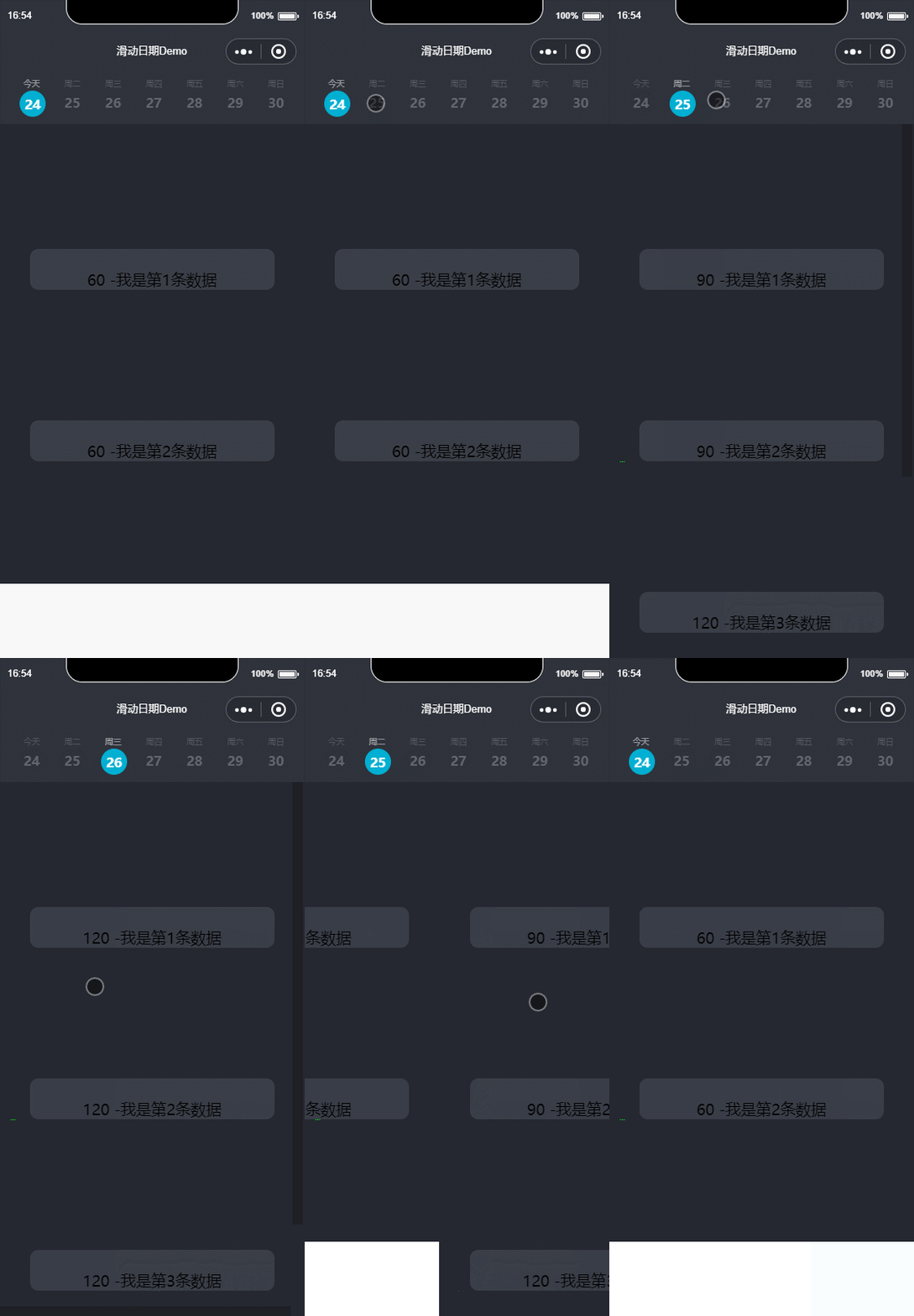
效果预览
实现要求:顶部固定悬浮的是获取未来一周的日期,分为上下两部分,上面部分显示星期,下面则显示具体日期。今天则显示今天,可点击头部具体日期,可向左向右滑动。
实现代码
顶部日历

页面部分的代码
       <view wx:for="{{dayList}}" wx:for-index="index" class="tab-item {{currentSwiper==index ?'active':'noactive'}}" wx:key="index" bindtap='changeTab' data-current="{{index}}">

          <view class="TimeOrderBox scroll-view-item bc_red {{id == index ? 'coloBack':''}}" id="{{index}}" data-selectTime="{{item.month}}/{{item.day}}" data-week="{{item.week}}">

            <view class="TimesWD">

              <text class="TimeOrderText" wx:if="{{NowDay==item.day}}">今天</text>

              <text class="TimeOrderText" wx:else>周{{item.week}}</text>

              <view class="TimeOrderDay">

                <text class="TimeOrderTextDay">{{item.day}}</text>

              </view>

            </view>

          </view>

        </view>

      </view>
这里我们用View标签 包裹起来,然后剩下的就是我们组装日期数据。我们来看js部分
 weekDate: function () {

    //获取周数据

    var myDate = new Date();// hehe

    myDate.toLocaleDateString();

    var month = myDate.getMonth() + 1;

    var time = myDate.getFullYear() + '年' + month + '月' + myDate.getDate() + '日';

    var total = 1;// 个数

    var dayList = [];

    dayList.push({

      'day': myDate.getDate(),

      'month': myDate.getMonth() + total,

      'week': toWeekDay(myDate.getDay()),

      'year': myDate.getFullYear()

    });

    for (var i = 0; i < 6; i++) {

      myDate.setDate(myDate.getDate() + total); // number 是最近几天  则会自动计算

      // 需求  月份-日   星期几

      dayList.push({

        'day': myDate.getDate(),

        'month': myDate.getMonth() + total,

        'week': toWeekDay(myDate.getDay()),

        'year': myDate.getFullYear()

      });

    }

    return dayList;

  }
function toWeekDay(weekDay) {// 传入数据  讲一周的某一天返回成中文状态下的字符

    switch (weekDay) {

        case 1: return '一'; break;

        case 2: return '二'; break;

        case 3: return '三'; break;

        case 4: return '四'; break;

        case 5: return '五'; break;

        case 6: return '六'; break;

        case 0: return '日'; break;

        default: break;

    }

    return '传入未知参数';

}
我们将一周的数据都封装进dayList中,然后返回。我们看下dayList返回了什么?
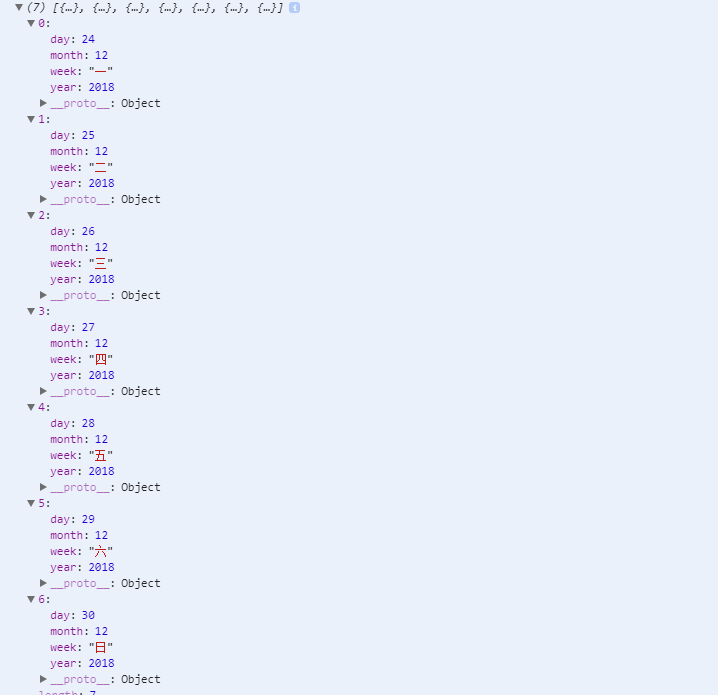
我们可以看到,通过上面js方法,我们得到了7条数据,分别有年、月、日以及星期几的数据。接下来我们看看css如何布局:
/* 循环周天样式 Start */

.tab-item{

  float: left;

  margin-left:20rpx;

  box-sizing: border-box;

  /* background-color: #2E323B;

  margin-top: -7rpx; */

  position: relative;

  /* padding-top: 20rpx; */

  top:8rpx;

}

.pageTop{

  /* width:100%; */

  height: 140rpx;

  background-color: #2E323B;

  padding-left: 40rpx;

  margin-top: -5rpx;

  position: fixed;

  top:;

  z-index:;

  width: 100%;

}

.TimeOrder{width:1036rpx;height:106rpx;border-top:1px solid #eee;border-bottom:1px solid #eee;overflow-x: auto;}

/* .TimeOrderBox{width:148rpx;height:106rpx;border-right:1px solid #eee;text-align: center;line-height: 106rpx;} */

.coloBack{color:#003a70;border-bottom:2px solid #003a70}

.scroll-header{

display: flex;

white-space: nowrap;

background:#fff;

}

.scroll-header .TimeOrderBox{

height:120rpx;

width:100rpx;

/* border:1px solid #eee; */

display: inline-block;

/* font-size: 50rpx; */

/* background:#fff; */

}

.TimeOrderText{

left: 50rpx;

top: 170rpx;

width: 20rpx;

height: 12rpx;

line-height: 24rpx;

opacity: 0.5;

color: #787B81;

font-size: 10px;

text-align: center;

font-weight:;

font-family: PingFangSC-Regular;

font-size: 20rpx;

/* margin-left: 10rpx; */

}

.TimeOrderTextDay{

  width:100%;

  height:60rpx;

  display: block;

  /* opacity: 0.5; */

  line-height: 60rpx;

  flex-direction: column;

  margin-right: 0rpx;

  color: #96989D;

  font-size: 32rpx;

  text-align: left;

  font-family: CenturyGothic-Bold;

  font-weight:bold;

}

.TimeOrderBox{

  width:100%;

  height:137rpx;

}

.TimeOrderBoxCon{

  width:100%;

  height:127rpx;

  border-bottom: 1rpx solid #000;

}

.TimeDayBox{

  width:100%;

  height:auto;

}

.TimeDayBoxCon{}

.whatTime{width:175rpx;height:105rpx;font-size:26rpx;text-align: center;line-height: 105rpx;background:#fff;border-radius: 10rpx;margin-right:10rpx;margin-bottom:10rpx;color:#000;}

.whatTime1{width:175rpx;height:105rpx;font-size:26rpx;text-align: center;line-height: 105rpx;background:#003a70 !important;border-radius: 10rpx;margin-right:10rpx;margin-bottom:10rpx;color:#fff;}

.whatTime2{width:175rpx;height:105rpx;font-size:26rpx;text-align: center;line-height: 105rpx;background:#fdfdfd;border-radius: 10rpx;margin-right:10rpx;margin-bottom:10rpx;color:#dbdbdb;}

/* 选中时缩小字体 */

.narrowFontSize{

   font-size: 22rpx;

}

.selectTimeLeft{padding-left:12rpx;}

.SelectTimeBtn{width:100%;height:98rpx;line-height: 98rpx;text-align: center;color:#fff;position: fixed;bottom:;background:#003a70;}

.SelectTimeBtnBox{width:100%;height:98rpx;background:#fff;}

.nowTime{

   background-color: #e4e4e4 ;

}

.TimesWD{

  width:80rpx;

}

.active .TimeOrderDay{

  margin-left:-10rpx;

  /* top: 250rpx; */

  width: 56rpx;

  height: 56rpx;

  background-color: #00AFD2;

  border-radius: 50%;

  padding: 5rpx;

  font-size:32rpx;

  font-family:CenturyGothic-Bold;

  font-weight:bold;

  color:#FFF;

  line-height:36rpx;

  text-align: center;

  /* margin-top:2rpx; */

}

.active   .TimeOrderTextDay{

  color:#fff;

  text-align: center;

  /* margin-left: 2rpx; */

}

.active  .TimeOrderText{

  color: rgba(255,255,255,1);

  font-family: CenturyGothic-Bold;

  text-align: center;

  font-size: 20rpx;

}

.noactive .TimeOrderTextDay{

  opacity: 0.5;

  /* margin-left:0rpx; */

}

swiper {

   position: absolute;

   height: 100%;

   width: 100%;

}

scroll-view{

  height: 100%;

  overflow: scroll;

  background-color:#252830;

}

swiper-item{

  overflow: scroll;

}

/*循环周天样式  End*/
我们需要实现滑动效果,可以使用swiper组件。关于swiper的参数和用法,感兴趣的可以查下,我们快速讲下实现。
因为我们需要一些滑动展示不同的数据,这里我们mock一些 json数据仿照通过api返回过来的数据来解析:
{

  "isSuccess": true,

    "errorCode": ,

      "errorMsg": null,

        "result": {

    "courseSeries": [

      {

        "date": "2018-12-24T00:00:00",

        "trainings": [

          {

            "id": ,

            "duration": ,

          },

          {

            "id": ,

            "startTime": "2018-12-24T15:00:00",

            "duration": ,

            "total": ,

            "bookedNumber":

          },

          {

            "id": ,

            "startTime": "2018-12-24T16:00:00",

            "duration": ,

            "total": ,

            "bookedNumber":

          }

        ]

      },

      {

        "date": "2018-12-25T00:00:00",

        "trainings": [

          {

            "id": ,

            "startTime": "2018-12-25T08:00:00",

            "duration": ,

            "total": ,

            "bookedNumber":

          },

          {

            "id": ,

            "startTime": "2018-12-25T08:00:00",

            "duration": ,

            "total": ,

            "bookedNumber":

          },

          {

            "id": ,

            "startTime": "2018-12-25T10:00:00",

            "duration": ,

            "total": ,

            "bookedNumber":

          },

          {

            "id": ,

            "startTime": "2018-12-25T12:00:00",

            "duration": ,

            "total": ,

            "bookedNumber":

          },

          {

            "id": ,

            "startTime": "2018-12-25T16:00:00",

            "duration": ,

            "total": ,

            "bookedNumber":

          }

        ]

      },

      {

        "date": "2018-12-26T00:00:00",

        "trainings": [

          {

            "id": ,

            "startTime": "2018-12-26T08:00:00",

            "duration": ,

            "total": ,

            "bookedNumber":

          },

          {

            "id": ,

            "startTime": "2018-12-26T10:00:00",

            "duration": ,

            "total": ,

            "bookedNumber":

          },

          {

            "id": ,

            "startTime": "2018-12-26T14:00:00",

            "duration": ,

            "total": ,

            "bookedNumber":

          },

          {

            "id": ,

            "startTime": "2018-12-26T16:00:00",

            "duration": ,

            "total": ,

            "bookedNumber":

          }

        ]

      },

      {

        "date": "2018-12-27T00:00:00",

        "trainings": []

      },

      {

        "date": "2018-12-28T00:00:00",

        "trainings": []

      },

      {

        "date": "2018-12-29T00:00:00",

        "trainings": []

      },

      {

        "date": "2018-12-30T00:00:00",

        "trainings": []

      }

    ]

  }
然后我们js中直接获取该Json数据。并解析成七条数据,因为我们显示的是一周数据
  onLoad: function () {

    let that=this;

    allList = [];

    that.filterday(mock.listData()["result"]["courseSeries"], that);

  },
 filterday: (res, options) => {

    let that = options;

    _.forEach(res, function (value) {

      that.coursesData(value, options);

    });

  },
  coursesData: (options, pargam) => {

    let that = pargam;

    if (options.trainings.length > 0) {

      let list = [];

      _.forEach(options.trainings, function (item, key) {

        list.push(item);

      });

      allList.push(list);

    } else {

      var objectData = {};

      allList = _.concat(allList, objectData);

    }

    let NowDay = new Date();

    console.log(that.weekDate());

    that.setData({

      dayList: that.weekDate(),

      dataShow: allList,

      NowDay: NowDay.getDate(),

    });

  },
其他需要注意的是滑动的时候有个滑动事件:switchSwiper,需要实现
 switchSwiper: function (e) {

    this.setData({

      currentSwiper: e.detail.current

    });

  },
另外,我们需要点击,所以此处也有点击周数据的时候 点击事件:
changeTab: function (e) {

    console.log(e);

    this.setData({

      currentTab: e.currentTarget.dataset.current

    });

  },
最后我们的页面部分代码是:
  <swiper circular="circular"  bindchange="switchSwiper" current="{{currentTab}}" indicator-dots="{{indicatorDots}}" autoplay="{{autoplay}}" interval="{{interval}}" duration="{{duration}}">

    <block wx:for="{{dataShow}}" wx:key="index">

      <swiper-item>

       <view wx:if="{{dataShow[index].length>0}}">

         <view wx:for="{{dataShow[index]}}" wx:for-item="key" wx:key="index">

           <scroll-view scroll-y="{{true}}">

            <view class="contentBody">

               <text>

                {{key.duration}} -我是第{{index}}条数据

               </text>

             </view>

            <view class='heightView'></view>

           </scroll-view>

          </view>

        </view>

       <view wx:else><view class="contentBody"><text>暂无数据</text></view></view>

     </swiper-item>

   </block>

 </swiper>
这样的话,我们就可以展现出我们mock的一些数据
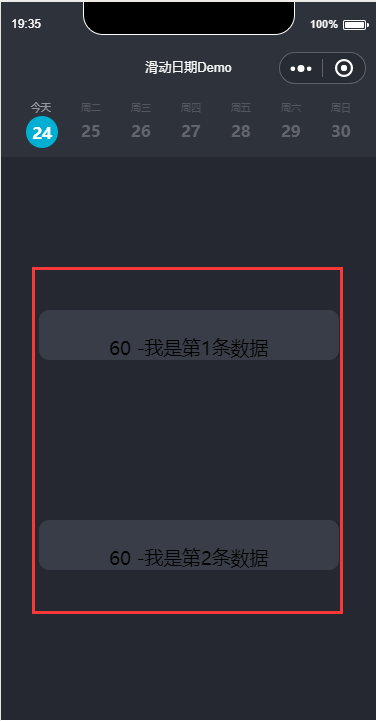
需要注意的是,上面当我们滑动的时候,我们是需要凸显当前所在的日期。
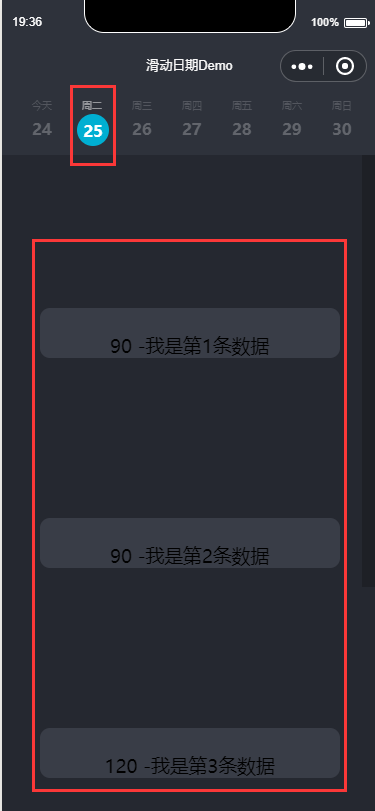
所以,在顶部周数据的时候,需要稍微做下处理。
<view class="TimeOrderBox scroll-view-item bc_red {{id == index ? 'coloBack':''}}" id="{{index}}" data-selectTime="{{item.month}}/{{item.day}}" data-week="{{item.week}}">
这样基本上 就已经实现了整体代码,
源码Demo
End
微信小程序之滑动日历展示的更多相关文章
- 微信小程序开发(4) 企业展示
在这篇微信小程序开发教程中,我们将介绍如何使用微信小程序开发企业内部宣传展示等功能. 一.小程序主体部分 一个小程序主体部分由三个文件组成,必须放在项目的根目录,如下: 1. 小程序逻辑 App({ ...
- 微信小程序横版日历,tab栏
代码地址如下:http://www.demodashi.com/demo/14243.html 一.前期准备工作 软件环境:微信开发者工具 官方下载地址:https://mp.weixin.qq.co ...
- 微信小程序缓存滑动距离,当页面浏览到一定位置,滑动其他页面后返回该页面记录之前的滑动距离
15.微信小程序缓存滑动距离 我们在浏览页面的时候,然后左滑或者右滑到新的页面,等返回此页面,我们希望可以记录上次滑动的距离 虽然这个实现起来并不难,但是会遇到一些坑,因为scroll-view的组件 ...
- 微信小程序左右滑动切换页面示例代码--转载
微信小程序——左右滑动切换页面事件 微信小程序的左右滑动触屏事件,主要有三个事件:touchstart,touchmove,touchend. 这三个事件最重要的属性是pageX和pageY,表示X, ...
- 微信小程序手势滑动卡片案例
最近工作中有项目要使用微信小程序技术进行开发,其中一项功能困扰了我很久,卡片滑动动效以及手势识别.经过一番研究和参考,现在把成果展示.记录自己踩到的坑,如果大家有需要,也可以帮助到大家. 效果图: 首 ...
- 微信小程序新闻信息列表展示
微信小程序信息展示列表 wxml <!-- 轮播图 --> <view class='haibao' bindtap="seeDetail" id="{ ...
- 微信小程序实现滑动删除效果
在一些app中,随处可见左滑动的效果,在微信小程序中,官方并未提供相关组件,需要我们自己动手写一个类似的效果 下面仅列举出核心代码,具体的优化需要根据你自身的需求 <view class='li ...
- 微信小程序左右滑动切换图片酷炫效果
开门见山,先上效果吧!感觉可以的用的上的再往下看. 心动吗?那就继续往下看! 先上页面结构吧,也就是wxml文件,其实可以理解成微信自己封装过的html,这个不多说了,不懂也没必要往下看了. < ...
- 微信小程序左右滑动切换图片酷炫效果(附效果)
开门见山,先上效果吧!感觉可以的用的上的再往下看. 心动吗?那就继续往下看! 先上页面结构吧,也就是wxml文件,其实可以理解成微信自己封装过的html,这个不多说了,不懂也没必要往下看了. < ...
随机推荐
- 利用百度地图api实现定位
使用百度地图api前需要先获取一个百度地图开放平台的访问应用AK, 获取百度地图开放平台访问应用AK方式:注册百度账号-->申请百度开发者-->获取密匙-->使用相关功能. 注册账号 ...
- C# 中Datatime类用法总结
C# 中Datatime类用法总结 收集了一些记录下来,这些有的是从网上找的,有些是自己使用到的: DateTime dt = DateTime.Now; dt.ToString();//2005-1 ...
- CSS学习笔记六:写原生导航栏
因为刚开始学习CSS时,只了解了一些基本样式,然后就跑去学习bootstrap.bootstrap是个不错的东西,挺好玩,起码让你写界面写的轻轻松松,几行引入代码,再来个复制粘贴就解决了,而且boot ...
- Python_网页爬虫
import sys import multiprocessing import re import os import urllib.request as lib def craw_links( u ...
- Java中判断是否为空的方法
1.判断字符串或者对象是否为空 首先来看一下工具StringUtils的判断方法: 一种是org.apache.commons.lang3包下的: 另一种是org.springframework.ut ...
- 一个能拖动,能调整大小,能更新bind值的vue指令-vuedragx
一. 背景说明 开发一个可自定义组件化门户配置页面,期间采用了vue框架作为前端视图引擎,作为一个刚入手vue的萌新,开发第一个功能就遇到了拦路虎.需要一个拖动并且可改变大小的容器盒子.当时查看vue ...
- Redis的并发竞争问题的解决方案总结
什么是Redis的并发竞争问题 Redis的并发竞争问题,主要是发生在并发写竞争. 考虑到redis没有像db中的sql语句,update val = val + 10 where ...,无法使用这 ...
- RedHat Linux下iptables防火墙设置
一般情况下iptables已经包含在Linux发行版中.运行 # iptables --version 来查看系统是否安装iptables 启动iptables:# service iptables ...
- Exchanger兄弟线程间数据信息交换
一.简述 Exchanger可以在两个线程之间交换数据,只能是2个线程,他不支持更多的线程之间互换数据.当线程A调用Exchange对象的exchange()方法后,他会陷入阻塞状态,直到线程B也调用 ...
- springBoot+springSecurity 数据库动态管理用户、角色、权限
使用spring Security3的四种方法概述 那么在Spring Security3的使用中,有4种方法: 一种是全部利用配置文件,将用户.权限.资源(url)硬编码在xml文件中,已经实现过, ...