
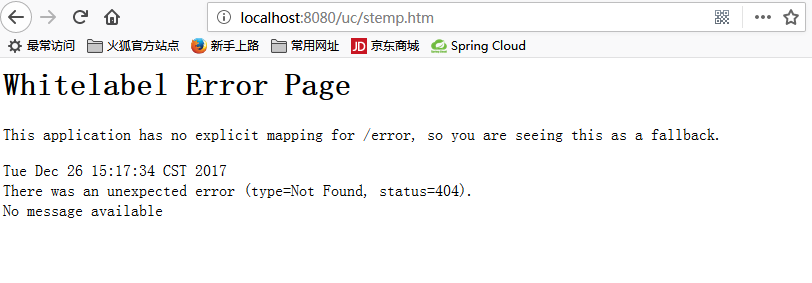
Spring Boot : Whitelabel Error Page解决方案
 <?xml version="1.0" encoding="UTF-8"?>

 <project xmlns="http://maven.apache.org/POM/4.0.0" xmlns:xsi="http://www.w3.org/2001/XMLSchema-instance"

     xsi:schemaLocation="http://maven.apache.org/POM/4.0.0 http://maven.apache.org/xsd/maven-4.0.0.xsd">

     <modelVersion>4.0.0</modelVersion>

     <groupId>com.demo</groupId>

     <artifactId>Demo</artifactId>

     <version>0.0.1-SNAPSHOT</version>

     <packaging>jar</packaging>

     <name>Demo</name>

     <description>Demo project for Spring Boot</description>

     <parent>

         <groupId>org.springframework.boot</groupId>

         <artifactId>spring-boot-starter-parent</artifactId>

         <version>1.5.9.RELEASE</version>

         <relativePath /> <!-- lookup parent from repository -->

     </parent>

     <properties>

         <project.build.sourceEncoding>UTF-8</project.build.sourceEncoding>

         <project.reporting.outputEncoding>UTF-8</project.reporting.outputEncoding>

         <java.version>1.8</java.version>

     </properties>

     <dependencies>

         <dependency>

             <groupId>org.mybatis.spring.boot</groupId>

             <artifactId>mybatis-spring-boot-starter</artifactId>

             <version>1.3.1</version>

         </dependency>

         <dependency>

             <groupId>org.springframework.boot</groupId>

             <artifactId>spring-boot-starter-web</artifactId>

         </dependency>

         <dependency>

             <groupId>org.springframework.boot</groupId>

             <artifactId>spring-boot-starter-jdbc</artifactId>

             <exclusions>

                 <exclusion>

                     <groupId>org.apache.tomcat</groupId>

                     <artifactId>tomcat-jdbc</artifactId>

                 </exclusion>

             </exclusions>

         </dependency>

         <dependency>

             <groupId>org.springframework.boot</groupId>

             <artifactId>spring-boot-starter-test</artifactId>

             <scope>test</scope>

         </dependency>

     </dependencies>

     <build>

         <plugins>

             <plugin>

                 <groupId>org.springframework.boot</groupId>

                 <artifactId>spring-boot-maven-plugin</artifactId>

             </plugin>

         </plugins>

     </build>

 </project>
 package com.demo.controller;

 import org.springframework.beans.factory.annotation.Autowired;

 import org.springframework.stereotype.Controller;

 import org.springframework.web.bind.annotation.RequestMapping;

 import org.springframework.web.bind.annotation.ResponseBody;

 import com.demo.domain.User;

 import com.demo.service.UserService;

 @Controller

 @RequestMapping(value = "/uc")

 public class UserController {

     @Autowired

     private UserService userService;

     @ResponseBody

     @RequestMapping("/stemp.htm")

     private String sYeMian(User user){

         System.out.println("进了方法 syso");

         User u = new User();

         u.setMuBan(user.getMuBan());

         int i = userService.sYeMian(u);

         if (i>0){

             return "存储成功";

         }

             return "存储失败";

     }

 }
 package com.demo.example.demo;

 import org.springframework.boot.SpringApplication;

 import org.springframework.boot.autoconfigure.SpringBootApplication;

 @SpringBootApplication

 public class Demo1Application {

     public static void main(String[] args) {

         SpringApplication.run(Demo1Application.class, args);

     }

 }
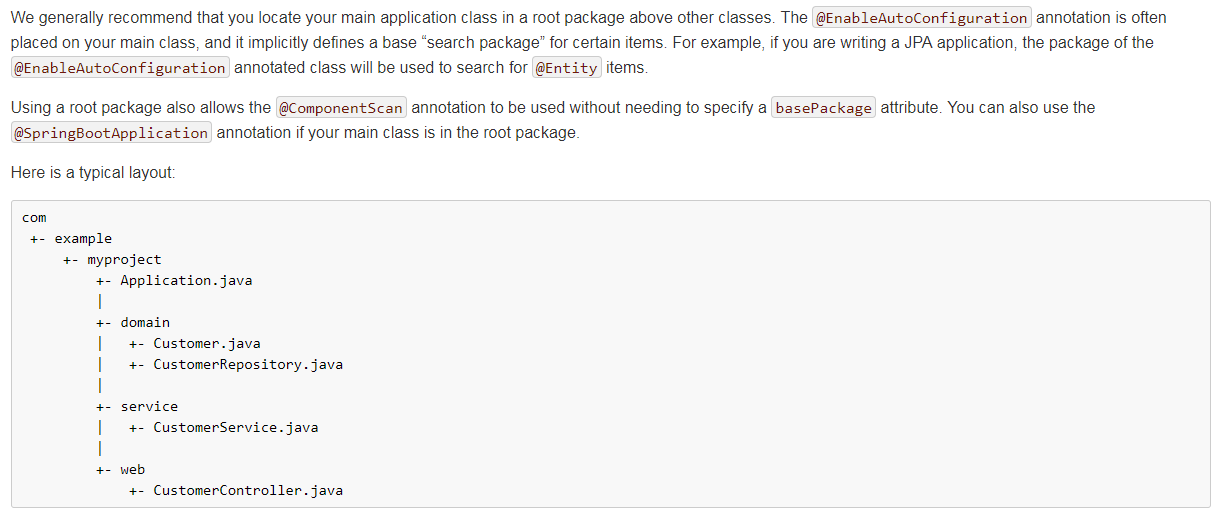
 package com.demo.example.demo;

 import org.springframework.boot.SpringApplication;

 import org.springframework.boot.autoconfigure.SpringBootApplication;

 import org.springframework.context.annotation.ComponentScan;

 @SpringBootApplication

 @ComponentScan(basePackages = {"com.demo.controller"})

 public class Demo1Application {

     public static void main(String[] args) {

         SpringApplication.run(Demo1Application.class, args);

     }

 }
 package com.demo;

 import org.springframework.boot.SpringApplication;

 import org.springframework.boot.autoconfigure.SpringBootApplication;

 import org.springframework.context.annotation.ComponentScan;

 @SpringBootApplication

 public class Demo1Application {

     public static void main(String[] args) {

         SpringApplication.run(Demo1Application.class, args);

     }

 }
Spring Boot : Whitelabel Error Page解决方案的更多相关文章
- spring boot: Whitelabel Error Page的解决方案
http://blog.csdn.net/u014788227/article/details/53670112
- Spring Boot Web Error Page处理
spring Boot默认是whitelabel error page. 其实我们可以自己处理,由于时间有限,所以就简单说明一下方法. 首先配置 @Configuration public class ...
- spring boot 开始部署报Whitelabel Error Page错解决方法
因为时刚刚才学spring boot ,第一次碰到的问题,花了半个小时终于明白了,SpringBoot 的application类会自动扫描子包类下的mapping方法,因此application类不 ...
- 初学 Spring boot 报错 Whitelabel Error Page 404
按照教程,写了个最简单的 HelloWorld,尼玛报错 -->Whitelabel Error Page 404. 网上99%都是项目结构不对,说什么 Application放在父级 pack ...
- Spring Boot Controller相应JSP页面 错误whitelabel error page
在学习SpringBoot显示JSP页面的时候出现了错误,Controller可以正常调用,但是JSP页面就是不能正常显示. whitelabel error page 解决:注释掉scope < ...
- 《Springboot极简教程》问题解决:Springboot启动报错 Whitelabel Error Page: This application has no explicit mapping for(转)
13.2 Spring Boot启动报错:Whitelabel Error Page 13.2 Spring Boot启动报错:Whitelabel Error Page 问题描述 Whitelabe ...
- Whitelabel Error Page 专题
Spring boot为错误视图提供了如下错误属性:timestamp:错误发生的时间status:HTTP状态码error:错误原因exception:异常的类名message:异常消息(如果这个错 ...
- Whitelabel Error Page异常
做了个简单的springboot项目,一开始所有运行正常,之后写了一天的代码,再运行相同的代码,就一直报以下异常: Whitelabel Error Page This application has ...
- SpringBoot接口服务处理Whitelabel Error Page(转)
To switch it off you can set server.error.whitelabel.enabled=false http://stackoverflow.com/question ...
随机推荐
- 在单体应用的一些DDD实践经验
阅读此文需要一定的DDD基础,如果你是第一次接触DDD读者,建议先去阅读一些DDD相关的书籍或者文章之后再来阅读本文. 背景 自从我在团队中推行DDD以来,我们团队经历了一系列的磨难--先是把核心项目 ...
- JSP之JSTL_functions
<?xml version="1.0" encoding="UTF-8" ?> <taglib xmlns="http://java ...
- Redis跟Spring整合,sentinel模式
普通模式整合 一.在pom.xml中引入redis的依赖 <dependency> <groupId>org.springframework.data</groupId& ...
- <<Senium2自动化测试>>读书笔记一
为进一步加强Python知识扩展和学习,在朋友的推荐下选择了<<Selenium2自动化测试实战>>,作者胡志恒,基于Python语言实现,以实例的方式详细讲解WebDrive ...
- Shader 入门笔记(三) ShaderLab 初识
Unity中,Unity Shader 都是ShaderLab 来编写的.ShaderLab 是Unity提供的编写Unity Shader 的一种说明性语言. 1)Properties :定义了着色 ...
- NetworkManager 冲突
今天看centos7的视频的时候发现视频里总是配置ip失败,明明什么都对的,没有错误 至少在逻辑上是没有的 情况发生 1.centos7会自动启动这个服务,NetworkManager服务,重启后ip ...
- 【转】EI收录的中国期刊
ISSN 期刊名 0567-7718 Acta Mechanica Sinica 1006-7191 Acta Metallurgica Sinica (English Letters) ...
- 【转】高斯-克吕格投影与UTM投影异同
高斯-克吕格(Gauss-Kruger)投影与UTM投影(Universal Transverse Mercator,通用横轴墨卡托投影)都是横轴墨卡托投影的变种,目前一些国外的软件或国外进口仪器的配 ...
- 2. getline()和get()
1.面向行输入:getline() ---其实还可以接受第三个参数. getline()函数读取整行,调用该方法 使用cin.getline().该函数有两个参数, 第一个参数是是用来存储输入行的数组 ...
- Oracle 修改表操作
如题: --增加列操作: alert table 表名 add 列名 列的类型 eg:alter table EMP1 add pwd varchar2(10); --删除列操作: alert ...