
vuex的一些学习
刚开始学vuex看文档看的一脸懵逼,故而网上各种查找资料,视频去观看学习,虽然看了很多还是很蒙圈,最近看了一个讲vuex的视频还有一个 类似的简书文档从中学到了很多,慢慢理清了头绪,至此记录一下,共同学习共同进步。。。
1、安装下载vuex npm install vuex --save
2、我们先来了解一下vuex官网的一些介绍,有一个流程图很形象的介绍了vuex中的各种属性直接的联系,以及vuex主要的作用

这个图刚开始我是看不懂的,不是很明白他们之间的关系,现在就来梳理一下
一、如何引入vuex
前面我们安装了vuex,但是如何引入呢?
首先我们现在文件夹目录下建一个store文件夹,然后再建一个store.js文件,在这个文件里面引入vuex
//store.js
import Vue from 'vue'

import Vuex from 'vuex'

 Vue.use(Vuex)
然后在main.js文件里面引入store.js文件,就可以使用vuex了
//main.js
import Vue from 'vue'

import App from './App.vue'

import {store} from './store/store'

new Vue({

  store:store,

  el: '#app',

  render: h => h(App)

})
二、先来看一下没用vuex进行数据传递的代码,这个使用父子之间的props进行传值
//App.vue中的初始化代码

<template>

<div id="app">

    <product-list-one v-bind:products="products"></product-list-one>

    <product-list-two v-bind:products="products"></product-list-two>

</div>

</template>

<script>

import ProductListOne from './components/ProductListOne.vue'

import ProductListTwo from './components/ProductListTwo.vue'

export default {

    name: 'app',

    components: {

        'product-list-one': ProductListOne,

        'product-list-two': ProductListTwo

    },

    data () {

        return {

            products: [

                 {name:'权杖',price:800},

             {name:'纪梵希',price:400},

             {name:'迪奥',price:360},

             {name:'圣罗兰',price:320},

            ]

        }

    }

}

</script>

<style>

body{

    font-family: Ubuntu;

    color: #555;

}

</style>
//ProductListOne.vue

<template>

    <div id="product-list-one">

        <h2>Product List One</h2>

        <ul>

            <li v-for="product in products">

                <span class="name">{{ product.name }}</span>

                <span class="price">${{ product.price }}</span>

            </li>

        </ul>

    </div>

</template>

<script>

export default {

    props: ['products'],

    data () {

        return {

        }

    }

}

</script>

<style scoped>

#product-list-one{

    background: #FFF8B1;

    box-shadow: 1px 2px 3px rgba(0,0,0,0.2);

    margin-bottom: 30px;

    padding: 10px 20px;

}

#product-list-one ul{

    padding: 0;

}

#product-list-one li{

    display: inline-block;

    margin-right: 10px;

    margin-top: 10px;

    padding: 20px;

    background: rgba(255,255,255,0.7);

}

.price{

    font-weight: bold;

    color: #E8800C;

}

</style>
//ProductListTwo.vue

<template>

    <div id="product-list-two">

        <h2>Product List Two</h2>

        <ul>

            <li v-for="product in products">

                <span class="name">{{ product.name }}</span>

                <span class="price">${{ product.price }}</span>

            </li>

        </ul>

    </div>

</template>

<script>

export default {

    props: ['products'],

    data () {

        return {

        }

    }

}

</script>

<style scoped>

#product-list-two{

    background: #D1E4FF;

    box-shadow: 1px 2px 3px rgba(0,0,0,0.2);

    margin-bottom: 30px;

    padding: 10px 20px;

}

#product-list-two ul{

    padding: 0;

    list-style-type: none;

}

#product-list-two li{

    margin-right: 10px;

    margin-top: 10px;

    padding: 20px;

    background: rgba(255,255,255,0.7);

}

.price{

    font-weight: bold;

    color: #860CE8;

    display: block;

}

</style>
属性一:State
这个属性简单的说就是放数据的用的容器,你可以把你需要公用的数据放到这个属性里面,然后在每个需要的页面用store.state.products去调用它,代码如下
//store.js

import Vue from 'vue'

import Vuex from 'vuex'

 Vue.use(Vuex)

 export const store = new Vuex.Store({

     state:{

         products:[

             {name:'权杖',price:800},

             {name:'纪梵希',price:400},

             {name:'迪奥',price:360},

             {name:'圣罗兰',price:320},

         ]

     }

 })
当然,我们用了vuex中的state相应的组件ProductListOne和ProductListTwo也要相应改变,两个文件需要改的都一样
<template>

  <div id="product-list-one">

    <h2>Product List One</h2>

    <ul>

      <li v-for="product in saleProducts">

        <span class="name">{{product.name}}</span>

        <span class="price">${{product.price}}</span>

      </li>

    </ul>

  </div>

</template>

<script>

export default {

  data () {

        return {

            saleProducts : this.$store.state.products //获取store中state的数据

        }

    }

}

</script>
属性二:Getters
这个属性就相当于一个方法去改变数据,这里我让每个数据都打八折,代码如下
//store.js

import Vue from 'vue'

import Vuex from 'vuex'

 Vue.use(Vuex)

 export const store = new Vuex.Store({

     state:{

         products:[

             {name:'权杖',price:800},

             {name:'纪梵希',price:400},

             {name:'迪奥',price:360},

             {name:'圣罗兰',price:320},

         ]

     },

     getters:{

         salesProducts:(state)=>{

             var salesProducts = state.products.map(

              product=>{

                return{

                  name:'**'+product.name+'**',

                  price:product.price*0.8

                };

              });

        return salesProducts;

         }

     },

 })
<!-- productListTwo.vue -->

<script>

export default {

 /* data () {

        return {

            saleProducts : this.$store.state.products //获取store中state的数据

        }

    }*/

      computed:{

      salesProducts(){

        return this.$store.getters.salesProducts;//使用getters调取改变的数据

      }

    }

}

</script>
属性三:Mutations
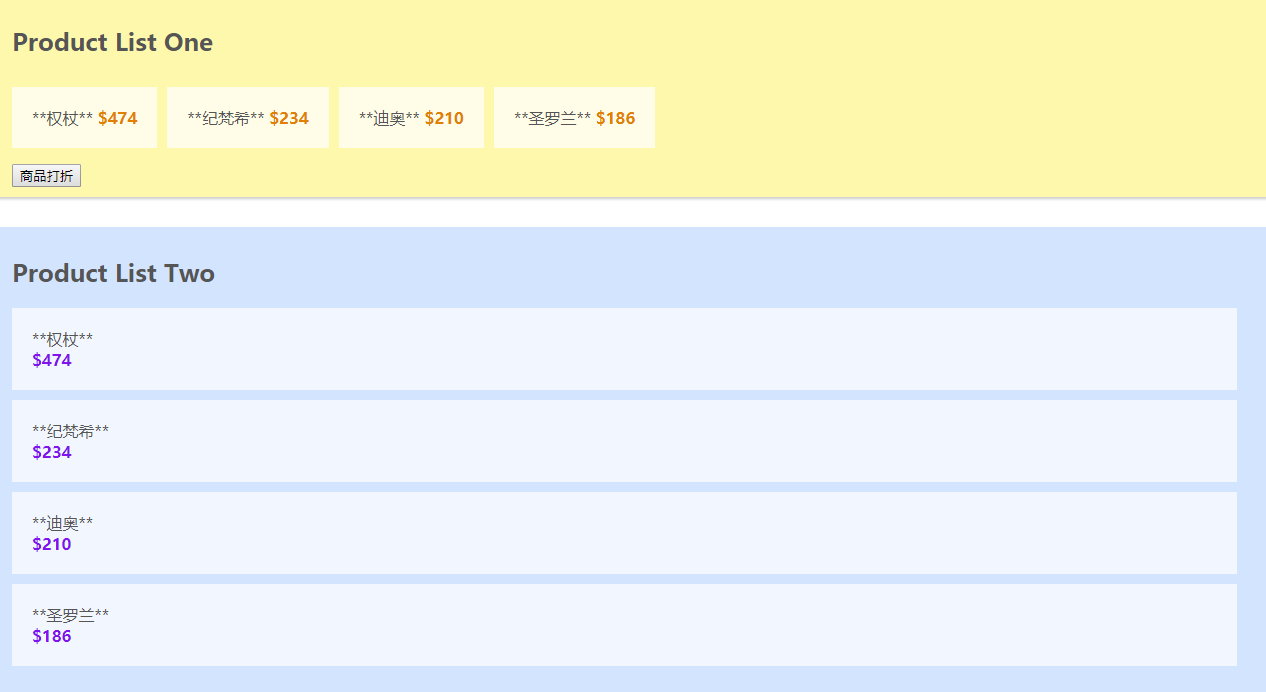
该属性主要是用于你触发事件是需要使用Mutations,如果我们需要实现点击降价的话,就需要这个属性,调用this.$store.commit('')
//store.js

import Vue from 'vue'

import Vuex from 'vuex'

 Vue.use(Vuex)

 export const store = new Vuex.Store({

     state:{

         products:[

             {name:'权杖',price:800},

             {name:'纪梵希',price:400},

             {name:'迪奥',price:360},

             {name:'圣罗兰',price:320},

         ]

     },

     getters:{

         salesProducts:(state)=>{

             var salesProducts = state.products.map(

              product=>{

                return{

                  name:'**'+product.name+'**',

                  price:product.price*0.8

                };

              });

        return salesProducts;

         }

     },

   mutations:{

       reducePrice:state=>{

            state.products.forEach(product=>{

          product.price-=10;

        })

       }

   }

 })
<template>

  <div id="product-list-one">

    <h2>Product List One</h2>

    <ul>

      <li v-for="product in salesProducts">

        <span class="name">{{product.name}}</span>

        <span class="price">${{product.price}}</span>

      </li>

    </ul>

  <button @click="reducePrice">商品打折</button>

  </div>

</template>

<script>

export default {

  /*data () {

        return {

            saleProducts : this.$store.state.products //获取store中state的数据

        }

    },*/

    computed:{

      salesProducts(){

        return this.$store.getters.salesProducts;

        /*var saleProducts = this.$store.state.products.map(

              product=>{

                return{

                  name:'**'+product.name+'**',

                  price:product.price*0.8

                }

              })

        return saleProducts;*/

      }

    },

    methods:{

      reducePrice:function(){

        /*this.$store.state.products.forEach(product=>{

          product.price-=10;

        })*/

        this.$store.commit('reducePrice');

      }

    }

}

</script>
属性四:Actions
该属性类似Mutations不同的是:$store.dispatch("",amount)
Actions提交Mutations,
Actions可以同时提交异步的方法
//store.js

import Vue from 'vue'

import Vuex from 'vuex'

 Vue.use(Vuex)

 export const store = new Vuex.Store({

     state:{

         products:[

             {name:'权杖',price:800},

             {name:'纪梵希',price:400},

             {name:'迪奥',price:360},

             {name:'圣罗兰',price:320},

         ]

     },

     getters:{

         salesProducts:(state)=>{

             var salesProducts = state.products.map(

              product=>{

                return{

                  name:'**'+product.name+'**',

                  price:product.price*0.6

                };

              });

        return salesProducts;

         }

     },

   mutations:{

       reducePrice:(state,payload)=>{

            state.products.forEach(product=>{

          product.price-=payload;

        })

       }

   },

   actions:{

       reducePrice:(context,payload)=>{

           context.commit("reducePrice",payload);

       }

   }

 })
 methods:{

      reducePrice:function(amount){

        /*this.$store.state.products.forEach(product=>{

          product.price-=10;

        })*/

        //this.$store.commit('reducePrice');

        this.$store.dispatch("reducePrice",amount);//dispatch分发

      }

    }
属性五:mapGetters,mapActions
先安装 npm install babel--preset-stage-2 --save-dev
然后在你需要的页面引入mapGetters,mapActions,这个主要是用在你的store.js里面可能有很多个Getters和Actions时,比较方便简洁的一种写法
<script>

import {mapGetters} from "vuex"  //引入mapGetters

import {mapActions} from "vuex"   //引入mapActions

export default {

    computed:{

        ...mapGetters([

           "salesProducts"

        ])

    },

    methods:{

      ...mapActions([

        "reducePrice"

        ])

    }

}

</script>
vuex的一些学习的更多相关文章
- Vuex 源码学习(一)
(一)Vuex 是什么? Vuex 是一个专为 Vue.js 应用程序开发的状态管理模式.它采用集中式存储管理应用的所有组件的状态, 并以相应的规则保证状态以一种可预测的方式发生变化. —— 来自 V ...
- Vuex 源码学习(二)
Vue加载后,将Vuex 加载到 Vue对象上后,初始化Store. (一) Store的参数的定义 其中 action 与 mutation 的订阅者 用 数组存储,而其属性都是用对象存储的. 考虑 ...
- vue+vue-cli+vuex+vrouter 开发学习和总结
1.项目目录结构 1.components------------------------->页面中所用的公共组件: 2.router index.js -------------------- ...
- Vuex的深入学习
1.vuex 的dispatch和commit提交mutation的区别 (1)当你的操作行为中含有异步操作,比如向后台发送请求获取数据,就需要使用action的dispatch去完成了.其他使用co ...
- vuex - 常用命令学习及用法整理
https://vuex.vuejs.org/zh-cn/api.html 命令 用途 备注 this.$store 组件中访问store实例 store.state.a 获取在state对象中的数据 ...
- vuex与vue-router学习方案
1.vuex,官方vuex2.0的文档写得太简略了,先1.0的文档,研究1.0分支的counter例子.1.0文档只需看核心概念和API参考文档.2.0的用法先不管,需要的时候再说,先把1.0高熟练. ...
- vuex构建笔记本应用学习
vuex:针对vue应用派生的专门管理应用state的工具,state可以理解为我们组件需要操作的data数据,都知道,vue构建spa应用的时候,随着组件规模的提升,各个子组件之间的通信如果采用子组 ...
- 四、什么是vuex
一.关于vuex刚开始学习的时候对于里面的很多名词有很陌生.很难接受这个定义,下面这个链接很好很简单通俗的解释了什么是vuex 我喜欢的vuex网址:https://zhuanlan.zhihu.co ...
- [Vue] vuex进行组件间通讯
vue 组件之间数据传输(vuex) 初始化 store src/main.js import Vuex from "vuex"; Vue.use(Vuex); new Vue({ ...
随机推荐
- dsp实验一 常见问题教程
1.选择合适阅读材料:卖油翁.将进酒,等. 2.录音设备三选一:某种电脑声卡+线上convert/楼月mp3录音软件+格式工厂(我选的)/Matlab (注:这是目前已知的方法,我只用了第二个) 3. ...
- vue+webpack项目 url的问题了解
阮一峰js模块化 webpack打包 url-loader vue Loader ES6 模块化 babel成CommonJS规范的实现 能正常显示图片的写法如下, src通过控制台可以看到被web ...
- 开源litemall学习
1参数拼装 https://blog.yeskery.com/articles/345298282 WxWebMvcConfiguration HandlerMethodArgumentResolve ...
- 使用Github时遇到问题的解决方法
记录了一些我在使用Github时遇到问题的解决方法 git中报unable to auto-detect email address 错误的解决办法 问题描述: 执行 git commit -m &q ...
- Docker-----仓库
安装registry 安装并启动docker yum -y install docker systemctl enable docker systemctl start docker 下载regist ...
- JustSoso笔记
当时想了大半天,想着到底要怎么绕过MD5呢,结果还是没做出来,即使问了学长,自己还是漏了一个步骤,file=hint.php,特此笔记,又学到了个引用变量的知识 学习自 https://www.ctf ...
- TinyMCE
段落段落段落段落 标题1 标题2 标题3 标题4 标题5 标题6
- Java编程思想(后)
Java编程思想(后) 持有对象 如果一个程序只包含固定数量的且其生命期都是已知的对象,那么这是一个非常简单的程序. Java中的库基本类型: List, Set, Queue和Map --- 称为集 ...
- nginx跨域问题记录
现象:访问 toolbox.chinasoft.com 提示如下:Access to Font at 'https://images.chinasoft.com/static-toolbox/styl ...
- NodeJS Addon 多线程通信
某个产品的Mac客户端计划基于electron实现,因为现有SDK有C API,原理上用NodeJS Addon来封装成JS API就可使用了.但涉及到与Addon多线程交互,翻找资料没能找到到底该怎 ...