
IDEA 导入 Tomcat9 源码
源码下载(Source Code Distributions)地址:https://tomcat.apache.org/download-90.cgi
tomcat 和 servlet 以及 jdk 版本的对应关系:http://tomcat.apache.org/whichversion.html
附上搭建好的环境:https://gitee.com/jhxxb/MyTomcat
Maven方式
一、解压源码
在源码根目录新建 home 文件夹,把 conf 文件夹和 webapps 文件夹移动到 home 文件夹里,然后在源码根目录新建 pom.xml 文件(原来为 Ant 工程,这里把它改为 Maven 工程)
pom.xml
<?xml version="1.0" encoding="UTF-8"?>

<project xmlns="http://maven.apache.org/POM/4.0.0"

         xmlns:xsi="http://www.w3.org/2001/XMLSchema-instance"

         xsi:schemaLocation="http://maven.apache.org/POM/4.0.0 http://maven.apache.org/xsd/maven-4.0.0.xsd">

    <modelVersion>4.0.0</modelVersion>

    <groupId>org.apache.tomcat</groupId>

    <artifactId>tomcat</artifactId>

    <name>tomcat</name>

    <version>9.0.19</version>

    <dependencies>

        <dependency>

            <groupId>junit</groupId>

            <artifactId>junit</artifactId>

            <version>4.12</version>

            <scope>test</scope>

        </dependency>

        <dependency>

            <groupId>org.apache.ant</groupId>

            <artifactId>ant</artifactId>

            <version>1.10.5</version>

        </dependency>

        <dependency>

            <groupId>wsdl4j</groupId>

            <artifactId>wsdl4j</artifactId>

            <version>1.6.3</version>

        </dependency>

        <!--<dependency>-->

            <!--<groupId>javax.xml</groupId>-->

            <!--<artifactId>jaxrpc</artifactId>-->

            <!--<version>1.1</version>-->

        <!--</dependency>-->

        <dependency>

            <groupId>org.apache.geronimo.specs</groupId>

            <artifactId>geronimo-jaxrpc_1.1_spec</artifactId>

            <version>2.1</version>

        </dependency>

<!--        <dependency>-->

<!--            <groupId>org.eclipse.jdt.core.compiler</groupId>-->

<!--            <artifactId>ecj</artifactId>-->

<!--            <version>4.5</version>-->

<!--        </dependency>-->

        <dependency>

            <groupId>org.eclipse.jdt</groupId>

            <artifactId>ecj</artifactId>

            <version>3.17.0</version>

        </dependency>

        <dependency>

            <groupId>org.easymock</groupId>

            <artifactId>easymock</artifactId>

            <version>4.0.2</version>

            <scope>test</scope>

        </dependency>

    </dependencies>

    <build>

        <plugins>

            <plugin>

                <groupId>org.apache.maven.plugins</groupId>

                <artifactId>maven-compiler-plugin</artifactId>

                <configuration>

                    <source>1.8</source>

                    <target>1.8</target>

                    <encoding>UTF-8</encoding>

                </configuration>

            </plugin>

            <plugin>

                <groupId>org.apache.maven.plugins</groupId>

                <artifactId>maven-resources-plugin</artifactId>

                <configuration>

                    <encoding>UTF-8</encoding>

                </configuration>

            </plugin>

        </plugins>

    </build>

</project>
二、用 IDEA 直接打开
这里删除了一些无用的文件

1.打开项目属性(F4)
把 java 文件夹标记为 Sources,test 文件夹标记为 Tests
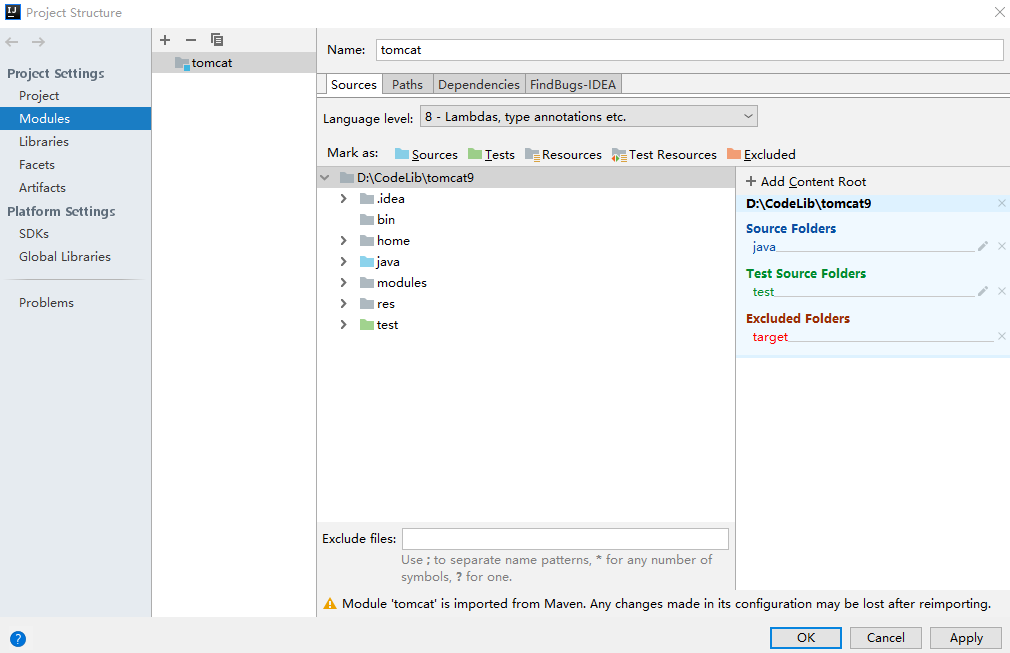
2.运行
找到 org.apache.catalina.startup.Bootstrap 运行 main 方法
2.1、ResponseTrailers 找不到,把 home\webapps\examples\WEB-INF\classes\trailers 目录拷贝到 test 目录下
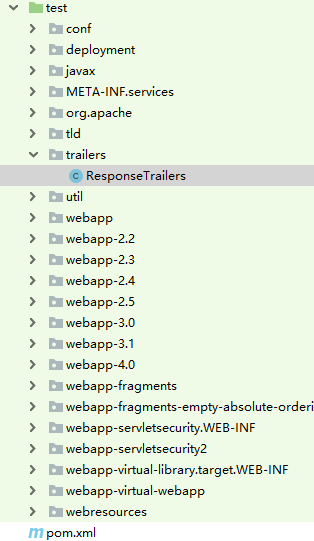
ResponseTrailers.java
/*

 * Licensed to the Apache Software Foundation (ASF) under one or more

 * contributor license agreements.  See the NOTICE file distributed with

 * this work for additional information regarding copyright ownership.

 * The ASF licenses this file to You under the Apache License, Version 2.0

 * (the "License"); you may not use this file except in compliance with

 * the License.  You may obtain a copy of the License at

 *

 *     http://www.apache.org/licenses/LICENSE-2.0

 *

 * Unless required by applicable law or agreed to in writing, software

 * distributed under the License is distributed on an "AS IS" BASIS,

 * WITHOUT WARRANTIES OR CONDITIONS OF ANY KIND, either express or implied.

 * See the License for the specific language governing permissions and

 * limitations under the License.

 */

package trailers;

import java.io.IOException;

import java.io.PrintWriter;

import java.util.HashMap;

import java.util.Map;

import java.util.function.Supplier;

import javax.servlet.ServletException;

import javax.servlet.http.HttpServlet;

import javax.servlet.http.HttpServletRequest;

import javax.servlet.http.HttpServletResponse;

/**

 * This example writes some trailer fields to the HTTP response.

 */

public class ResponseTrailers extends HttpServlet {

    private static final long serialVersionUID = 1L;

    private static final Supplier<Map<String,String>> TRAILER_FIELD_SUPPLIER =

            new TrailerFieldSupplier();

    @Override

    protected void doGet(HttpServletRequest req, HttpServletResponse resp)

            throws ServletException, IOException {

        resp.setTrailerFields(TRAILER_FIELD_SUPPLIER);

        resp.setContentType("text/plain");

        resp.setCharacterEncoding("UTF-8");

        PrintWriter pw  = resp.getWriter();

        pw.print("This response should include trailer fields.");

    }

    private static class TrailerFieldSupplier implements Supplier<Map<String,String>> {

        private static final Map<String,String> trailerFields = new HashMap<>();

        static {

            trailerFields.put("x-trailer-1", "Trailer value one");

            trailerFields.put("x-trailer-2", "Trailer value two");

        }

        @Override

        public Map<String, String> get() {

            return trailerFields;

        }

    }

}
2.2、CookieFilter 找不到,把 home\webapps\examples\WEB-INF\classes\util\CookieFilter.java 文件拷贝到 test\util 目录下
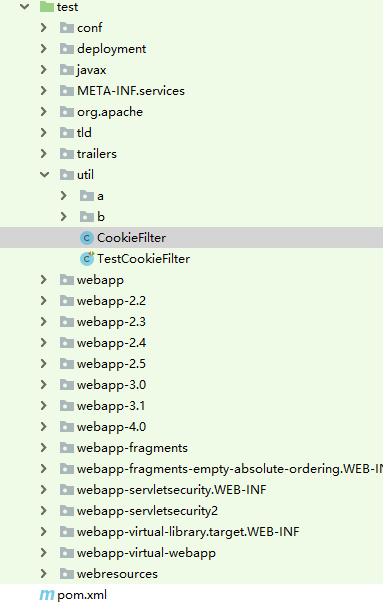
CookieFilter.java
/*

 * Licensed to the Apache Software Foundation (ASF) under one or more

 * contributor license agreements.  See the NOTICE file distributed with

 * this work for additional information regarding copyright ownership.

 * The ASF licenses this file to You under the Apache License, Version 2.0

 * (the "License"); you may not use this file except in compliance with

 * the License.  You may obtain a copy of the License at

 *

 *     http://www.apache.org/licenses/LICENSE-2.0

 *

 * Unless required by applicable law or agreed to in writing, software

 * distributed under the License is distributed on an "AS IS" BASIS,

 * WITHOUT WARRANTIES OR CONDITIONS OF ANY KIND, either express or implied.

 * See the License for the specific language governing permissions and

 * limitations under the License.

 */

package util;

import java.util.Locale;

import java.util.StringTokenizer;

/**

 * Processes a cookie header and attempts to obfuscate any cookie values that

 * represent session IDs from other web applications. Since session cookie names

 * are configurable, as are session ID lengths, this filter is not expected to

 * be 100% effective.

 *

 * It is required that the examples web application is removed in security

 * conscious environments as documented in the Security How-To. This filter is

 * intended to reduce the impact of failing to follow that advice. A failure by

 * this filter to obfuscate a session ID or similar value is not a security

 * vulnerability. In such instances the vulnerability is the failure to remove

 * the examples web application.

 */

public class CookieFilter {

    private static final String OBFUSCATED = "[obfuscated]";

    private CookieFilter() {

        // Hide default constructor

    }

    public static String filter(String cookieHeader, String sessionId) {

        StringBuilder sb = new StringBuilder(cookieHeader.length());

        // Cookie name value pairs are ';' separated.

        // Session IDs don't use ; in the value so don't worry about quoted

        // values that contain ;

        StringTokenizer st = new StringTokenizer(cookieHeader, ";");

        boolean first = true;

        while (st.hasMoreTokens()) {

            if (first) {

                first = false;

            } else {

                sb.append(';');

            }

            sb.append(filterNameValuePair(st.nextToken(), sessionId));

        }

        return sb.toString();

    }

    private static String filterNameValuePair(String input, String sessionId) {

        int i = input.indexOf('=');

        if (i == -1) {

            return input;

        }

        String name = input.substring(0, i);

        String value = input.substring(i + 1, input.length());

        return name + "=" + filter(name, value, sessionId);

    }

    public static String filter(String cookieName, String cookieValue, String sessionId) {

        if (cookieName.toLowerCase(Locale.ENGLISH).contains("jsessionid") &&

                (sessionId == null || !cookieValue.contains(sessionId))) {

            cookieValue = OBFUSCATED;

        }

        return cookieValue;

    }

}
2.3、conf\server.xml 找不到,设置下 jvm 参数(就是指定之前创建的 home 目录)
-Dcatalina.home=D:\CodeLib\tomcat9\home
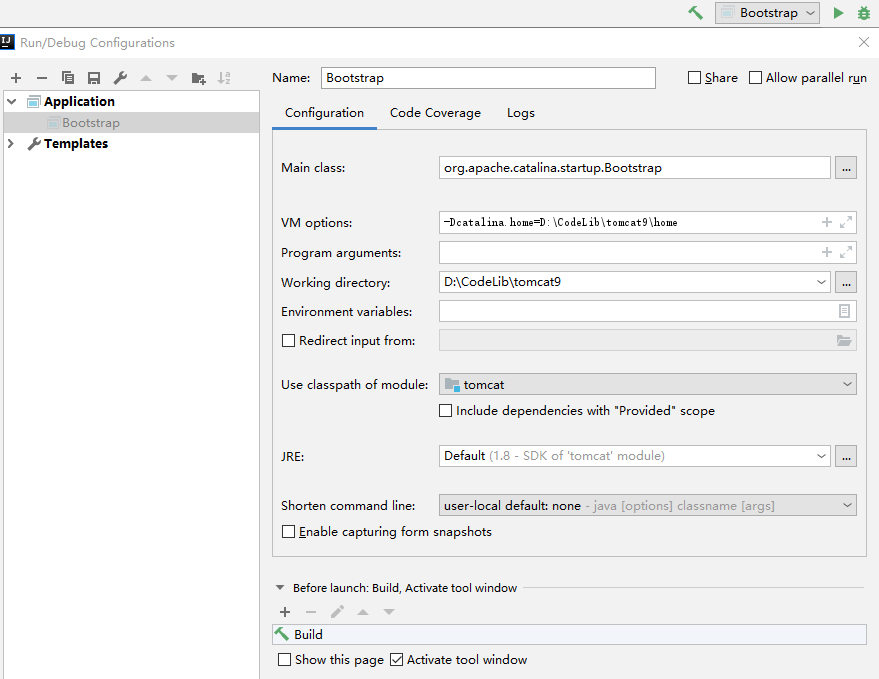
2.4、控制台报错:Error configuring application listener of class [listeners.ContextListener]
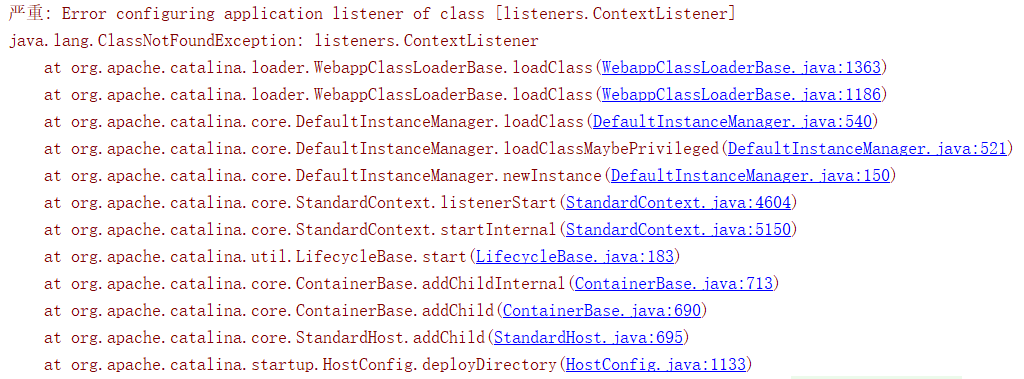
没找到具体原因,删掉 webapps 下的 examples 文件夹即可
2.5、控制台或网页报错:Servlet.service() for servlet [jsp] in context with path [] threw exception [org.apache.jasper.JasperException: Unable to compile class for JSP] with root cause

编辑 org.apache.catalina.startup.ContextConfig 文件的 configureStart() 方法,添加初始化 JSP 解析器的代码
context.addServletContainerInitializer(new JasperInitializer(), null);
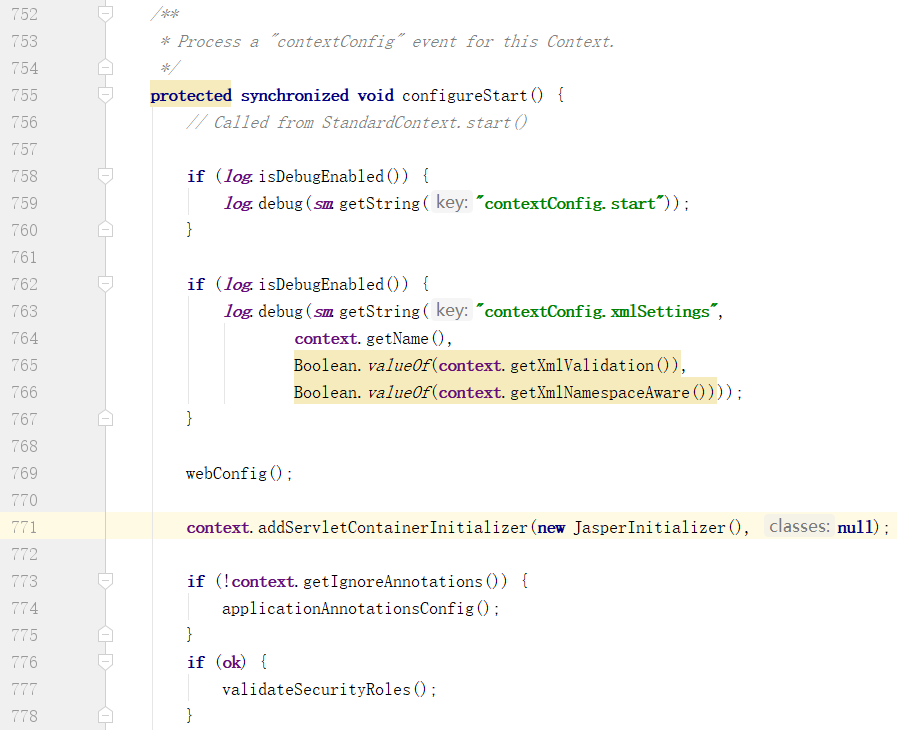
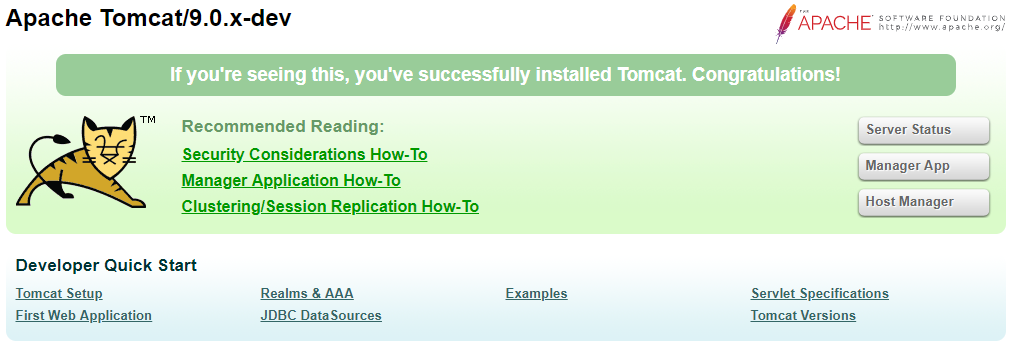
最后访问 http://127.0.0.1:8080/ 就可以看到欢迎页了
Ant方式
解压 tomcat 源码,编辑 build.properties.default 文件,修改 base.path 路径
# ----- Default Base Path for Dependent Packages -----

# Please note this path must be absolute, not relative,

# as it is referenced with different working directory

# contexts by the various build scripts.

base.path=D:/CodeLib/apache-tomcat-9.0.19-src/tomcat-build-libs
下载 Ant,配置环境变量
https://ant.apache.org/bindownload.cgi
# 设置系统环境变量

setx /M ANT_HOME "D:\apache-ant-1.10.5"

setx /M Path "%Path%;%ANT_HOME%\bin"
编译 tomcat,生成 idea 项目
cd D:\CodeLib\apache-tomcat-9.0.19-src

ant

ant ide-intellij

用 idea 打开源码目录,会提示设置变量属性,按照自己设置的目录设置即可,后面运行和 Maven 方式类似
https://gongxufan.github.io/2017/10/20/tomcat-source-debug/
https://emacsist.github.io/tags/tomcat%E6%BA%90%E7%A0%81/
IDEA 导入 Tomcat9 源码的更多相关文章
- IDEA导入tomcat9源码跑起来~
如题,这里记录一下用IDEA导入tomcat9的源码,并跑起来.看了本教程你还是不会的话直接问我. 一.环境安装以及目录搭建 tomcat9源码下载地址:http://mirrors.hust.edu ...
- 探秘Tomcat(一)——Myeclipse中导入Tomcat源码
前言:有的时候自己不知道自己是井底之蛙,这并没有什么可怕的,因为你只要蜷缩在方寸之间的井里,无数次的生活轨迹无非最终归结还是一个圆形:但是可怕的是有一天你不得不从井里跳出来生活,需要重新审视井以外的生 ...
- Eclipse导入Hadoop源码项目及编写Hadoop程序
一 Eclipse导入Hadoop源码项目 基本步骤: 1)在Eclipse新建一个java项目[hadoop-1.2.1] 2)将Hadoop压缩包解压目录src下的core,hdfs,mapred ...
- 关于导入geoserver 源码到Eclipse编译运行
参考http://blog.csdn.net/gisshixisheng/article/details/43016443 和 http://blog.sina.com.cn/s/blog_6e37 ...
- spring源码学习(一):eclipse导入spring源码
前言 对于一门技术,我们最先是了解它(what),然后再熟练的使用它(how)以及何时用它(when),最后肯定要看透它(why).spring作为Java开发人员可以说是最熟悉不过的了,基本每个Ja ...
- eclipse导入Java源码
eclipse导入Java源码 下载源码包(一般jdk都自带了, 我的没有) src.zip eclipse -> window -> preferences -> JAVA -&g ...
- Hadoop1.x目录结构及Eclipse导入Hadoop源码项目
这是解压hadoop后,hadoop-1.2.1目录 各目录结构及说明: Eclipse导入Hadoop源码项目: 注意:如果没有ant的包可以去网上下,不是hadoop里面的. 然后如果通过以上还报 ...
- idea 导入spring 源码注意的问题
问题:idea导入spring 源码的步骤是: 首先从官网下载spring的源码:git clone https://github.com/spring-projects/spring-framewo ...
- 导入android源码中的APP源码到eclipse
导入android源码中的APP源码到eclipse 一般最简单的办法就是创建新的android工程,选择create project from existing source选项,直接导入源码就OK ...
随机推荐
- 小米平板6.0系统如何无ROOT激活xposed框架的步骤
在较多企业的引流,或业务操作中,基本上都需要使用安卓的黑高科技术Xposed框架,近期,我们企业购买了一批新的小米平板6.0系统,基本上都都是基于7.0以上系统,基本上都不能够获得ROOT的su权限, ...
- SQL Server数据仓库的基础架构规划
问题 SQL Server数据仓库具有自己的特征和行为属性,有别去其他.从这个意义上说,数据仓库基础架构规划需要与标准SQL Server OLTP数据库系统的规划不同.在本文中,我们将介绍在计划数据 ...
- servlet之转发与重定向的区别
转发(服务器端跳转): 一次请求 <jsp:forward> request.getRequestDispatcher("new.jsp").forward(requ ...
- oracle异地备份
一.安装oracle客户端 右键以管理员身份运行 选择管理员 跳过软件更新 选择语言,默认中文 指定安装位置 检查当前环境 安装 二.使用exp命令备份 exp 用户名/密码@IP地址/数据库 own ...
- k8s部署dashboard:v1.5.1
1.准备dashboard.yaml文件 apiVersion: extensions/v1beta1 kind: Deployment metadata: # Keep the name in sy ...
- Java基础系列--07_String、StringBuffer和StringBuilder
String类 (1)字符串:字符串是常量:它们的值在创建之后不能更改,存储在堆中. 如果字符串多次赋值,其实是每次重新赋值的时候程序都先在内存中寻找已开辟的空间是否存在该值;如果 ...
- 在html代码中js的script标签建议放在那里?
今天编写了一个简单的js代码,F12有错误,然后发现是<script>放的位置有问题.之前在我的印象当中,说的是这个标签放在哪里都可以,然而...并不是这样的,例如我现在练习的这个代码,写 ...
- 基本MVVM 和 ICommand用法举例(转)
引言 在本贴中,我们将学习WPF Commands. Commands 可以很好地与 MVVM 模式 (Model- View-ViewModel)结合在一起.我们也将看到,视图(view)实际上是怎 ...
- django.db.utils.ProgrammingError: (1146, "Table 'db_gold.user_ip_info' doesn't exist") RuntimeError: Model class scanhosts.models.HostLoginInfo doesn't declare an explicit app_label and isn't in an a
Error Msg 创建了一个apps的目录将所有app放入apps文件中, 将apps路径加入sys.path中:sys.insert(0, os.path.join(BASE_DIR, " ...
- VMware Workstation14 安装Ubuntu18.04
1 下载Vmware Workstations14破解版 百度网盘链接:https://pan.baidu.com/s/12yVxoPCJUAmdts4SUdzndg 提取码:bs0g 2 下载Ubu ...