
centos7安装nginx-1.13.6 新手入门,图文解析
系统环境
操作系统:64位CentOS Linux release 7.2.1511 (Core)
安装nginx依赖包
[root@localhost ~]# yum install gcc-c++ pcre pcre-devel zlib zlib-devel openssl openssl—devel
必须要安装,时间可能有点久。
下载nginx
下载地址:http://nginx.org/en/download.html

下载最新的nginx-1.13.6(写笔记时,这个版本是最新的),下载好之后,在centos系统中创建/soft目录
[root@localhost ~]# mkdir /soft
利用工具WinSCP,将下载好的nginx包拷贝到centos下的/soft目录
解压nginx
[root@localhost ~]# cd /soft
[root@localhost soft]# tar -zxvf nginx-1.13.6.tar.gz
编译和安装nginx
[root@localhost soft]# cd nginx-1.13.6/
[root@localhost nginx-1.13.6]# ./configure --prefix=/usr/local/nginx
指定安装在/usr/local/nginx目录下,不指定也没关系,默认就是这个目录。
[root@localhost nginx-1.13.6]# make && make install
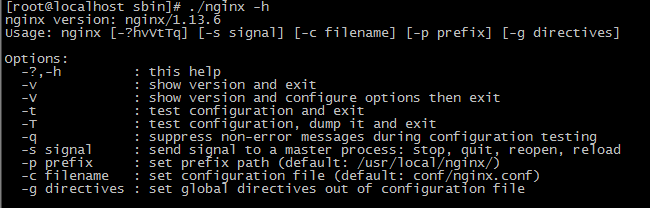
查看nginx版本号:
[root@localhost ~]# cd /usr/local/nginx/sbin/
[root@localhost sbin]# ./nginx -h
开启80端口
[root@localhost conf]# firewall-cmd --zone=public --add-port=80/tcp --permanent
[root@localhost conf]# firewall-cmd --reload
启动和停止nginx
启动
[root@localhost sbin]# ./nginx
停止
[root@localhost sbin]# ./nginx -s stop
重启
[root@localhost sbin]# ./nginx -s reload
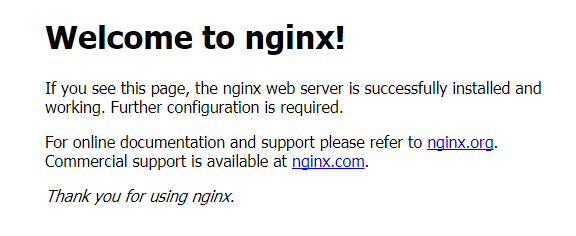
浏览
在浏览器地址栏输入http://192.168.1.100/
参考网址
https://www.cnblogs.com/lxg0/p/6979274.html
简单配置
下面这段配置是最最最简单的负载均衡配置,文件名nginx_fzjh.conf,只要在我们启动nginx的时候,指定这个配置文件就行了([root@localhost sbin]# /usr/local/nginx/sbin/nginx -c /usr/local/nginx/conf/nginx_fzjh.conf)
worker_processes 4;

events{

    worker_connections 1024;

}

http{

    server {

        listen 80;

            server_name myserver;

        location / {

            proxy_pass http://mysite;

        }

    }

    upstream mysite {

        #ip_hash;

        server 10.101.56.52:80;# weight=5;

        server 10.101.56.52:8089;# weight=3;

        #server x.x.x.x:80 weight=1;

    }

}
只看不回复,诅咒你钉钉0.0000000001厘米。
centos7安装nginx-1.13.6 新手入门,图文解析的更多相关文章
- centos7安装kafka_2.11-1.0.0 新手入门
系统环境 1.操作系统:64位CentOS Linux release 7.2.1511 (Core) 2.jdk版本:1.8.0_121 3.zookeeper版本:zookeeper-3.4.9. ...
- linux(centos7) 安装nginx
linux(centos7) 安装nginx 1.14(stable) 版本 Nginx配置文件常见结构的从外到内依次是「http」「server」「location」等等,缺省的继承关系是从外到内, ...
- 【Nginx安装】CentOS7安装Nginx及配置
[Nginx安装]CentOS7安装Nginx及配置 2018年03月05日 11:07:21 阅读数:7073 Nginx是一款轻量级的网页服务器.反向代理服务器.相较于Apache.lighttp ...
- VMware虚拟机中的CentOS7安装Nginx后本机无法访问的解决办法
VMware虚拟机中的CentOS7安装Nginx后本机无法访问的解决办法 在linux上安装nginx 请参考:Linux Centos7 安装 nginx 在虚拟机centos7上安装nginx之 ...
- Centos7 下nginx nginx-1.13.4 安装
环境:CentOS Linux release 7.3.1611 (Core) Linux localhost.localdomain 3.10.0-514.26.2.el7.x86_64 #1 S ...
- centos7安装nginx的两种方法
第一种方式:通过yum安装 直接通过 yum install nginx 肯定是不行的,因为yum没有nginx,所以首先把 nginx 的源加入 yum 中 运行下面的命令: 1.将nginx放到y ...
- CentOS7 安装Nginx+MySQL
首先我们需要安装nginx的yum源 [root@AD ~]# rpm -Uvh http://nginx.org/packages/centos/7/noarch/RPMS/nginx-releas ...
- (转)AIX7.1安装Nginx 1.13的方法
原文:https://blog.csdn.net/lvshaorong/article/details/79401860 https://blog.csdn.net/lvshaorong/articl ...
- Centos7安装Nginx实战
一.背景 最近在写一些自己的项目,用到了nginx,所以自己动手来在Centos7上安装nginx,以下是安装步骤. 二.基本概念以及应用场景 1.什么是nginx Nginx是一款使用C语言开发的高 ...
随机推荐
- GIT-windows系统部署git服务器
windows系统部署git服务器 因为需要所以就来利用IIS(Internet Information Service )来进行搭建. 进入正文: 不管你是什么win7.win8.win8.1还是w ...
- Entity Framework入门教程(4)---EF中的实体关系
这一节将总结EF是怎么管理实体之间的关系.EF与数据库一样支持三种关系类型:①一对一 ,②一对多,③多对多. 下边是一个SchoolDB数据库的实体数据模型,图中包含所有的实体和各个实体间的关系.通过 ...
- 源码来袭:bind手写实现
JavaScript中的this指向规则 源码来袭:call.apply手写实现与应用 理解建议:如果对this指向规则不了解的话,建议先了解this指向规则,最好还能对call和apply的使用和内 ...
- SpringBoot系列: RestTemplate 快速入门
====================================相关的文章====================================SpringBoot系列: 与Spring R ...
- Gram 矩阵与向量到子空间的距离
设 $W$ 是 $n$ 维 Euclidean 空间 $V$ 的子空间, $\beta\in V$, 定义 $\beta$ 到 $W$ 的距离 $$\bex \rd (\beta,W)=|\bet ...
- sqlserver 生成脚本执行创建索引
create or alter proc SP_CreateIndex as begin if exists(select * from sys.objects where name='execsql ...
- AB PLC分类
AB PLC产品更新速度还是挺快的,以前很多产品都停产了,所以分类也跟着调整,就目前而言: 一.主要类型 AB PLC按类型,主要分为三大类: • 小型:MicroLogix控制器 • 中型:Comp ...
- PowerDesigner使用总结(转)
PowerDesigner使用总结一.使用PowerDesigner生成HTML功能 使用PowerDesigner设计数据库关系以后,可以生成HTML,供团队成员进行讨论. Step 1:创建一个n ...
- 【原创】大数据基础之Oozie(2)使用
命令行 $ oozie help 1 导出环境变量 $ export OOZIE_URL=http://oozie_server:11000/oozie 否则都需要增加 -oozie 参数,比如 $ ...
- django中sqlite迁移mysql
sqlite数据迁移 1 数据备份 django中打开terminalpython manage.py dumpdata authorization > authorization_data.j ...