
[UWP] 使用SemanticZoom控件
在写一个看新闻软件的时候,用到了SemanticZoom控件,遇到了一些问题,比如如何根据首字母分类,以及放大视图中有数据的和没数据的通过背景色或前景色区分,幸运的是,all solved。
先来个效果图

主要是参考了msdn的一篇博客,地址已经放在参考链接里了。
首先是一个SemanticZoom控件,这个控件有ZoomedInView和ZoomedOutView两种视图。
ZoomedOutView视图就是这个

而ZoomedInView视图就是一个带有列表头的列表的样子,还是上个图好了,我个人不喜欢看一大段的纯文字
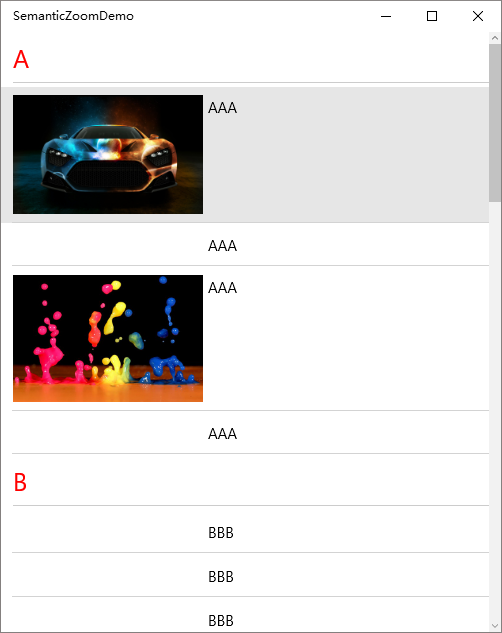
首先弄个Model,这里叫Picture
  public class Picture

     {

         public string ImageUri { get; set; }

         public string Title { get; set; }

     }
然后再加个ViewModel,叫MainPageViewModel,类里写一个数据集合和加载数据的方法
public ObservableCollection<AlphaKeyGroup<Picture>> AllPictures { get; set; }
关于加载数据的方法,很显然,我们要把数据按照Title的首字母分组,按首字母分组说实话我不会,然后我在msdn找到了一个类叫AlphaKeyGroup,这个类可以用来按首字母分组
 public class AlphaKeyGroup<T> : List<T>

     {

         /// <summary>

         /// The delegate that is used to get the key information.

         /// </summary>

         /// <param name="item">An object of type T</param>

         /// <returns>The key value to use for this object</returns>

         public delegate string GetKeyDelegate(T item);

         /// <summary>

         /// The Key of this group.

         /// </summary>

         public string Key { get; private set; }

         /// <summary>

         /// Public constructor.

         /// </summary>

         /// <param name="key">The key for this group.</param>

         public AlphaKeyGroup(string key)

         {

             Key = key;

         }

         /// <summary>

         /// Create a list of AlphaGroup<T> with keys set by a SortedLocaleGrouping.

         /// </summary>

         /// <param name="slg">The </param>

         /// <returns>Theitems source for a LongListSelector</returns>

         private static List<AlphaKeyGroup<T>> CreateGroups(SortedLocaleGrouping slg)

         {

             List<AlphaKeyGroup<T>> list = new List<AlphaKeyGroup<T>>();

             foreach (string key in slg.GroupDisplayNames)

             {

                 list.Add(new AlphaKeyGroup<T>(key));

             }

             return list;

         }

         /// <summary>

         /// Create a list of AlphaGroup<T> with keys set by a SortedLocaleGrouping.

         /// </summary>

         /// <param name="items">The items to place in the groups.</param>

         /// <param name="ci">The CultureInfo to group and sort by.</param>

         /// <param name="getKey">A delegate to get the key from an item.</param>

         /// <param name="sort">Will sort the data if true.</param>

         /// <returns>An items source for a LongListSelector</returns>

         public static List<AlphaKeyGroup<T>> CreateGroups(IEnumerable<T> items, CultureInfo ci, GetKeyDelegate getKey, bool sort)

         {

             SortedLocaleGrouping slg = new SortedLocaleGrouping(ci);

             List<AlphaKeyGroup<T>> list = CreateGroups(slg);

             foreach (T item in items)

             {

                 int index = ;

                 if (slg.SupportsPhonetics)

                 {

                     //check if your database has yomi string for item

                     //if it does not, then do you want to generate Yomi or ask the user for this item.

                     //index = slg.GetGroupIndex(getKey(Yomiof(item)));

                 }

                 else

                 {

                     index = slg.GetGroupIndex(getKey(item));

                 }

                 if (index >=  && index < list.Count)

                 {

                     list[index].Add(item);

                 }

             }

             if (sort)

             {

                 foreach (AlphaKeyGroup<T> group in list)

                 {

                     group.Sort((c0, c1) => { return ci.CompareInfo.Compare(getKey(c0), getKey(c1)); });

                 }

             }

             return list;

         }

     }
AlphaKeyGroup
使用的时候这样,CreateGroups方法有三个参数,第一个是要分组的数据,第二个参数是分组的方法,第三个参数是是否排序,该方法返回了一个List<AlphaKeyGroup<Picture>>类型的数据,
  //按拼音分组

  List<AlphaKeyGroup<Picture>> groupData = AlphaKeyGroup<Picture>.CreateGroups(

                 picturesList, (Picture s) => s.Title, true);

  foreach (var item in groupData)

  {

      AllPictures.Add(item);

  }
当然首先要在picturesList里加一些示例数据
  picturesList.Add(new Picture { ImageUri = "http://t3.gstatic.com/images?q=tbn:ANd9GcQ_ih-aN2gxUz435mPC733IFDNhk1vqFQSVKshWMHEtzxKfKqbs", Title = "OOO" });

             picturesList.Add(new Picture { ImageUri = "http://4.bp.blogspot.com/-v4cAAv3ViZk/T3w0jsZocUI/AAAAAAAACE0/l21tSjKnSUI/s640/Cool_facebook_timeline_covers+%252814%2529.jpg", Title = "ZZZ" });

             picturesList.Add(new Picture { ImageUri = "http://t3.gstatic.com/images?q=tbn:ANd9GcTv1Kx5oic3I39RTIoAMrFOKQxaIKNtXSNSr5B5bUGsX5mRMMBl_Q", Title = "DDD" });

             picturesList.Add(new Picture { ImageUri = "http://t0.gstatic.com/images?q=tbn:ANd9GcRFzgy_qOhDZ3GAQVxIOi1oTg8VSToo8hX_0cxoD6ZqUW9K-r9p", Title = "BBB" });
然后开始写UI部分,当然要先把Page的DataContext设置到MainPageViewModel的实例,比较简单这里就不写了, 再在Xaml里加上一个CollectionViewSource,用来给SemanticZoom提供数据,ItemsPath填的是集合属性的名字,至于为什么填这个,看看AlphaKeyGroup类的源码就知道了,里面有个List<T>类型的 InternalList,数据就是被存在这里的,IsSourceGrouped意思是要把AllPictures分组
 <CollectionViewSource x:Key="CollectionViewSource" IsSourceGrouped="True"

                                           ItemsPath="InternalList"

                                           Source="{Binding AllPictures}"/>
开始写SemanticZoom
 <SemanticZoom >

             <SemanticZoom.Style>

                 <Style TargetType="SemanticZoom">

                     <Setter Property="HorizontalContentAlignment" Value="Stretch"/>

                 </Style>

             </SemanticZoom.Style>

             <!--数据列表-->

             <SemanticZoom.ZoomedInView>

                 <ListView ItemsSource="{Binding Source={StaticResource CollectionViewSource}}"

                                   SelectionMode="None"

                                   ShowsScrollingPlaceholders="True"

                                   IsItemClickEnabled="True"

                                   ItemClick="ListView_ItemClick">

                     <ListView.ItemTemplate>

                         <DataTemplate>

                             <Grid  Padding="0,8"

                                    BorderThickness="{StaticResource BorderThickness}"

                                    BorderBrush="{StaticResource BorderBrush}" >

                                 <Grid.ColumnDefinitions>

                                     <ColumnDefinition Width="2*"/>

                                     <ColumnDefinition Width="3*"/>

                                     <ColumnDefinition Width="Auto"/>

                                 </Grid.ColumnDefinitions>

                                 <Image Grid.Column="0" Stretch="Fill" HorizontalAlignment="Left" >

                                     <Image.Source>

                                         <BitmapImage UriSource="{Binding imageUri}"/>

                                     </Image.Source>

                                 </Image>

                                 <Grid Grid.Column="1" Margin="5,2">

                                     <TextBlock Text="{Binding Title}" VerticalAlignment="Top" TextWrapping="Wrap"/>

                                 </Grid>

                             </Grid>

                         </DataTemplate>

                     </ListView.ItemTemplate>

                     <ListView.ItemContainerStyle>

                         <Style TargetType="ListViewItem">

                             <Setter Property="HorizontalContentAlignment" Value="Stretch"/>

                             <Setter Property="Margin" Value="0"/>

                         </Style>

                     </ListView.ItemContainerStyle>

                     <!--列表头-->

                     <ListView.GroupStyle>

                         <GroupStyle HidesIfEmpty="True" >

                             <GroupStyle.HeaderTemplate>

                                 <DataTemplate>

                                     <TextBlock Text="{Binding Key}" FontSize="25" Foreground="Red"/>

                                 </DataTemplate>

                             </GroupStyle.HeaderTemplate>

                         </GroupStyle>

                     </ListView.GroupStyle>

                 </ListView>

             </SemanticZoom.ZoomedInView>

             <!--排序列表-->

             <SemanticZoom.ZoomedOutView>

                 <GridView ItemsSource="{Binding Source={StaticResource CollectionViewSource},Path=CollectionGroups}">

                     <GridView.ItemsPanel>

                         <ItemsPanelTemplate>

                             <WrapGrid MaximumRowsOrColumns="4" VerticalAlignment="Top" Orientation="Horizontal"/>

                         </ItemsPanelTemplate>

                     </GridView.ItemsPanel>

                     <GridView.ItemTemplate>

                         <DataTemplate>

                             <Border Background="{Binding Converter={StaticResource BackgroundConverter}}">

                                 <TextBlock Text="{Binding Group.Key}" HorizontalAlignment="Center"

                                                    VerticalAlignment="Center"

                                                    Foreground="{Binding Converter={StaticResource ForegroundConverter}}"/>

                             </Border>

                         </DataTemplate>

                     </GridView.ItemTemplate>

                     <GridView.ItemContainerStyle>

                         <Style TargetType="GridViewItem">

                             <Setter Property="HorizontalAlignment" Value="Center"/>

                             <Setter Property="HorizontalContentAlignment" Value="Stretch"/>

                             <Setter Property="VerticalAlignment" Value="Center"/>

                             <Setter Property="VerticalContentAlignment" Value="Stretch"/>

                         </Style>

                     </GridView.ItemContainerStyle>

                     <GridView.Template>

                         <ControlTemplate>

                             <ScrollViewer ScrollViewer.VerticalScrollMode="Enabled">

                                 <Viewbox Stretch="Uniform" Margin="8"  VerticalAlignment="Top"

                                              ScrollViewer.VerticalScrollMode="Enabled" StretchDirection="Both" >

                                     <ItemsPresenter  />

                                 </Viewbox>

                             </ScrollViewer>

                         </ControlTemplate>

                     </GridView.Template>

                 </GridView>

             </SemanticZoom.ZoomedOutView>

         </SemanticZoom>
SemanticZoom
注意到排序列表的GridView.ItemTemplate ,用到了两个Converter,即BackgroundConverter和ForegroundConverter
      <Border Background="{Binding Converter={StaticResource BackgroundConverter}}">

             <TextBlock Text="{Binding Group.Key}" HorizontalAlignment="Center"

                        VerticalAlignment="Center"

                        Foreground="{Binding Converter={StaticResource ForegroundConverter}}"/>

      </Border>
我一直想实现在ZoomedOutView里那种有数据的和没数据的用颜色区分的功能,自己写Converter没写出来,然后发现了这个
这两个Converter是系统自带的,用的时候设置好Enabled和Disabled的颜色,有数据的时候显示Enabled的颜色,没有就显示Disabled的颜色
 <JumpListItemBackgroundConverter x:Key="BackgroundConverter" Enabled="Red"

                                          Disabled="Transparent"/>

 <JumpListItemBackgroundConverter x:Key="ForegroundConverter" Enabled="White" Disabled="Black"/>
附上demo
还有一个待解决的问题,在ZoomOutView中如何将无数据的项变成不可点击状态?既然那两个Converter能知道哪个是没数据的,说明一定有办法,Pending……
参考链接
[UWP] 使用SemanticZoom控件的更多相关文章
- [WP8.1UI控件编程]SemanticZoom控件实现分组列表
11.1.5 SemanticZoom实现分组列表 SemanticZoom控件可以让用户实现一种更加高级的列表,这种列表可以对列表的项目进行分组,同时这个SemanticZoom控件会提供两个具有相 ...
- UWP 用Thumb 控件仿制一个可拖动悬浮 Button
参考了 http://www.cnblogs.com/zhanggaoxing/p/6403430.html,并加以改进. 最终效果::: Thumb 的原生事件 DragStarted,DragDe ...
- UWP开发之控件:用WebView做聊天框
目录 说明 WebView存在的价值 使用WebView的几个重要技巧 使用WebView做的聊天框 说明 大家都知道,无论是之前的Winform.WPF还是现在的IOS.Android开发中,都存在 ...
- UWP自动填充控件AutoSuggestBox小优化
UWP提供的AutoSuggestBox本身非常好用,在项目中经常用到,但是当我们使用时发现一下不人性化的设置,例子1如下: <Page x:Class="SelfInkCanvas. ...
- [UWP]实现Picker控件
1. 前言 在WPF中,很多打开下拉框(Popup或Flyout)选择一个结果值的控件,除了ComboBox等少数例外,这种控件都以-Picker做名称后缀.因为要打开关闭下拉框和计算下拉框的弹出位置 ...
- UWP 播放媒体控件
最近我的uwp需要有一个有声朗读的功能,like this 点击声音按钮就可以有声朗读了.这里主要是用了媒体播放的控件. 一般我们把需求分为两种: 一种是不需要呈现播放器的样子,只需要用户点击一下别的 ...
- win10 uwp 绘图 Line 控件使用
本文主要讲一个在绘图中,我们会有一个基础的控件,Line.控件的基本使用和他能做出的我们很多时候需要的界面. 虽然是一个简单控件,但是可以做出很诡异的很好看的UI. 首先,我们要知道,Line就是画直 ...
- UWP Flyout浮动控件
看见没,点击"Options"按钮,浮动出来一个界面,这个界面可以用xaml自定义. 如果要点击的控件又Flyout属性那么,可以直接按照下面用 <Button Conten ...
- Windows UWP开发系列 – 控件默认样式
今天用一个Pivot控件的时候,想修改一下它的Header样式,却发现用Blend和VS无法导出它的默认样式了,导致无法下手,不知道是不是Blend的bug. 在网上搜了一下,在MSDN上还是找到了它 ...
随机推荐
- javaScript中的小细节-局部作用域中的var
javaScript中var是很神奇的,在局部作用域中,var a = b = c = 1;是不一样的,a为使用var声明的变量,而b和c则是全局下的,此类变量被称为隐式全局变量:var a = 1; ...
- 了解JavaScript 对象的属性操作
提起操作, 很多人都会想到我们学习过程中最经常做的操作, 就是对数据库进行增, 删, 改, 查, 既然提到这个, 那么对于对象的属性操作也不例外, 基本上可以说也是这几个操作. JS中对象的属性标签 ...
- 20-C语言结束
我回去看了下5号写的.虽然今天已经21号了~,花了16天. 复习完C专题,接下来我大概会用C做一些操作系统/信息安全的小东西,会发到博客里,敬请期待! ----2016/11/21
- 3、项目资源的提供 - PMO项目管理办公室
PMO项目管理办公室也需要对项目相关的资源进行提供,从而针对项目的资源也进行标准化和规范化的管理.也就是说,PMO项目管理办公室就是提供项目相关的规范化资源内容,从而统一管理项目相关的内容,达到规范的 ...
- 我的2013 Q.E.D
"旧历的年底毕竟最像年底,村镇上不必说,就在天空中也显出将到新年的气象来.灰白色的沉重的晚云中间时时发出闪光,接着一声钝响,是送灶的爆竹:近处燃放的可就更强烈了,震耳的大音还没有息,空气里已 ...
- Oracle使用java source调用外部程序
需求 Oracle调用第三方外部程序.Oracle使用sqluldr2快速导出大批量数据,然后用winrar压缩后发送邮件. 本文档主要实现前两步需求,发送邮件程序这里不再说明. 原码 授权 begi ...
- MySQL排序原理与案例分析
前言 排序是数据库中的一个基本功能,MySQL也不例外.用户通过Order by语句即能达到将指定的结果集排序的目的,其实不仅仅是Order by语句,Group by语句,Distinct ...
- Linux设备树语法详解
概念 Linux内核从3.x开始引入设备树的概念,用于实现驱动代码与设备信息相分离.在设备树出现以前,所有关于设备的具体信息都要写在驱动里,一旦外围设备变化,驱动代码就要重写.引入了设备树之后,驱动代 ...
- 40GbE网络之后
Ethernet Alliance 成员则有近90家公司,主要成员包括:网路晶片厂商Intel.Broadcom,网路设备商Cisco.Juniper.Brocade.Dell.QLogic,以及储存 ...
- 怎么知道Fragment属于哪个Activity呢?
如果程序是一条线运行的,Fragment 中 getActivity() 是获取的上一个打开或者执行的Activity中的值. 多个Activity也是如此,就看顺序是怎么执行的,getActiv ...