
权限管理系统之集成Shiro实现登录、url和页面按钮的访问控制
用户权限管理一般是对用户页面、按钮的访问权限管理。Shiro框架是一个强大且易用的Java安全框架,执行身份验证、授权、密码和会话管理,对于Shiro的介绍这里就不多说。本篇博客主要是了解Shiro的基础使用方法,在权限管理系统中集成Shiro实现登录、url和页面按钮的访问控制。
一、引入依赖
使用SpringBoot集成Shiro时,在pom.xml中可以引入shiro-spring-boot-web-starter。由于使用的是thymeleaf框架,thymeleaf与Shiro结合需要 引入thymeleaf-extras-shiro。
        <!-- https://mvnrepository.com/artifact/org.apache.shiro/shiro-spring-boot-web-starter -->

        <dependency>

            <groupId>org.apache.shiro</groupId>

            <artifactId>shiro-spring-boot-web-starter</artifactId>

            <version>1.4.0</version>

        </dependency>

        <!-- https://mvnrepository.com/artifact/com.github.theborakompanioni/thymeleaf-extras-shiro -->

        <dependency>

            <groupId>com.github.theborakompanioni</groupId>

            <artifactId>thymeleaf-extras-shiro</artifactId>

            <version>2.0.0</version>

        </dependency>
二、增加Shiro配置
有哪些url是需要拦截的,哪些是不需要拦截的,登录页面、登录成功页面的url、自定义的Realm等这些信息需要设置到Shiro中,所以创建Configuration文件ShiroConfig。
package com.example.config;

import org.apache.shiro.mgt.SecurityManager;

import org.apache.shiro.spring.web.ShiroFilterFactoryBean;

import org.apache.shiro.web.mgt.DefaultWebSecurityManager;

import org.springframework.beans.factory.annotation.Qualifier;

import org.springframework.context.annotation.Bean;

import org.springframework.context.annotation.Configuration;

import at.pollux.thymeleaf.shiro.dialect.ShiroDialect;

import java.util.LinkedHashMap;

import java.util.Map;

@Configuration

public class ShiroConfig {

    @Bean("shiroFilterFactoryBean")

    public ShiroFilterFactoryBean shiroFilterFactoryBean(SecurityManager securityManager) {

        System.out.println("ShiroConfiguration.shirFilter()");

        ShiroFilterFactoryBean shiroFilterFactoryBean = new ShiroFilterFactoryBean();

        shiroFilterFactoryBean.setSecurityManager(securityManager);

        //拦截器.

        Map<String,String> filterChainDefinitionMap = new LinkedHashMap<String,String>();

        // 配置不会被拦截的链接 顺序判断

        filterChainDefinitionMap.put("/static/**", "anon");

        //配置退出 过滤器,其中的具体的退出代码Shiro已经替我们实现了

        filterChainDefinitionMap.put("/logout", "logout");

        //<!-- 过滤链定义,从上向下顺序执行,一般将/**放在最为下边 -->:这是一个坑呢,一不小心代码就不好使了;

        //<!-- authc:所有url都必须认证通过才可以访问; anon:所有url都都可以匿名访问-->

        filterChainDefinitionMap.put("/**", "authc");

        // 如果不设置默认会自动寻找Web工程根目录下的"/login.jsp"页面

        shiroFilterFactoryBean.setLoginUrl("/login");

        // 登录成功后要跳转的链接

        shiroFilterFactoryBean.setSuccessUrl("/index");

        //未授权界面;

        shiroFilterFactoryBean.setUnauthorizedUrl("/403");

        shiroFilterFactoryBean.setFilterChainDefinitionMap(filterChainDefinitionMap);

        return shiroFilterFactoryBean;

    }

    @Bean(name="defaultWebSecurityManager")    //创建DefaultWebSecurityManager

    public DefaultWebSecurityManager getDefaultWebSecurityManager(@Qualifier("userRealm")MyShiroRealm userRealm){

        DefaultWebSecurityManager defaultWebSecurityManager = new DefaultWebSecurityManager();

        defaultWebSecurityManager.setRealm(userRealm);

        return defaultWebSecurityManager;

    }

    //创建Realm

    @Bean(name="userRealm")

    public MyShiroRealm getUserRealm(){

        return new MyShiroRealm();

    }

    @Bean

    public ShiroDialect shiroDialect() {

        return new ShiroDialect();

    }

}
ShiroDialect这个bean对象是在thymeleaf与Shiro结合,前端html访问Shiro时使用。
三、自定义Realm
在自定义的Realm中继承了AuthorizingRealm抽象类,重写了两个方法:doGetAuthorizationInfo和doGetAuthenticationInfo。doGetAuthorizationInfo主要是用来处理权限配置,doGetAuthenticationInfo主要处理身份认证。这里在doGetAuthorizationInfo中,将role表的id和permission表的code分别设置到SimpleAuthorizationInfo对象中的role和permission中。还有一个地方需要注意:@Component("authorizer"),刚开始我没设置,但报错提示需要一个authorizer的bean,查看AuthorizingRealm可以发现它implements了Authorizer,所以在自定义的realm上添加@Component("authorizer")就可以了。
package com.example.config;

import org.apache.shiro.authc.AuthenticationException;

import org.apache.shiro.authc.AuthenticationInfo;

import org.apache.shiro.authc.AuthenticationToken;

import org.apache.shiro.authc.SimpleAuthenticationInfo;

import org.apache.shiro.authz.AuthorizationInfo;

import org.apache.shiro.authz.SimpleAuthorizationInfo;

import org.apache.shiro.realm.AuthorizingRealm;

import org.apache.shiro.subject.PrincipalCollection;

import org.springframework.beans.factory.annotation.Autowired;

import org.springframework.stereotype.Component;

import com.example.pojo.Permission;

import com.example.pojo.Role;

import com.example.pojo.User;

import com.example.service.RoleService;

import com.example.service.UserService;

@Component("authorizer")

public class MyShiroRealm extends AuthorizingRealm {

    @Autowired

    private UserService userService;

    @Autowired

    private RoleService roleService;

    @Override

    protected AuthorizationInfo doGetAuthorizationInfo(PrincipalCollection principals) {

        System.out.println("权限配置-->MyShiroRealm.doGetAuthorizationInfo()");

        SimpleAuthorizationInfo authorizationInfo = new SimpleAuthorizationInfo();

        User user  = (User)principals.getPrimaryPrincipal();

        System.out.println("User:"+user.toString()+" roles count:"+user.getRoles().size());

        for(Role role:user.getRoles()){

            authorizationInfo.addRole(role.getId());

            role=roleService.getRoleById(role.getId());

            System.out.println("Role:"+role.toString());

            for(Permission p:role.getPermissions()){

                System.out.println("Permission:"+p.toString());

                authorizationInfo.addStringPermission(p.getCode());

            }

        }

        System.out.println("权限配置-->authorizationInfo"+authorizationInfo.toString());

        return authorizationInfo;

    }

    /*主要是用来进行身份认证的,也就是说验证用户输入的账号和密码是否正确。*/

    @Override

    protected AuthenticationInfo doGetAuthenticationInfo(AuthenticationToken token)

            throws AuthenticationException {

        System.out.println("MyShiroRealm.doGetAuthenticationInfo()");

        //获取用户的输入的账号.

        String username = (String)token.getPrincipal();

        System.out.println(token.getCredentials());

        //通过username从数据库中查找 User对象,如果找到,没找到.

        //实际项目中,这里可以根据实际情况做缓存,如果不做,Shiro自己也是有时间间隔机制,2分钟内不会重复执行该方法

        User user = userService.getUserById(username);

        System.out.println("----->>userInfo="+user);

        if(user == null){

            return null;

        }

        SimpleAuthenticationInfo authenticationInfo = new SimpleAuthenticationInfo(

                user, //用户名

                "123456", //密码

                getName()  //realm name

        );

        return authenticationInfo;

    }

}
四、登录认证
1.登录页面
这里做了一个非常丑的登录页面,主要是自己懒,不想在网上复制粘贴找登录页面了。
<!DOCTYPE html>

<head>

    <meta charset="utf-8">

    <title></title>

    <meta name="renderer" content="webkit">

    <meta http-equiv="X-UA-Compatible" content="IE=edge,chrome=1">

    <meta name="viewport" content="width=device-width, initial-scale=1, maximum-scale=1">

    <meta name="apple-mobile-web-app-status-bar-style" content="black">

    <meta name="apple-mobile-web-app-capable" content="yes">

    <meta name="format-detection" content="telephone=no">

</head>

<form action="/login" method="post">

      <label>用户名:</label><input type="text" name="id"   id="id" ><br>

      <label >密码:</label><input type="text" name="pwd"  id="pwd" ><br>

      <button type="submit">登录</button><button type="reset">取消</button>

</form>

</body>

</html>
2.处理登录请求
在LoginController中通过登录名、密码获取到token实现登录。
package com.example.controller;

import org.apache.shiro.SecurityUtils;

import org.apache.shiro.authc.IncorrectCredentialsException;

import org.apache.shiro.authc.UnknownAccountException;

import org.apache.shiro.authc.UsernamePasswordToken;

import org.apache.shiro.subject.Subject;

import org.springframework.stereotype.Controller;

import org.springframework.ui.Model;

import org.springframework.web.bind.annotation.RequestMapping;

import org.springframework.web.bind.annotation.RequestMethod;

@Controller

public class LoginController {

    //退出的时候是get请求,主要是用于退出

    @RequestMapping(value = "/login",method = RequestMethod.GET)

    public String login(){

        return "login";

    }

    //post登录

    @RequestMapping(value = "/login",method = RequestMethod.POST)

    public String login(Model model,String id,String pwd){

        //添加用户认证信息

        Subject subject = SecurityUtils.getSubject();

        UsernamePasswordToken usernamePasswordToken = new UsernamePasswordToken(

                id,

                "123456");

        try {

                subject.login(usernamePasswordToken);

                return "home";

            }

        catch (UnknownAccountException e) {

            //用户名不存在

            model.addAttribute("msg","用户名不存在");

            return "login";

            }catch (IncorrectCredentialsException e) {

                //密码错误

                model.addAttribute("msg","密码错误");

                return "login";

                }

    }

    @RequestMapping(value = "/index")

    public String index(){

        return "home";

    }

}
五、Controller层访问控制
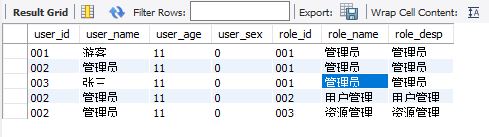
1.首先来数据库的数据,两张图是用户角色、和角色权限的数据。

2.设置权限
这里在用户页面点击编辑按钮时设置需要有id=002的角色,在点击选择角色按钮时需要有code=002的权限。
    @RequestMapping(value = "/edit",method = RequestMethod.GET)

    @RequiresRoles("002")//权限管理;

    public String editGet(Model model,@RequestParam(value="id") String id) {

        model.addAttribute("id", id);

        return "/user/edit";

    }
    @RequestMapping(value = "/selrole",method = RequestMethod.GET)

    @RequiresPermissions("002")//权限管理;

    public String selctRole(Model model,@RequestParam("id") String id,@RequestParam("type") Integer type) {

        model.addAttribute("id",id);

        model.addAttribute("type", type);

        return "/user/selrole";

    }
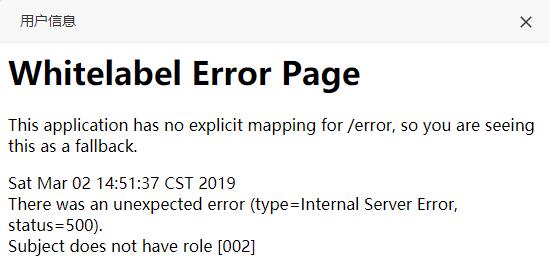
当使用用户001登录时,点击编辑,弹出框如下,提示没有002的角色
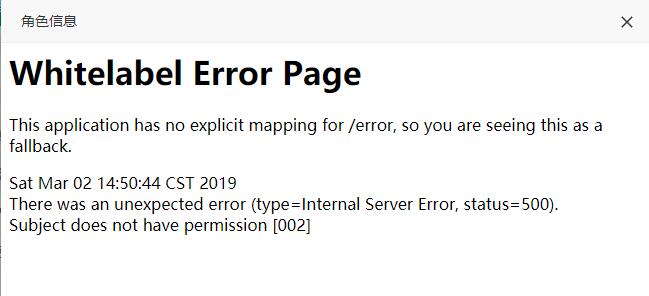
点击选择角色按钮时提示没有002的权限。
当使用用户002登录时,点击编辑按钮,显示正常,点击选择角色也是提示没002的权限,因为权限只有001。
六、前端页面层访问控制
有时为了不想像上面那样弹出错误页面,需要在按钮显示上进行不可见,这样用户也不会点击到。前面已经引入了依赖并配置了bean,这里测试下在html中使用shiro。
1.首先设置html标签引入shiro
<html xmlns:th="http://www.thymeleaf.org"

      xmlns:shiro="http://www.pollix.at/thymeleaf/shiro">
2.控制按钮可见
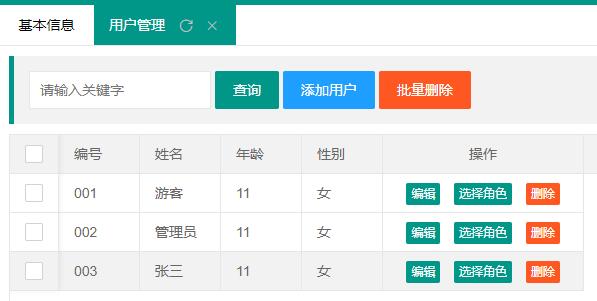
这里使用shiro:hasAnyRoles="002,003"判断用户角色是否是002或003,是则显示不是则不显示。
    <div class="layui-inline">

        <a shiro:hasAnyRoles="002,003" class="layui-btn layui-btn-normal newsAdd_btn" onclick="addUser('')">添加用户</a>

    </div>

    <div class="layui-inline">

        <a shiro:hasAnyRoles="002,003" class="layui-btn layui-btn-danger batchDel" onclick="getDatas();">批量删除</a>

    </div>
当001用户登录时,添加用户、批量删除按钮都不显示,只显示查询按钮。
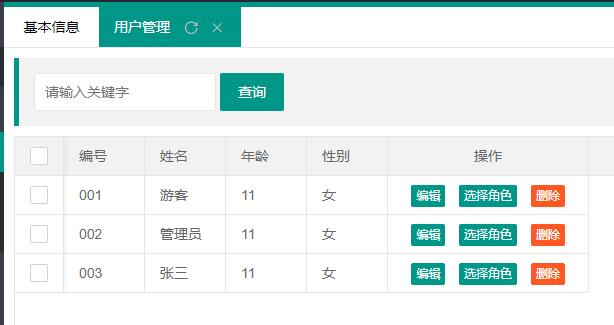
当002用户登录时,添加用户、批量删除按钮都显示
七、小结
这里只是实现了Shiro的简单的功能,Shiro还有很多很强大的功能,比如session管理等,而且目前权限管理模块还有很多需要优化的功能,左侧导航栏的动态加载和权限控制、Shiro与Redis结合实现session共享、Shiro与Cas结合实现单点登录等。后续可以把项目做为开源项目,慢慢完善集成更多模块例如:Swagger2、Redis、Druid、RabbitMQ等供初学者参考。
权限管理系统之集成Shiro实现登录、url和页面按钮的访问控制的更多相关文章
- 如何实现登录、URL和页面按钮的访问控制?
用户权限管理一般是对用户页面.按钮的访问权限管理.Shiro框架是一个强大且易用的Java安全框架,执行身份验证.授权.密码和会话管理,对于Shiro的介绍这里就不多说.本篇博客主要是了解Shiro的 ...
- Spring Boot + Spring Cloud 实现权限管理系统 (集成 Shiro 框架)
Apache Shiro 优势特点 它是一个功能强大.灵活的,优秀开源的安全框架. 它可以处理身份验证.授权.企业会话管理和加密. 它易于使用和理解,相比Spring Security入门门槛低. 主 ...
- Asp.Net Core 项目实战之权限管理系统(5) 用户登录
0 Asp.Net Core 项目实战之权限管理系统(0) 无中生有 1 Asp.Net Core 项目实战之权限管理系统(1) 使用AdminLTE搭建前端 2 Asp.Net Core 项目实战之 ...
- cas 3.5.3服务器搭建+spring boot集成+shiro模拟登录(不修改现有shiro认证架构)
因为现有系统外部接入需要,需要支持三方单点登录.由于系统本身已经是微服务架构,由多个业务独立的子系统组成,所以有自己的用户认证微服务(不是cas,我们基础设施已经够多了,现在能不增加就不增加).但是因 ...
- 如何在通用权限管理系统中集成log4net日志功能
开发人员都知道,在系统运行中要记录各种日志,自己写一个日志功能,无论是在效率还是功能扩展上来说都不是很好,目前大多用的是第三方的日志系统,其中一个非常有名,用的最多的就是log4net.下面是关于这个 ...
- Asp.Net Core 项目实战之权限管理系统(2) 功能及实体设计
0 Asp.Net Core 项目实战之权限管理系统(0) 无中生有 1 Asp.Net Core 项目实战之权限管理系统(1) 使用AdminLTE搭建前端 2 Asp.Net Core 项目实战之 ...
- Asp.Net Core 项目实战之权限管理系统(6) 功能管理
0 Asp.Net Core 项目实战之权限管理系统(0) 无中生有 1 Asp.Net Core 项目实战之权限管理系统(1) 使用AdminLTE搭建前端 2 Asp.Net Core 项目实战之 ...
- Asp.Net Core 项目实战之权限管理系统(7) 组织机构、角色、用户权限
0 Asp.Net Core 项目实战之权限管理系统(0) 无中生有 1 Asp.Net Core 项目实战之权限管理系统(1) 使用AdminLTE搭建前端 2 Asp.Net Core 项目实战之 ...
- Asp.Net Core 项目实战之权限管理系统(8) 功能菜单的动态加载
0 Asp.Net Core 项目实战之权限管理系统(0) 无中生有 1 Asp.Net Core 项目实战之权限管理系统(1) 使用AdminLTE搭建前端 2 Asp.Net Core 项目实战之 ...
随机推荐
- md5 加密文件
import hashlibimport os def get_md5(file_path): md5 = None if os.path.isfile(file_path): f = open(fi ...
- 发现一款适合php网站的管理软件——kodexplorer,能取代ftp
今天偶然看到可以利用可道云来管理网站的文件.可道云不需要数据库,因此搭建非常简单.搭建的方法也很简单.传统的 WordPress 站点的文件管理,通常是是通过 FTP 或者服务器面板自带的文件管理器来 ...
- (BUG记录)记一次与其他系统交互协作时造成的锁表问题
最近两日做公司电信某计费项目时,接收一个银行对账的任务,在完成对账后.电信和银行两方金额一致时需要进行充值.冲正操作保持金额一致.冲正服务是JAVA统一调用Tuxedo服务,这个服务已经是一个稳定可用 ...
- html笔记第一天
快速生成标签有序ol>li*3无序ul>(li>a{新闻标题})*3定义列表 dl>(dt+dd)*3制作表格table>(tr>td*5)*6pading:3个数 ...
- jstl使用中的错误----基于idea
第一:首先正确将jstl.jar和standard.jar导入项目的lib目录下,注意两者的版本信息 第二: <%@ taglib prefix="c" uri=" ...
- SEED实验——return-to-libc实验
实验概述 本实验的学习目标是让学生获得缓冲区溢出攻击的一种有趣变体——return-to-libc攻击实验的亲身体验.这种攻击可以绕过目前在主要linux操作系统中实现的现有保护方案.利用缓冲区溢出漏 ...
- partial 的随笔
partial class Dmeos { public int Ager { get; set; } public void Run() { Console.WriteLine(Ager); } } ...
- JAVA四类八种基本数据类型
boolean类型 Boolean在内存中占用一个字节. 当java编译器把java源代码编译为字节码时,会用int或byte来表示boolean.在java虚拟机中,用整数零来表示false,用任意 ...
- [Swift]LeetCode234. 回文链表 | Palindrome Linked List
Given a singly linked list, determine if it is a palindrome. Example 1: Input: 1->2 Output: false ...
- [Swift]LeetCode293. 翻转游戏 $ Flip Game
You are playing the following Flip Game with your friend: Given a string that contains only these tw ...