
ActiveMQ 常见集群模式
Master Slave 架构模式
这种模式是基于文件共享锁的高可用集群,个人理解其实是一种 Failover 模式,可以是一主一从,也可以是一主两从。
本文使用 Docker 搭建一个主从模式的 ActiveMQ 5.8.0 集群,一个主节点,两个从节点。
ActiveMQ 镜像的创建可以参考 构建ActiveMQ镜像并运行
version: "2.1"

services:

  activemq-A:

    image: cocowool/activemq:5.8.0

    hostname: activemq-A

    expose:

      - "8161"

      - "61613"

    ports:

      - "8161:8161"

      - "61613:61613"

    volumes:

      - ~/Projects/sh-valley/docker-conf/activemq/activemq-5.8.0-A.xml:/usr/local/apache-activemq-5.8.0/conf/activemq.xml

      - ~/Projects/sh-valley/docker-conf/activemq/kahadb:/usr/local/apache-activemq-5.8.0/data/kahadb

    networks:

      - default

  activemq-B:

    image: cocowool/activemq:5.8.0

    hostname: activemq-B

    expose:

      - "8162"

      - "61614"

    ports:

      - "8162:8161"

      - "61614:61613"

    volumes:

      - ~/Projects/sh-valley/docker-conf/activemq/activemq-5.8.0-B.xml:/usr/local/apache-activemq-5.8.0/conf/activemq.xml

      - ~/Projects/sh-valley/docker-conf/activemq/kahadb:/usr/local/apache-activemq-5.8.0/data/kahadb

    networks:

      - default
其实两个配置文件是一样的,关键是将 kahadb 的目录利用本地文件实现在两个容器见共享。验证过程记录。
$ docker-compose up

Attaching to activemq_activemq-B_1, activemq_activemq-A_1

activemq-B_1  | INFO: Using default configuration

activemq-B_1  | (you can configure options in one of these file: /etc/default/activemq /root/.activemqrc)

activemq-B_1  |

activemq-B_1  | INFO: Invoke the following command to create a configuration file

activemq-B_1  | /usr/local/apache-activemq-5.8.0/bin/activemq setup [ /etc/default/activemq | /root/.activemqrc ]

activemq-B_1  |

activemq-A_1  | INFO: Using default configuration

activemq-A_1  | (you can configure options in one of these file: /etc/default/activemq /root/.activemqrc)

activemq-A_1  |

activemq-A_1  | INFO: Invoke the following command to create a configuration file

activemq-B_1  | INFO: Using java '/usr/local/jdk1.8.0_144/bin/java'

activemq-A_1  | /usr/local/apache-activemq-5.8.0/bin/activemq setup [ /etc/default/activemq | /root/.activemqrc ]

activemq-A_1  |

activemq-B_1  | INFO: Starting in foreground, this is just for debugging purposes (stop process by pressing CTRL+C)

activemq-A_1  | INFO: Using java '/usr/local/jdk1.8.0_144/bin/java'

activemq-A_1  | INFO: Starting in foreground, this is just for debugging purposes (stop process by pressing CTRL+C)

activemq-B_1  | Java Runtime: Oracle Corporation 1.8.0_144 /usr/local/jdk1.8.0_144/jre

activemq-B_1  |   Heap sizes: current=1005056k  free=989327k  max=1005056k

activemq-B_1  |     JVM args: -Xms1G -Xmx1G -Djava.util.logging.config.file=logging.properties -Dcom.sun.management.jmxremote -Djava.io.tmpdir=/usr/local/apache-activemq-5.8.0/tmp -Dactivemq.classpath=/usr/local/apache-activemq-5.8.0/conf; -Dactivemq.home=/usr/local/apache-activemq-5.8.0 -Dactivemq.base=/usr/local/apache-activemq-5.8.0 -Dactivemq.conf=/usr/local/apache-activemq-5.8.0/conf -Dactivemq.data=/usr/local/apache-activemq-5.8.0/data

activemq-B_1  | Extensions classpath:

activemq-B_1  |   [/usr/local/apache-activemq-5.8.0/lib,/usr/local/apache-activemq-5.8.0/lib/camel,/usr/local/apache-activemq-5.8.0/lib/optional,/usr/local/apache-activemq-5.8.0/lib/web,/usr/local/apache-activemq-5.8.0/lib/extra]

activemq-B_1  | ACTIVEMQ_HOME: /usr/local/apache-activemq-5.8.0

activemq-B_1  | ACTIVEMQ_BASE: /usr/local/apache-activemq-5.8.0

activemq-B_1  | ACTIVEMQ_CONF: /usr/local/apache-activemq-5.8.0/conf

activemq-B_1  | ACTIVEMQ_DATA: /usr/local/apache-activemq-5.8.0/data

activemq-A_1  | Java Runtime: Oracle Corporation 1.8.0_144 /usr/local/jdk1.8.0_144/jre

activemq-A_1  |   Heap sizes: current=1005056k  free=989327k  max=1005056k

activemq-A_1  |     JVM args: -Xms1G -Xmx1G -Djava.util.logging.config.file=logging.properties -Dcom.sun.management.jmxremote -Djava.io.tmpdir=/usr/local/apache-activemq-5.8.0/tmp -Dactivemq.classpath=/usr/local/apache-activemq-5.8.0/conf; -Dactivemq.home=/usr/local/apache-activemq-5.8.0 -Dactivemq.base=/usr/local/apache-activemq-5.8.0 -Dactivemq.conf=/usr/local/apache-activemq-5.8.0/conf -Dactivemq.data=/usr/local/apache-activemq-5.8.0/data

activemq-A_1  | Extensions classpath:

activemq-A_1  |   [/usr/local/apache-activemq-5.8.0/lib,/usr/local/apache-activemq-5.8.0/lib/camel,/usr/local/apache-activemq-5.8.0/lib/optional,/usr/local/apache-activemq-5.8.0/lib/web,/usr/local/apache-activemq-5.8.0/lib/extra]

activemq-A_1  | ACTIVEMQ_HOME: /usr/local/apache-activemq-5.8.0

activemq-A_1  | ACTIVEMQ_BASE: /usr/local/apache-activemq-5.8.0

activemq-A_1  | ACTIVEMQ_CONF: /usr/local/apache-activemq-5.8.0/conf

activemq-A_1  | ACTIVEMQ_DATA: /usr/local/apache-activemq-5.8.0/data

activemq-B_1  | Loading message broker from: xbean:activemq.xml

activemq-A_1  | Loading message broker from: xbean:activemq.xml

activemq-B_1  |  INFO | Refreshing org.apache.activemq.xbean.XBeanBrokerFactory$1@68c4039c: startup date [Wed Sep 07 13:16:20 UTC 2022]; root of context hierarchy

activemq-A_1  |  INFO | Refreshing org.apache.activemq.xbean.XBeanBrokerFactory$1@68c4039c: startup date [Wed Sep 07 13:16:20 UTC 2022]; root of context hierarchy

activemq-B_1  |  INFO | PListStore:[/usr/local/apache-activemq-5.8.0/data/localhost/tmp_storage] started

activemq-B_1  |  INFO | Using Persistence Adapter: KahaDBPersistenceAdapter[/usr/local/apache-activemq-5.8.0/data/kahadb]

activemq-A_1  |  INFO | PListStore:[/usr/local/apache-activemq-5.8.0/data/localhost/tmp_storage] started

activemq-A_1  |  INFO | Using Persistence Adapter: KahaDBPersistenceAdapter[/usr/local/apache-activemq-5.8.0/data/kahadb]

activemq-A_1  |  INFO | Database /usr/local/apache-activemq-5.8.0/data/kahadb/lock is locked... waiting 10 seconds for the database to be unlocked. Reason: java.io.IOException: File '/usr/local/apache-activemq-5.8.0/data/kahadb/lock' could not be locked.

activemq-B_1  |  INFO | KahaDB is version 4

activemq-B_1  |  INFO | Recovering from the journal ...

activemq-B_1  |  INFO | Recovery replayed 1 operations from the journal in 0.022 seconds.

activemq-B_1  |  INFO | Apache ActiveMQ 5.8.0 (localhost, ID:activemq-B-41795-1662556582026-0:1) is starting

activemq-B_1  |  INFO | Listening for connections at: tcp://activemq-B:61616?maximumConnections=1000&wireformat.maxFrameSize=104857600

activemq-B_1  |  INFO | Connector openwire Started

activemq-B_1  |  INFO | Listening for connections at: amqp://activemq-B:5672?maximumConnections=1000&wireformat.maxFrameSize=104857600

activemq-B_1  |  INFO | Connector amqp Started

activemq-B_1  |  INFO | Listening for connections at: stomp://activemq-B:61612?transport.closeAsync=false

activemq-B_1  |  INFO | Connector stomp Started

activemq-B_1  |  INFO | Listening for connections at: stomp+nio://activemq-B:61613?transport.closeAsync=false

activemq-B_1  |  INFO | Connector stomp+nio Started

activemq-B_1  |  INFO | Apache ActiveMQ 5.8.0 (localhost, ID:activemq-B-41795-1662556582026-0:1) started

activemq-B_1  |  INFO | For help or more information please see: http://activemq.apache.org

activemq-B_1  | ERROR | Temporary Store limit is 51200 mb, whilst the temporary data directory: /usr/local/apache-activemq-5.8.0/data/localhost/tmp_storage only has 42398 mb of usable space

activemq-B_1  |  INFO | Web console type: embedded

activemq-B_1  |  INFO | ActiveMQ WebConsole initialized.

activemq-B_1  |  INFO | Initializing Spring FrameworkServlet 'dispatcher'

activemq-B_1  |  INFO | jolokia-agent: No access restrictor found at classpath:/jolokia-access.xml, access to all MBeans is allowed

activemq-A_1  |  INFO | Database /usr/local/apache-activemq-5.8.0/data/kahadb/lock is locked... waiting 10 seconds for the database to be unlocked. Reason: java.io.IOException: File '/usr/local/apache-activemq-5.8.0/data/kahadb/lock' could not be locked.
根据启动的顺序不同,A、B 都有可能抢到锁对外提供服务,未抢到锁的实例日志一直会报无法解锁的错误,同时不会对外提供 Web Console 服务。使用 Python 的连接例子,发现 stomp.py 有一个问题不能很好的支持 failover。
Networks of Brokers
这是一种负载均衡的架构,各个 Broker 通过互相连接并共享队列信息,实现集群的负载均衡,即只要消费者连接到 Broker 网络中任意一台,就可以消费所有的消息。
这种方案主要关注 ActiveMQ 配置中的两个参数
- TransportConnector,传输连接器参数主要控制服务端和客户端之间的通信方式
- NetworkConnector,网络连接器参数主要控制服务端和服务端之间的通信
本文构建了这样一种架构,Broker1 作为与生产者沟通的节点,负责接收消息以及传递消费者反馈给生产者的消息,Broker2、Broker3作为与消费者沟通的节点,支持与大量的消费者建立链接。这种架构适用于消费者数量非常多,通常是超过1万个节点的情况。根据实际生产运行的情况,一台4C16G的虚拟机,一个ActiveMQ实例通常能够承受2000个左右的链接能保持长期稳定运行。
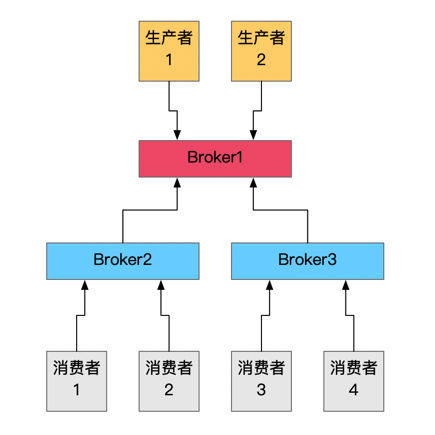
具体的 docker 配置如下,相关的文件可以从我的 Github 上下载。
version: "2.1"

services:

  activemq-broker1:

    image: cocowool/activemq:5.8.0

    hostname: activemq-broker1

    expose:

      - "8161"

      - "61611"

    ports:

      - "8161:8161"

      - "61611:61612"

    volumes:

      - ~/Projects/sh-valley/docker-conf/activemq-network/activemq-5.8.0-broker1.xml:/usr/local/apache-activemq-5.8.0/conf/activemq.xml

    networks:

      activemq-network:

        ipv4_address: 172.28.1.11

  activemq-broker2:

    image: cocowool/activemq:5.8.0

    hostname: activemq-broker2

    expose:

      - "8162"

      - "61612"

    ports:

      - "8162:8161"

      - "61612:61612"

    volumes:

      - ~/Projects/sh-valley/docker-conf/activemq-network/activemq-5.8.0-broker2.xml:/usr/local/apache-activemq-5.8.0/conf/activemq.xml

    networks:

      activemq-network:

        ipv4_address: 172.28.1.12

  activemq-broker3:

    image: cocowool/activemq:5.8.0

    hostname: activemq-broker3

    expose:

      - "8163"

      - "61613"

    ports:

      - "8163:8161"

      - "61613:61612"

    volumes:

      - ~/Projects/sh-valley/docker-conf/activemq-network/activemq-5.8.0-broker3.xml:/usr/local/apache-activemq-5.8.0/conf/activemq.xml

    networks:

      activemq-network:

        ipv4_address: 172.28.1.13

networks:

  activemq-network:

    ipam:

      config:

      - subnet: 172.28.1.0/24
执行 docker-compose up 命令可以启动三个 ActiveMQ 实例,然后分别通过 http://localhost:8161\8162\8163 可以查看三个实例的控制台,在 Broker2\Broker3 的 Network 页签下可以看到到 Broker1 的链接。我们在生产实践过程中发现过这个连接出问题的情况,此时 ActiveMQ 实例进程并无异常,这时就会影响连接到这个实例的消费者。
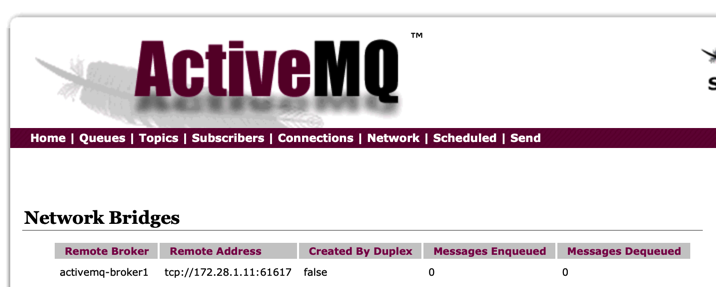
要测试这种架构的可用性,可以参考 Python 与 ActiveMQ 交互的一些例子 中的代码示例,修改对应的端口地址就能看到效果。
这个架构可以配合 Master Slave 进一步优化,如下图所示:
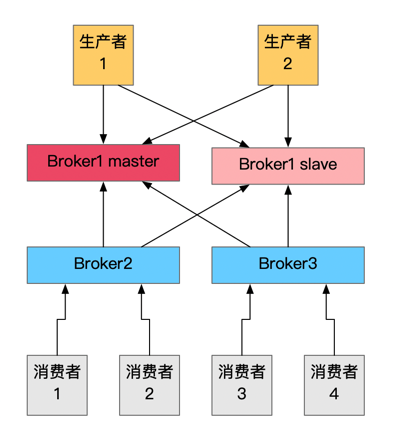
生产者连接的实例采用 Master Slave Failover 方式,消费者连接的实例在配置 NetworkConnector 时也采用 Failover 模式,这样 Broker1 就提供了主从的高可用模式,进一步提高了整个集群应对风险的能力。
参考资料
- ActiveMQ集群安装
- Persistence vs. Durability in Messaging. Do you know the difference?
- Shared File System Master Slave
- Networks of Brokers
- docker-compose 固定IP
- ActiveMQ实现负载均衡+高可用部署方案
- ActiveMQ中的NetworkConnector(网络连接器)详解
ActiveMQ 常见集群模式的更多相关文章
- Azure上搭建ActiveMQ集群-基于ZooKeeper配置ActiveMQ高可用性集群
ActiveMQ从5.9.0版本开始,集群实现方式取消了传统的Master-Slave方式,增加了基于ZooKeeper+LevelDB的实现方式. 本文主要介绍了在Windows环境下配置基于Zoo ...
- Redis 5.0.7 讲解,单机、集群模式搭建
Redis 5.0.7 讲解,单机.集群模式搭建 一.Redis 介绍 不管你是从事 Python.Java.Go.PHP.Ruby等等... Redis都应该是一个比较熟悉的中间件.而大部分经常写业 ...
- ActiveMQ的集群方案对比及部署
转载:http://blog.csdn.net/lifetragedy/article/details/51869032 ActiveMQ的集群 内嵌代理所引发的问题: 消息过载 管理混乱 如何解决这 ...
- 深入剖析Redis系列: Redis集群模式搭建与原理详解
前言 在 Redis 3.0 之前,使用 哨兵(sentinel)机制来监控各个节点之间的状态.Redis Cluster 是 Redis 的 分布式解决方案,在 3.0 版本正式推出,有效地解决了 ...
- ActiveMQ伪集群部署
本文借鉴http://www.cnblogs.com/guozhen/p/5984915.html,在此基础上进行了完善,使之成为一个完整版的伪分布式部署说明,在此记录一下! 一.本文目的 介绍如何在 ...
- ActiveMQ实战-集群
原文:http://blog.csdn.net/lifetragedy/article/details/51869032 ActiveMQ的集群 内嵌代理所引发的问题: 消息过载 管理混乱 如何解决这 ...
- activemq 搭建--集群
linux activmemq 集群安装,配置和高可用测试 从 ActiveMQ 5.9 开始,ActiveMQ 的集群实现方式取消了传统的Master-Slave 方式,增加了基于Z ...
- Redis 单机模式,主从模式,哨兵模式(sentinel),集群模式(cluster),第三方模式优缺点分析
Redis 的几种常见使用方式包括: 单机模式 主从模式 哨兵模式(sentinel) 集群模式(cluster) 第三方模式 单机模式 Redis 单副本,采用单个 Redis 节点部署架构,没有备 ...
- master挂了的话pm2怎么处理 使用pm2方便开启node集群模式
本文为转载 Introduction As you would probably know, Node.js is a platform built on Chrome's JavaScript ru ...
- 数据源管理 | 搜索引擎框架,ElasticSearch集群模式
本文源码:GitHub·点这里 || GitEE·点这里 一.集群环境搭建 1.环境概览 ES版本6.3.2,集群名称esmaster,虚拟机centos7. 服务群 角色划分 说明 en-maste ...
随机推荐
- 《Java并发编程的艺术》读书笔记:二、Java并发机制的底层实现原理
二.Java并发机制底层实现原理 这里是我的<Java并发编程的艺术>读书笔记的第二篇,对前文有兴趣的朋友可以去这里看第一篇:一.并发编程的目的与挑战 有兴趣讨论的朋友可以给我留言! 1. ...
- 带你了解NLP的词嵌入
摘要:今天带领大家学习自然语言处理中的词嵌入的内容. 本文分享自华为云社区<[MindSpore易点通]深度学习系列-词嵌入>,作者:Skytier. 1 特征表示 在自然语言处理中,有一 ...
- Django更换数据库和迁移数据方案
前言 双十一光顾着买东西都没怎么写文章,现在笔记里还有十几篇半成品文章没写完- 今天来分享一下 Django 项目切换数据库和迁移数据的方案,网络上找到的文章方法不一,且使用中容易遇到各类报错,本文根 ...
- 【Virt.Contest】CF1321(div.2)
第一次打虚拟赛. CF 传送门 T1:Contest for Robots 统计 \(r[i]=1\) 且 \(b[i]=0\) 的位数 \(t1\) 和 \(r[i]=0\) 且 \(b[i]=1\ ...
- 解决“fast-forward, aborting”问题
1. 现象 对某一个远程仓库 git pull 过程中,报错如下: # zl @ srv123 in ~/git/radxa/kernel [14:09:54] $ git pull remote: ...
- 元数据Metadata到底有什么用
什么是元数据 元数据Metadata很简单,是关于数据的数据.这就意味着是数据的描述和上下文.他有助于组织和发现理解数据. 举例: 1张照片中除了照片本身还是,照片的时间日期,大小,格式相机设置,地理 ...
- 修改egg.js项目的默认favicon图标
在项目根目录下的config/config.default.js文件中配置 将 .ico的图标放在一个目录中 方法一.读取本地文件 const path = require('path'); cons ...
- go语言单元测试:go语言用gomonkey为测试函数或方法打桩
一,安装用到的库1,gomonkey代码的地址: https://github.com/agiledragon/gomonkey 2,从命令行安装gomonkey go get -u github.c ...
- 【Java并发009】原理层面:ThreadLocal类全解析
一.前言 在Java多线程模块中,ThreadLocal是比较重要的知识点,虽然ThreadLocal类位于java.lang包,但是这个类基本上仅用于多线程. 二.ThreadLocal类概要 2. ...
- SDK怎么测试?俺不会啊
转载请注明出处️ 作者:测试蔡坨坨 原文链接:caituotuo.top/7bc8d1c8.html 你好,我是测试蔡坨坨. 众所周知,在云产品和SaaS蓬勃发展的当下,企业中有许多系统和环节都是依赖 ...