
【Azure 应用服务】Azure Function 启用 Managed Identity后, Powershell Funciton出现 ERROR: ManagedIdentityCredential authentication failed
问题描述
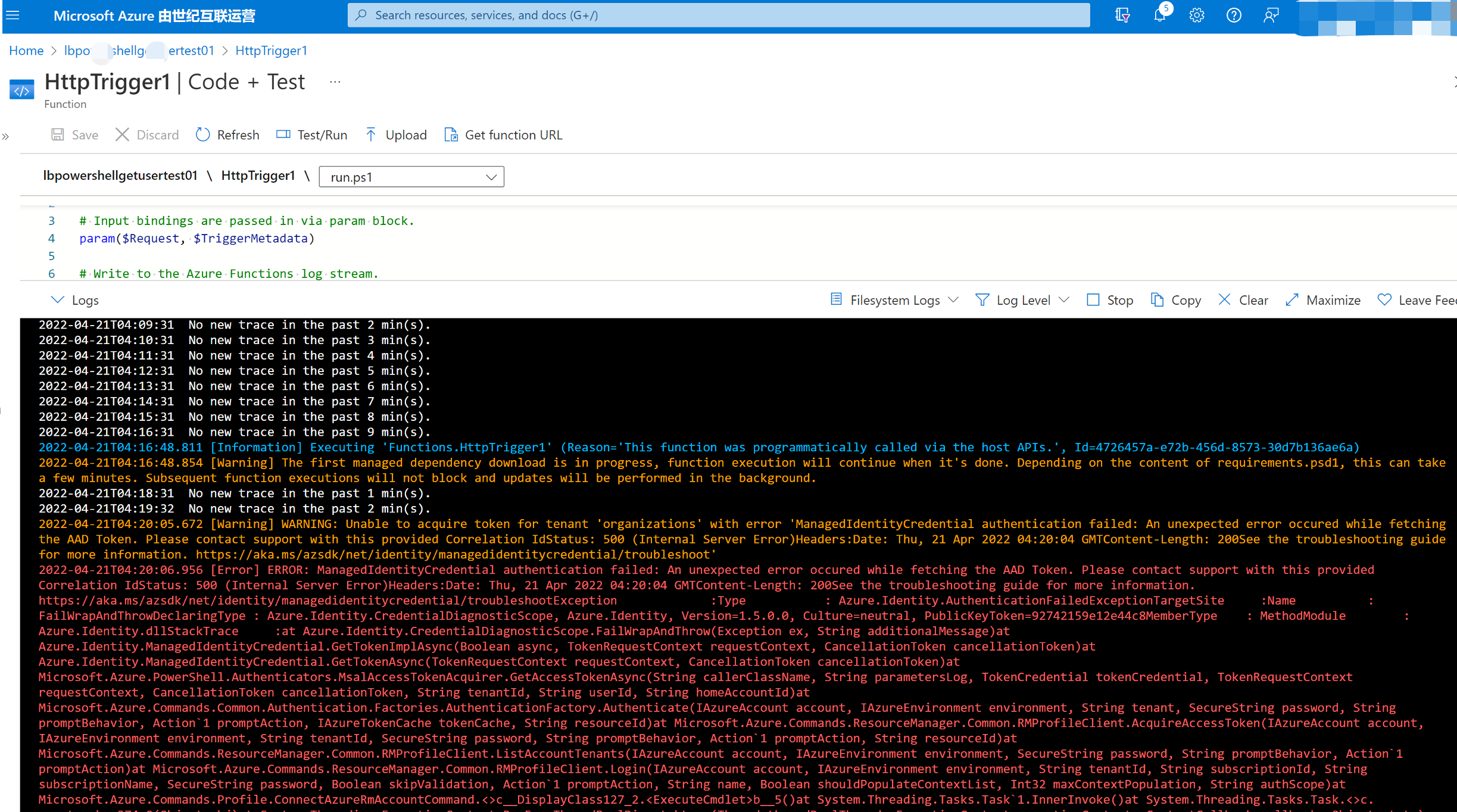
编写Powershell Function,登录到China Azure并获取Azure AD User信息,但是发现遇见了 [Error] ERROR: ManagedIdentityCredential authentication failed: An unexpected error occured while fetching the AAD Token. Please contact support with this provided Correlation IdStatus: 500 (Internal Server Error) 。
问题分析
分析错误原因,这是因为Powershell登录时候出现错误,考虑到目前是登录到中国区Azure,所以使用 Connect-AzAccount 登录时,想要指定 -Environment 为 AzureChinaCloud。
而 PowerShell Function App 自动在根目录下添加 profile.ps1 文件, 默认文件内容为:
# Azure Functions profile.ps1

#

# This profile.ps1 will get executed every "cold start" of your Function App.

# "cold start" occurs when:

#

# * A Function App starts up for the very first time

# * A Function App starts up after being de-allocated due to inactivity

#

# You can define helper functions, run commands, or specify environment variables

# NOTE: any variables defined that are not environment variables will get reset after the first execution

# Authenticate with Azure PowerShell using MSI.

# Remove this if you are not planning on using MSI or Azure PowerShell.

if ($env:MSI_SECRET) {

    Disable-AzContextAutosave -Scope Process | Out-Null

    Connect-AzAccount -Identity

}

# Uncomment the next line to enable legacy AzureRm alias in Azure PowerShell.

# Enable-AzureRmAlias

# You can also define functions or aliases that can be referenced in any of your PowerShell functions.
可见,默认的 Connect-AzAccount -Identity中并没有指定 Environment, 所以Function在运行时,会默认连接到Global Azure,所以就会出现 ManagedIdentityCredential authentication failed。
PS: 如果没有启用Managed Identity,则$env:MSI_SECRET为False,不会执行profile.ps1中的代码。
解决方案
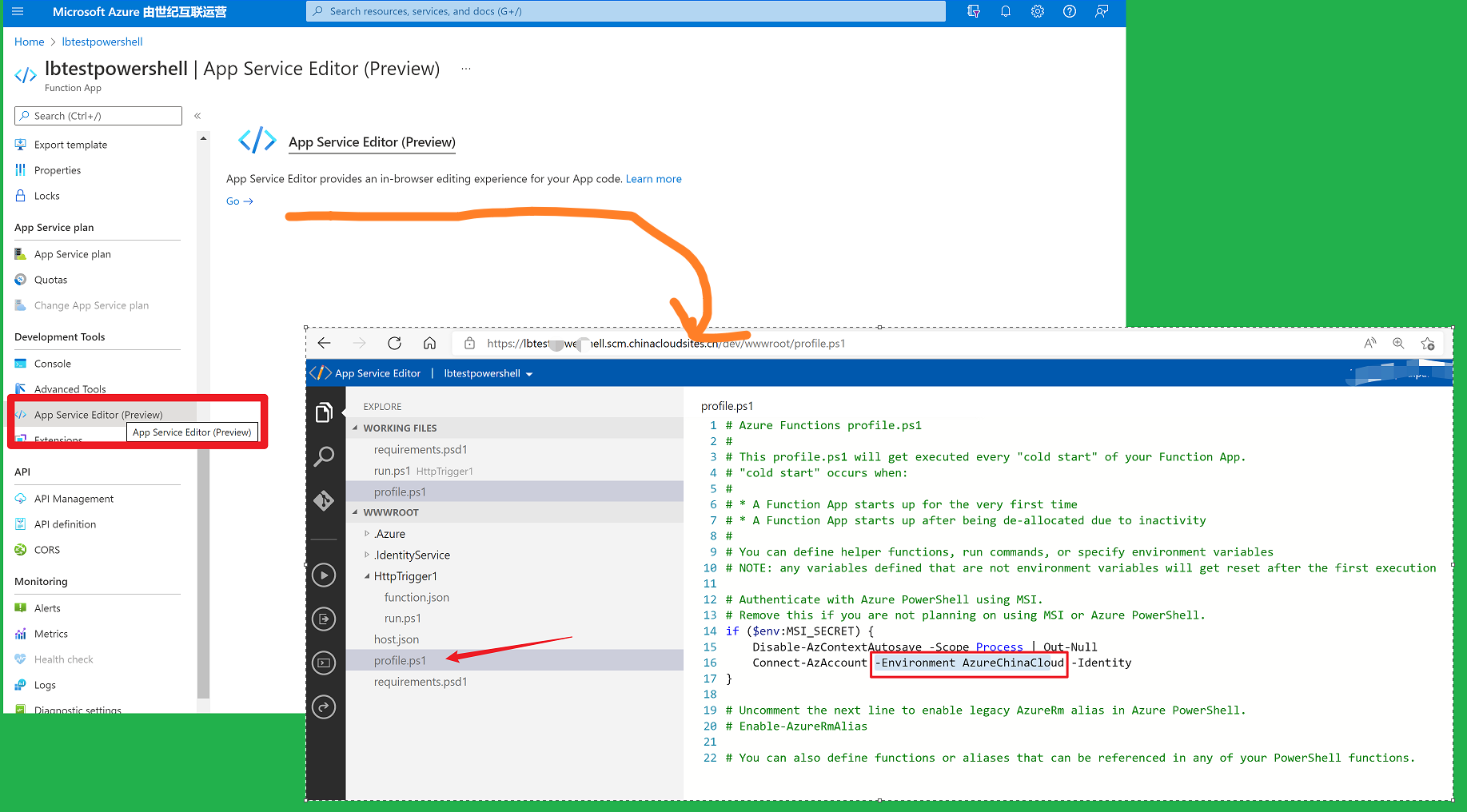
在Function App页面中,点击App Service Editor, 修改 profile.ps1 文件。
使用
Connect-AzAccount -Environment AzureChinaCloud -Identity
代替
Connect-AzAccount -Identity
操作截图如下:
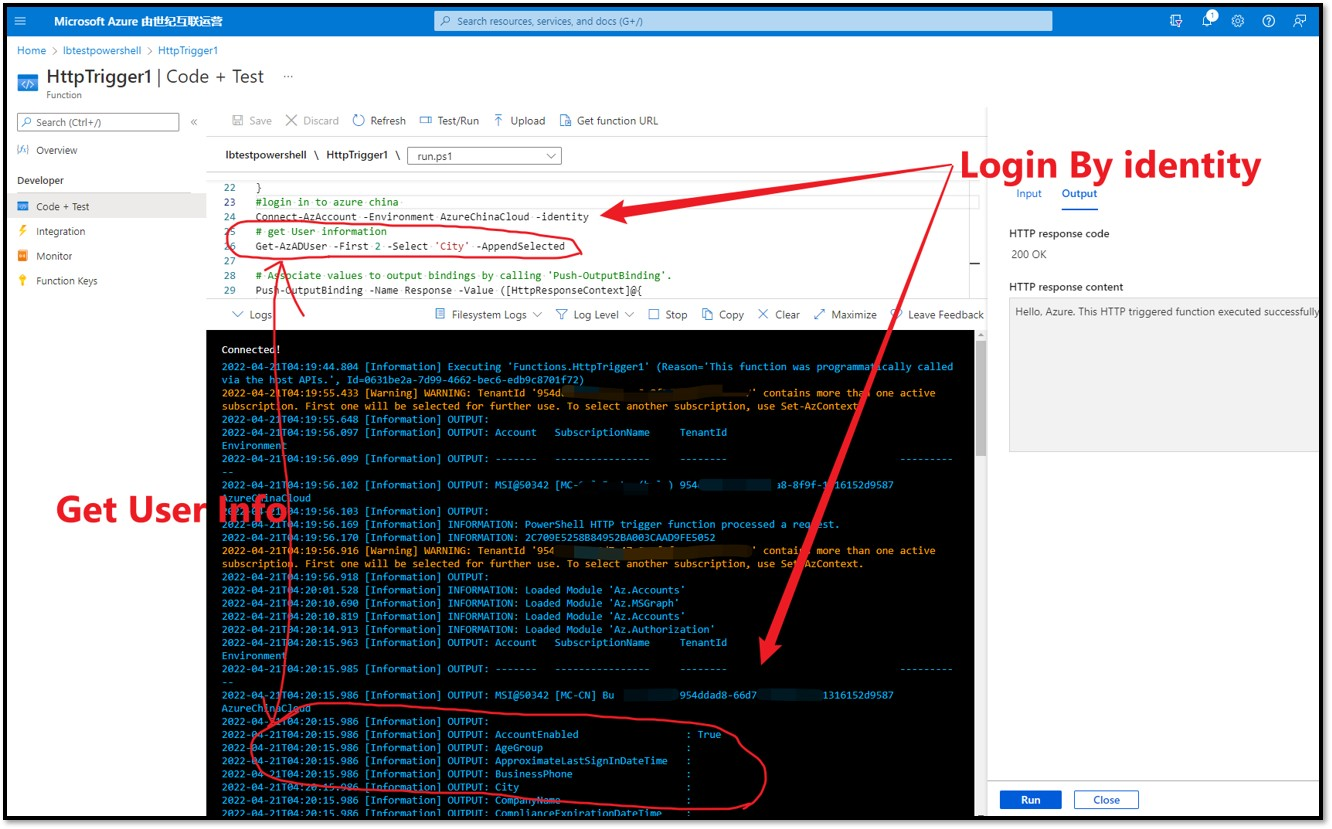
修改后,回到Function --> Code + Test 页面,测试问题消失。
using namespace System.Net

# Input bindings are passed in via param block.

param($Request, $TriggerMetadata)

# Write to the Azure Functions log stream.

Write-Host "PowerShell HTTP trigger function processed a request."

Write-Host $env:MSI_SECRET

# Interact with query parameters or the body of the request.

$name = $Request.Query.Name

if (-not $name) {

    $name = $Request.Body.Name

}

$body = "This HTTP triggered function executed successfully. Pass a name in the query string or in the request body for a personalized response."

if ($name) {

    $body = "Hello, $name. This HTTP triggered function executed successfully."

}

#login in to azure china

Connect-AzAccount -Environment AzureChinaCloud -identity

# get User information

Get-AzADUser -First 2 -Select 'City' -AppendSelected

# Associate values to output bindings by calling 'Push-OutputBinding'.

Push-OutputBinding -Name Response -Value ([HttpResponseContext]@{

    StatusCode = [HttpStatusCode]::OK

    Body = $body

})
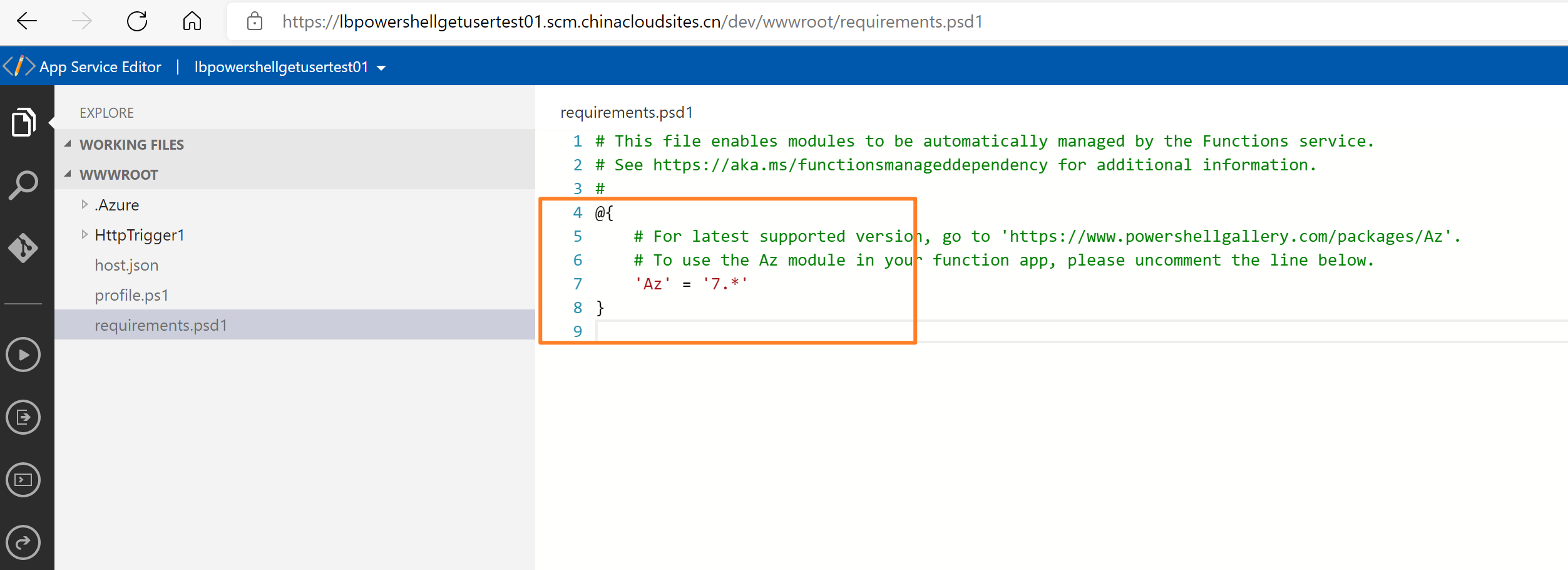
注:为了是的Connect-AzAccount成功运行,需要在requirements.psd1中添加 'Az' = '7.*' ,使得Function App的实例安装好Az模块。当然,如果Function中需要其他的Powershell模块,在这里添加即可。
# This file enables modules to be automatically managed by the Functions service.

# See https://aka.ms/functionsmanageddependency for additional information.

#

@{

    # For latest supported version, go to 'https://www.powershellgallery.com/packages/Az'.

    # To use the Az module in your function app, please uncomment the line below.

    'Az' = '7.*'

}
附录一:在中国区Function App中如果没有指定Environment的其他异常有
异常一:anagedIdentityException: Exception thrown when retrieving a token using ADAL library
Microsoft.Azure.AppService.ManagedIdentity.ManagedIdentityException: Exception thrown when retrieving a token using ADAL library --->

Microsoft.IdentityModel.Clients.ActiveDirectory.AdalServiceException: AADSTS500011: The resource principal named

https://management.core.windows.net/ was not found in the tenant named GSKChina. This can happen if the application has not been installed by the

administrator of the tenant or consented to by any user in the tenant. You might have sent your authentication request to the wrong tenant. Trace

ID: cdc5ba6d-851a-45f1-a29f-20e608af0700 Correlation ID: af280748-d9f0-4d02-9ce3-ac74dffe0d23 Timestamp: 2022-04-19 09:50:50Z --->

System.Net.Http.HttpRequestException: Response status code does not indicate success: 400 (BadRequest). --->

Microsoft.IdentityModel.Clients.ActiveDirectory.AdalException: {"error":"invalid_resource","error_description":"AADSTS500011: The resource

principal named https://management.core.windows.net/ was not found in the tenant named GSKChina. This can happen if the application has not been

installed by the administrator of the tenant or consented to by any user in the tenant. You might have sent your authentication request to the

wrong tenant.\r\n

Trace ID: cdc5ba6d-851a-45f1-a29f-20e608af0700\r\n

Correlation ID: af280748-d9f0-4d02-9ce3-ac74dffe0d23\r\n

Timestamp: 2022-04-19 09:50:50Z",

"error_codes":[500011],

"timestamp":"2022-04-19 09:50:50Z",

"trace_id":"cdc5ba6d-851a-45f1-a29f-20e608af0700",

"correlation_id":"af280748-d9f0-4d02-9ce3-ac74dffe0d23",

"error_uri":"https://login.partner.microsoftonline.cn/error?code=500011"}:

Unknown error --- End of inner exception stack trace ---

--- End of inner exception stack trace

--- at Microsoft.IdentityModel.Clients.ActiveDirectory.Internal.Http.AdalHttpClient.d__22`1.MoveNext()

--- End of stack trace from previous location where exception was thrown

--- at System.Runtime.ExceptionServices.ExceptionDispatchInfo.Throw() at System.Runtime.CompilerServices.TaskAwaiter.HandleNonSuccessAndDebuggerNotification(Task task) at Microsoft.IdentityModel.Clients.ActiveDirectory.Internal.Http.AdalHttpClient.d__21`1.MoveNext()

--- End of stack trace from previous location where exception was thrown

--- at System.Runtime.ExceptionServices.ExceptionDispatchInfo.Throw() at System.Runtime.CompilerServices.TaskAwaiter.HandleNonSuccessAndDebuggerNotification(Task task) at Microsoft.IdentityModel.Clients.ActiveDirectory.Internal.Flows.AcquireTokenHandlerBase.d__72.MoveNext()

--- End of stack trace from previous location where exception was thrown

--- at System.Runtime.ExceptionServices.ExceptionDispatchInfo.Throw() at System.Runtime.CompilerServices.TaskAwaiter.HandleNonSuccessAndDebuggerNotification(Task task) at Microsoft.IdentityModel.Clients.ActiveDirectory.Internal.Flows.AcquireTokenHandlerBase.d__69.MoveNext()

--- End of stack trace from previous location where exception was thrown

--- at System.Runtime.ExceptionServices.ExceptionDispatchInfo.Throw() at System.Runtime.CompilerServices.TaskAwaiter.HandleNonSuccessAndDebuggerNotification(Task task) at Microsoft.IdentityModel.Clients.ActiveDirectory.Internal.Flows.AcquireTokenHandlerBase.d__59.MoveNext()

--- End of stack trace from previous location where exception was thrown

--- at System.Runtime.ExceptionServices.ExceptionDispatchInfo.Throw() at System.Runtime.CompilerServices.TaskAwaiter.HandleNonSuccessAndDebuggerNotification(Task task) at Microsoft.IdentityModel.Clients.ActiveDirectory.Internal.Flows.AcquireTokenHandlerBase.d__57.MoveNext()

--- End of stack trace from previous location where exception was thrown

--- at System.Runtime.ExceptionServices.ExceptionDispatchInfo.Throw() at System.Runtime.CompilerServices.TaskAwaiter.HandleNonSuccessAndDebuggerNotification(Task task) at Microsoft.IdentityModel.Clients.ActiveDirectory.AuthenticationContext.d__33.MoveNext()

--- End of stack trace from previous location where exception was thrown

--- at System.Runtime.ExceptionServices.ExceptionDispatchInfo.Throw() at System.Runtime.CompilerServices.TaskAwaiter.HandleNonSuccessAndDebuggerNotification(Task task) at Microsoft.IdentityModel.Clients.ActiveDirectory.AuthenticationContext.d__58.MoveNext()

--- End of stack trace from previous location where exception was thrown

--- at System.Runtime.ExceptionServices.ExceptionDispatchInfo.Throw() at System.Runtime.CompilerServices.TaskAwaiter.HandleNonSuccessAndDebuggerNotification(Task task) at Microsoft.Azure.AppService.ManagedIdentity.Clients.AdalClient.d__2.MoveNext()

--- End of stack trace from previous location where exception was thrown --- at System.Runtime.ExceptionServices.ExceptionDispatchInfo.Throw() at System.Runtime.CompilerServices.TaskAwaiter.HandleNonSuccessAndDebuggerNotification(Task task) at Microsoft.Azure.AppService.ManagedIdentity.Clients.AdalClient.d__0.MoveNext()

--- End of inner exception stack trace

--- at Microsoft.Azure.AppService.ManagedIdentity.Clients.AdalClient.d__0.MoveNext()

--- End of stack trace from previous location where exception was thrown

--- at System.Runtime.ExceptionServices.ExceptionDispatchInfo.Throw() at System.Runtime.CompilerServices.TaskAwaiter.HandleNonSuccessAndDebuggerNotification(Task task) at Microsoft.Azure.AppService.ManagedIdentity.AadProvider.d__11.MoveNext()

--- End of stack trace from previous location where exception was thrown

--- at System.Runtime.ExceptionServices.ExceptionDispatchInfo.Throw() at System.Runtime.CompilerServices.TaskAwaiter.HandleNonSuccessAndDebuggerNotification(Task task) at

 Microsoft.Azure.AppService.ManagedIdentity.AadProvider.GetAuthToken(String tenantId, String clientId, String secretUrl, String resource, X509Certificate2 cert, IManagedIdentityLogger logger, Boolean bypassCache, String authenticationEndpoint) at

 Microsoft.Azure.AppService.TokenService.Controllers.TokenRequestServer.GetTokenV10(ITokenServiceHttpRequest tokenRequest)
异常二:ManagedIdentityCredential authentication failed: An unexpected error occured while fetching the AAD Token.
2022-04-19T15:05:56.059 [Warning] WARNING: Unable to acquire token for tenant 'organizations' with error 'ManagedIdentityCredential authentication failed:
An unexpected error occured while fetching the AAD Token. Please contact support with this provided Correlation Id
Status: 500 (Internal Server Error)Headers:Date: Tue, 19 Apr 2022 15:05:55 GMTContent-Length: 200
See the troubleshooting guide for more information. https://aka.ms/azsdk/net/identity/managedidentitycredential/troubleshoot'

2022-04-19T15:05:56.847 [Error] ERROR: ManagedIdentityCredential authentication failed:
An unexpected error occured while fetching the AAD Token. Please contact support with this provided Correlation Id
Status: 500 (Internal Server Error)Headers:Date: Tue, 19 Apr 2022 15:05:55 GMTContent-Length: 200
See the troubleshooting guide for more information. https://aka.ms/azsdk/net/identity/managedidentitycredential/troubleshootException
参考资料
Get-AzADUser : https://docs.microsoft.com/en-us/powershell/module/az.resources/get-azaduser?view=azps-7.4.0
【Azure 应用服务】Azure Function 启用 Managed Identity后, Powershell Funciton出现 ERROR: ManagedIdentityCredential authentication failed的更多相关文章
- 【Azure 应用服务】Azure Function HTTP 触发后, 230秒就超时。而其他方式触发的Function, 执行5分钟后也超时,如何调整超时时间?
问题描述 Azure Function HTTP 触发后, 230秒就超时,而其他方式触发的Function, 执行5分钟后也超时,如何调整超时时间? 问题分析 查阅官方文档,对函数应用超时持续时间有 ...
- 【Azure 应用服务】App Service/Azure Function的出站连接过多而引起了SNAT端口耗尽,导致一些新的请求出现超时错误(Timeout)
问题描述 当需要在应用中有大量的出站连接时候,就会涉及到SNAT(源地址网络转换)耗尽的问题.而通过Azure App Service/Function的默认监控指标图表中,却没有可以直接查看到SNA ...
- 【Azure 应用服务】App Service .NET Core项目在Program.cs中自定义添加的logger.LogInformation,部署到App Service上后日志不显示Log Stream中的问题
问题描述 在.Net Core 5.0 项目中,添加 Microsoft.Extensions.Logging.AzureAppServices 和 Microsoft.Extensions.Logg ...
- 【Azure 应用服务】部署Kafka Trigger Function到Azure Function服务中,解决自定义域名解析难题
问题描述 经过前两篇文章,分别使用VM搭建了Kafka服务,创建了Azure Function项目,并且都在本地运行成功. [Azure Developer]在Azure VM (Windows) 中 ...
- 【Azure 应用服务】App Service For Linux 部署Java Spring Boot应用后,查看日志文件时的疑惑
编写Java Spring Boot应用,通过配置logging.path路径把日志输出在指定的文件夹中. 第一步:通过VS Code创建一个空的Spring Boot项目 第二步:在applicat ...
- 【Azure 应用服务】App Service 开启了私有终结点(Private Endpoint)模式后,如何来实现公网Git部署呢?
问题描述 因为中国区的App Service对外(公网访问)需要进行ICP备案,所以很多情况下,Web应用部署到App Service后,都是通过Application Gateway(应用程序网关) ...
- 【Azure 应用服务】NodeJS Express + MSAL 实现API应用Token认证(AAD OAuth2 idToken)的认证实验 -- passport.authenticate('oauth-bearer', {session: false})
问题描述 在前两篇博文中,对NodeJS Express应用 使用MSAL + AAD实现用户登录并获取用户信息,获取Authorization信息 ( ID Token, Access Token) ...
- Azure 应用服务中的 API 应用、ASP.NET 和 Swagger 入门
学习内容: 如何通过 Visual Studio 2015 中的内置工具在 Azure 应用服务中创建和部署 API 应用. 如何使用 Swashbuckle NuGet 包动态生成 Swagger ...
- 为 Azure 应用服务配置连续部署工作流
本快速入门介绍了如何将应用服务 GitHub 集成以实现连续部署工作流.在本教程中完成的所有操作均符合1元试用条件. 本快速入门介绍了如何将应用服务 GitHub 集成以实现连续部署工作流.在本教程中 ...
随机推荐
- J20航模遥控器开源项目系列教程(五)| 制作STM32F0接收机,8路PWM输出,SBUS输出,PPM输出 | 加密狗无线化,畅玩飞行模拟器
我们的开源宗旨:自由 协调 开放 合作 共享 拥抱开源,丰富国内开源生态,开展多人运动,欢迎加入我们哈~ 和一群志同道合的人,做自己所热爱的事! 项目开源地址:https://github.com/J ...
- C++_STL_all_of
all_of 功能描述 如果在[first,last)范围内的数组进行判断, 如果pred返回true返回true 否则返回false 等同于 template<class InputItera ...
- spring cloud 和dubbo区别?
1.服务调用方式 dubbo是RPC springcloud Rest Api2.注册中心,dubbo 是zookeeper springcloud是eureka,也可以是zookeeper3.服务网 ...
- A5/web项目连接Oracle 12c数据库报:ORA-01017: 用户名/口令无效
解决办法: 修改Oracle12c用户名密码,再改回来,就ok了,亲测有效.
- forward和redirect的区别?http状态码301,302分别代表什么?
一.forward和redirect的区别 从地址栏显示来说:forward是服务器内部重定向,客户端浏览器的网址不会发生变化:redirect发生一个状态码,告诉服务器去重新请求那个网址,显示的的新 ...
- (转载)MySQL删除所有表的外键约束、禁用外键约束
其实如果想删除所有表可以直接如下操作: 在navicat中直接选中所有表,然后右键删除表即可,会有提示,一路确定,就会先删掉没有外键的表和字表,只要一路确定,删几批就把表都删完了,并不算太麻烦. 转: ...
- 什么是切点JoinPoint?
程序运行中的一些时间点, 例如一个方法的执行, 或者是一个异常的处理. 在 Spring AOP 中, join point 总是方法的执行点.
- My模板设计模式
模板模式 目标: 第一个设计模式:模板模式 步骤: 第一个设计模式:模板模式 讲解: 我们现在使用抽象类设计一个模板模式的应用, 例如在小学的时候,我们经常写作文,通常都是有模板可以套用的. 假如我现 ...
- python中PIL库的使用
API参考 打开dos窗口,安装库: pip install pillow 很明显,图片有点大,咱们缩略一下: from PIL import Image im = Image.open(" ...
- pycharm2019版本可用破解
1.下载破解文件 点击链接https://pan.baidu.com/s/1FbpXC4-rACrLMfeuVzJGPQ 提取码:hyed 下载补丁文件jetbrains-agent.jar并将它 ...