
2023-03-01:用moonfdd/ffmpeg-go库,将h264文件编码为mp4文件。
2023-03-01:用moonfdd/ffmpeg-go库,将h264文件编码为mp4文件。
答案2023-03-01:
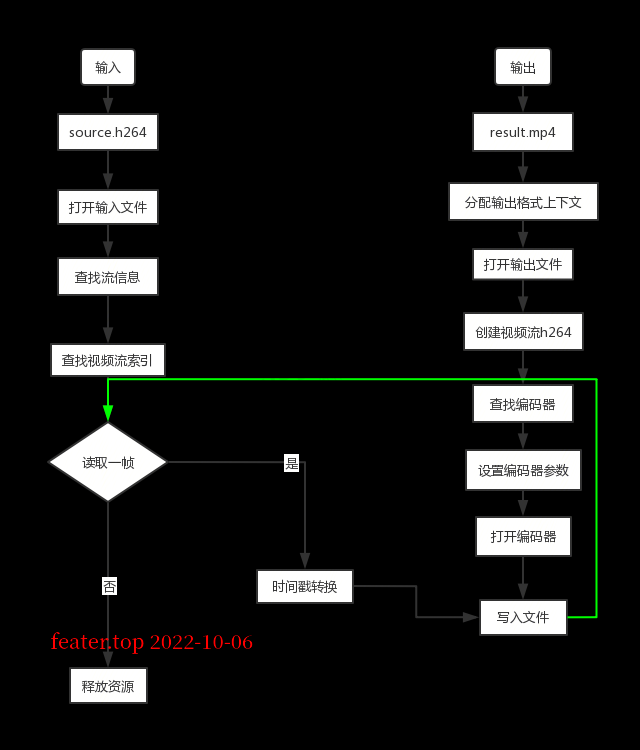
使用 github.com/moonfdd/ffmpeg-go 库。现在我们有h264的流,创建一个mp4文件,新建一条流并将h264流插入进去。(暂时没有音频部分)。
转换流程图为:
命令如下:
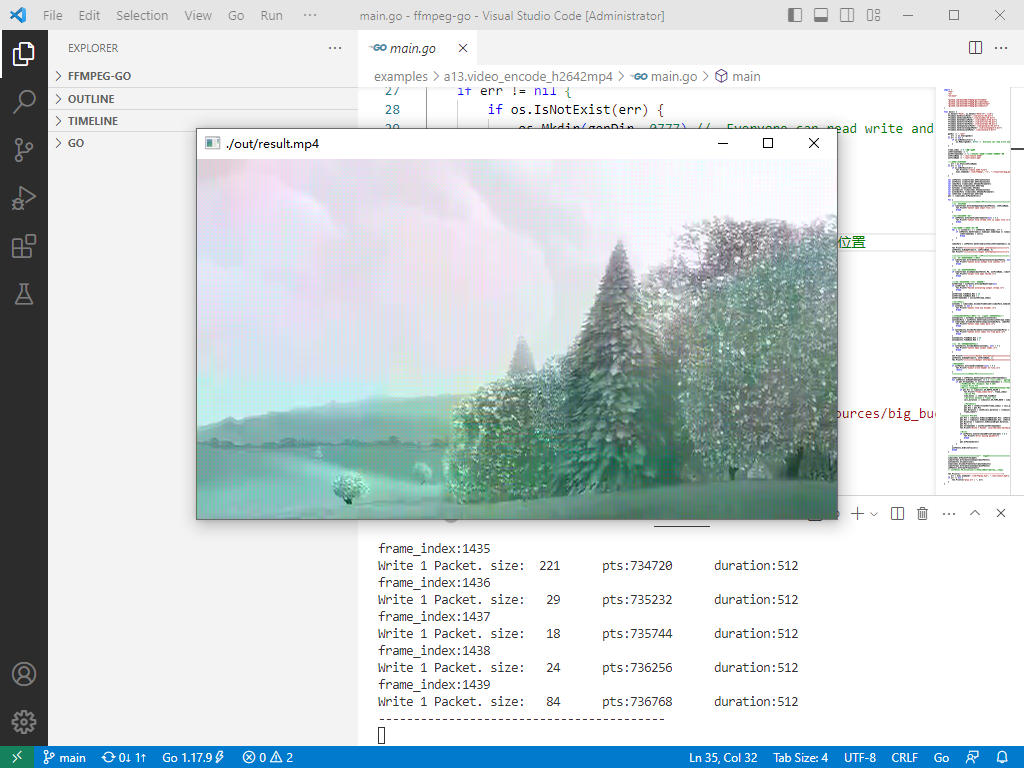
go run ./examples/a13.video_encode_h2642mp4/main.go
参考了13:h264编码为mp4,代码用golang编写。代码如下:
package main

import (

	"fmt"

	"os"

	"os/exec"

	"github.com/moonfdd/ffmpeg-go/ffcommon"

	"github.com/moonfdd/ffmpeg-go/libavcodec"

	"github.com/moonfdd/ffmpeg-go/libavformat"

	"github.com/moonfdd/ffmpeg-go/libavutil"

)

func main() {

	os.Setenv("Path", os.Getenv("Path")+";./lib")

	ffcommon.SetAvutilPath("./lib/avutil-56.dll")

	ffcommon.SetAvcodecPath("./lib/avcodec-58.dll")

	ffcommon.SetAvdevicePath("./lib/avdevice-56.dll")

	ffcommon.SetAvfilterPath("./lib/avfilter-56.dll")

	ffcommon.SetAvformatPath("./lib/avformat-58.dll")

	ffcommon.SetAvpostprocPath("./lib/postproc-55.dll")

	ffcommon.SetAvswresamplePath("./lib/swresample-3.dll")

	ffcommon.SetAvswscalePath("./lib/swscale-5.dll")

	genDir := "./out"

	_, err := os.Stat(genDir)

	if err != nil {

		if os.IsNotExist(err) {

			os.Mkdir(genDir, 0777) //  Everyone can read write and execute

		}

	}

	frame_index := 0 //统计帧数

	inVStreamIndex := -1

	outVStreamIndex := -1 //输入输出视频流在文件中的索引位置

	inVFileName := "./out/result.h264"

	outFileName := "./out/result.mp4"

	//是否存在h264文件

	_, err = os.Stat(inVFileName)

	if err != nil {

		if os.IsNotExist(err) {

			fmt.Println("create h264 file")

			exec.Command("./lib/ffmpeg", "-i", "./resources/big_buck_bunny.mp4", "-vcodec", "copy", "-an", inVFileName, "-y").CombinedOutput()

		}

	}

	var inVFmtCtx *libavformat.AVFormatContext

	var outFmtCtx *libavformat.AVFormatContext

	var codecPara *libavcodec.AVCodecParameters

	var outVStream *libavformat.AVStream

	var outCodec *libavcodec.AVCodec

	var outCodecCtx *libavcodec.AVCodecContext

	var outCodecPara *libavcodec.AVCodecParameters

	var inVStream *libavformat.AVStream

	pkt := libavcodec.AvPacketAlloc()

	for {

		//======================输入部分============================//

		//打开输入文件

		if libavformat.AvformatOpenInput(&inVFmtCtx, inVFileName, nil, nil) < 0 {

			fmt.Printf("Cannot open input file.\n")

			break

		}

		//查找输入文件中的流

		if inVFmtCtx.AvformatFindStreamInfo(nil) < 0 {

			fmt.Printf("Cannot find stream info in input file.\n")

			break

		}

		//查找视频流在文件中的位置

		for i := uint32(0); i < inVFmtCtx.NbStreams; i++ {

			if inVFmtCtx.GetStream(i).Codecpar.CodecType == libavutil.AVMEDIA_TYPE_VIDEO {

				inVStreamIndex = int(i)

				break

			}

		}

		codecPara = inVFmtCtx.GetStream(uint32(inVStreamIndex)).Codecpar //输入视频流的编码参数

		fmt.Printf("===============Input information========>\n")

		inVFmtCtx.AvDumpFormat(0, inVFileName, 0)

		fmt.Printf("===============Input information========<\n")

		//=====================输出部分=========================//

		//打开输出文件并填充格式数据

		if libavformat.AvformatAllocOutputContext2(&outFmtCtx, nil, "", outFileName) < 0 {

			fmt.Printf("Cannot alloc output file context.\n")

			break

		}

		//打开输出文件并填充数据

		if libavformat.AvioOpen(&outFmtCtx.Pb, outFileName, libavformat.AVIO_FLAG_READ_WRITE) < 0 {

			fmt.Printf("output file open failed.\n")

			break

		}

		//在输出的mp4文件中创建一条视频流

		outVStream = outFmtCtx.AvformatNewStream(nil)

		if outVStream == nil {

			fmt.Printf("Failed allocating output stream.\n")

			break

		}

		outVStream.TimeBase.Den = 25

		outVStream.TimeBase.Num = 1

		outVStreamIndex = int(outVStream.Index)

		//查找编码器

		outCodec = libavcodec.AvcodecFindEncoder(codecPara.CodecId)

		if outCodec == nil {

			fmt.Printf("Cannot find any encoder.\n")

			break

		}

		//从输入的h264编码器数据复制一份到输出文件的编码器中

		outCodecCtx = outCodec.AvcodecAllocContext3()

		outCodecPara = outFmtCtx.GetStream(uint32(outVStream.Index)).Codecpar

		if libavcodec.AvcodecParametersCopy(outCodecPara, codecPara) < 0 {

			fmt.Printf("Cannot copy codec para.\n")

			break

		}

		if outCodecCtx.AvcodecParametersToContext(outCodecPara) < 0 {

			fmt.Printf("Cannot alloc codec ctx from para.\n")

			break

		}

		outCodecCtx.TimeBase.Den = 25

		outCodecCtx.TimeBase.Num = 1

		//打开输出文件需要的编码器

		if outCodecCtx.AvcodecOpen2(outCodec, nil) < 0 {

			fmt.Printf("Cannot open output codec.\n")

			break

		}

		fmt.Printf("============Output Information=============>\n")

		outFmtCtx.AvDumpFormat(0, outFileName, 1)

		fmt.Printf("============Output Information=============<\n")

		//写入文件头

		if outFmtCtx.AvformatWriteHeader(nil) < 0 {

			fmt.Printf("Cannot write header to file.\n")

			return

		}

		//===============编码部分===============//

		inVStream = inVFmtCtx.GetStream(uint32(inVStreamIndex))

		for inVFmtCtx.AvReadFrame(pkt) >= 0 { //循环读取每一帧直到读完

			if pkt.StreamIndex == uint32(inVStreamIndex) { //确保处理的是视频流

				//FIXME:No PTS (Example: Raw H.264)

				//Simple Write PTS

				//如果当前处理帧的显示时间戳为0或者没有等等不是正常值

				if pkt.Pts == libavutil.AV_NOPTS_VALUE {

					fmt.Printf("frame_index:%d\n", frame_index)

					//Write PTS

					time_base1 := inVStream.TimeBase

					//Duration between 2 frames (us)

					calc_duration := libavutil.AV_TIME_BASE / libavutil.AvQ2d(inVStream.RFrameRate)

					//Parameters

					pkt.Pts = int64((float64(frame_index) * calc_duration) / (libavutil.AvQ2d(time_base1) * float64(libavutil.AV_TIME_BASE)))

					pkt.Dts = pkt.Pts

					pkt.Duration = int64(calc_duration / (libavutil.AvQ2d(time_base1) * float64(libavutil.AV_TIME_BASE)))

					frame_index++

				}

				//Convert PTS/DTS

				pkt.Pts = libavutil.AvRescaleQRnd(pkt.Pts, inVStream.TimeBase, outVStream.TimeBase, libavutil.AV_ROUND_NEAR_INF|libavutil.AV_ROUND_PASS_MINMAX)

				pkt.Dts = libavutil.AvRescaleQRnd(pkt.Dts, inVStream.TimeBase, outVStream.TimeBase, libavutil.AV_ROUND_NEAR_INF|libavutil.AV_ROUND_PASS_MINMAX)

				pkt.Duration = libavutil.AvRescaleQ(pkt.Duration, inVStream.TimeBase, outVStream.TimeBase)

				pkt.Pos = -1

				pkt.StreamIndex = uint32(outVStreamIndex)

				fmt.Printf("Write 1 Packet. size:%5d\tpts:%d\tduration:%d\n", pkt.Size, pkt.Pts, pkt.Duration)

				//Write

				if outFmtCtx.AvInterleavedWriteFrame(pkt) < 0 {

					fmt.Printf("Error muxing packet\n")

					break

				}

				pkt.AvPacketUnref()

			}

		}

		outFmtCtx.AvWriteTrailer()

		break

	}

	//===========================释放所有指针===============================//

	libavcodec.AvPacketFree(&pkt)

	libavformat.AvformatCloseInput(&outFmtCtx)

	outCodecCtx.AvcodecClose()

	libavcodec.AvcodecFreeContext(&outCodecCtx)

	libavformat.AvformatCloseInput(&inVFmtCtx)

	inVFmtCtx.AvformatFreeContext()

	// outFmtCtx.Pb.AvioClose()//案例里面有,但个人感觉不对

	fmt.Println("-----------------------------------------")

	_, err = exec.Command("./lib/ffplay.exe", "./out/result.mp4").Output()

	if err != nil {

		fmt.Println("play err = ", err)

	}

}
2023-03-01:用moonfdd/ffmpeg-go库,将h264文件编码为mp4文件。的更多相关文章
- 使用ffmpeg获取视频流后如何封装存储成mp4文件
int main(int argc,char *argv[]) 02 { 03 AVFormatContext *pFormatCtx; 04 int i,videoStream; 05 AVC ...
- FFmpeg基础库编程开发学习笔记——音频常见格式及字幕格式
声明一下:这些关于ffmpeg的文章仅仅是用于记录我的学习历程和以便于以后查阅,文章中的一些文字可能是直接摘自于其它文章.书籍或者文献,学习ffmpeg相关知识是为了使用在Android上,我也才是刚 ...
- 解决QZ-SDK静态库libRPToolLib.a中avfoundation.o文件和kxMovie依赖的ffmpeg静态库libavdevice.a函数重复定义的问题
解决QZ-SDK静态库libRPToolLib.a中avfoundation.o文件和kxMovie依赖的ffmpeg静态库libavdevice.a函数重复定义的问题 在原来项目中导入全志v3相机的 ...
- 基于ffmpeg静态库的应用开发
最近几天在试着做基本ffmpeg静态库的开发,只有main中包含了avdevice_register_all 或avfilter_register_all,编译就通不过,undefined refre ...
- ffmpeg第三方库编译记录
最近在研究ffmpeg的编译,之前使用的Ubuntu,需要安装虚拟机,非常麻烦,所以后来改研究在Windows平台编译. 一开始遇到很多挫折,参考了网上很多的帖子,但要么不全要么内容已过期,经过我的反 ...
- Windows 系统 vs2012 MinGW 编译ffmpeg 静态库
Windows系统下 vs2012编译ffmpeg 动态库 前面已经有文章讲述,本文将讲述如果编译生成ffmpeg静态库以方便 在vs2012下调用. 准备工作:安装MinGW环境,修改ffmpeg配 ...
- 为iOS编译FFmpeg静态库
为iOS编译FFmpeg静态库 环境:OS X Yosemite (版本10.10.5) Xcode (Version 7.1.1 (7B1005)) 一.资料准备: (1)ffmpeg源 ...
- xcode5下一个ffmpeg静态库配置
1.若要安装xcode命令行工具 1).xcode5安装命令行工具方法: 在终端运行命令Using xcode-select --install 2).xcode5之前安装命令行工具方法: 2.xco ...
- FFmpeg基础库编程开发学习笔记——视频常见格式
声明一下:这些关于ffmpeg的文章仅仅是用于记录我的学习历程和以便于以后查阅,文章中的一些文字可能是直接摘自于其它文章.书籍或者文献,学习ffmpeg相关知识是为了使用在Android上,我也才是刚 ...
- FFmpeg(2)-avformat_open_input()函数详解并示例打开mp4文件
一. 解封装 pts 是显示的时间 dts是解码的时间, 这个时间是用来做同步. av_register_all(), 注册所有的格式.包括解封装格式和加封装格式. avformat_network_ ...
随机推荐
- WIn环境基于vs编辑器,Qt应用申请管理员权限的解决方法(转载)
原文章地址:https://blog.csdn.net/weixin_38416696/article/details/103879377 基本按照那个文章的操作.基本可以了. 唯一问题就是那个vs的 ...
- 记一次dubbo服务丢失的问题排查
主要环境与用到的(关键)组件: Springboot2.3.2 其中,dubbo-spring-boot-starter版本为2.7.8 zookeeper3.5.9 首先是服务报错: No prov ...
- Android 音视频 - MediaCodec 编解码音视频
我们知道 Camera 采集回传的是 YUV 数据,AudioRecord 是 PCM,我们要对这些数据进行编码(压缩编码),这里我们来说在 Android 上音视频编解码逃不过的坑-MediaCod ...
- 2022年8月学科能力综合测试(TACA)试题解答 Mathemaitca练习
目录 试题地址 1 4 5 10 13 你让我猜我肯定这么猜 试题地址 https://k.sina.com.cn/article_2897328623_acb1b9ef019011qen.html ...
- Cesium近地天空盒,解决图片旋转问题
前言 当我们使用官网的例子设置天空盒后,会发现天空云彩是斜的,比如下边这张图:通过查阅网上资料,需要修改cesium的源码,以下是修改后skybox的源码,在自己的项目中引入即可: 实现代码 cons ...
- java网络编程--1 网络模型、网络协议
java网络编程--1 网络模型.网络协议 javaweb指的是网页编程 B/S 网络编程指的是面向TCP/IP相关 C/S 1.1.概述 两种不同的通信模式: 实时通信:打电话 连接---接了--- ...
- HashMap 与 ConcurrentHashMap 底层实现
系统性学习,异步IT-BLOG 一.HashMap 底层源码 JDK7 版本(数组+链表) 我们存放的 hashMap 都会封装成一个节点对象 Entry(key,value),然后将此节点对象存放到 ...
- Java面试——阻塞队列
一.阻塞队列 [1]首先它是一个队列,而一个阻塞队列在数据结构中所起的作用大致如下图所示:
- ArcGIS模型构建器ModelBuilder的使用方法
本文介绍在ArcMap软件中,基于模型构建器(ModelBuilder)完成模型建立与使用的具体方法. 首先,在ArcMap软件中打开"ModelBuilder". 建 ...
- '林子雨大数据' 实验3 HBase操作与接口编程
"林子雨大数据" 实验3 HBase操作与接口编程 环境搭建 VM虚拟机和Ubuntu系统的安装 在Windows中使用VirtualBox安装Ubuntu虚拟机(2020年7月版 ...