
react+antd 导出excel文件(简单数据&多级表头)
需求:
在基于react+antd进行开发的页面中,实现导出excel报表的功能
实际场景:
1.简单数据:单层表头+数据
2.复杂数据:多层表头+数据
实现方式:
1.简单数据
简单数据的导出使用了js-export-excel插件,需要自己转换表头数据与表格数据,代码如下:
import { useState } from 'react';

import { message, Button } from 'antd';

import ExportJsonExcel from 'js-export-excel';

import type { RequestData } from '@/utils/request';

import type { ProjectInfoParams } from '@/services/summary';

import type { PaginationProps } from 'antd';

import { downloadChannelSettle } from '@/services/xxx'; // 接口地址

interface DownloadEffortsProps {

  columnsData: any[];

  totalList?: any[];

  tableParams?: ProjectInfoParams & PaginationProps & { order?: string; sort?: string };

}

const DownloadEfforts: React.FC<DownloadEffortsProps> = (props) => {

  const { columnsData, tableParams } = props;

  // 按钮loading

  const [downLoading, setDownLoading] = useState<boolean>(false);

  // 下载结算申请报表

  const downloadEffectExcel = async () => {

    // 请求所有数据

    const downloadParams = { ...tableParams, current: 1, pageSize: 0, pageNum: 1 };

    // 开启按钮loading

    setDownLoading(true);

    try {

      const res: RequestData = await downloadChannelSettle(downloadParams);

      if (res.result) {

        const { tableList } = res.result;

        // 表头数组去掉操作栏

        const newestHeaderList = columnsData.filter((arr: any) => arr.valueType !== 'option');

        // 导出报表的表头与数据的处理

        const resultData: any[] = [];

        if (tableList) {

          tableList.forEach((item: any, index: number) => {

            const resultItem = {};

            newestHeaderList.forEach((el: any, i: number) => {

              if (newestHeaderList[i].title) {

                resultItem[newestHeaderList[i].title] =

                  tableList[index][newestHeaderList[i].dataIndex];

              }

            });

            resultData.push(resultItem);

          });

        }

        const newHeader = newestHeaderList.map((item: any) => item.title);

        const option = {

          fileName: '导出数据', // 文件名字

          datas: [

            {

              sheetData: resultData, // 数据

              sheetName: 'sheet',

              sheetFilter: newHeader, // 表头

              sheetHeader: newHeader, // 表头

            },

          ],

        };

        const toExcel = new ExportJsonExcel(option);

        toExcel.saveExcel();

      } else {

        message.error('下载失败!');

      }

    } catch (error) {

      //

    } finally {

      // 关闭按钮loading

      setDownLoading(false);

    }

  };

  return (

    <Button key="downloadExcel" type="ghost" onClick={downloadEffectExcel} loading={downLoading}>

      下载报表

    </Button>

  );

};

export default DownloadEfforts;
2.复杂数据
复杂数据,我只处理了多层表头的情况,table组件展示如图:
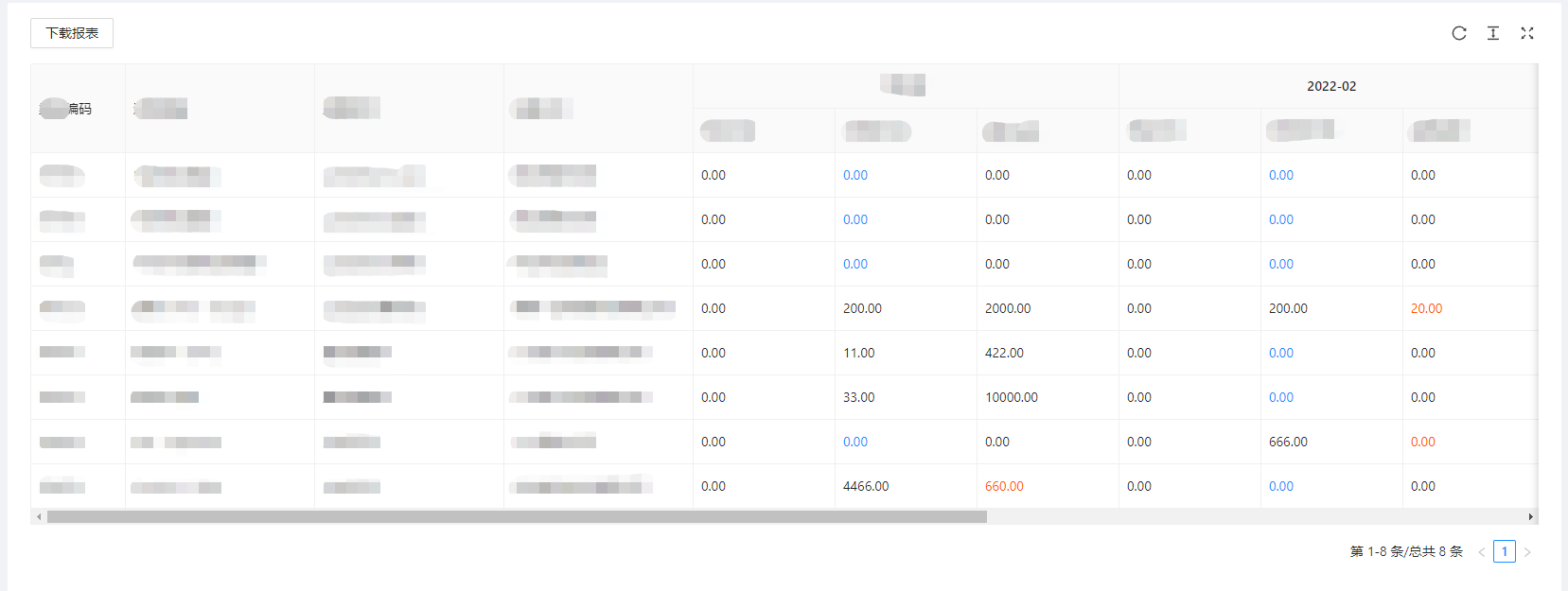
因为js-export-excel插件无法直接导出多层表头的数据(并且产品要求excel文件要与table展示布局相同),因此选用了react-html-table-to-excel插件进行开发,代码如下:
import { useState, useRef, useEffect } from 'react';

import { isEmpty } from 'lodash';

import { message, Table, Button } from 'antd';

import ReactHTMLTableToExcel from 'react-html-table-to-excel';

import type { RequestData } from '@/utils/request';

import type { ParamsType } from '@ant-design/pro-provider';

import type { PaginationProps } from 'antd';

import { downloadChannelGoBackReport } from '@/services/xxx';

import type { SettleApplicationParams } from '@/services/xxx';

interface DownloadEffortsProps {

  columnsData: any[];

  totalList?: any[];

  tableParams?: ParamsType & PaginationProps & { order?: string; sort?: string; month?: string[] };

}

const DownloadEfforts: React.FC<DownloadEffortsProps> = (props) => {

  const { columnsData, tableParams } = props;

  const buttonRef = useRef<any>(null);

  const tableRef = useRef<any>(null);

  const [tableData, setTableData] = useState<SettleApplicationParams[]>([]);

  // 按钮loading

  const [downLoading, setDownLoading] = useState<boolean>(false);

  // 下载报表

  const downloadEffectExcel = async (e: any) => {

    e.stopPropagation();

    // 请求所有数据

    const downloadParams = { ...tableParams, current: 1, pageSize: 0, pageNum: 1 };

    if (downloadParams.month && !isEmpty(downloadParams.month)) {

      // 开启按钮loading

      setDownLoading(true);

      try {

        const res: RequestData = await downloadChannelGoBackReport(downloadParams);

        if (res.result) {

          const { tableList } = res.result;

          setTableData(tableList);

        } else {

          message.error('下载失败!');

          setDownLoading(false);

        }

      } catch (error) {

        //

      }

    } else {

      message.error('查询时间不能为空');

    }

  };

  useEffect(() => {

    // 拿到本次请求的数据后,再进行下载

    if (columnsData.length > 0 && tableData.length > 0) {

      const table = tableRef?.current?.querySelector('table');

      table.setAttribute('id', 'table-to-xls');

      buttonRef.current.handleDownload();

      // 关闭按钮loading

      setDownLoading(false);

      // 下载完后,清除数据

      setTimeout(() => {

        setTableData([]);

      }, 0);

    }

    // eslint-disable-next-line react-hooks/exhaustive-deps

  }, [tableData])

  useEffect(() => {

    // 禁止组件按钮的默认点击事件(因为ts默认用的是Element,需要声明为HTMLElement)

    const button = document.querySelector('#test-table-xls-button') as HTMLElement;

    if (button) button.style['pointer-events'] = ('none');

  }, []);

  return (<>

    <Button key="downloadExcel" type="ghost" onClick={(e) => downloadEffectExcel(e)} loading={downLoading}>

      下载报表

    </Button>

    <span style={{ visibility: 'hidden' }}>

      <ReactHTMLTableToExcel

        ref={buttonRef}

        key="downloadExcel"

        id="test-table-xls-button"

        className="ant-btn"

        table="table-to-xls"

        filename="报表"

        sheet="报表"

        buttonText="下载报表"

      />

    </span>

    <div ref={tableRef} style={{ position: 'absolute', zIndex: -1, top: 0, left: 0, width: 0, height: 0 }}>

      <Table

        rowKey='id'

        columns={columnsData.filter((arr: any) => arr.valueType !== 'option')}

        dataSource={tableData}

      />

    </div>

  </>

  );

};

export default DownloadEfforts;
最终导出效果:
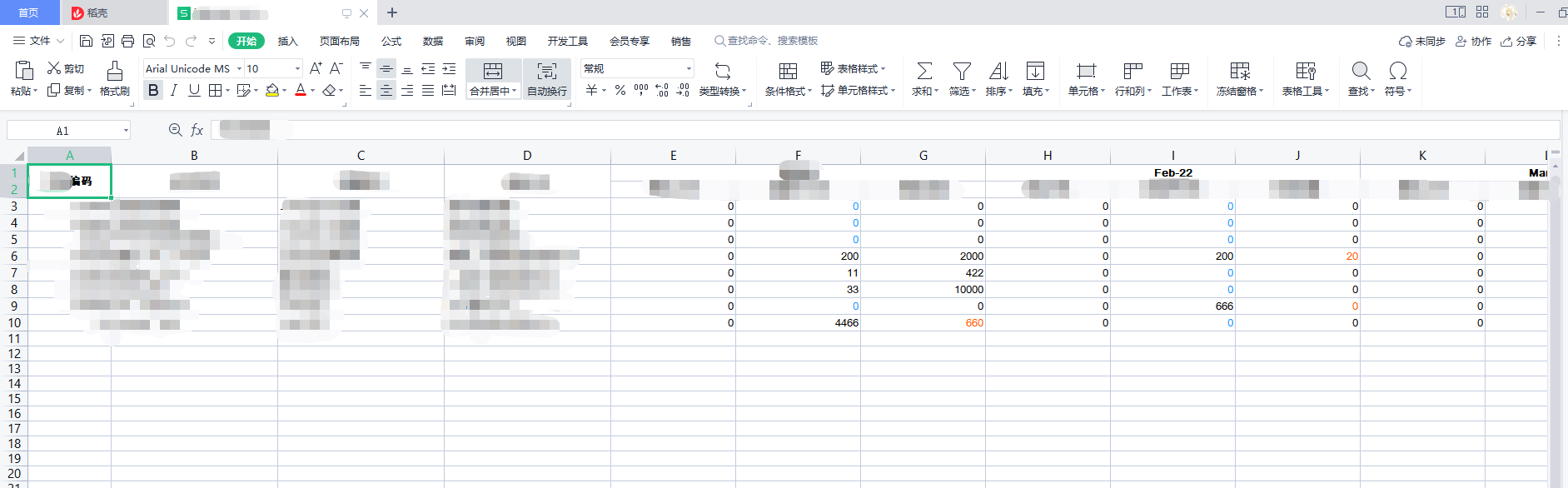
【ps】:因为YYYY-MM格式的表头数据会在导出时自动转格式(如上图),因此可以在表头处理时手动转为【YYYY年MM月】的格式避免此类情况。

参考文档:https://blog.csdn.net/weixin_44240581/article/details/115265810
这两个依赖的配置项很接近,肉眼可以明确属性名的含义,不做赘述。
react+antd 导出excel文件(简单数据&多级表头)的更多相关文章
- POI导出大量数据的简单解决方案(附源码)-Java-POI导出大量数据,导出Excel文件,压缩ZIP(转载自iteye.com)
说明:我的电脑 2.0CPU 2G内存 能够十秒钟导出 20W 条数据 ,12.8M的excel内容压缩后2.68M 我们知道在POI导出Excel时,数据量大了,很容易导致内存溢出.由于Excel ...
- java POI导出Excel文件数据库的数据
在web开发中,有一个经典的功能,就是数据的导入导出.特别是数据的导出,在生产管理或者财务系统中用的非常普遍,因为这些系统经常要做一些报表打印的工作.这里我简单实现导出Excel文件. POI jar ...
- JavaScript 上万条数据 导出Excel文件(改装版)
最近项目要js实现将数据导出excel文件,网上很多插件实现~~那个开心呀,谁知道后面数据量达到上万条时出问题:浏览器不仅卡死,导出的excel文件一直提示网络失败.... debug调试发现var ...
- JavaScript 上万条数据 导出Excel文件 页面卡死
最近项目要js实现将数据导出excel文件,网上很多插件实现~~那个开心呀,谁知道后面数据量达到上万条时出问题:浏览器不仅卡死,导出的excel文件一直提示网络失败.... debug调试发现var ...
- 纯前端实现数据导出excel文件
一 安装依赖 npm install -S file-saver xlsx npm install -D script-loader 二 新建文件夹 在网上百度引入即可 三 在main.js中引入 ...
- PHP导出excel文件,第一步先实现PHP模板导出不带数据
今天继续研究PHP导出excel文件,把复杂的事情简单化,一步步实现功能,首先实现模板文件的导出,随后再实现写入数据后导出,最终实现功能,这是基本思路.中间可以加一步,先自己写入数据导出试试,随后再数 ...
- 前端必读3.0:如何在 Angular 中使用SpreadJS实现导入和导出 Excel 文件
在之前的文章中,我们为大家分别详细介绍了在JavaScript.React中使用SpreadJS导入和导出Excel文件的方法,作为带给广大前端开发者的"三部曲",本文我们将为大家 ...
- PHPExcel导出excel文件
今天园子刚开,先来个货顶下,后续园丁qing我会再慢慢种园子的,希望大家多来园子逛逛. PHPExcel导出excel文件,先说下重要的参数要记住的东西 impUser() 导入方法 exportEx ...
- asp.net 导出excel文件
之前做过winfrom程序的导出excel文件的功能,感觉非常简单.现在试着做asp.net中导出excel的功能,之前用的是Microsoft.Office.Interop.Excel这个对象来实现 ...
- JQGrid导出Excel文件
系列索引 Web jquery表格组件 JQGrid 的使用 - 从入门到精通 开篇及索引 Web jquery表格组件 JQGrid 的使用 - 4.JQGrid参数.ColModel API.事件 ...
随机推荐
- 【虚拟机】虚拟机安装win10
VMware-workstation 16 pro 点击查看代码 密钥: ZF3R0-FHED2-M80TY-8QYGC-NPKYF YF390-0HF8P-M81RQ-2DXQE-M2UT6 ZF7 ...
- 基于MIPI的高性能成像系统
硬件组件Digilent Genesys ZU × 1 (FPGA平台) Digilent PCAM5 × 1 (MIPI摄像头) 软件组件AMD-Xilinx Vivado 设计套件 介绍从简单的嵌 ...
- matplotlib处理数据可是化的时候出现中文显示异常,为[][]的解决方法
1.在使用matplotlib处理数据实现可是化操作的时候,处于语言习惯,经常会使用中文做图表备注,而中文显示会出现异常,如下图: 中文显示异常 那如何解决呢,实际上我们只需要在代码中添加两行内容即可 ...
- Burpsuite入门之target模块攻防中利用
可以用来收集目标站点的更多资产 可以探测一些自动加载的接口.内容等,有的内容并不能被访问者直接看见,通过抓包的方式就可以一目了然. 1栏中是流量信息,其中包含着你所请求的流量 2栏中是对1栏中内容的一 ...
- 【未完】【DDR系列文章收集】
资料来源 1.https://zhuanlan.zhihu.com/p/343262874 (1)主要讲DRAM刷新的内容: 为什么需要刷新(漏电流导致电容电荷的流失)? 刷新的本质(对存储数据的电容 ...
- mysql问题汇总含解决方案
MySQL,插入数据提示"The table `xxx` is full" 背景:MEMORY引擎,hash索引 解决方法 1. 查看当前设置的table_size show va ...
- firewalld 防火墙centos7
在centos7中iptables已经废弃不用 firewalld命令: 查看所有规则 firewall-cmd --list-all 用命令行 来 允许40ip 访问本机 firewall-cmd ...
- mysql索引 数据库优化
1.mysql索引结构b+树 a.首先要说二叉树,二叉查找树,数的结构不用多说,二叉查找树,大概就是几个原则,左边比右边的小,然后保持一个分布均匀,也就是树的高度尽量最小. b.b-树,b-树和二叉查 ...
- Ingress限流
先说结论: ingress节点数量=n0 ingress限流配置 nginx.ingress.kubernetes.io/limit-rps: "n1" nginx.ingre ...
- 多线程学习(第二天)Java内存模型
一.内存模型基础 Java的并发采用的是共享内存模型,Java线程之间的通信总是隐式进行,整个通信过程对程序员完全透明. 如果编写多线程程序的Java程序员不理解隐式进行的线程之间通信的工作机制,很可 ...