
FPGA:乒乓球比赛模拟机的设计
简介
开发板:EGO1
开发环境:Windows10 + Xilinx Vivado 2020
数字逻辑大作业题目 7: 乒乓球比赛模拟机的设计
乒乓球比赛模拟机用发光二极管(LED)模拟乒乓球运动轨迹,是由甲乙双方参赛,加上裁判的三人游戏(也可以不用裁判)。
管脚约束代码:
点击查看代码
set_property IOSTANDARD LVCMOS33 [get_ports CLK]

set_property IOSTANDARD LVCMOS33 [get_ports hitA]

set_property IOSTANDARD LVCMOS33 [get_ports hitB]

set_property PACKAGE_PIN P17 [get_ports CLK]

set_property PACKAGE_PIN P5 [get_ports hitA]

set_property PACKAGE_PIN R1 [get_ports hitB]

set_property IOSTANDARD LVCMOS33 [get_ports {ballLocation[5]}]

set_property IOSTANDARD LVCMOS33 [get_ports {ballLocation[4]}]

set_property IOSTANDARD LVCMOS33 [get_ports {ballLocation[0]}]

set_property IOSTANDARD LVCMOS33 [get_ports {ballLocation[3]}]

set_property IOSTANDARD LVCMOS33 [get_ports {ballLocation[2]}]

set_property IOSTANDARD LVCMOS33 [get_ports {ballLocation[1]}]

set_property IOSTANDARD LVCMOS33 [get_ports {ballLocation[7]}]

set_property IOSTANDARD LVCMOS33 [get_ports {ballLocation[6]}]

set_property PACKAGE_PIN F6 [get_ports {ballLocation[7]}]

set_property PACKAGE_PIN G4 [get_ports {ballLocation[6]}]

set_property PACKAGE_PIN G3 [get_ports {ballLocation[5]}]

set_property PACKAGE_PIN J4 [get_ports {ballLocation[4]}]

set_property PACKAGE_PIN H4 [get_ports {ballLocation[3]}]

set_property PACKAGE_PIN J3 [get_ports {ballLocation[2]}]

set_property PACKAGE_PIN J2 [get_ports {ballLocation[1]}]

set_property PACKAGE_PIN K2 [get_ports {ballLocation[0]}]

set_property IOSTANDARD LVCMOS33 [get_ports speedA]

set_property PACKAGE_PIN P4 [get_ports speedA]

set_property IOSTANDARD LVCMOS33 [get_ports speedB]

set_property PACKAGE_PIN N4 [get_ports speedB]

set_property IOSTANDARD LVCMOS33 [get_ports {statusOut[3]}]

set_property IOSTANDARD LVCMOS33 [get_ports {statusOut[2]}]

set_property IOSTANDARD LVCMOS33 [get_ports {statusOut[1]}]

set_property PACKAGE_PIN K1 [get_ports {statusOut[3]}]

set_property PACKAGE_PIN H6 [get_ports {statusOut[2]}]

set_property PACKAGE_PIN M1 [get_ports {statusOut[1]}]

set_property PACKAGE_PIN K3 [get_ports {statusOut[0]}]

set_property IOSTANDARD LVCMOS33 [get_ports {statusOut[0]}]

set_property IOSTANDARD LVCMOS33 [get_ports {LED1[5]}]

set_property IOSTANDARD LVCMOS33 [get_ports {LED0[0]}]

set_property IOSTANDARD LVCMOS33 [get_ports {LED0[3]}]

set_property IOSTANDARD LVCMOS33 [get_ports {LED1[2]}]

set_property IOSTANDARD LVCMOS33 [get_ports {LED0[6]}]

set_property IOSTANDARD LVCMOS33 [get_ports {LEDBit[1]}]

set_property IOSTANDARD LVCMOS33 [get_ports {LEDBit[4]}]

set_property IOSTANDARD LVCMOS33 [get_ports {LEDBit[7]}]

set_property IOSTANDARD LVCMOS33 [get_ports {LED1[6]}]

set_property IOSTANDARD LVCMOS33 [get_ports {LED0[1]}]

set_property IOSTANDARD LVCMOS33 [get_ports {LED1[3]}]

set_property IOSTANDARD LVCMOS33 [get_ports {LED0[4]}]

set_property IOSTANDARD LVCMOS33 [get_ports {LED0[7]}]

set_property IOSTANDARD LVCMOS33 [get_ports {LED1[0]}]

set_property IOSTANDARD LVCMOS33 [get_ports {LEDBit[2]}]

set_property IOSTANDARD LVCMOS33 [get_ports {LEDBit[0]}]

set_property IOSTANDARD LVCMOS33 [get_ports {LEDBit[5]}]

set_property IOSTANDARD LVCMOS33 [get_ports {LED1[4]}]

set_property IOSTANDARD LVCMOS33 [get_ports {LED0[2]}]

set_property IOSTANDARD LVCMOS33 [get_ports {LED0[5]}]

set_property IOSTANDARD LVCMOS33 [get_ports {LED1[1]}]

set_property IOSTANDARD LVCMOS33 [get_ports {LEDBit[3]}]

set_property IOSTANDARD LVCMOS33 [get_ports {LEDBit[6]}]

set_property IOSTANDARD LVCMOS33 [get_ports {LED1[7]}]

set_property PACKAGE_PIN B4 [get_ports {LED0[0]}]

set_property PACKAGE_PIN A4 [get_ports {LED0[1]}]

set_property PACKAGE_PIN A3 [get_ports {LED0[2]}]

set_property PACKAGE_PIN B1 [get_ports {LED0[3]}]

set_property PACKAGE_PIN A1 [get_ports {LED0[4]}]

set_property PACKAGE_PIN B3 [get_ports {LED0[5]}]

set_property PACKAGE_PIN B2 [get_ports {LED0[6]}]

set_property PACKAGE_PIN D5 [get_ports {LED0[7]}]

set_property PACKAGE_PIN D4 [get_ports {LED1[0]}]

set_property PACKAGE_PIN E3 [get_ports {LED1[1]}]

set_property PACKAGE_PIN D3 [get_ports {LED1[2]}]

set_property PACKAGE_PIN F4 [get_ports {LED1[3]}]

set_property PACKAGE_PIN F3 [get_ports {LED1[4]}]

set_property PACKAGE_PIN E2 [get_ports {LED1[5]}]

set_property PACKAGE_PIN D2 [get_ports {LED1[6]}]

set_property PACKAGE_PIN H2 [get_ports {LED1[7]}]

set_property PACKAGE_PIN G2 [get_ports {LEDBit[0]}]

set_property PACKAGE_PIN C2 [get_ports {LEDBit[1]}]

set_property PACKAGE_PIN C1 [get_ports {LEDBit[2]}]

set_property PACKAGE_PIN H1 [get_ports {LEDBit[3]}]

set_property PACKAGE_PIN G1 [get_ports {LEDBit[4]}]

set_property PACKAGE_PIN F1 [get_ports {LEDBit[5]}]

set_property PACKAGE_PIN E1 [get_ports {LEDBit[6]}]

set_property PACKAGE_PIN G6 [get_ports {LEDBit[7]}]

set_property IOSTANDARD LVCMOS33 [get_ports reset]

set_property PACKAGE_PIN P2 [get_ports reset]
设计要求
- 主要功能
- 模拟乒乓球比赛,用发光二极管(LED)模拟乒乓球运动轨迹,由甲乙双方参赛;
- 用8个LED灯表示球桌,其中点亮的LED来回移动表示乒乓球的运动,球速可以调节;
- 当球移动到最左侧或最右侧时,表示一方的击球位置。如果提前击球,或未及时击球,则对方得一分;
- 甲乙得分使用数码管计分,一局11球;
- 用发光二极管表示甲乙的发球权,每5分交换发球权。
- 附加功能
- 用发光二极管提示甲乙的接球和发球;
- 比赛结束后,用数码管动态显示胜利的一方。
工作原理
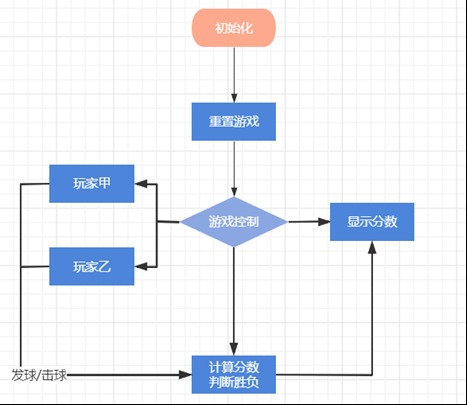
本电路由时钟分频模块,玩家控制器模块,分数处理模块,游戏控制模块,乒乓球运动控制模块和数码管显示模块组成。
- 比赛开始前,可以通过reset开关重置比赛;
- 比赛进行时,甲乙两位选手通过扳动开关来实现挥动球拍和控制球速的效果。当乒乓球到击球位置时,若选手未及时击球,或提前击球,则输掉一球,对方加一分。每打5球,就交换一次球权,共打11球,数码管上会显示当前得分,分高者获胜;
- 比赛结束后,数码管会显示箭头来表示一方的获胜;
- 另外还有4个LED来表示双方的发球和接球。
- 系统方框图:
各部分模块具体功能及设计思路
游戏控制器模块
- 模块功能:控制整个模拟器各组件状态;
- 设计思路:该模块主要是用于控制比赛的进行。在设计中,使用status表示当前的比赛状态。010表示A发球,001表示B发球,110表示玩家A接球,101表示玩家B接球。这样的规定能够有效区分乒乓球不同的运动状态,并判定发/击球的有效性,同时显示在LED灯上来提示选手。另外再用accurateBallLocation [32:0]来表示球的精确位置,范围为$1000_{10} - 9000_{10} $,这样使球在LED显示的误差范围内,可以被击中。
- 代码:
点击查看代码
`timescale 1ns / 1ps

module GameController(  //全局状态控制器

    input CLK,

    input reg hitA, //玩家A输入

    input [1: 0] speedA, //玩家A速度

    input reg hitB,  //玩家B输入

    input [1: 0] speedB,  //玩家B速度

    input reg serviceSide, //发球方

    input reg reset,    //重置

    output reg [2: 0] status, //全局状态

    output reg [7: 0] ballLocation, //球位置

    output reg getScoreA,   //A得分

    output reg getScoreB    //B得分

    );

    reg hitATrigger;

    reg hitBTrigger;

    reg [2: 0] speed;

    reg [15: 0] accurateBallLocation;

    reg resetTrigger;

    // reg serviceSide;

    initial begin   //初始化变量

        hitATrigger = 'b0;

        hitBTrigger = 'b0;

        status = 'b010;

        accurateBallLocation = 'd2000;

        speed = 'd2;

        // serviceSide = 'b0;

        getScoreA = 'b0;

        getScoreB = 'b0;

        resetTrigger = 'b0;

    end

    always @(posedge CLK) begin     //根据报告所述转换状态

        if(resetTrigger == 'b0 && reset == 'b1) begin

            hitATrigger = 'b0;

            hitBTrigger = 'b0;

            status = 'b010;

            accurateBallLocation = 'd2000;

            speed = 'd2;

            // serviceSide = 'b0;

            getScoreA = 'b0;

            getScoreB = 'b0;

        end

        else begin

            if(status == 'b010 || status == 'b001) begin//换发球

                status = serviceSide == 'b0 ? 'b010 : 'b001;

                getScoreA = 'b0;

                getScoreB = 'b0;

            end

            if(status == 'b010) begin //A发球

                accurateBallLocation = 'd2000;

                if(hitATrigger == 'b0 && hitA == 'b1) begin

                    status = 'b101;

                    if(speedA == 'd00) speed = 'd2;

                    else speed = 'd4;

                end

                hitATrigger = hitA;

            end

            else if(status == 'b001) begin //B发球

                accurateBallLocation = 'd10000;

                if(hitBTrigger == 'b0 && hitB == 'b1) begin

                    status = 'b110;

                    if(speedB == 'd00) speed = 'd2;

                    else speed = 'd4;

                end

                hitBTrigger = hitB;

            end

            else if(status == 'b110) begin //A接球

                if(hitATrigger == 'b0 && hitA == 'b1) begin

                    if(accurateBallLocation >= 'd1000 && accurateBallLocation <= 'd3000) begin

                        status = 'b101;

                        if(speedA == 'd00) speed = 'd2;

                        else speed = 'd4;

                    end

                end

                hitATrigger = hitA;

                if(accurateBallLocation < 'd500) begin

                    getScoreB = 'b1;

                    status = serviceSide == 'b0 ? 'b010 : 'b001;

                end

                accurateBallLocation -= speed * 'd3;

            end

            else if(status == 'b101) begin //B接球

                if(hitBTrigger == 'b0 && hitB == 'b1) begin

                    if(accurateBallLocation >= 'd9000 && accurateBallLocation <= 'd11000) begin

                        status = 'b110;

                        if(speedB == 'd00) speed = 'd2;

                        else speed = 'd4;

                    end

                end

                hitBTrigger = hitB;

                if(accurateBallLocation >'d11500) begin

                    getScoreA = 'b1;

                    status = serviceSide == 'b0 ? 'b010 : 'b001;

                end

                accurateBallLocation += speed * 'd3;

            end

        end

        resetTrigger = reset;

        if(accurateBallLocation >= 'd2000 && accurateBallLocation < 'd3000) ballLocation = 'b10000000;//球的位置显示

        if(accurateBallLocation >= 'd3000 && accurateBallLocation < 'd4000) ballLocation = 'b01000000;

        if(accurateBallLocation >= 'd4000 && accurateBallLocation < 'd5000) ballLocation = 'b00100000;

        if(accurateBallLocation >= 'd5000 && accurateBallLocation < 'd6000) ballLocation = 'b00010000;

        if(accurateBallLocation >= 'd6000 && accurateBallLocation < 'd7000) ballLocation = 'b00001000;

        if(accurateBallLocation >= 'd7000 && accurateBallLocation < 'd8000) ballLocation = 'b00000100;

        if(accurateBallLocation >= 'd8000 && accurateBallLocation < 'd9000) ballLocation = 'b00000010;

        if(accurateBallLocation >= 'd9000 && accurateBallLocation <= 'd10000) ballLocation = 'b00000001;

    end

endmodule
玩家控制模块
模块功能:控制玩家输入与接发球操作;
设计思路:在设计电路中规定了使能端EN,玩家只有在轮到自己发/击球时才有效;并规定了击球的间隔,模拟了击空的情况。除此之外还设计实现了玩家击球速度的选择。
代码:
点击查看代码
`timescale 1ns / 1ps

module Player(CLK, EN, hit, speed, hitOut, speedOut);

    input CLK, EN, hit, speed;

    output reg hitOut;

    output reg [1: 0] speedOut;

    reg [31: 0] activeInterval = 'd1000;    //一个下降沿到下一个上升沿直接最小时间间隔

    reg [31: 0] interval;

    reg hitTrigger;

    initial begin

        interval = 'd0;

        hitTrigger = 'b0;

        hitOut = 'b0;

        speedOut = 'b1;

    end

    always @(posedge CLK) begin

        if(EN == 'b1) begin

            if(hitTrigger =='b0 && hit == 'b1) begin

                if(interval >= activeInterval) begin

                    hitOut = hit;

                end

            end

            else if(hitTrigger == 'b1 && hit == 'b0) begin

                interval = 'd0;

                hitOut = hit;

            end

            hitTrigger = hit;

            interval += 1;

            if(speed == 'b0) begin

                speedOut = 'd00;

            end

            else begin

                speedOut = 'd01;

            end

        end

    end

endmodule
时钟分频模块
模块功能:对时钟分频;
设计思路:将EG01的100MHZ的时钟分频为1000HZ。
代码:
点击查看代码
`timescale 1ns / 1ps

module ClockDivider(originCLK, dividedCLK);

    input originCLK;

    output dividedCLK;

    reg tempDivCLK;

    reg [31: 0] count;

    // reg [31: 0] ratio = 'd2;

    reg [31: 0] ratio = 'd100_000;  //时钟分频器,将P17的100MHz分为1000Hz

    initial begin

        tempDivCLK = 'b0;

        count = 'd0;

    end

    always @(posedge originCLK) begin

        count = count + 1;

        if(count == ratio)

            count = 'd0;

        if(count == 'd0)

            tempDivCLK = 'b0;

        if(count == ratio / 2)

            tempDivCLK = 'b1;

    end

    assign dividedCLK = tempDivCLK;

endmodule
乒乓球控制模块
模块功能:接受信号控制乒乓球从左向右移动,或者从右向左移动,并且可以根据玩家选择的击球速度去调整;
设计思路:用8个LED模拟,点亮的灯表示球的位置,然后像流水灯一样来回滚动,在发球时暂停。
代码:这里实际上包括在了游戏控制,下面代码是调用其他的Main。
点击查看代码
`timescale 1ns / 1ps

module Main(

    input CLK,

    input hitA,

    input speedA,

    input hitB,

    input speedB,

    input reset,

    output reg [3: 0] statusOut,

    output wire [7: 0] ballLocation,

    output wire [7:0] LED0,

    output wire [7:0] LED1,

    output wire [7:0] LEDBit

    );

    wire [2: 0] status;

    wire dividedCLK;

    wire [1: 0] speedOutA;

    wire [1: 0] speedOutB;

    wire getScoreA, getScoreB;

    ClockDivider clockDivider(CLK, dividedCLK);

    wire serviceSide;

    reg EnA;

    reg EnB;

    initial begin

        EnA = 'b1;

        EnB = 'b1;

    end

    Player player1(dividedCLK, EnA, hitA, speedA, hitOutA, speedOutA);

    Player player2(dividedCLK, EnB, hitB, speedB, hitOutB, speedOutB);

    GameController gameController(  //调用全局状态控制器

        dividedCLK,

        hitOutA,

        speedOutA,

        hitOutB,

        speedOutB,

        serviceSide,

        reset,

        status,

        ballLocation,

        getScoreA,

        getScoreB

    );

    always @(posedge dividedCLK) begin

        if(status == 'b010) begin

            statusOut = 'b1000;

        end

        else if(status == 'b001) begin

            statusOut = 'b0001;

        end

        else if(status == 'b110) begin

            statusOut = 'b0100;

        end

        else if(status == 'b101) begin

            statusOut = 'b0010;

        end

    end

    reg [7:0][7:0] dataIn;

    reg [31:0] count;

    initial begin

        count = 'd0;

        while(count < 8) begin

            dataIn[count] = 'd100;

            count ++;

        end

        count = 'd0;

    end

    DigitalTubeDriver digitalTubeDriver(    //调用数码管驱动

        dividedCLK,

        dataIn,

        LED0,

        LED1,

        LEDBit

    );

    wire endGame;

    wire [1:0] winner;

    wire [15: 0] scoreA;

    wire [15: 0] scoreB;

    ScoreBoard scoreBoard(

        dividedCLK,

        getScoreA,

        getScoreB,

        reset,

        serviceSide,

        endGame,

        winner,

        scoreA,

        scoreB

    );

    reg [7:0] i;

    reg [7:0] j;

    reg [31:0] countTemp;

    reg [31:0] countTemp2;

    reg resetTrigger;

    reg [31: 0] flowLightCount;

    reg endGameTrigger;

    initial begin

        resetTrigger = 'b0;

        flowLightCount = 'd0;

        endGameTrigger = 'd0;

    end

    always @(posedge dividedCLK) begin

        if(resetTrigger == 'b0 && reset == 'b1) begin

            EnA = 'b1;

            EnB = 'b1;

            dataIn[2] = 'd100;//不显示

            dataIn[3] = 'd100;

            dataIn[4] = 'd100;

            dataIn[5] = 'd100;

            endGameTrigger = 'd0;

        end

        resetTrigger = reset;

        i = 'd0;

        countTemp = scoreB;

        while(i < 'd2) begin

            dataIn[i] = countTemp % 'd10;

            countTemp /= 'd10;

            i++;

        end

        j = 'd6;

        countTemp2 = scoreA;

        while(j < 'd8) begin

            dataIn[j] = countTemp2 % 'd10;

            countTemp2 /= 'd10;

            j++;

        end

        if(endGame == 'b1) begin    //游戏结束时显示箭头指向赢的玩家

            if(endGameTrigger == 'b0) begin

                EnA = 'b0;

                EnB = 'b0;

            end

            if(winner == 'b10) begin

                case(flowLightCount)

                    'd100: dataIn[2] = 'd22;//箭头

                    'd200: dataIn[3] = 'd22;

                    'd300: dataIn[4] = 'd22;

                    'd400: dataIn[5] = 'd22;

                endcase

                flowLightCount++;

                if(flowLightCount == 'd500) begin

                    flowLightCount = 'd0;

                    dataIn[2] = 'd100;

                    dataIn[3] = 'd100;

                    dataIn[4] = 'd100;

                    dataIn[5] = 'd100;

                end

            end

            else begin

                case(flowLightCount)

                    'd100: dataIn[5] = 'd21;//箭头

                    'd200: dataIn[4] = 'd21;

                    'd300: dataIn[3] = 'd21;

                    'd400: dataIn[2] = 'd21;

                endcase

                flowLightCount++;

                if(flowLightCount == 'd500) begin

                    flowLightCount = 'd0;

                    dataIn[2] = 'd100;

                    dataIn[3] = 'd100;

                    dataIn[4] = 'd100;

                    dataIn[5] = 'd100;

                end

            end

        end

        endGameTrigger = endGame;

    end

endmodule
分数处理模块
模块功能:计数。每进行一轮控制分数加1,判断是否已打够11球,是则判别出获胜方。
设计思路:在A,B两人分数上升沿时,对总分加1,然后判断是否已满11球。若满11球,比较判断出胜利的一方,随后将其状态传给显示模块用于显示结果。
代码:
点击查看代码
`timescale 1ns / 1ps

module ScoreBoard(

    input CLK,

    input getScoreA,

    input getScoreB,

    input reset,

    output reg serviceSide,

    output reg endGame,

    output reg [1:0] winner,

    output reg [15: 0] scoreA,

    output reg [15: 0] scoreB

    );

    reg getScoreATrigger;

    reg getScoreBTrigger;

    reg resetTrigger;

    initial begin

        serviceSide = 'b0;

        endGame = 'b0;

        getScoreATrigger = 'b0;

        getScoreBTrigger = 'b0;

        scoreA = 'b0;

        scoreB = 'b0;

        resetTrigger = 'b0;

    end

    always @(posedge CLK) begin

        if(resetTrigger == 'b0 && reset == 'b1) begin

            serviceSide = 'b0;

            endGame = 'b0;

            getScoreATrigger = 'b0;

            getScoreBTrigger = 'b0;

            scoreA = 'b0;

            scoreB = 'b0;

        end

        else begin  //getScoreA或getScoreB出现上升沿,对应玩家得分

            if(getScoreATrigger == 'b0 && getScoreA == 'b1)

                scoreA ++;

            if(getScoreBTrigger == 'b0 && getScoreB == 'b1)

                scoreB ++;

            getScoreATrigger = getScoreA;

            getScoreBTrigger = getScoreB;

            if((scoreA + scoreB) / 5 % 2 == 'd0)    //每5个球换发

                serviceSide = 'b0;

            else

                serviceSide = 'b1;

            if(scoreA + scoreB == 'd11) //到达11个球时游戏结束

                endGame = 'b1;

            if(endGame == 1) begin  //游戏结束时判断赢的那方

                if(scoreA > scoreB)

                winner = 'b10;

                else if(scoreA < scoreB)

                winner = 'b01;

                else

                winner = 'b11;

            end

            else begin

                winner = 'b00;

            end

        end

        resetTrigger = reset;

    end

endmodule
数码管显示模块
模块功能:利用数码管显示比赛数据;
设计思路:使用$ 8 * 8 $的矩阵显示每个数码管的显示情况,另外设有对每个数码管表示显示的标志,从而动态地去更新。在有一方获胜后,会将不显示分数的数码管动态地闪烁箭头,以此来表示获胜的一方。
代码:
点击查看代码
`timescale 1ns / 1ps

//参考EGO1的数码管显示模块

module DigitalTubeDriver(   //数码管驱动

    input CLK,

    input reg [7:0][7:0] dataIn,    //输入数据

    output reg [7:0] LED0,  //输出的LED0,管理前4位显示

    output reg [7:0] LED1,  //输出的LED1,管理后4位显示

    output reg [7:0] LEDBit //LEDBIT,管理每个亮或不亮

    );

    reg [3:0] count;

    wire [7:0] data0;

    initial begin

        LEDBit = 'b00000001;

        count = 'd0;

    end

    // assign LED1 = LED0;

    always @(posedge CLK) begin

        case(dataIn[count]) //检查每种数字或符号对应亮哪些边

            'd0: LED0 = 'b00111111;

            'd1: LED0 = 'b00000110;

            'd2: LED0 = 'b01011011;

            'd3: LED0 = 'b01001111;

            'd4: LED0 = 'b01100110;

            'd5: LED0 = 'b01101101;

            'd6: LED0 = 'b01111101;

            'd7: LED0 = 'b00000111;

            'd8: LED0 = 'b01111111;

            'd9: LED0 = 'b01101111;

            'd21: LED0 = 'b01110000;

            'd22: LED0 = 'b01000110;

            default: LED0 = 'b00000000;

        endcase

        if(count == 'd7) begin

            count = 'd0;

            LEDBit = 'b00000001;

        end

        else if(count == 'd0) begin

            LEDBit = 'b10000000;

            count = 'd1;

        end

        else begin

            count++;

            LEDBit = LEDBit >> 1;

        end

        LED1 = LED0;

    end

endmodule
参考文献
[1] Vivado环境下多个并行的仿真测试文件如何支持单独仿真。
https://blog.csdn.net/CDCL19_220327/article/details/125802252?spm=1001.2014.3001.5502
[2] Vivado里程序固化详细教程。
https://blog.csdn.net/sinat_15674025/article/details/84535754?spm=1001.2014.3001.5502
[3] xilinx vivado 自带仿真工具xsim信号为蓝色Z态的解决办法。
https://blog.csdn.net/Shawge/article/details/107592471?spm=1001.2014.3001.5502
[4] Vivado环境下多个并行的仿真测试文件如何支持单独仿真?
https://blog.csdn.net/CDCL19_220327/article/details/125802252?spm=1001.2014.3001.5502
FPGA:乒乓球比赛模拟机的设计的更多相关文章
- 基于FPGA的XPT2046触摸控制器设计
基于FPGA的XPT2046触摸控制器设计 小梅哥编写,未经许可,文章内容和所涉及代码不得用于其他商业销售的板卡 本实例所涉及代码均可通过向 xiaomeige_fpga@foxmail.com 发 ...
- 基于FPGA的SPI FLASH控制器设计
1.SPI FLASH的基本特征 本文实现用FPGA来设计SPI FLASH,FLASH型号为W25Q128BV.支持3种通信方式,SPI.Dual SPI和Quad SPI.FLASH的存储单元无法 ...
- Xilinx FPGA控制器的Everspin STT-DDR4设计指南
自旋转移扭矩磁阻随机存取存储器(STT-MRAM)是一种持久性存储技术,可利用各种工业标准接口提供性能,持久性和耐用性. Everspin推出了STT-MRAM产品,该产品利用称为JE-DDR4的JE ...
- 利用UltraScale和UltraScale+FPGA和MPSOC加速DSP设计生产力
利用UltraScale和UltraScale+FPGA和MPSOC加速DSP设计生产力 Accelerating DSP Design Productivity with UltraScale an ...
- 012 基于FPGA的网口通信实例设计【转载】
一.网口通信设计分类 通过上面其他章节的介绍,网口千兆通信,可以使用TCP或者UDP协议,可以外挂PHY片或者不挂PHY片,总结下来就有下面几种方式完成通信: 图8‑17基于FPGA的网口通信实例设计 ...
- 玩转Java多线程(乒乓球比赛)
转载请标明博客的地址 本人博客和github账号,如果对你有帮助请在本人github项目AioSocket上点个star,激励作者对社区贡献 个人博客:https://www.cnblogs.com/ ...
- 基于FPGA的1553B通信模块的设计(转)
reference:http://www.21ic.com/app/eda/201808/798483.htm https://www.milstd1553.com/ [导读] 摘 要: 提出一种将F ...
- FPGA的时钟质量对设计的影响
小梅哥编写,未经许可严禁用于任何商业用途 近期,一直在调试使用Verilog编写的以太网发送摄像头数据到电脑的工程(以下简称以太网图传).该工程基于今年设计的一款FPGA教学板AC620.AC620上 ...
- FPGA基础学习(9) -- 复位设计
目录 1. 常见问题 2. 常见的复位方式 3. 合理的复位设计 3.1 复位电平 3.2 异步复位同步化 3.3 恰到好处的复位 4. 补充 4.1 所谓的上电初始化 参考文献 一开始接触到FPGA ...
- [FPGA] Verilog 燃气灶控制器的设计与实现
燃气灶控制器的设计与实现 一.引述 本次实验所用可编程器件型号为MAXII EPM1270T144C5(其引脚表见本人另一博文:可编程实验板EPM1270T144C5使用说明),通过可编程实验板实现一 ...
随机推荐
- KubeEdge 1.12版本发布,稳定性、安全性、可扩展性均带来大幅提升
摘要:2022年9月29日,KubeEdge发布1.12版本.新版本新增多个增强功能,在扩展性.稳定性.安全性上均有大幅提升. 本文分享自华为云社区<KubeEdge 1.12版本发布,稳定性. ...
- 7.RabbitMQ系列之topic主题交换器
topic主题交换器它根据在队列绑定的路由键和路由模式通配符匹配将消息路由到队列. 生产者在消息头中添加路由键并将其发送到主题交换器. 收到消息后,exchange尝试将路由键与绑定到它的所有队列的绑 ...
- uoj221【NOI2016】循环之美
前面部分比较简单,就是无脑化式子,简单点讲好了. 首先肯定在\((x,y)=1\)时才考虑这个分数,要求纯循环的话,不妨猜猜结论,就是y必须和K互质.所以答案是\(\sum_{i=1}^n \sum_ ...
- 41.SessionAuthenticatio和自定义认证
SessionAuthentication认证介绍 SessionAuthentication使用了Django默认的会话后端 适合AJAX客户端等运行在同样会话上下文环境中的模式 是DRF默认的认证 ...
- python导包
我们将完成特定功能的代码块放在一个.py结尾的文件中,这个文件被称为模块.在这个模块中可能包含变量,函数,类等等内容. 当我们从外部需要用到这个模块时,就需要将这个模块导入到我们当前环境.导入方式有以 ...
- 题解 UVA439 骑士的移动 Knight Moves
前言 最近板子题刷多了-- 题意 一个 \(8\times 8\) 的棋盘,问马从起点到终点的最短步数为多少. \(\sf Solution\) 要求最短路径嘛,显然 bfs 更优. 读入 这个读入处 ...
- 二、docker安装
一.docker安装 Docker 是管理容器的工具, Docker 不等于 容器. 1.1.docker yum源设置 #step 1 download docker-ce.repo file [r ...
- letcode刷题记录-day03-罗马转整数
题目 罗马转整数 题目描述 罗马数字包含以下七种字符: I, V, X, L,C,D 和 M. 字符 数值 I 1 V 5 X 10 L 50 C 100 D 500 M 1000 例如, 罗马数字 ...
- Docker基础和常用命令
Docker基础和常用命令 一,Docker 简介 1.1,什么是 Docker Docker 使用 Google 公司推出的 Go 语言 进行开发实现,基于 Linux 内核的 cgroup,nam ...
- 3.JS
1.简介 JavaScript 因为互联网而生,紧随着浏览器的出现而问世 1997年7月,ECMAScript 1.0发布. 1998年6月,ECMAScript 2.0版发布. 1999年12月,E ...