
SAP Using Text Modules in Adobe Forms
In this demo we will create an adobe form which displays text in two different languages (English or French) based on the given condition. This functionality is achieved by using TEXT MODULES in adobe forms.
Step1: Go to transaction SFP and create an interface for the Adobe form.
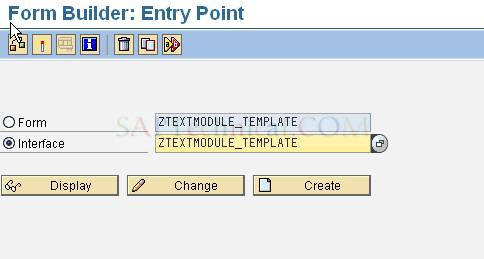
Note: Maintain Interface type ABAP-Dictionary Base interface. (IN ECC6.0 Version)
Step2: Create an import parameter as shown below:
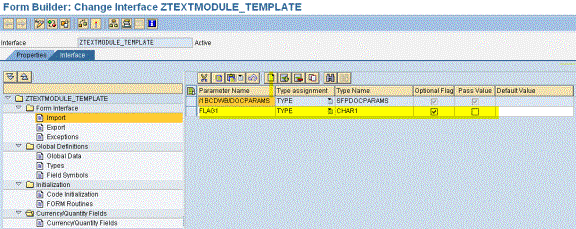
Step3: Save and Activate the interface.
Step4: Now go to transaction Smartforms to create Text Module for the Language Conversion, Select Text Module and Enter Text Module Name & Click on create.

Here, we are converting English text to French text, so we have to enter the French conversion of the English text.
Text 1: TEXT IN ENGLISH.

Click on Save.
Similarly create the text module for text French to English.
Text 2: TEXT IN FRENCH
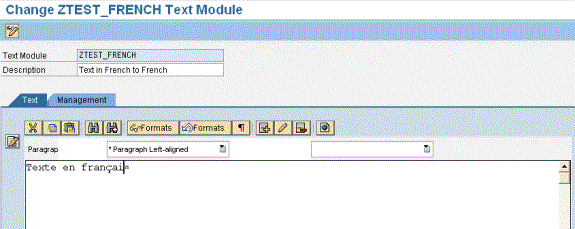
STEP 5: Once the Text modules are created, Go to Transaction SFP to design form builder for the interface ZTEXTMODULE_TEMPLATE.
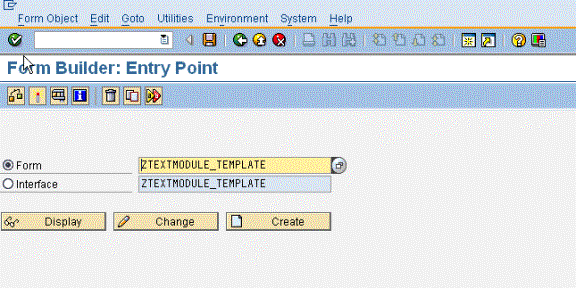
STEP 6: Click on Create.
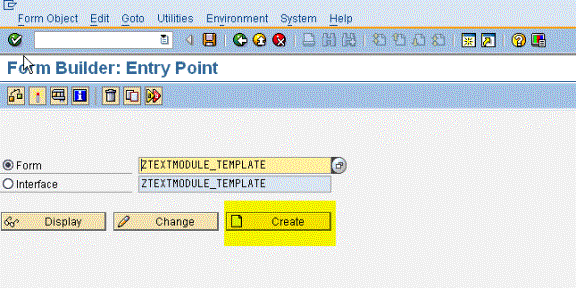
STEP 7:
After clicking on create, the system would prompt you for the Interface name and description.
In Interface Name tab : ZTEXTMODULE_TEMPLATE.
In Description : Form for the Language Conversion.
Now the following screen appears:
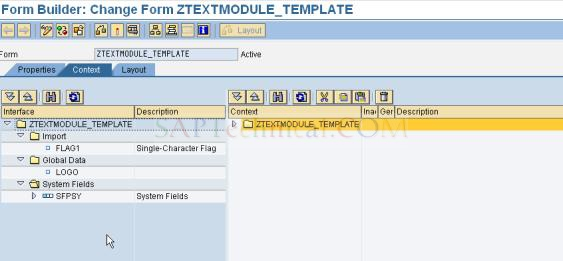
STEP 8:
Right Click on Form name in the context area and create New Folder.
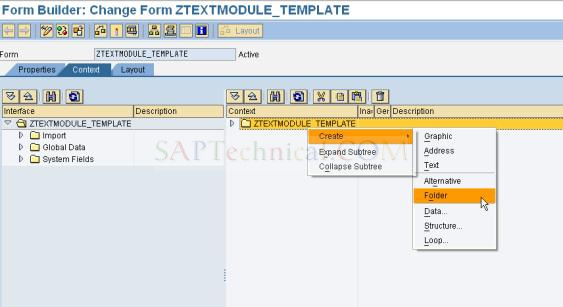
STEP 9:
Drag & Drop Flag1 field from the import part in to the Context area.
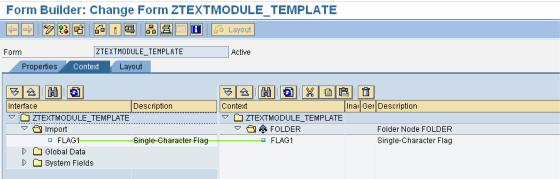
STEP 10:
Right Click on New FOLDER, create three texts for the text modules.
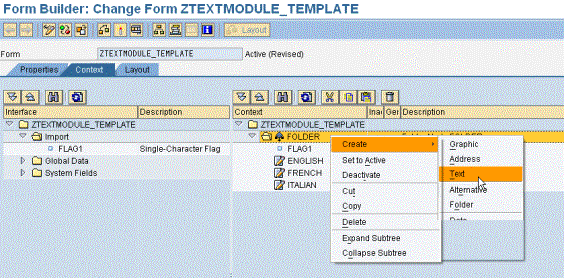
STEP 11:
Double click on the new folder. The following screen appears. Click on Condition

TEP 12:
Double-Click on Text and maintain the properties as shown below.
Description as Convert TEXT INTO ENGLISH into FRENCH
Text Type : Text Module
Text Name : Text Module name (‘ztest_french’)
Text Language : ‘FR’

Repeat the above step for the other texts as well.
STEP 13:
Click on Layout.
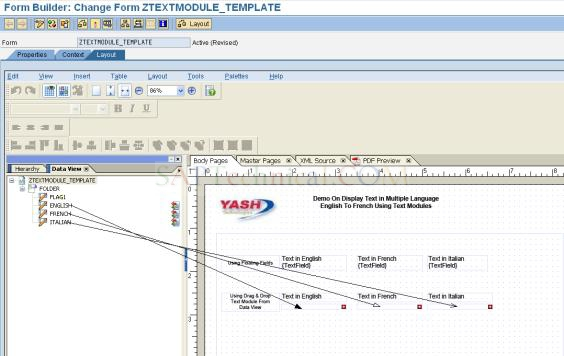
On the left side platter, in data view, we can view all the fields that we defined in the context part. (In this example, flag1 and three texts)
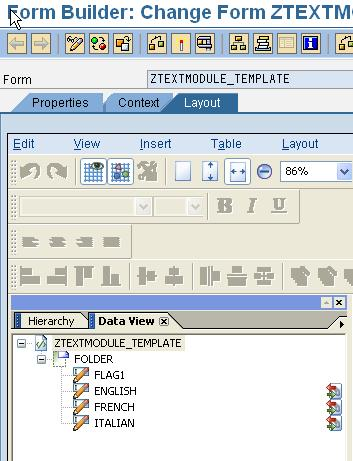
STEP 14:
In our layout, let us also include a logo and some text as well.
Go to Master Page. From Library Palette, insert image field and text into the master page.
Enter text in text field and Enter image in image field and check the checkbox “Embedded image data”.

STEP 15:
Go to Body Page.
Create following three text fields:
- Text in English
- Text in French
- Text in Italian.
Now right click on the text field and select the option “floating fields”.
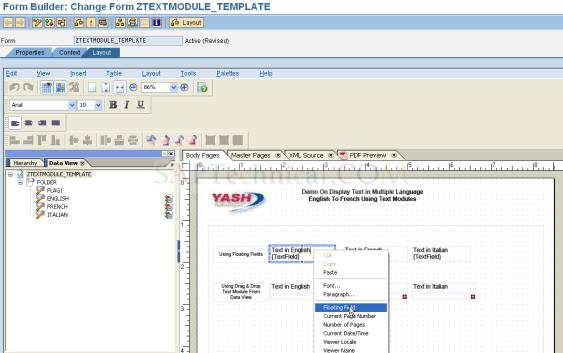
Now we need to do the binding for the text field. Select the text field “Text in English”, Click on palette à click on object àgo to binding tab. Please see the following screenshot for the binding.
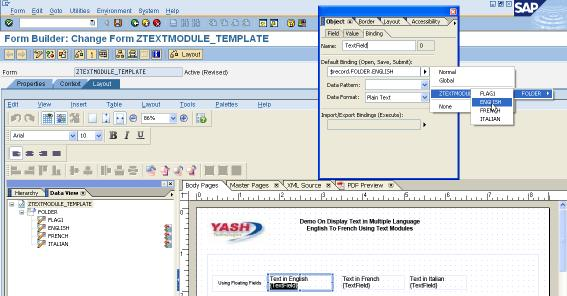
Now repeat the above step for binding the other two text fields.
STEP 15 - 2:
Second way is Drag & Drop from the Data view.
Just below the text field drag & drop the text field from the data view, in this case you don’t have to do the binding, it will assign automatically.
STEP 16:
Click on Save and Activate it.
STEP 17:
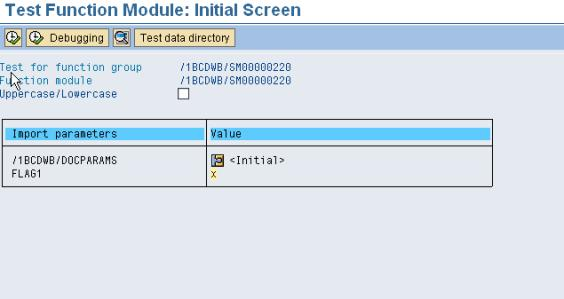
Click on Execute. Assign Value ‘X’ to Flag1. Otherwise it only display in English. If FLAG1 has value ‘X’ than test will display in English & French Both.

SAP Using Text Modules in Adobe Forms的更多相关文章
- An Example Of Validating Text Item In Oracle Forms Using When-Validate-Item Trigger
Example is given below to validate a Text Item in Oracle Forms with specific rules condition which c ...
- Writing Text Files On The Client in Oracle Forms 10g
Below is the example to write file on client in Oracle Forms 10g with webutil library package.Note: ...
- Highlighting Text Item On Entry In Oracle Forms
Highlight a Text Item in Oracle Forms With Visual Attribute It is very necessary to highlight the cu ...
- Xamarin.Forms入门学习路线
Xamarin 介绍 Xamarin是一套跨平台解决方案,目的是使用C#语言创造原生的iOS,Android,Mac和Windows应用. Xamarin的三个优势: Xamarin App拥有原生A ...
- C#通过RFC连接sap系统
先理解一下 RFC(Romote Function Call)远程函数调用 调用前提: 1.要想通过C# 通过RFC调用SAP端,SAP端要存在RFC远程调用的函数才行(例如SAP端通过SE37创建) ...
- Perform Cut Copy Paste Operations Using Cut_Region Copy_Region Paste_Region Commands In Oracle Forms
You can do Select, Cut, Copy and Paste operations on text items in Oracle Forms using Select_All, Cu ...
- Winista.Text.HtmlParser; 获取html
using System;using System.Collections.Generic;using System.ComponentModel;using System.Data;using Sy ...
- create Context Menu in Windows Forms application using C# z
In this article let us see how to create Context Menu in Windows Forms application using C# Introduc ...
- Windows Forms(二)
导读 1.用VS创建一个Windows Forms程序 2.分析上面的程序 3.Mediator pattern(中介者模式) 4.卡UI怎么办——BackgroundWorker组件 用VS创建一个 ...
随机推荐
- 【Hadoop】HBase组件配置
目录 HBase实验步骤: 1.配置时间同步(所有节点) 2.部署HBase(master节点) 3.配置HBase(master节点) 4.拷贝文件到slave节点 5.修改权限,切换用户(所有节点 ...
- 基于Vue的v-charts导出图片并下载
依赖 npm install file-saver 页面 <ve-chart ref="chart"></ve-chart> <el-button t ...
- python基础练习题(题目 矩阵对角线之和)
day25 --------------------------------------------------------------- 实例038:矩阵对角线之和 题目 求一个3*3矩阵主对角线元 ...
- 通俗易懂的ArcGis开发快速入门
前言 本文主要介绍ArcGis的ArcEngine开发,学习时,我们需要放下心里障碍,那就是Gis开发只是普通的软件开发,并不需要专业的GIS知识,就是非常普通的,调用相关的C++开发的COM组件. ...
- Halo 开源项目学习(五):评论与点赞
基本介绍 博客系统中,用户浏览文章时可以在文章下方发表自己的观点,与博主或其他用户进行互动,也可以为喜欢的文章点赞.下面我们一起分析一下 Halo 项目中评论和点赞功能的实现过程. 发表评论 评论可以 ...
- .NET桌面程序应用WebView2组件集成网页开发3 WebView2的进程模型
系列目录 [已更新最新开发文章,点击查看详细] WebView2 运行时使用与 Microsoft Edge 浏览器相同的进程模型. WebView2 运行时中的进程 WebView2 进程组 ...
- GO语言学习——切片二
使用make()函数构造切片 格式: make([]T, size, cap) 其中: T:切片的元素类型 size:切片中元素的数量 cap:切片的容量 切片的本质 切片的本质就是对底层数组的封装, ...
- 从零开始搭建GoLang语言开发环境
更多干货文章,更多最新文章,欢迎到作者主博客 菜鸟厚非 一.安装 GoLang 1.1 下载 首先访问 https://go.dev/dl/ 下载 GoLang,下载完成后双击安装即可.如下: 1.2 ...
- Docker系列教程05-Docker数据卷(Data Volume)学习
引言 在Docker中,容器的数据读写默认发生在容器的存储层,当容器被删除时其上的数据将会丢失.要想实现数据的持久化,需要将数据从宿主机挂载到容器中.目前Docker提供了三种方式将数据从宿主机挂载到 ...
- 零基础学Java第一节(语法格式、数据类型)
本篇文章是<零基础学Java>专栏的第一篇文章,从本篇文章开始,将会连更本专栏,带领大家将Java基础知识彻底学懂,文章采用通俗易懂的文字.图示及代码实战,从零基础开始带大家走上高薪之路! ...