
Python实现随机森林RF并对比自变量的重要性
本文介绍在Python环境中,实现随机森林(Random Forest,RF)回归与各自变量重要性分析与排序的过程。
其中,关于基于MATLAB实现同样过程的代码与实战,大家可以点击查看MATLAB实现随机森林(RF)回归与自变量影响程度分析这篇文章。
本文分为两部分,第一部分为代码的分段讲解,第二部分为完整代码。
1 代码分段讲解
1.1 模块与数据准备
首先,导入所需要的模块。在这里,需要pydot与graphviz这两个相对不太常用的模块,即使我用了Anaconda,也需要单独下载、安装。具体下载与安装,如果同样是在用Anaconda,大家就参考Python pydot与graphviz库在Anaconda环境的配置即可。
import pydot

import numpy as np

import pandas as pd

import scipy.stats as stats

import matplotlib.pyplot as plt

from sklearn import metrics

from openpyxl import load_workbook

from sklearn.tree import export_graphviz

from sklearn.ensemble import RandomForestRegressor
接下来,我们将代码接下来需要用的主要变量加以定义。这一部分大家先不用过于在意,浏览一下继续向下看即可;待到对应的变量需要运用时我们自然会理解其具体含义。
train_data_path='G:/CropYield/03_DL/00_Data/AllDataAll_Train.csv'

test_data_path='G:/CropYield/03_DL/00_Data/AllDataAll_Test.csv'

write_excel_path='G:/CropYield/03_DL/05_NewML/ParameterResult_ML.xlsx'

tree_graph_dot_path='G:/CropYield/03_DL/05_NewML/tree.dot'

tree_graph_png_path='G:/CropYield/03_DL/05_NewML/tree.png'

random_seed=44

random_forest_seed=np.random.randint(low=1,high=230)
接下来,我们需要导入输入数据。
在这里需要注意,本文对以下两个数据处理的流程并没有详细涉及与讲解(因为在写本文时,我已经做过了同一批数据的深度学习回归,本文就直接用了当时做深度学习时处理好的输入数据,因此以下两个数据处理的基本过程就没有再涉及啦),大家直接查看下方所列出的其它几篇博客即可。
初始数据划分训练集与测试集
类别变量的独热编码(One-hot Encoding)
针对上述两个数据处理过程,首先,数据训练集与测试集的划分在机器学习、深度学习中是不可或缺的作用,这一部分大家可以查看Python TensorFlow深度学习回归代码:DNNRegressor的2.4部分,或Python TensorFlow深度神经网络回归:keras.Sequential的2.3部分;其次,关于类别变量的独热编码,对于随机森林等传统机器学习方法而言可以说同样是非常重要的,这一部分大家可以查看Python实现类别变量的独热编码(One-hot Encoding)。
在本文中,如前所述,我们直接将已经存在.csv中,已经划分好训练集与测试集且已经对类别变量做好了独热编码之后的数据加以导入。在这里,我所导入的数据第一行是表头,即每一列的名称。关于.csv数据导入的代码详解,大家可以查看多变量两两相互关系联合分布图的Python绘制的数据导入部分。
# Data import

'''

column_name=['EVI0610','EVI0626','EVI0712','EVI0728','EVI0813','EVI0829','EVI0914','EVI0930','EVI1016',

             'Lrad06','Lrad07','Lrad08','Lrad09','Lrad10',

             'Prec06','Prec07','Prec08','Prec09','Prec10',

             'Pres06','Pres07','Pres08','Pres09','Pres10',

             'SIF161','SIF177','SIF193','SIF209','SIF225','SIF241','SIF257','SIF273','SIF289',

             'Shum06','Shum07','Shum08','Shum09','Shum10',

             'Srad06','Srad07','Srad08','Srad09','Srad10',

             'Temp06','Temp07','Temp08','Temp09','Temp10',

             'Wind06','Wind07','Wind08','Wind09','Wind10',

             'Yield']

'''

train_data=pd.read_csv(train_data_path,header=0)

test_data=pd.read_csv(test_data_path,header=0)
1.2 特征与标签分离
特征与标签,换句话说其实就是自变量与因变量。我们要将训练集与测试集中对应的特征与标签分别分离开来。
# Separate independent and dependent variables

train_Y=np.array(train_data['Yield'])

train_X=train_data.drop(['ID','Yield'],axis=1)

train_X_column_name=list(train_X.columns)

train_X=np.array(train_X)

test_Y=np.array(test_data['Yield'])

test_X=test_data.drop(['ID','Yield'],axis=1)

test_X=np.array(test_X)
可以看到,直接借助drop就可以将标签'Yield'从原始的数据中剔除(同时还剔除了一个'ID',这个是初始数据的样本编号,后面就没什么用了,因此随着标签一起剔除)。同时在这里,还借助了train_X_column_name这一变量,将每一个特征值列所对应的标题(也就是特征的名称)加以保存,供后续使用。
1.3 RF模型构建、训练与预测
接下来,我们就需要对随机森林模型加以建立,并训练模型,最后再利用测试集加以预测。在这里需要注意,关于随机森林的几个重要超参数(例如下方的n_estimators)都是需要不断尝试找到最优的。关于这些超参数的寻优,在MATLAB中的实现方法大家可以查看MATLAB实现随机森林(RF)回归与自变量影响程度分析的1.1部分;而在Python中的实现方法,我们将在下一篇博客中介绍。
# Build RF regression model

random_forest_model=RandomForestRegressor(n_estimators=200,random_state=random_forest_seed)

random_forest_model.fit(train_X,train_Y)

# Predict test set data

random_forest_predict=random_forest_model.predict(test_X)

random_forest_error=random_forest_predict-test_Y
其中,利用RandomForestRegressor进行模型的构建,n_estimators就是树的个数,random_state是每一个树利用Bagging策略中的Bootstrap进行抽样(即有放回的袋外随机抽样)时,随机选取样本的随机数种子;fit进行模型的训练,predict进行模型的预测,最后一句就是计算预测的误差。
1.4 预测图像绘制、精度衡量指标计算与保存
首先,进行预测图像绘制,其中包括预测结果的拟合图与误差分布直方图。关于这一部分代码的解释,大家可以查看Python TensorFlow深度学习回归代码:DNNRegressor的2.9部分。
# Draw test plot

plt.figure(1)

plt.clf()

ax=plt.axes(aspect='equal')

plt.scatter(test_Y,random_forest_predict)

plt.xlabel('True Values')

plt.ylabel('Predictions')

Lims=[0,10000]

plt.xlim(Lims)

plt.ylim(Lims)

plt.plot(Lims,Lims)

plt.grid(False)

plt.figure(2)

plt.clf()

plt.hist(random_forest_error,bins=30)

plt.xlabel('Prediction Error')

plt.ylabel('Count')

plt.grid(False)
以上两幅图的绘图结果如下所示。
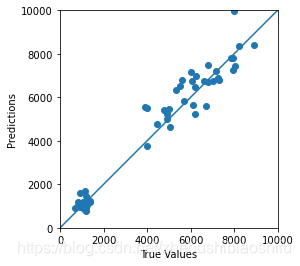
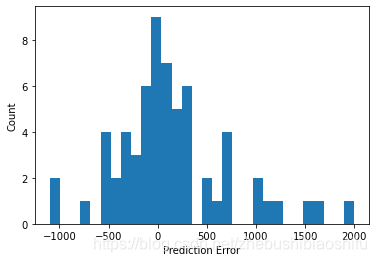
接下来,进行精度衡量指标的计算与保存。在这里,我们用皮尔逊相关系数、决定系数与RMSE作为精度的衡量指标,并将每一次模型运行的精度衡量指标结果保存在一个Excel文件中。这一部分大家同样查看Python TensorFlow深度学习回归代码:DNNRegressor的2.9部分即可。
# Verify the accuracy

random_forest_pearson_r=stats.pearsonr(test_Y,random_forest_predict)

random_forest_R2=metrics.r2_score(test_Y,random_forest_predict)

random_forest_RMSE=metrics.mean_squared_error(test_Y,random_forest_predict)**0.5

print('Pearson correlation coefficient is {0}, and RMSE is {1}.'.format(random_forest_pearson_r[0],

                                                                        random_forest_RMSE))

# Save key parameters

excel_file=load_workbook(write_excel_path)

excel_all_sheet=excel_file.sheetnames

excel_write_sheet=excel_file[excel_all_sheet[0]]

excel_write_sheet=excel_file.active

max_row=excel_write_sheet.max_row

excel_write_content=[random_forest_pearson_r[0],random_forest_R2,random_forest_RMSE,random_seed,random_forest_seed]

for i in range(len(excel_write_content)):

        exec("excel_write_sheet.cell(max_row+1,i+1).value=excel_write_content[i]")

excel_file.save(write_excel_path)
1.5 决策树可视化
这一部分我们借助DOT这一图像描述语言,进行随机森林算法中决策树的绘制。
# Draw decision tree visualizing plot

random_forest_tree=random_forest_model.estimators_[5]

export_graphviz(random_forest_tree,out_file=tree_graph_dot_path,

                feature_names=train_X_column_name,rounded=True,precision=1)

(random_forest_graph,)=pydot.graph_from_dot_file(tree_graph_dot_path)

random_forest_graph.write_png(tree_graph_png_path)
其中,estimators_[5]是指整个随机森林算法中的第6棵树(下标是从0开始的),换句话说我们就是从很多的树(具体树的个数就是前面提到的超参数n_estimators)中抽取了找一个来画图,做一个示范。如下图所示。
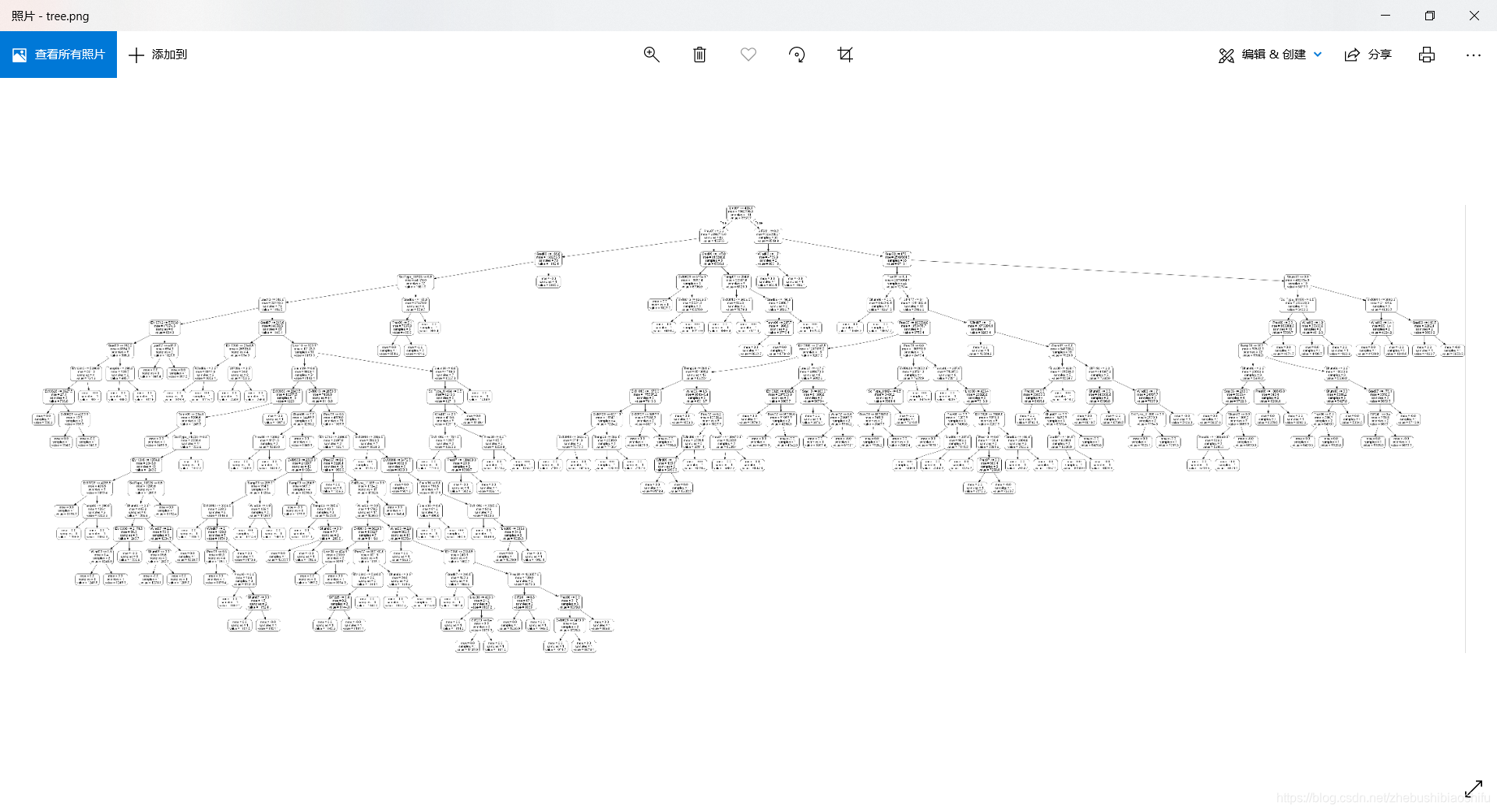
可以看到,单单是这一棵树就已经非常非常庞大了。我们将上图其中最顶端(也就是最上方的节点——根节点)部分放大,就可以看见每一个节点对应的信息。如下图
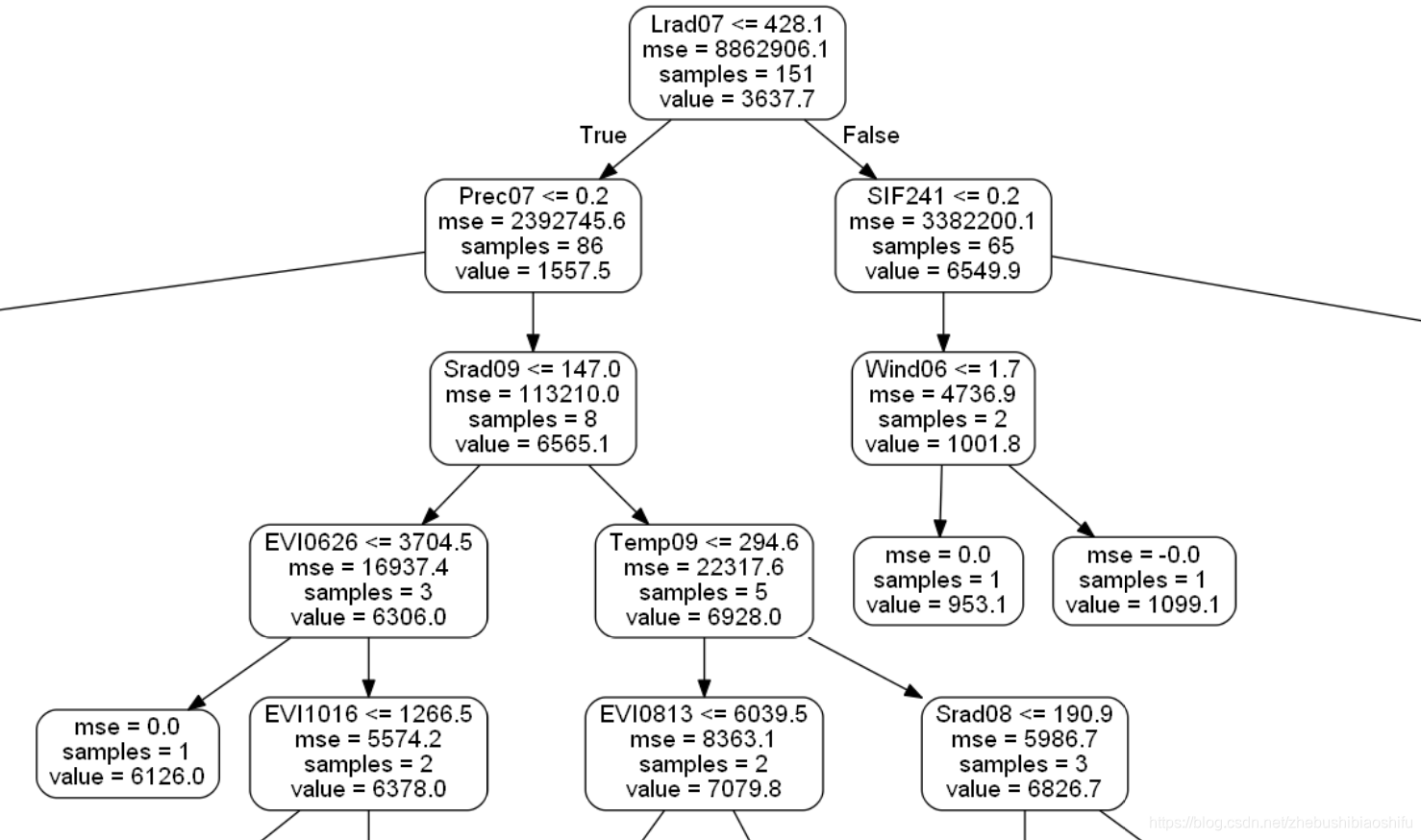
在这里提一句,上图根节点中有一个samples=151,但是我的样本总数是315个,为什么这棵树的样本个数不是全部的样本个数呢?
其实这就是随机森林的内涵所在:随机森林的每一棵树的输入数据(也就是该棵树的根节点中的数据),都是随机选取的(也就是上面我们说的利用Bagging策略中的Bootstrap进行随机抽样),最后再将每一棵树的结果聚合起来(聚合这个过程就是Aggregation,我们常说的Bagging其实就是Bootstrap与Aggregation的合称),形成随机森林算法最终的结果。
1.6 变量重要性分析
在这里,我们进行变量重要性的分析,并以图的形式进行可视化。
# Calculate the importance of variables

random_forest_importance=list(random_forest_model.feature_importances_)

random_forest_feature_importance=[(feature,round(importance,8))

                                  for feature, importance in zip(train_X_column_name,random_forest_importance)]

random_forest_feature_importance=sorted(random_forest_feature_importance,key=lambda x:x[1],reverse=True)

plt.figure(3)

plt.clf()

importance_plot_x_values=list(range(len(random_forest_importance)))

plt.bar(importance_plot_x_values,random_forest_importance,orientation='vertical')

plt.xticks(importance_plot_x_values,train_X_column_name,rotation='vertical')

plt.xlabel('Variable')

plt.ylabel('Importance')

plt.title('Variable Importances')
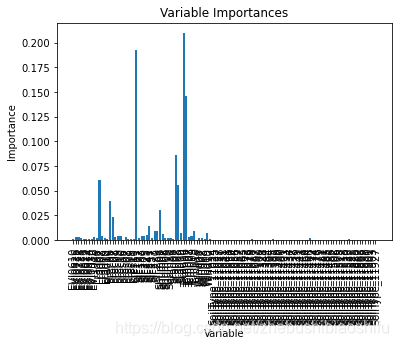
得到图像如下所示。这里是由于我的特征数量(自变量数量)过多,大概有150多个,导致横坐标的标签(也就是自变量的名称)都重叠了;大家一般的自变量个数都不会太多,就不会有问题~
以上就是全部的代码分段介绍~
2 完整代码
# -*- coding: utf-8 -*-

"""

Created on Sun Mar 21 22:05:37 2021

@author: fkxxgis

"""

import pydot

import numpy as np

import pandas as pd

import scipy.stats as stats

import matplotlib.pyplot as plt

from sklearn import metrics

from openpyxl import load_workbook

from sklearn.tree import export_graphviz

from sklearn.ensemble import RandomForestRegressor

# Attention! Data Partition

# Attention! One-Hot Encoding

train_data_path='G:/CropYield/03_DL/00_Data/AllDataAll_Train.csv'

test_data_path='G:/CropYield/03_DL/00_Data/AllDataAll_Test.csv'

write_excel_path='G:/CropYield/03_DL/05_NewML/ParameterResult_ML.xlsx'

tree_graph_dot_path='G:/CropYield/03_DL/05_NewML/tree.dot'

tree_graph_png_path='G:/CropYield/03_DL/05_NewML/tree.png'

random_seed=44

random_forest_seed=np.random.randint(low=1,high=230)

# Data import

'''

column_name=['EVI0610','EVI0626','EVI0712','EVI0728','EVI0813','EVI0829','EVI0914','EVI0930','EVI1016',

             'Lrad06','Lrad07','Lrad08','Lrad09','Lrad10',

             'Prec06','Prec07','Prec08','Prec09','Prec10',

             'Pres06','Pres07','Pres08','Pres09','Pres10',

             'SIF161','SIF177','SIF193','SIF209','SIF225','SIF241','SIF257','SIF273','SIF289',

             'Shum06','Shum07','Shum08','Shum09','Shum10',

             'Srad06','Srad07','Srad08','Srad09','Srad10',

             'Temp06','Temp07','Temp08','Temp09','Temp10',

             'Wind06','Wind07','Wind08','Wind09','Wind10',

             'Yield']

'''

train_data=pd.read_csv(train_data_path,header=0)

test_data=pd.read_csv(test_data_path,header=0)

# Separate independent and dependent variables

train_Y=np.array(train_data['Yield'])

train_X=train_data.drop(['ID','Yield'],axis=1)

train_X_column_name=list(train_X.columns)

train_X=np.array(train_X)

test_Y=np.array(test_data['Yield'])

test_X=test_data.drop(['ID','Yield'],axis=1)

test_X=np.array(test_X)

# Build RF regression model

random_forest_model=RandomForestRegressor(n_estimators=200,random_state=random_forest_seed)

random_forest_model.fit(train_X,train_Y)

# Predict test set data

random_forest_predict=random_forest_model.predict(test_X)

random_forest_error=random_forest_predict-test_Y

# Draw test plot

plt.figure(1)

plt.clf()

ax=plt.axes(aspect='equal')

plt.scatter(test_Y,random_forest_predict)

plt.xlabel('True Values')

plt.ylabel('Predictions')

Lims=[0,10000]

plt.xlim(Lims)

plt.ylim(Lims)

plt.plot(Lims,Lims)

plt.grid(False)

plt.figure(2)

plt.clf()

plt.hist(random_forest_error,bins=30)

plt.xlabel('Prediction Error')

plt.ylabel('Count')

plt.grid(False)

# Verify the accuracy

random_forest_pearson_r=stats.pearsonr(test_Y,random_forest_predict)

random_forest_R2=metrics.r2_score(test_Y,random_forest_predict)

random_forest_RMSE=metrics.mean_squared_error(test_Y,random_forest_predict)**0.5

print('Pearson correlation coefficient is {0}, and RMSE is {1}.'.format(random_forest_pearson_r[0],

                                                                        random_forest_RMSE))

# Save key parameters

excel_file=load_workbook(write_excel_path)

excel_all_sheet=excel_file.sheetnames

excel_write_sheet=excel_file[excel_all_sheet[0]]

excel_write_sheet=excel_file.active

max_row=excel_write_sheet.max_row

excel_write_content=[random_forest_pearson_r[0],random_forest_R2,random_forest_RMSE,random_seed,random_forest_seed]

for i in range(len(excel_write_content)):

        exec("excel_write_sheet.cell(max_row+1,i+1).value=excel_write_content[i]")

excel_file.save(write_excel_path)

# Draw decision tree visualizing plot

random_forest_tree=random_forest_model.estimators_[5]

export_graphviz(random_forest_tree,out_file=tree_graph_dot_path,

                feature_names=train_X_column_name,rounded=True,precision=1)

(random_forest_graph,)=pydot.graph_from_dot_file(tree_graph_dot_path)

random_forest_graph.write_png(tree_graph_png_path)

# Calculate the importance of variables

random_forest_importance=list(random_forest_model.feature_importances_)

random_forest_feature_importance=[(feature,round(importance,8))

                                  for feature, importance in zip(train_X_column_name,random_forest_importance)]

random_forest_feature_importance=sorted(random_forest_feature_importance,key=lambda x:x[1],reverse=True)

plt.figure(3)

plt.clf()

importance_plot_x_values=list(range(len(random_forest_importance)))

plt.bar(importance_plot_x_values,random_forest_importance,orientation='vertical')

plt.xticks(importance_plot_x_values,train_X_column_name,rotation='vertical')

plt.xlabel('Variable')

plt.ylabel('Importance')

plt.title('Variable Importances')
至此,大功告成。
Python实现随机森林RF并对比自变量的重要性的更多相关文章
- 用Python实现随机森林算法,深度学习
用Python实现随机森林算法,深度学习 拥有高方差使得决策树(secision tress)在处理特定训练数据集时其结果显得相对脆弱.bagging(bootstrap aggregating 的缩 ...
- python实现随机森林、逻辑回归和朴素贝叶斯的新闻文本分类
实现本文的文本数据可以在THUCTC下载也可以自己手动爬虫生成, 本文主要参考:https://blog.csdn.net/hao5335156/article/details/82716923 nb ...
- 随机森林RF、XGBoost、GBDT和LightGBM的原理和区别
目录 1.基本知识点介绍 2.各个算法原理 2.1 随机森林 -- RandomForest 2.2 XGBoost算法 2.3 GBDT算法(Gradient Boosting Decision T ...
- Python中随机森林的实现与解释
使用像Scikit-Learn这样的库,现在很容易在Python中实现数百种机器学习算法.这很容易,我们通常不需要任何关于模型如何工作的潜在知识来使用它.虽然不需要了解所有细节,但了解机器学习模型是如 ...
- 【机器学习】随机森林RF
随机森林(RF, RandomForest)包含多个决策树的分类器,并且其输出的类别是由个别树输出的类别的众数而定.通过自助法(boot-strap)重采样技术,不断生成训练样本和测试样本,由训练样本 ...
- Bagging与随机森林(RF)算法原理总结
Bagging与随机森林算法原理总结 在集成学习原理小结中,我们学习到了两个流派,一个是Boosting,它的特点是各个弱学习器之间存在依赖和关系,另一个是Bagging,它的特点是各个弱学习器之间没 ...
- 随机森林RF
bagging 随机森林顾名思义,是用随机的方式建立一个森林,森林里面有很多的决策树组成,随机森林的每一棵决策树之间是没有关联的.在得到森林之后,当有一个新的输 入样本进入的时候,就让森林中的每一棵决 ...
- python的随机森林模型调参
一.一般的模型调参原则 1.调参前提:模型调参其实是没有定论,需要根据不同的数据集和不同的模型去调.但是有一些调参的思想是有规律可循的,首先我们可以知道,模型不准确只有两种情况:一是过拟合,而是欠拟合 ...
- Python之随机森林实战
代码实现: # -*- coding: utf-8 -*- """ Created on Tue Sep 4 09:38:57 2018 @author: zhen &q ...
- python spark 随机森林入门demo
class pyspark.mllib.tree.RandomForest[source] Learning algorithm for a random forest model for class ...
随机推荐
- 10、数组a和b各有10个元素。将他们相同的位置元素逐个比较, 如果a中元素大于b中对应元素的次数多于b数组中元素大于a中元素的次数, 则认为a大于b。请统计大于等于小于的次数
/* 数组a和b各有10个元素.将他们相同的位置元素逐个比较, 如果a中元素大于b中对应元素的次数多于b数组中元素大于a中元素的次数, 则认为a大于b.请统计大于等于小于的次数 */ #include ...
- Android 按钮自定义背景后点击没有动画效果
只需要在按钮中添加属性就可以了 android:foreground="?selectableItemBackground"
- JavaSE -进阶基础---反射技术
反射常见用法: Java 反射机制是在运行状态中,对于任意一个类,都能够获得这个类的所有属性和方法,对于任意一个对象都能够调用它的任意一个属性和方法.这种在运行时动态的获取信息以及动态调用对象的方法的 ...
- SQL语句查询关键字前期数据准备
前期数据准备 create table emp( id int primary key auto_increment, name varchar(20) not null, gender enum(' ...
- 如何使用C#在Excel中插入分页符
在日常办公中,我们经常会用到Excel文档来帮助我们整理数据.为了方便打印Excel工作表,我们可以在Excel中插入分页符.各种处理软件一般都会自动按照用户所设置页面的大小自动进行分页,以美化文档的 ...
- 二分查找-LeetCode704 简单题
LeetCode代码链接:https://leetcode.cn/problems/binary-search/ 题目:给定一个 n 个元素有序的(升序)整型数组 nums 和一个目标值 target ...
- JavaEE Day11 BootStrap
之前:前端知识 HTML+CSS+JavaScript 不好写 今日内容:前端的开发框架,内部定义了丰富的CSS样式和JS代码,只需要拿来用就行 会用即可 一.BootStrap ...
- Python:灵活的开发环境
以下内容为本人的学习笔记,如需要转载,请声明原文链接微信公众号「englyf」https://mp.weixin.qq.com/s/WTl7BPAhX5VuK-gmHaErMg 本文大概 1667 个 ...
- Mybatis-Plus 对 json 的存储使用支持
Mybatis-Plus 对 json 的存储使用支持 场景分析: 随着数据库对字段类型支持的多元化,json 类型的存储已成为多场景高频使用的字段类型.而 MySql.postgrpSql 等都支持 ...
- CyclicBarrier循环屏障源码解析(基于jdk11)
目录 CyclicBarrier循环屏障源码解析(基于jdk11) 1.1 CyclicBarrier概述 1.2 CyclicBarrier原理 1.2.1 基本结构(jdk11) 1.2.2 aw ...