
小程序微信支付完整demo,包含退款
最近刚完成一个商场小程序(http://market.zhenzikj.com/detail/121.html), 使用到了微信支付功能,其中遇到了很多的抗,所以,我把支付这块摘出来,以免大家少走弯路。
demo小程序端很简单,就是一个页面:
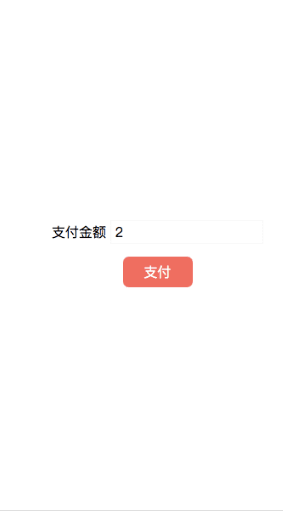
js代码:
//支付

  pay: function(e){

    var that = this;

    if(that.data.number == ''){

      wx.showToast({

        title: '请填写支付金额!',

        icon: 'none',

        duration: 2000

      })

      return;

    }

    util.getOpenid(function(openid){

      wx.request({

        url: app.globalData.baseUrl + '/pay/pay.html',

        header: {

          'content-type': 'application/x-www-form-urlencoded'

        },

        method: 'POST',

        data: {

          totalFee: that.data.number,

          openid: openid

        },

        success (res) {

          var data = res.data.data;

          wx.requestPayment(

            {

            'timeStamp': data.timeStamp,

            'nonceStr': data.nonce_str,

            'package': 'prepay_id='+data.prepay_id,

            'signType': 'MD5',

            'paySign': data.sign,

            'success':function(res){

              wx.showToast({

                title: '支付成功',

                icon: 'none',

                duration: 2000

              })

            },

            'fail':function(res){

              wx.showToast({

                title: '支付失败',

                icon: 'none',

                duration: 2000

              })

            }

          })

        }

      })

    });
java代码:
统一下单接口
/**

	 * 支付(api)

	 */

	@RequestMapping(value="/pay")

	@ResponseBody

	public ResultInfo<Object> pay(

			HttpServletRequest request,

			double totalFee,

			String openid){

		try {

			final String appId = CustomPropertyConfigurer.getProperty("weixin.mini.appid");

			final String key = CustomPropertyConfigurer.getProperty("weixin.mini.key");

			final String mch_id = CustomPropertyConfigurer.getProperty("weixin.mini.mch_id");

			final String notify_url = CustomPropertyConfigurer.getProperty("weixin.mini.notify_url");

			final String ip = CustomPropertyConfigurer.getProperty("ip");

			//out_trade_no是自定义的系统内部订单号

			String out_trade_no = new DateTime().toString("yyyyMMddHHmmss") + String.valueOf((int)((Math.random()*9+1)*1000));

			Order order = new Order();

			order.setAppid(appId);

			order.setMch_id(mch_id);

			order.setNonce_str(RandomStringGenerator.getRandomStringByLength(32));

			order.setBody("下单-支付");

			order.setOut_trade_no(out_trade_no);

			order.setTotal_fee((int)(totalFee * 100));//支付金额(分)

			order.setSpbill_create_ip(ip);

			order.setNotify_url(notify_url);

			order.setTrade_type("JSAPI");

			order.setSign_type("MD5");

			order.setOpenid(openid);

			//生成签名

			String sign = Signature.getSign(order, key);

			order.setSign(sign);

			String result = HttpRequest.sendPost("https://api.mch.weixin.qq.com/pay/unifiedorder", order, false, null, null);

			System.out.println(result);

			L.info("---------下单返回:"+result);

			XStream xStream = new XStream();

			xStream.ignoreUnknownElements();

			xStream.alias("xml", OrderReturnInfo.class);

			OrderReturnInfo returnInfo = (OrderReturnInfo)xStream.fromXML(result);

			if(returnInfo.getResult_code().equals("SUCCESS") && returnInfo.getReturn_code().equals("SUCCESS")){

				//下单成功,此处是你的业务代码

				System.out.print("下单成功");

			}

			//生成签名

			final String timeStamp = String.valueOf(System.currentTimeMillis()/1000);

			sign = "appId="+appId+"&nonceStr="+order.getNonce_str()+"&package=prepay_id="+returnInfo.getPrepay_id()+"&signType=MD5&timeStamp="+timeStamp+"&key="+key;

			sign = MD5.MD5Encode(sign).toUpperCase();

			JSONObject jsonObject = new JSONObject();

			jsonObject.put("nonce_str", order.getNonce_str());

			jsonObject.put("prepay_id", returnInfo.getPrepay_id());

			jsonObject.put("sign", sign);

			jsonObject.put("timeStamp", timeStamp);

			return new ResultInfo<Object>(0, jsonObject);

		} catch (Exception e) {

			e.printStackTrace();

			L.error("-------------", e);

		}

		return new ResultInfo<Object>(1000, "未知错误");

	}
申请退款接口
/**

	 * 申请退款

	 */

	@RequestMapping(value="/apply")

	@ResponseBody

	public Object apply(

			HttpServletRequest request,

			double refundFee,

			String out_trade_no){

		try {

			final String appId = CustomPropertyConfigurer.getProperty("weixin.mini.appid");

			final String mch_id = CustomPropertyConfigurer.getProperty("weixin.mini.mch_id");

			final String refund_notify_url = CustomPropertyConfigurer.getProperty("weixin.mini.refund_notify_url");

			final String key = CustomPropertyConfigurer.getProperty("weixin.mini.key");

			WxRefund wxRefund = new WxRefund();

			wxRefund.setAppid(appId);

			wxRefund.setMch_id(mch_id);

			wxRefund.setNonce_str(RandomStringGenerator.getRandomStringByLength(32));

			wxRefund.setOut_trade_no(out_trade_no);

			wxRefund.setOut_refund_no(out_trade_no);

			wxRefund.setRefund_fee((int)(refundFee*100));

			wxRefund.setTotal_fee((int)(refundFee*100));

			wxRefund.setNotify_url(refund_notify_url);

			//生成签名

			String sign = Signature.getSign(wxRefund, key);

			wxRefund.setSign(sign);

			//获取证书

			String certFile = request.getServletContext().getRealPath("/") + "cert/apiclient_cert.p12";

			String result = HttpRequest.sendPost("https://api.mch.weixin.qq.com/secapi/pay/refund", wxRefund, true, mch_id, certFile);

			L.info("---------退款返回:"+result);

			System.out.println(result);

			XStream xStream = new XStream();

			xStream.ignoreUnknownElements();

			xStream.alias("xml", RefundReturnInfo.class);

			RefundReturnInfo returnInfo = (RefundReturnInfo)xStream.fromXML(result);

			if(returnInfo.getResult_code().equals("SUCCESS") && returnInfo.getReturn_code().equals("SUCCESS")){

				return true;

			}

			return new ResultInfo<Object>(0, null);

		} catch (Exception e) {

			e.printStackTrace();

			L.error("------------------------", e);

		}

		return new ResultInfo<Object>(1000, "未知错误");

	}
完整代码下载: http://market.zhenzikj.com/detail/123.html
小程序微信支付完整demo,包含退款的更多相关文章
- 微信小程序 微信支付
微信小程序前端自处理: //时间戳 timeStamp() { return parseInt(new Date().getTime() / 1000) + '' }, //随机数 randomStr ...
- 微信小程序------微信支付模块
最近项目涉及到小程序开发:需要进行微信支付模块,接下来通过叙述,记录一下微信小程序中微信支付模块的开发,以便日后翻阅和使用. 学习指南----------微信支付开发文档:https://pay.we ...
- TP5调用小程序微信支付,回调,在待支付中再次调用微信支付
1,必须要有 $mch_id $key $appid这三个值,是需要去申请的,我是直接用公司的2,购买商品订单号用户openid统一下单名称商品价格(必须以分为单位,调起微信支付)服务器的ip地址(没 ...
- 微信小程序微信支付的一些坑
使用的是Node.js作为后端 统一下单: appid:这里的appid是调起微信支付的appid mch_id:商户号,需要注意的是商户号要与appid对应 nonce_str:Math.rando ...
- 小程序微信支付(UNIAPP+第三方SDK:binarywang)
小程序支付流程图说明(UNIAPP+第三方SDK:binarywang) 说明:小程序为UNI-APP开发,使用的第三方微信支付SDK为binarywang提供的,此SDK对微信公众号.小程序.微信各 ...
- 微信小程序——微信支付
这个讲起来也就比较麻烦一点,因为需要的不仅仅是咱们代码上的技术,嘿嘿! 先整理一下思路.如果想做微信支付: 1.现有一个公司账户(非个人账户),并且实名认证过的. 2.微信号 必须开通微信支付功能. ...
- 微信小程序微信支付流程
1.小程序调用wx.login获取登录凭证code wx.login(无请求参数)返回code(有效期5分钟) wx.login({ success:function(res){ //get res. ...
- 【微信小程序】调起微信支付完整demo
微信小程序调用微信支付接口 https://blog.csdn.net/u012667477/article/details/80940578
- .NET开发微信小程序-微信支付
前台MD5加密代码 /* * A JavaScript implementation of the RSA Data Security, Inc. MD5 Message * Digest Algor ...
- Taro/JS/H5/小程序:纯前端解决小程序微信支付统一下单和调起支付
这个文章不会说具体0到1的代码流程,我会着重讲几个问题的解决 准备以下依赖 "md5": "^2.2.1", "xml-js": " ...
随机推荐
- Sentry 后端云原生中间件实践 ClickHouse PaaS ,为 Snuba 事件分析引擎提供动力
目录(脑图) ClickHouse PaaS 云原生多租户平台(Altinity.Cloud) 官网:https://altinity.cloud PaaS 架构概览 设计一个拥有云原生编排能力.支持 ...
- Redis(安装、启动、测试、环境)
Redis 概述: Redis(Remote Dictionary Server ),即远程字典服务,是一个开源的使用ANSI C语言编写.支持网络.可基于内存亦可持久化的日志型.Key-Value数 ...
- Linux 一次性创建多个文件
创建多个文件,文件名数字编号是递增的,在文件名后面加上{n..m}: touch file-{1..10}.txt
- Word 设置页眉、页脚、页码
页眉:在 Word 文档中,每个页面的顶部区域为页眉.常用于显示文档的附加信息,可以插入时间.图形.公司微标.文档标题.文件名或作者姓名等. 页脚:页脚与页眉的作用相同,都可以作为显示文档的附加信息, ...
- XMLHttpRequest、Ajax、Fetch与Axios
1. 引言 XMLHttpRequest.Ajax.Fetch与Axios是网页前后端交互中常见到的名词 参考MDN:Ajax - Web 开发者指南 | MDN (mozilla.org) Ajax ...
- 基于Python的OpenGL 01 之Hello Triangle
1. 引言 本文基于Python语言,描述OpenGL的绘制流程,这里描述的是OpenGL的核心模式(Core-profile) 本文基于GLFW与PyOpenGL库进行开发,Python语言下的Op ...
- Vue学习笔记之表单绑定
1. 概述 1.1. 什么是数据的双向绑定 Vue.js是一个MV VM框架, 即数据双向绑定, 即当数据发生变化的时候, 视图也就发生变化, 当视图发生变化的时候,数据也会跟着同步变化.这也算是Vu ...
- Java中的源码,反码和补码
一.在Java中所有数据都是以补码的形式表示的,原码即数字的二进制表示加符号位,反码即将原码按位取反,补码简单来说即反码加1 二.Java中数据的表示方式 1.正数:正数的原码.补码.反码都相同,正数 ...
- 一步步入门Jenkins+Net Core3.1+Gitlab,实现 CICD
架构说明: 由浅入深,我们暂时不考虑分布式,安装Jenkins到用户服务器进行CICD 需要两台服务器 Gitlab:192.168.232.128:12080 源代码仓库,可以参考<安装git ...
- Cisco ASA防火墙恢复密码和基本配置
Cisco ASA密码恢复 一.思路 Cisco ASA防火墙密码恢复,与路由器相似 修改寄存器的值,绕过startup-config配置文件 重新修改密码 恢复修改寄存器的值,保存配置 二.操作步骤 ...