
解决Linux-Centos7启动Mysql服务失败丢失mysql.sock问题
在新安装mysql后进行启动发现报错
mysql启动服务命令
systemctl start mysqld@3306
Starting mysqld (via systemctl): Job for mysqld.service failed because the control process exited with error code. See "systemctl status mysqld3306.service" and "journalctl -xe" for details.
按照错误提示信息进行排查
systemctl status mysqld3306.service
journalctl -xe

尝试连接mysql报错查看sock文件夹发现sock文件丢失
[root@cdh03 mysqldata3309]# mysql -uroot -S /data/mysqldata3309/sock/mysql.sock -p"Ygadb(vw<6ae"
mysql: [Warning] Using a password on the command line interface can be insecure.
ERROR 2002 (HY000): Can't connect to local MySQL server through socket '/data/mysqldata3309/sock/mysql.sock' (2)

使用命令journalctl -xe查看报错具体原因,发现红色找字体的日志:SELinux is preventing mysqld from getattr access on the file /var/lib/mysql/ibdata1. For complete SELinux messages run: sealert -l
发现是selinux限制导致mysql服务启动失败
解决办法
1. 查看SELinux状态
1.1 getenforce
getenforce 命令是单词get(获取)和enforce(执行)连写,可查看selinux状态,与setenforce命令相反。
setenforce 命令则是单词set(设置)和enforce(执行)连写,用于设置selinux防火墙状态,如: setenforce 0用于关闭selinux防火墙,但重启后失效
[root@cdh03 ~]# getenforce
Enforcing
1.2 /usr/sbin/sestatus
Current mode表示当前selinux防火墙的安全策略
[root@cdh03 ~]# /usr/sbin/sestatus
SELinux status: enabled
SELinuxfs mount: /sys/fs/selinux
SELinux root directory: /etc/selinux
Loaded policy name: targeted
Current mode: enforcing
Mode from config file: enforcing
Policy MLS status: enabled
Policy deny_unknown status: allowed
Max kernel policy version: 28
SELinux status:selinux防火墙的状态,enabled表示启用selinux防火墙
Current mode: selinux防火墙当前的安全策略,enforcing 表示强
2. 关闭SELinux
2.1 临时关闭
setenforce 0 :用于关闭selinux防火墙,但重启后失效。
[root@cdh03 ~]# setenforce 0
[root@cdh03 ~]# /usr/sbin/sestatus
SELinux status: enabled
SELinuxfs mount: /sys/fs/selinux
SELinux root directory: /etc/selinux
Loaded policy name: targeted
Current mode: permissive
Mode from config file: enforcing
Policy MLS status: enabled
Policy deny_unknown status: allowed
Max kernel policy version: 28
2.1 永久关闭
修改selinux的配置文件,重启后生效。
打开 selinux 配置文件
[root@cdh03 ~]# vim /etc/selinux/config
修改 selinux 配置文件
将SELINUX=enforcing改为SELINUX=disabled,保存后退出
This file controls the state of SELinux on the system.
SELINUX= can take one of these three values:
enforcing - SELinux security policy is enforced.
permissive - SELinux prints warnings instead of enforcing.
disabled - No SELinux policy is loaded.
SELINUX=enforcing
SELINUXTYPE= can take one of three two values:
targeted - Targeted processes are protected,
minimum - Modification of targeted policy. Only selected processes are protected.
mls - Multi Level Security protection.
SELINUXTYPE=targeted
此时获取当前selinux防火墙的安全策略仍为Enforcing,配置文件并未生效。
[root@cdh03 ~]# getenforce
Enforcing
重启
[root@cdh03 ~]# reboot
验证
[root@cdh03 ~]# /usr/sbin/sestatus
SELinux status: disabled
[root@cdh03 ~]# getenforce
Disabled
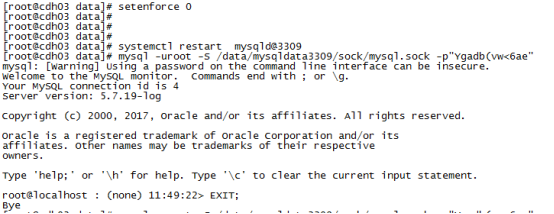
然后重启MYSQL服务,连接正常
解决Linux-Centos7启动Mysql服务失败丢失mysql.sock问题的更多相关文章
- centos7启动httpd服务失败:Job for httpd.service failed because the control process exited with error code.
centos7启动httpd命令有两个可以用 service httpd start systemctl start httpd.service 如果出现如下报错 Job for httpd.s ...
- mysql服务突然丢失解决方案
mysql服务突然丢失解决方案 今天系统从win7更新到win10之后,mysql突然没了,使用navicat连接提示如下: 看到这个,以为自己的mysql服务没启动,于是打开服务找mysql服务,发 ...
- Linux下启动Oracle服务和监听程序步骤
Linux下启动Oracle服务和监听程序启动和关闭步骤整理如下: 1.安装oracle: 2.创建oracle系统用户: 3./home/oracle下面的.bash_profile添加几个环境变量 ...
- linux centos7 安装常用软件java,node,mysql,Seafile
linux centos7 安装常用软件java,node,mysql,Seafile 安装压缩解压缩软件 yum install -y unzip zip 安装git yum install -y ...
- (转) Linux安装启动FTP服务
Linux安装启动FTP服务 Linux服务器默认是没有开启FTP服务的.也没有FTP服务器,为了文件的传输需要用到FTP服务器,以典型的vsftpd为例.vsftpd作为FTP服务器,在Linux系 ...
- 解决Linux下启动Tomcat遇到Neither the JAVA_HOME ...报错
解决Linux下启动Tomcat遇到Neither the JAVA_HOME ...报错 Neither the JAVA_HOME nor the JRE_HOME environment var ...
- CentOS7启动SSH服务报:Job for ssh.service failed because the control process exited with error code
CentOS7启动SSH服务报:Job for ssh.service failed because the control process exited with error code....... ...
- Linux服务器启动jstatd服务
Linux服务器启动jstatd服务 1.查找jdk所在目录 2.在jdk的bin目录下创建文件jstatd.all.policy touch jstatd.all.policy 3.写入安全配置 g ...
- 如何重启MySQL服务,正确重启mysql
RedHat Linux (Fedora Core/Cent OS) 1.启动:/etc/init.d/mysqld start 2.停止:/etc/init.d/mysqld stop 3.重启:/ ...
随机推荐
- 正则表达式基础(Regular Expression)
正则表达式简介 n 为什么需要正则表达式? q 文本的复杂处理. n 正则表达式的优势和用途? q 一种强大而灵活的文本处理工具: q 提供了一种紧凑的.动态的方式,能够以一种完全通用的方式 ...
- 你可能不知道的 Date 类
Date 是 JS 中的重要的一个内置对象,其实例主要用于处理时间和日期,其时间基于 1970-1-1 (世界标准时间)起的毫秒数,时间戳长度为 13 位(不同于 Unix 时间戳的长度 10 位). ...
- idea如何通过数据库生成实体类
---恢复内容开始--- https://blog.csdn.net/liu_yulong/article/details/72910588 ---恢复内容结束---
- 秋天的第一份“干货” I Referer 防盗链,为什么少了个字母 R?
Referer 为什么叫 Referer?它代表什么意思?在诸多防盗链竞争中它有什么优势? 今天,在聊 Referer 防盗链之前,先来聊聊我们在现实生活中常常碰到的推荐人(Referrer)信息. ...
- Java 实现截屏
操作系统:Windows 10 x64 参考:https://blog.csdn.net/weixin_40657079/article/details/83961708 1 import java. ...
- 用ASP创建API。NET Core (Day2):在ASP中创建API。网络核心
下载PDF article - 1.5 MB 下载source - 152.4 KB 下载source - 206.3 KB 下载source code from GitHub 表的内容 中间件路线图 ...
- 自定义Antd Pro 默认元素
概要 通用元素 修改的方式 主页面 标签上的图标 logo 和 系统名称 footer 的配置 loading 页面 最终效果 概要 使用 Antd Pro 来开发前端项目时, 生成的项目模板中, 一 ...
- 详解工程师不可不会的LRU缓存淘汰算法
大家好,欢迎大家来到算法数据结构专题,今天我们和大家聊一个非常常用的算法,叫做LRU. LRU的英文全称是Least Recently Used,也即最不经常使用.我们看着好像挺迷糊的,其实这个含义要 ...
- LVM创建及管理
安装lvm yum install -y lvm yum install -y lvm
- pytest文档52-命令行参数--setup-show查看fixture的执行过程
前言 使用命令行运行 pytest 用例的时候,看不到 fixture 的执行过程. 如果我们想知道fixture的执行过程和先后顺序,可以加上 --setup-show 命令行参数,帮助查看 fix ...